






Learn how to install Linux-based Machines as a Hyper V Guest. Microsoft started supporting Linux machines as Hyper-V guests long ago (Isn’t it?). Have you ever tried this?
This post is for you if you tried and failed to work like me. The world is changing, and even Microsoft allows us to build or host Linux servers in Azure.
I should admit that installing a Linux machine as a Hyper-V guest is not straightforward. There is little step-by-step documentation available on the Internet.
Altaro (Hyper-V backup solution) and Eric Siron wrote an excellent post on the Linux machine deployment scenario with Hyper-V. Eric explained many of the challenges and hiccups you may face in this process. Read the full post, “Getting Started with Ubuntu Linux Server as a Hyper-V Guest.”
| Index |
|---|
| How to Install Linux Based Machines as Hyper V Guest |
| Install Linux Based Machines as Hyper V Guest |
- How to Install and Use Linux on Windows 11 with WSL
- Download eBook Helps to Troubleshoot 5 Common Issues with Hyper V
- Hyper V Training Video From Backup Academy
How to Install Linux-Based Machines as Hyper V Guest
So, why is this guide on the Ubuntu Linux Operating System? Well, Eric Siron wanted a major distribution backed by a commercial operation. That way, if you get backed into a corner, you can get paid assistance.
| The Partition Tables of the Following Devices are Changed | The Following Partitions are Going to be Formatted |
|---|---|
| LVM VG svlnagios-vg, LV root LVM VG svlnagios-vg, LV swap_1 SCSI3 (0,0,0) (sda) | LVM VG svlnagios-vg, LV root as ext4 LVM VG svlnagios-vg, LV swap_1 as swap partition #1 of SCSI3 (0,0,0) (sda) as ext2 |
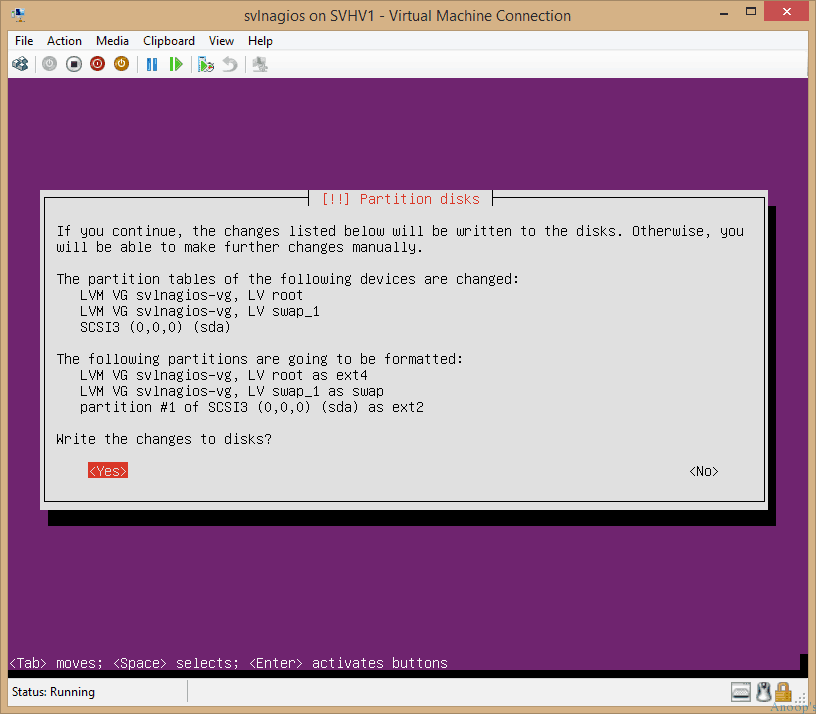
Install Linux Based Machines as Hyper V Guest
Here are some great tips from Eric on Linux and Windows Operating systems! If you have done as we’ve been begging you and gotten on board with PowerShell, even a little bit, or even if you’ve got some DOS, Linux is much easier than you think.
In Linux, everything is either a file or something that holds a file. Think about a Windows program. You must install it, creating two dozen files in eight directories and sixty to a hundred registry entries in every branch. Then, you have to run one of its exe files—or maybe a com file.

Resources
Windows 10 Latest Version Of Client Operating System From Microsoft (anoopcnair.com)
We are on WhatsApp now. To get the latest step-by-step guides, news, and updates, Join our Channel. Click here. HTMD WhatsApp.
Author
Anoop C Nair is Microsoft MVP! He is a Device Management Admin with more than 20 years of experience (calculation done in 2021) in IT. He is a Blogger, Speaker, and Local User Group HTMD Community leader. His primary focus is Device Management technologies like SCCM 2012, Current Branch, and Intune. He writes about ConfigMgr, Windows 11, Windows 10, Azure AD, Microsoft Intune, Windows 365, AVD, etc.


Discussion