






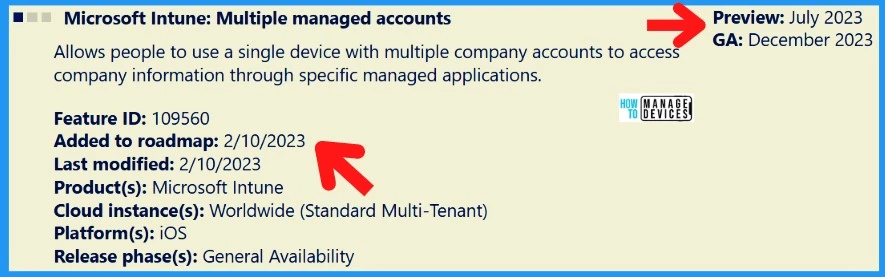
Let’s look into Multiple Identity Support for Intune MAM Policies. Intune Support for Multiple Outlook MAM Accounts is officially part of the Microsoft Intune roadmap. Microsoft plans to release the Multiple MAM accounts support feature by July 2023 in preview.
We have noticed some use cases for this scenario. A couple of contract staff from different organizations (entities) wanted to use the same iOS device for accessing their emails using Microsoft Outlook.
Microsoft Outlook is Intune App Protection Policy enabled application, and the corporate apps are managed by Intune. Intune can’t support MAM protection for multiple identities, even though the apps such as Teams, Outlook, Word, and Excel are multi-identity supported apps.
There could be scenarios where the organization uses different AD tenants but need to use the same devices with Intune MAM policies. Another Intune feature roadmap item – Intune To Introduce Account Driven User Enrollment For IOS/iPadOS.

Intune App Protection Policies
Intune app protection policies are also known as Mobile Application Management (MAM) policies. What are MAM policies? Apps that are incorporated with Intune App protection policies code using Intune SDK, App wrapping tools for iOS or Android.
Protection of Core app settings – Copy & Paste, Encryption, DLP, CA without managing the Device
Protection of Advanced App Configuration Settings – Customize app behavior, Save as Location Control, disable multi-identity, etc…
- Partner productivity apps – Zoom for Intune, ServiceNow Agent – Intune, etc
- Partner UEM apps – coexistence between apps that support Intune App Protection Policies and partner unified endpoint management (UEM) solutions. Examples: Workspace ONE Send and Citrix ShareFile for Intune.
You can check out the Intune Application supported scenarios in the below YouTube video. We have discussed Intune app protection policies also in that video.
Multiple Identity Support for Intune MAM Policies
Microsoft Intune: Multiple managed accounts are the new roadmap feature. This allows people to use a single device with multiple company accounts to access company information through specific Intune managed applications.
Microsoft has not shared much information (apart from the roadmap item) on supported scenarios with Microsoft Intune: Multiple managed accounts. Stay tuned: We will update the post whenever Microsoft releases more information.
| Name | Added Date | Preview Date | Platform | GA Date | Description |
|---|---|---|---|---|---|
| Microsoft Intune: Multiple managed accounts | Feb 10th 2023 | July 2023 | iOS | Dec 2023 | Allows people to use a single device with multiple company accounts for MAM enabled Apps |
Author
HTMD Admin Account to provide news and latest updates on the known issue from Microsoft world. We cover Windows, Intune, Azure, AVD, and Windows 365 news.


Hi @Anoop,
How do you know if the LOB/win32 App size can be extended through service request? I asked one of the core Microsoft support engineers, he said not doable.
Do you have any reference to the Microsoft documents to support this ? Please share if any. Thanks
This is an old article. By this article I am seeing that in by 2024 there should be multiple account support at least in iphone. My other searches and trying it shows that is not the case.
Can this article be updated as of June 2025?