






SCCM Technical Preview 2303 New Features
In this post, you will get SCCM Technical Preview 2303 new features details. It’s important to note that this is the third Technical Preview Version that has been released since the announcement of the SCCM 2211 Production Version.
In terms of features, in SCCM 2303 Technical Preview, You will experience the extension of the dark theme to one customer voice (OCV) wizard, and support is added for the SQL server 2022 RTM version.
SCCM Pre-release builds, known as Technical Previews, are made available in advance. While features from previous versions of the technical preview may remain in later versions, a technical preview installation does not offer the option to upgrade to a current branch installation, nor does it receive updates from the current branch release.
The Technical Preview provides a glimpse of the new functionality that Microsoft is working on. The configuration Manager Product team is working on developing new features, which are introduced in the Technical Preview and not yet available in the current branch of Configuration Manager.

Download SCCM Technical Preview 2302 Baseline Version
When you install a new technical preview site, use the latest baseline 2302. After installing a baseline version, use in-console updates to bring your installation up to date with the most recent SCCM Technical preview version.
Update 2303 for Technical Preview Branch is available in the Microsoft Configuration Manager Technical Preview console. For new installations, the 2302 baseline version of the Microsoft Configuration Manager Technical Preview Branch is available on the link: CM2302TP-Baseline or from the Eval center.
🧑💻Build SCCM Technical Preview LAB, How to Build Configuration Manager Technical Preview LAB | SCCM
The technical preview branch of Configuration Manager is not supported for use in a production environment. The technical preview is licensed for use only in a lab environment.
You can also read, Past releases in the what’s new to get more information about what new features SCCM Technical preview updates were released.
| Technical Preview Release | What’s New in SCCM Technical Preview |
|---|---|
| SCCM Technical Preview 2302 | SCCM 2302 Technical Preview New Features |
| SCCM Technical Preview 2301 | New Features In SCCM 2301 Technical Preview |
New Features in SCCM 2303 Technical Preview Version
Let’s check the new features to try out in SCCM 2303 technical preview version. Starting with Configuration Manager version 2303, You will experience the addition of new features and improvements.
SQL Server 2022 Version Support Added for Configuration Manager
Starting with SCCM technical preview 2303, support is added for SQL server 2022 RTM version. You can use this version of SQL Server for the following sites:
- A central administration site
- A primary site
- A secondary site
The following table identifies the recommended compatibility levels for Configuration Manager site databases:
| SQL Server version | Supported compatibility levels | Recommended level |
|---|---|---|
| SQL Server 2022 | 150, 140, 130, 120, 110 | 150 |
Prerequisites for SCCM Site Server Roles
Prerequisites for the site server roles now include ODBC driver for SQL Server, Starting with SCCM technical preview 2303, Configuration Manager requires the installation of the ODBC driver for SQL server as a prerequisite. This prerequisite is required when you create a new site or update an existing one.
The updates for the ODBC driver are not managed by Configuration Manager. Verifying and updating this component is recommended to ensure it is current.
SCCM Console Dark Theme Extended to One Customer Voice (OCV) Wizard
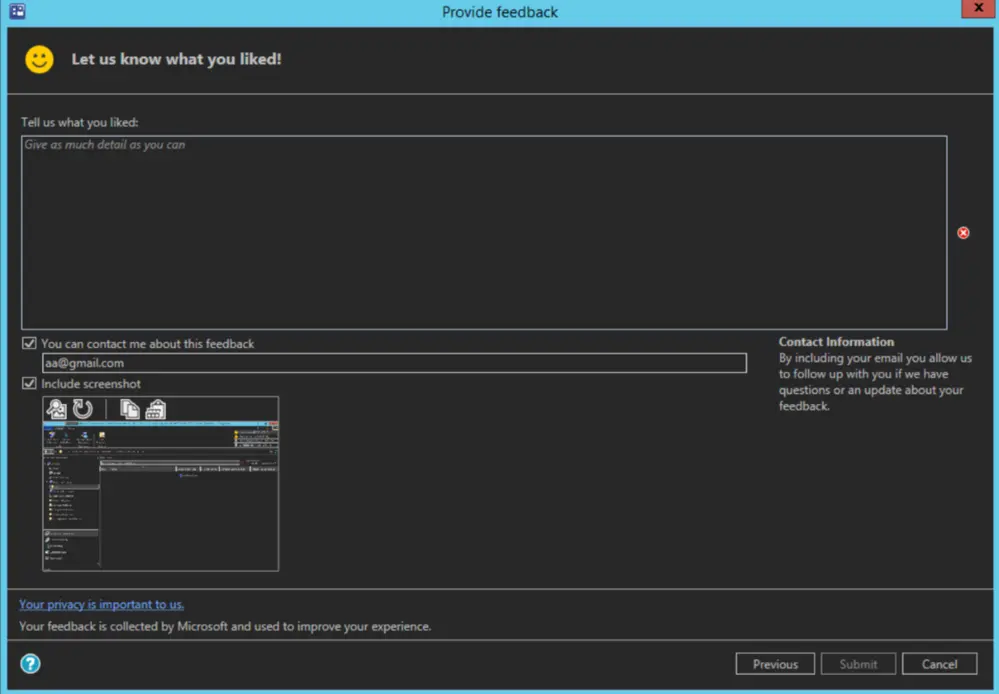
Starting from SCCM Technical Preview 2303, the Configuration Manager console expands the dark theme to include the one customer voice (OCV) wizards. As part of the continuous effort to enhance the dark theme and overall administrative console experience, all ‘Send a smile’ and ‘Send a frown’ wizards will now conform to the dark theme.
The dark theme for SCCM Console provides you with a great look compared to the light theme. It’s also good If you are a person who spends a lot of time working in the SCCM Console, Dark mode can reduce eye strain in low-light conditions. Here you will see how you can Enable Dark Theme for SCCM Console.
Author
About Author – Jitesh, Microsoft MVP, has over six years of working experience in the IT Industry. He writes and shares his experiences related to Microsoft device management technologies and IT Infrastructure management. His primary focus is Windows 10/11 Deployment solution with Configuration Manager, Microsoft Deployment Toolkit (MDT), and Microsoft Intune.




Discussion