






Windows 10 KB5025221 April Patch Tuesday 2023
Let’s check the details of the April 2023 Patch Tuesday for Windows 10. Windows 10 KB5025221 updates were released by Microsoft to fix known issues, and security vulnerabilities and improve performance. The main problem with the March patch Tuesday was Security Vulnerability for Outlook.
Windows 11 April patches are explained in Windows 11 KB5025224 KB5025239 April 2023 Patches. The latest Windows 10 KB5025221 update addresses security issues for your Windows operating system, a known problem, and security updates fix 1 actively exploited zero-day vulnerability.
There is no significant improvement as part of this April Patch Tuesday LCU KB5025221 for Windows 10. USB printer-related issues were fixed with April 2023 LCU. The system classifies USB Printers as multimedia devices even though they are not.
Known issue: conflict between Legacy and New LAPs Client after April LCU Patching. Microsoft added the new built-in LAPs client to Windows 10 and Windows 11 devices as part of April LCUs, and this is causing issues for many organizations that are already using LAPs solutions.

Zero Day Security Vulnerability
1 Zero-Day Security Vulnerability with Windows Common Log File System Driver Elevation of Privilege Vulnerability CVE-2023-28252. What privileges could be gained by an attacker who successfully exploited this vulnerability? An attacker who successfully exploited this vulnerability could gain SYSTEM privileges.
- Windows 10 Version Details after April Patch Tuesday updates – Windows 10 21H2/22H2 KB5025221 (OS Builds 19042.2846, 19044.2846, and 19045.2846). More Information – Windows 10 Version Numbers Build Numbers Major Minor Build Rev.
Video – Windows 10 KB5025221 April Patch Tuesday
Let’s check the Fixes, Improvements, and Known Issues with Windows 11 KB5025224 + KB5025239, and Windows 10 KB5025221 April Patch Tuesday in this video.
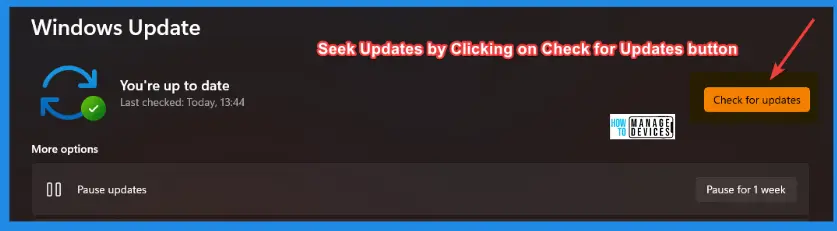
How to Seek Windows Updates?
Windows 11 allows you to choose when and how to receive the latest updates to ensure your device runs efficiently and securely. To manage your update preferences and view available updates, select “Check for Windows updates.”
Alternatively, you can seek the latest Windows update by selecting Start > Settings > Windows Update by accessing the update settings.
Microsoft releases security updates on “Patch Tuesday,” the second Tuesday of each month at 10:00 AM PST. IT professionals should plan their deployment schedules according to their time zone(s).
Improvements with Windows 10 April Patches
Let’s quickly look at the Improvements with Windows 10 April Patches. There is little improvement with Windows 10 as Microsoft concentrates on Windows 11 instead of Windows 10.
Issues Fixed with Windows 10 April Patch
Let’s have a look at the issues that are fixed with Windows 10 April patch Tuesday KB5025221. The following table covers both Windows 10 22H2 and 21H2 fixes.
| Fixes with Windows 11 April Patch | Details |
|---|---|
| USB printers related issues were fixed | The system classifies USB Printers as multimedia devices even though they are not. |
Known Issues from Windows 10 KB5025221
You can check the current status of known issues after the last patch update on April 2023 CU. This table offers a summary of active current problems and those issues that have been resolved in the previous 30 days.
| Summary | Originating update | Status | Last update |
|---|---|---|---|
| Legacy LAPS and New LAPS Client Conflict | KB5025221 (OS Builds 19042.2846, 19044.2846, and 19045.2846) | Investigating | New Built-in LAPs Client For Windows 11 and 10 |
| You might receive an error with apphelp.dll from apps using DirectX Outdated Intel Graphics drivers might cause issues with certain apps. | OS Build 19045.2251 KB5019959 2022-11-08 | Not to Resolve | Mitigation is in place |
| Devices with a locale set to Croatia might not utilize the expected currency | N/A | Investigating | Workaround is provided |
| The start menu, Windows Search, and UWP apps might have issues opening | N/A | Investigating | Workaround is provided |
| The KIR Rollback option is enabled | OS Build 19045.2130 KB5018410 2022-10-11 | Investigating | KIR Rollback option is enabled |
| KB5012170 might fail to install, and you might receive a 0x800f0922 error | KB5012170 might fail to install, and you might receive a 0x800f0922 error | Investigating | Workaround is provided |
| Domain join processes may fail with the error “0xaac (2732)“ | OS Build 22621.674 KB5018427 2022-10-11 | Refer to KB5020276 to understand the designed behavior | As per design |
More details on Windows 10 known issues – Windows 10, version 22H2 known issues.
SCCM Windows 10 KB5025221 Deployment
Learn how to Deploy Windows 10 KB5025221 April 2023 Cumulative Updates using SCCM/WSUS. You can deploy Windows 10 April 2023 CU KBs using Intune or SCCM.
Using the following methods, you can create a monthly patch package for March 2023. You can also search with Windows 10 LCU for April 2023 KB5025221. The easiest way is to check from the SCCM admin console.
NOTE! You can verify the Windows 10 versions (OS Builds 19042.2604, 19044.2604, and 19045.2604) by installing April 2023 Latest Cumulative Updates.
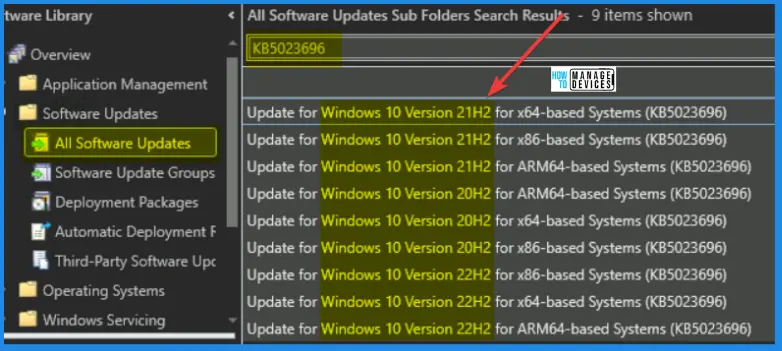
- In SCCM Console, Navigate to Software Library\Overview\Software Updates\All Software Updates.
- You must initiate a WSUS Sync from the All Software Updates node (Right-click on the node and initiate the sync).
- Search with the following KB5025221 Number.
- Or you can search with 23-04 Cumulative Update for Windows 10, as shown in the below screenshot.
| Name of Windows 10 Patch | KB Article | Release Date |
|---|---|---|
| 2023-03 Cumulative Update for Windows 10 Version 22H2 for ARM64-based Systems (KB5025221) | 5025221 | 4/11/2023 5:00:00 PM |
| 2023-03 Cumulative Update for Windows 10 Version 22H2 for x64-based Systems (KB5025221) | 5025221 | 4/11/2023 5:00:00 PM |
| 2023-03 Cumulative Update for Windows 10 Version 22H2 for x86-based Systems (KB5025221) | 5025221 | 4/11/2023 5:00:00 PM |
| 2023-03 Cumulative Update for Windows 10 Version 20H2 for x86-based Systems (KB5025221) | 5025221 | 4/11/2023 5:00:00 PM |
| 2023-03 Cumulative Update for Windows 10 Version 20H2 for x64-based Systems (KB5025221) | 5025221 | 4/11/2023 5:00:00 PM |
| 2023-03 Cumulative Update for Windows 10 Version 20H2 for ARM64-based Systems (KB5025221) | 5025221 | 4/11/2023 5:00:00 PM |
| 2023-03 Cumulative Update for Windows 10 Version 21H2 for ARM64-based Systems (KB5025221) | 5025221 | 4/11/2023 5:00:00 PM |
| 2023-03 Cumulative Update for Windows 10 Version 21H2 for x86-based Systems (KB5025221) | 5025221 | 4/11/2023 5:00:00 PM |
| 2023-03 Cumulative Update for Windows 10 Version 21H2 for x64-based Systems (KB5025221) | 5025221 | 4/11/2023 5:00:00 PM |
- How to Create Deploy New Software Update Patch Package Using SCCM | ConfigMgr
- SCCM ADR Automatic Deployment Rule Creation Process
Intune Windows 10 KB5025221 Deployment
Let’s check how to deploy the April 2023 Patch Tuesday (LCU) Deployment using Intune. You can deploy Windows 10 April CU using Microsoft Intune. The patch deployment process in Microsoft Intune is different from that of SCCM.
I don’t think creating a new patch deployment policy to cater to monthly CU deployments is mandatory, but you can use the following method to expedite. The existing patch deployment policy will deliver the patches using WUfB (Windows Update for Business).
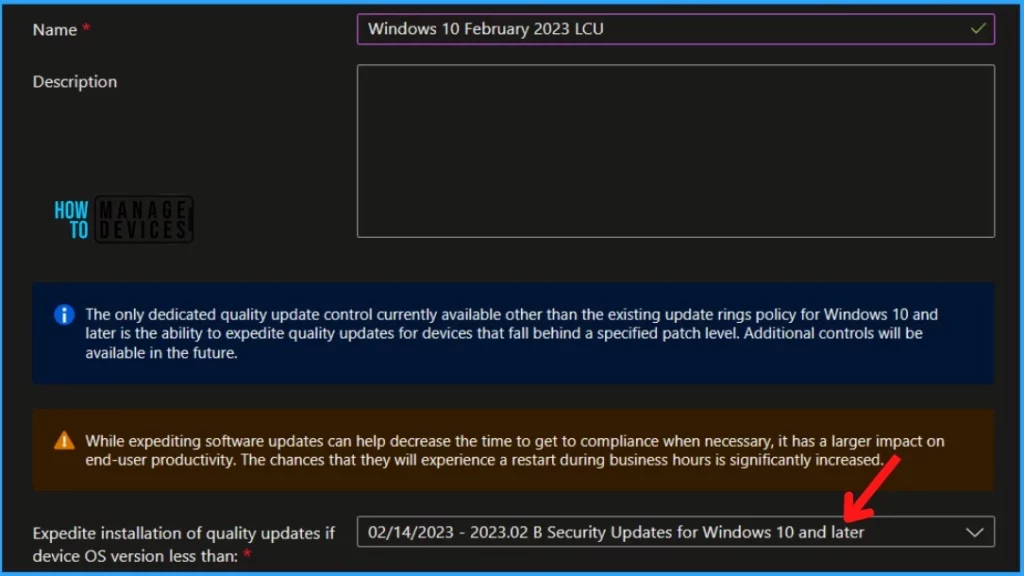
You have the option to expedite the Installation of April 2023 quality updates. Create expedited update profiles for Quality updates using the following steps.
- Sign in to the Microsoft Intune admin center https://endpoint.microsoft.com/
- Navigate Device -> Windows 10 quality Updates.
- Click on +Create Profile.
The following are the Settings for Intune quality update profile for the monthly patching process if you want to expedite the deployment of patches. Otherwise, you can use the standard quality updates policy from Intune.
- Name – Windows 10 April 2023 LCU.
- Description – Recommend adding a detailed description.
- Expedite installation of quality updates if the device OS version is less than 11th April 2023 – 2023.04 B Security Updates for Windows 10 and later
- Number of days to wait before the restart is enforced – 1 Day
More Details on Zero Day Out Of Band Patch Deployment Using Intune MEM Expedite Best Option and Intune Reporting Issue: Expedite Windows Security Patch Deployment.
Windows 10 KB5025221 Direct Download Links
Let’s manually download the 2023 April Cumulative Update for Windows 10 (KB5025221) from the Microsoft Update Catalog website. The following tables provide the direct links to download the April 2023 Cumulative Updates for Windows 10.
You can check the Microsoft Update Catalog portal to get the direct download links to the hotfixes for April 2023 LCU. Check this out Microsoft Update Catalog – https://www.catalog.update.microsoft.com/
| Title | Products | Size | Direct Download |
|---|---|---|---|
| 2023-03 Cumulative Update for Windows 10 Version 22H2 for x64-based Systems KB5025221 | Windows 10 22H2 | 697.9 MB/ | Download (x86) Download (x64) |
Resource – April 11, 2023—KB5025221 (OS Builds 19042.2846, 19044.2846, and 19045.2846) – Microsoft Support
Author
About the Author – Anoop C Nair




We’re having an issue where users Office apps will randomly crash or not open at all after this security update arrived. Anyone else experiencing the same?
We have the same issue where users Office apps will randomly crash or not open at all after this security update arrived. Have not been able to get it resolved yet.
has anyone found a solution?