Skip to content
Windows Autopilot Provisioning Delay | Users may Experience up to One Hour of Delay

Windows Autopilot Provisioning Delay | Users may Experience up to One Hour of Delay

Written By Vidya M A
Last Updated April 12, 2023
Posted In Intune
SHARE

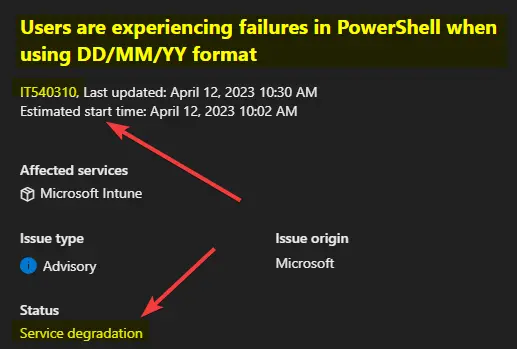
Microsoft published an alert on Windows Autopilot Provisioning Delay. Users are experiencing failures in PowerShell when using DD/MM/YY format. The service shows as degraded as part of IT540310. You can check more details from the Service health and message center.

Windows Autopilot providing delay is caused by PowerShell failures when using DD/MM/YY format as per the Microsoft incident ticket. Microsoft is already working on the issue and testing the solution in the development environment.

Learn more about the Windows Autopilot Hybrid Domain Join Step-by-Step Implementation guide. There is another post that will help to learn troubleshooting details about the Windows Autopilot Hybrid Domain Join scenario.

Joy’s other Windows Autopilot troubleshooting blogs are below Windows Autopilot PreProvisioning Backend Process- Deep Dive – Post 4Windows Autopilot Processes from Device Side – Part 3. Windows Autopilot Behind The Scenes Secrets – Admin Side – Part 2.

Patch My PC
Windows Autopilot Provisioning Delay Users may Experience up to One Hour of Delay Fig. 1

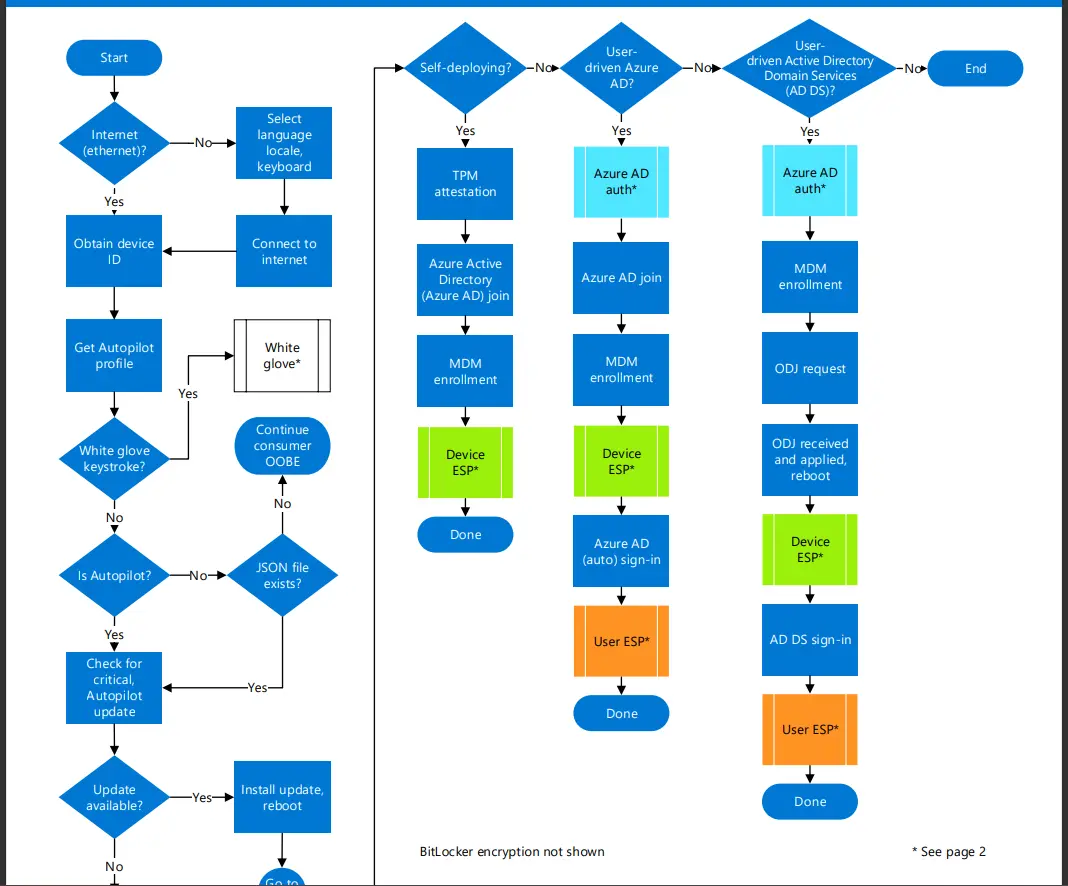
Download Windows Autopilot Deployment Flowchart

Happy Autopiloting 🙂 Bonus tip: Windows 10/11 Autopilot deployment process PDF can be downloaded from the link. You can download the Windows Autopilot Deployment Flowchart prepared by Michael Niehaus.
Windows Autopilot Provisioning Delay | Users may Experience up to One Hour of Delay Fig.2

Current status Root Cause – Windows Autopilot Provisioning Delay Issue

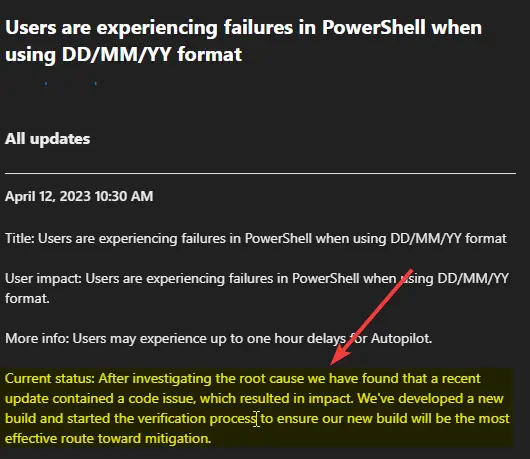
Let’s check the current status of the Windows Autopilot Provisioning Delay Issue from the below update from Microsoft. As per Microsoft, After investigating the root cause, they have found that a recent update contained a code issue, which resulted in an impact.

Microsoft has already developed a new build and started the verification process to ensure our new build will be the most effective route toward mitigation.

  • Root cause: Microsoft’s most recent build contained a code issue that caused an impact.
Windows Autopilot Provisioning Delay Users may Experience up to One Hour of Delay Fig. 3

Author

Vidya is a computer enthusiast. She is here to share quick tips and tricks with Windows 11 or Windows 10 users. She is also keen to find solutions to and write about day-to-day tech problems.

Written by

About Author - Vidya is a computer enthusiast. She is here to share quick tips and tricks with Windows 11 or Windows 10 users. She is also keen to find solutions to day-to-day tech problems and write about them.

Discussion

Join the discussion

Your email address will not be published. Required fields are marked *

Related guides

Intune

Simplify Windows Devices to Run Only the Required Applications using Intune

Key Takeaways Hey, let’s learn about Simplify Windows Devices to Run Only the Required Applications using Intune. This policy lets administrators replace the default windows shell with a custom or lightweight shell. it improves performance by using system resources and is useful for devices that run a dedicated application. If the policy is disabled or […]

AC Anoop C Nair 8 min read
Intune

Enhance macOS Compliance with Custom Security and Compliance Checks to Improve Device Security using Microsoft Intune

Key Takeaways In this post we are discussing about Enhance macOS Compliance with Custom Security and Compliance Checks to Improve Device Security using Microsoft Intune. Microsoft has announced the general availability of Custom Compliance Settings for macOS in Microsoft Intune. The feature helps organizations strengthen security controls while supporting many types of macOS management scenarios. […]

AC Anoop C Nair 4 min read
Intune

Manage Samsung Galaxy Firmware Versions to Improve Security and Compliance using Microsoft Intune

Key Takeaways In this post we are discussing Manage Samsung Galaxy Firmware Versions to Improve Security and Compliance using Microsoft Intune. Microsoft Intune has received a new update that expands firmware management capabilities for Samsung Galaxy devices through Firmware Versionsintegration. This enhancement gives IT administrators more control over firmware and operating system updates, helping them […]

AC Anoop C Nair 4 min read
Intune

MS Intune Adds Windows Registry Data Collection to Device Inventory for Single Values All Key Values and Subkeys

Key Takeaways Microsoft Intune 2607 introduces Windows Registry Data collection in Device Inventory, allowing IT admins to verify actual device configurations without relying on custom discovery or remediation scripts. Using the Properties Catalog, admins can collect registry information through Single Value, All Values Under a Key (Non-Recursive), or Same Value Across Subkeys. MS Intune Adds […]

AC Anoop C Nair 5 min read