






SCCM Failed to Download Updates Error Invalid Certificate Signature
Here are the steps you can follow to troubleshoot and fix the SCCM Failed to Download Updates Error Invalid Certificate Signature issue, The issue was experienced here while attempting to download the Windows 11 KB5025239 patches, there may be a few possible causes for this issue.
The error typically appears while trying to download Windows software updates, When you try to download an update into a deployment package through the SCCM console, an error message pops up saying, “Invalid certificate signature”.
Trav Eastman shared an issue in the SCCM – ConfigMgr Professionals Group, which prompted several other IT professionals to join the discussion and share their experiences. Based on the initial observations, the issue appears to be related to the Windows 11 KBs when attempting to initiate the ADRs.
If you encounter the “Invalid certificate signature” error message while trying to download through the SCCM console, it could indicate a problem with the digital signature of the updated file. This error can occur due to a mismatch between the digital signature of the update and the signature that SCCM expects.

- SCCM 2303 Upgrade Step By Step Guide | New Features
- FIX SCCM Console Access Error 0x80070005 0x800706ba RPC Server Is Unavailable
Failed to Download Updates Error Invalid Certificate Signature
We need to examine the issue statement here. The problem admins were facing that the update failed to download, and we are looking for a solution to resolve the issue.
Although several cases may appear similar to this issue, the troubleshooting steps required for each case may differ. In this scenario, you may receive the following error message:
The task “Download Software Updates Wizard” Completed with Errors. You may see the Error: Failed to download content id. Error Invalid certificate signature by checking the details.
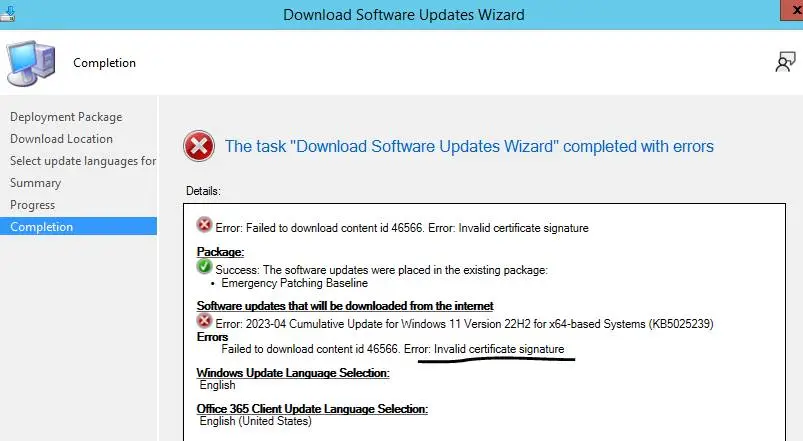
If you are facing problems downloading files while using Automatic Deployment Rules (ADRs) in ConfigMgr, there could be various reasons behind it. Some common causes of this issue could be network connectivity problems, server configuration issues, or even an incorrect ADR configuration. It’s essential to troubleshoot and diagnose the underlying cause of the problem to resolve it effectively.
Root Cause
Is this problem persist for Trav, who initially reported this issue? The wait for an extra day seems to have paid off, as the issue you were experiencing appears to have been resolved. The question comes, It’s possible that Microsoft may have made some changes or updates that may have fixed the issue?

However, it’s always a good practice to monitor the situation to ensure the issue doesn’t recur. In case the problem persists, it’s advisable to take further action, such as seeking assistance from IT support or reviewing any potential configuration changes that may be needed. It’s always better to be proactive when troubleshooting issues and ensure everything runs smoothly.
Some steps you can take include advisable Microsoft assistance if you cannot resolve the issue independently. If you have already resolved the issue or performed any troubleshooting steps to fix it, feel free to share your experience and insights to assist the wider community.
Let’s check SCCM Log Files for Client and Server components. Get the latest or updated list of SCCM Logs. The Configuration Manager logs are essential to troubleshoot an issue and fixing those.
Author
About Author – Jitesh, Microsoft MVP, has over six years of working experience in the IT Industry. He writes and shares his experiences related to Microsoft device management technologies and IT Infrastructure management. His primary focus is Windows 10/11 Deployment solution with Configuration Manager, Microsoft Deployment Toolkit (MDT), and Microsoft Intune.




I found the solution for this problem. This is because in March 2023 MS changed the way it distributes updates/upgrades for Windows 11 22H2. About this UUP can read here https://techcommunity.microsoft.com/t5/windows-it-pro-blog/get-ready-for-the-first-uup-on-premises-updates-coming-in-march/ba-p/3738461
But if you use SCCM to distributes updates your SCCM need to be not less than 2111 version. But if you didn’t update SCCM before march 2023 this calls problem.
About problems there is article https://techcommunity.microsoft.com/t5/configuration-manager-blog/unified-update-platform-uup-faq-s/ba-p/3808697. Exactly this problem described in point 5.
In comments I wrote a solution for this problem. If you have symptoms like in 5 point of article than you need to do some actions with SCCM DB.
If you cant sync particular update, for example 2023-04 how in article, you need to find all .psf files that are in this update.
Make SQL query like this
SELECT *
FROM vSMS_CIContentFiles
WHERE CI_UniqueID = ‘3157dbaf-04f5-49fc-baef-300bbd6d121a’ AND FileName like ‘%.psf’ and IsSigned=1
You will get all .psf files from this update that needs to be corrected in DB.
You need File_ID’s from result of query.
Next make new query with your File_ID’s:
SELECT *
FROM CI_Files
where FileName like ‘%.psf’ and File_ID in (72057594038044265,72057594038044148,72057594038044262)
And see if that files have IsSigned=1.
Than make update
update CI_Files
set issigned=0
where FileName like ‘%.psf’ and File_ID in (72057594038044148,72057594038044262,72057594038044265) and IsSigned=1
That’s it! Problem for this update resolved.
Try to download it again.