






Fix Windows 10 Microsoft Surface Video Player Sound Issue
How can I fix the sound issue with the Windows 10 Microsoft Surface Video Player? I’ve been facing intermediate video player and sound issues with the Microsoft Surface for the last few months. In Windows 10, sound/audio and video player issues are rare.
I tried to update the Audio drivers without any luck. I still don’t have a permanent fix or resolution for the Microsoft Surface Audio/Sound issue. There is an ugly workaround to temporarily fix the problem, which is explained in this post. So, what about the video player issue?
Most of the time, Windows 10 Microsoft Surface video player issues are caused by problems with sound/audio. Once we fix the audio/sound issue, the video player issue will be resolved automatically.
This post provides all the details on how to fix the Windows 10 Microsoft Surface Video Player Sound Issue.

Table of Contents
- Bug Fix Windows 10 Desktop or Taskbar disappearing or unresponsive using KIR
- Fix Windows 10 Bluetooth File Transfer Issues
- Fix Windows 10 WiFi Connectivity Issues Internet Connection is Getting Disconnected
Video Tutorial to Fix Sound and Video Issues with Windows 10 Surface Device – Fix Windows 10 Microsoft Surface Video Player Sound Issue
https://www.youtube.com/embed/PjYqTndpkoI YouTube player Error: – An error occurred. Please try again later (playback ID —–). Movies & TV Windows Universal Application Error:- Can’t play; please try again. Fix Windows 10 Microsoft Surface Video Player Sound Issue?
- If the problem continues, visit www.xbox.com/support to check for guidance… Error 0x800705aa Sound Error:- Sound Test, Error – Failed to play test tone.
| Fix Windows 10 Microsoft Surface Video Player Sound Issue | Details |
|---|---|
| Error | 0x800705aa |
| Sound Error | Sound Test |
| Error | Failed to play test tone |
How to Fix NO SOUND VIDEO Player Issues in Windows 10 Surface Device
Open the Windows 10 Settings page (more details here), type Device Manager in the search box, and tap/click on Device Manager from the list below.
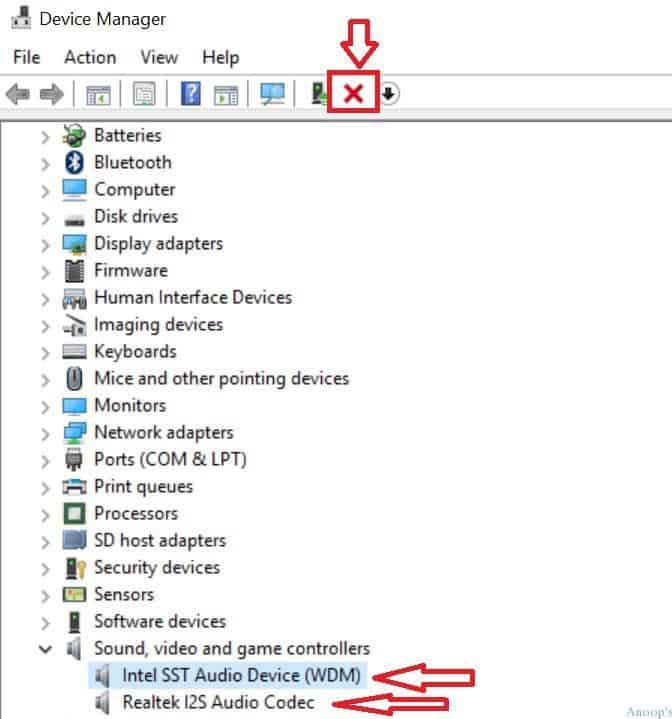
- Navigate through Device Manager and expand the Sound, Video, and Game Controllers section. Click on the Audio/Sound device called “Intel SST Audio Device (WDM)” and click on the UNINSTALL (X icon) button at the top of the device manager page.
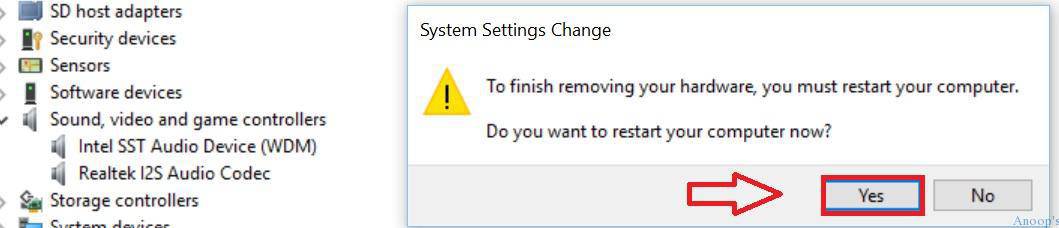
- Sometimes, the Windows 10 surface prompts you to restart the machine to complete the uninstall. If so, it’s better to restart the machine as soon as possible. After the restart, the surface will automatically add the default sound drivers, fixing the issue.
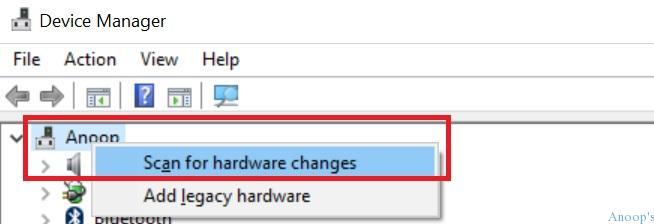
- If it does not prompt a restart to complete the Windows 10 Surface audio/sound driver uninstallation, go to the top left-hand corner of the device manager and right-click on the computer name (Anoop in my case)—tap/click on “scan for hardware changes.” This automatically installs your audio/sound driver on the Windows 10 Surface machine. This fixed the audio and sound issue of my Windows 10 Surface.
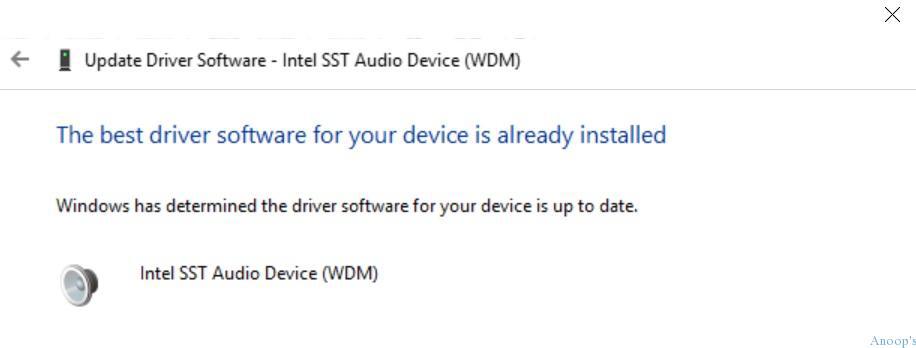
- I even tried to update the Windows 10 drivers for Surface 3 without any success/luck. Update Driver Software – Intel SST Audio Device (WDM) – “The best driver software for your device is already installed“.

Resources
SCCM Related Posts Real World Experiences Of SCCM Admins (anoopcnair.com)
SCCM Video Tutorials For IT Pros – HTMD Blog #2 (howtomanagedevices.com)
We are on WhatsApp now. To get the latest step-by-step guides, news, and updates, Join our Channel. Click here. HTMD WhatsApp.
Author
Anoop C Nair is Microsoft MVP! He is a Device Management Admin with more than 20 years of experience (calculation done in 2021) in IT. He is a Blogger, Speaker, and Local User Group HTMD Community leader. His main focus is on Device Management technologies like SCCM 2012, Current Branch, and Intune. He writes about ConfigMgr, Windows 11, Windows 10, Azure AD, Microsoft Intune, Windows 365, AVD, etc.



This solved my problem. Many thanks!