






Another Outlook Zero Day Vulnerability with May 2023 Patch Tuesday
Another Outlook Zero Day Vulnerability announced by Microsoft. Microsoft released Three (3) Zero Day Vulnerabilities with May 2023 Patch Tuesday. The Microsoft Outlook vulnerability is critical and needs to be fixed very soon. Another vulnerability fixed by Microsoft is FIX Windows Boot Manager Vulnerability CVE-2023-24932 BlackLotus UEFI Bootkit.
One of the vulnerabilities is critical and is related to the affected version of Microsoft Outlook software. There was a similar issue with Outlook a few months ago – FIX Zero Day Security Vulnerability For Outlook. Microsoft released Windows KB5026368 and KB5026372 and Windows 10 KB5026361.
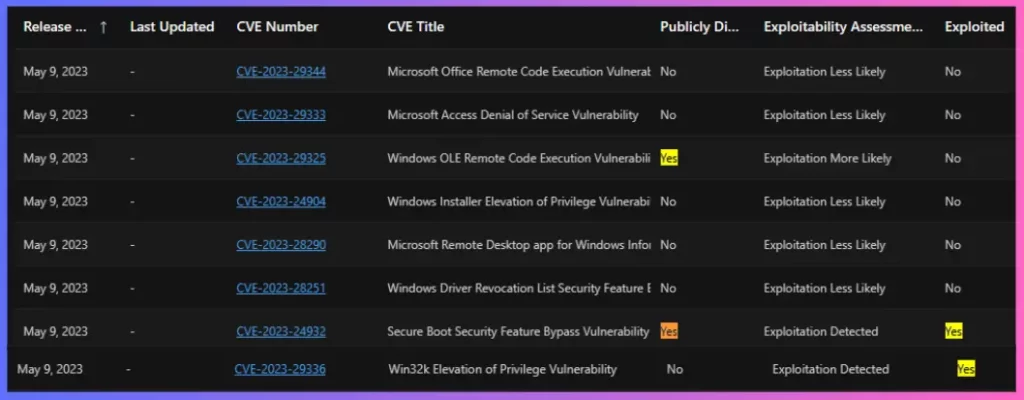
3 Zero-Day Security Vulnerabilities with Windows OLE Remote Code Execution Vulnerability CVE-2023-29325. Also, Secure Boot Security Feature Bypass Vulnerability CVE-2023-24932 and Win32k Elevation of Privilege Vulnerability CVE-2023-29336.
The following table gives more details on 3 zero-day vulnerabilities announced by Microsoft. It’s important to fix the Outlook-related vulnerability because the max severity is given as Critical. More details to Expedite Microsoft Office Apps Updates Using Intune Policy | Faster Updates For M365 Apps.

| Release Date | CVE Number | CVE Title | Publicly Disclosed | Exploitability Assessment | Exploited | Impact | Max Severity | Tag |
|---|---|---|---|---|---|---|---|---|
| May 9, 2023 | CVE-2023-29325 | Windows OLE Remote Code Execution Vulnerability | Yes | Exploitation More Likely | No | Remote Code Execution | Critical | Windows OLE |
| May 9, 2023 | CVE-2023-24932 | Secure Boot Security Feature Bypass Vulnerability | Yes | Exploitation Detected | Yes | Security Feature Bypass | Important | Windows Secure Boot |
| May 9, 2023 | CVE-2023-29336 | Win32k Elevation of Privilege Vulnerability | No | Exploitation Detected | Yes | Elevation of Privilege | Important | Windows Win32K |
CVE-2023-29325 – Microsoft Outlook Vulnerability
CVE-2023-29325 – The exploitation of the vulnerability might involve either a victim opening a specially crafted email with an affected version of Microsoft Outlook software or a victim’s Outlook application displaying a preview of a specially crafted email. This could result in the attacker executing remote code on the victim’s machine.
CVE-2023-24932 Windows Boot Manager Vulnerability
CVE-2023-24932 – The security update addresses the vulnerability by updating the Windows Boot Manager, but it is not enabled by default. Additional steps are required at this time to mitigate the vulnerability. Please refer to the following for steps to determine the impact on your environment: KB5025885: How to manage the Windows Boot Manager revocations for Secure Boot changes associated with CVE-2023-24932.
There is another vulnerability, and CVE ID is CVE-2023-29336 – An attacker who successfully exploits this vulnerability could gain SYSTEM privileges.
FIX CVE-2023-29325 – Microsoft Outlook Vulnerability
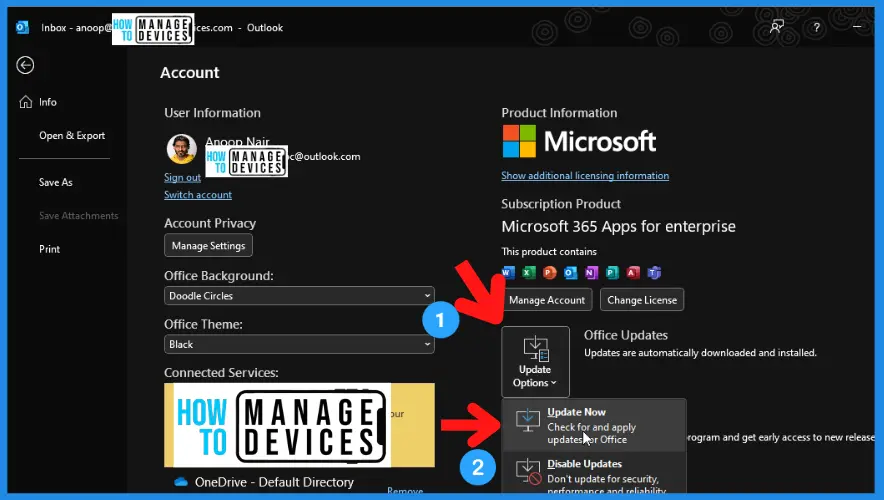
You have the option to expedite or speed up the Outlook application. More details Expedite Microsoft Office Apps Updates Using Intune Policy | Faster Updates For M365 Apps.
| Outlook Versions | Impacted |
|---|---|
| Windows Outlook Client (Thick) | Yes – All supported versions are impacted |
| Android Outlook Client | NO |
| iOS Outlook Client | NO |
| macOS Outlook Client | NO |
| Outlook Web | NO |
| M365 services | NO |
Author
Vidya is a computer enthusiast. She is here to share quick tips and tricks with Windows 11 or Windows 10 users. She is also keen to find solutions to day-to-day tech problems and write about them.




Discussion