






Control Organizational Messages using Intune RBAC Role
Let’s learn how you can control Organizational Messages using Intune RBAC. Role-based access control (RBAC) enables effective management of access privileges for your organization resources, specifying both the individuals who are granted access and the actions they are permitted to perform.
Organizational messages in Microsoft Intune offer the capability to utilize branded messages for the purpose of informing individuals about their organization or preparing them for new roles. They also serve as a means to notify users about organizational updates and training opportunities.
By leveraging these features, organizations can effectively communicate important information and facilitate learning within their workforce. Starting with Intune Service release 2304, Additional permissions to support administrators in controlling the delivery of organization messages.
There are twelve (12) built-in Intune roles (RBAC roles). You can create custom Intune roles if none of the provided roles supports your scenario. Without any additional configuration, it is possible to allocate built-in roles to groups. However, it is not feasible to modify the name, description, type, or permissions of a built-in role or remove it.

To create organizational messages in Microsoft Intune, you must be assigned one of the following roles, Azure AD Global administrator, Intune administrator, Organizational messages manager (Intune Built-in role), or Organizational messages writer (Azure AD role).
- Configure Organizational Messages From Intune Portal
- Windows Autopilot Scenario For Streamlined Modern Device Deployment
Control Organizational Message from Intune RBAC Role
In order to create, edit, or assign roles, your Azure AD account must possess one of the following permissions: Global Administrator or Intune Service Administrator (also referred to as Intune Administrator).
- Sign in to the Microsoft Intune admin center https://intune.microsoft.com/.
- Navigate to Tenant administration > Roles.
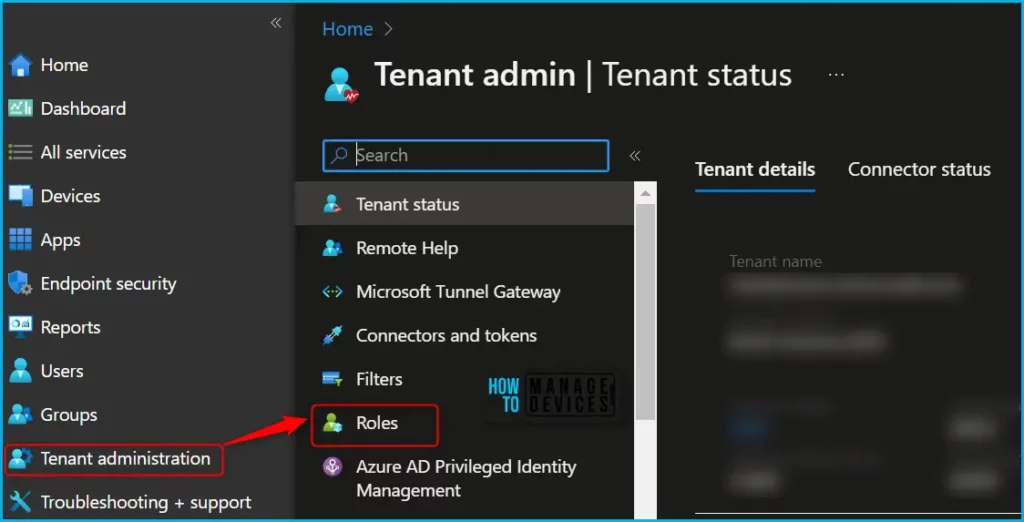
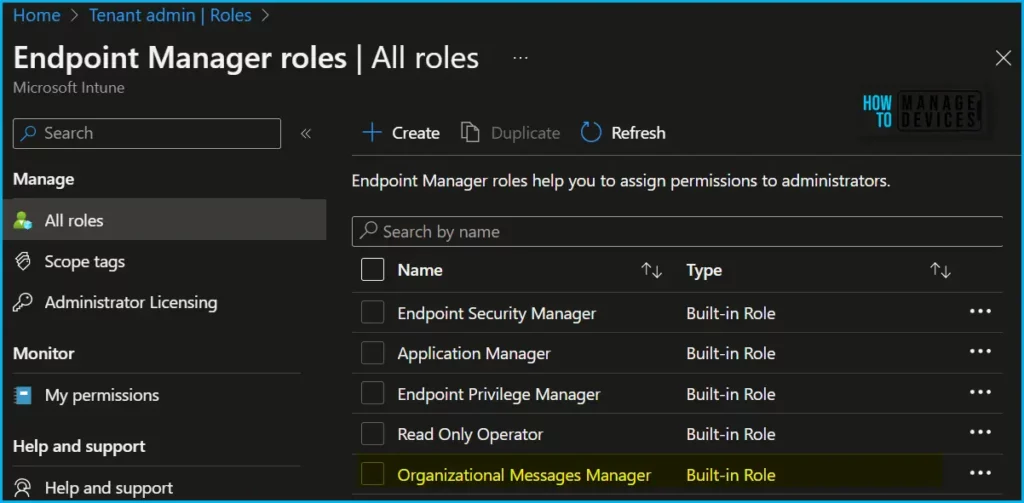
In the All roles, you will find all the built-in roles, and created custom roles available in the tenant. The Organizational Messages Manager built-in role manages organizational messages in Intune console.
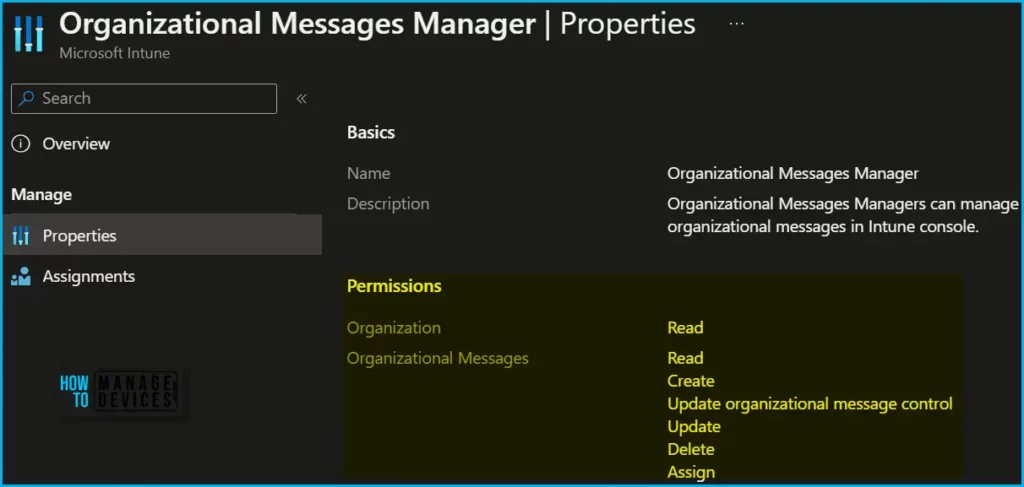
Here is how you can check the permissions by navigating to the roles by clicking on Properties. Here you can also be able to get the details of permissions added for the role.
You can assign built-in roles, Organizational Messages Manager, to groups without further configuration. You can’t delete or edit the name, description, type, or permissions of a built-in role.
| Actions | Descriptions |
| Create | Create organizational message |
| Read | Read organizational message delivery results |
| Update organizational message control | Determines who can change the Organizational Messages toggle to allow or block Microsoft direct messages |
| Update | Update organizational message |
| Delete | Ability to delete organizational message |
| Assign | Assign the organizational message to a group |
You can duplicate built-in roles to create, edit, or assign Intune roles. Here’s how you can duplicate Intune RBAC roles for Organizational Messages and manage roles under Organizational Messages custom role section, Duplicate Intune RBAC Roles.
You can assign a built-in or custom role to an Intune user, choose the built-in role (Organizational Messages Manager) you want to assign > Assignments > + Assign.
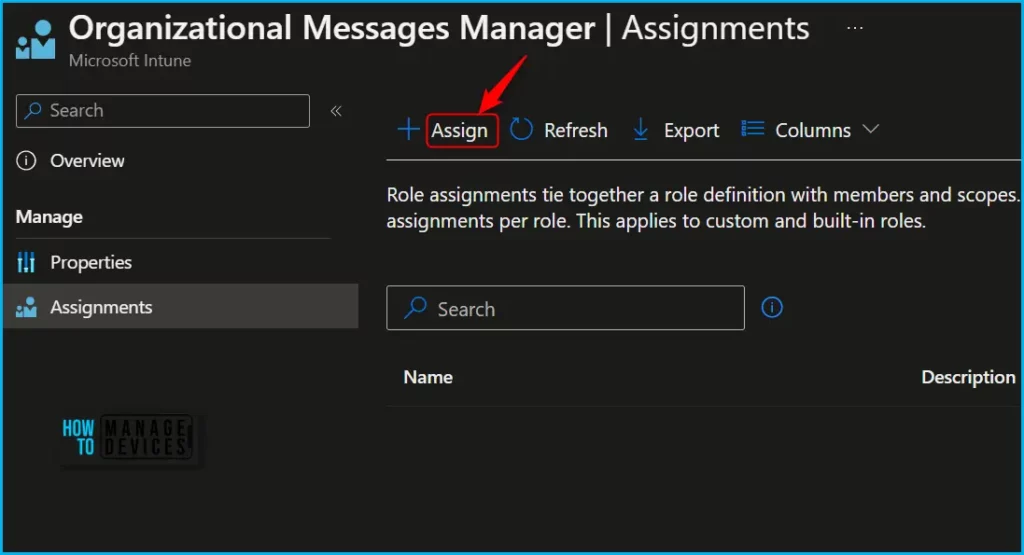
On the Basics page, enter an Assignment name and optional Assignment description, and then choose Next. On the next screen Admin Groups, select the group that contains the user you want to give the permissions. Choose Next and complete the Assignment.
The Update organizational message control RBAC permission for organizational messages, determines who can change the Organizational Messages toggle to allow or block Microsoft direct messages. This permission is also added to the Organizational Messages Manager built-in role.
Intune RBAC Strategic options – Video
In this video, we will explain Intune RBAC Strategic Options | Role-Based Access Controls | Scope Groups | Intune Objects | Roles.
Author
About Author – Jitesh, Microsoft MVP, has over six years of working experience in the IT Industry. He writes and shares his experiences related to Microsoft device management technologies and IT Infrastructure management. His primary focus is Windows 10/11 Deployment solution with Configuration Manager, Microsoft Deployment Toolkit (MDT), and Microsoft Intune.


Discussion