






Windows Copilot Explained | AI Powered First Operating System | License Cost
Exciting News from Microsoft! Windows Copilot and Licene Cost are explained in this post. Let’s get the first impression from this post. Microsoft is going to release the Windows Copilot in June. Windows Copilot helps you to make Windows 11 the first PC platform to announce centralized AI assistance to help people easily take action and get things done.
With Windows Copilot, users will embark on a journey where the power of Artificial Intelligence becomes an invaluable companion, effortlessly navigating through complex tasks, offering personalized assistance, and revolutionizing the concept of productivity.
Microsoft introduced AI integration with Windows 11 or Windows 11 copilot in the Build 2023 conference for developers. Microsoft wants developers to develop an app ecosystem that can easily integrate with Windows Copilots. Developers can use chat GPT plugins to develop AI capabilities for their applications and enhance applications within the Windows ecosystem using Windows Plug-in options.
Microsoft has already released the first Public version of the AI-powered Operating System Windows 11 Copilot with Windows 11 Insider Preview Build 23493 to the Dev Channel. The important news is that Microsoft will release Windows Copilot in June. Let’s discuss Windows copilot, what features will get into Windows, and how AI can power Windows and Windows users so the Windows ecosystem will get more power with AI.

| Windows Copilot | |
|---|---|
| First PC platform to announce centralized AI assistance | Bing Chat plugins, ChatGPT, etc.. |
| Release Date | Preview for Windows 11 in 30th June 2023 |
What is Windows Copilot?
What are the Advantages of Windows Copilot?
2. The Copilot button is front and center on your taskbar
3. Simple to find and use
4. It makes every user a power user
5. It helps you to take action
6. Customize your settings
7. Seamlessly connect across your favorite apps
What is the License Cost or Pricing for Windows Copilot?
The licensing cost is $30 per user per month (and the M365 E3 license costs around $36 per user per month). This means you are talking about $66 per user per month in total.
- AI Powered Copilot in Word to Automate Creation of Complex Documents
- Copilot in Excel AI Integration to Automate Excel Tasks Coming Soon
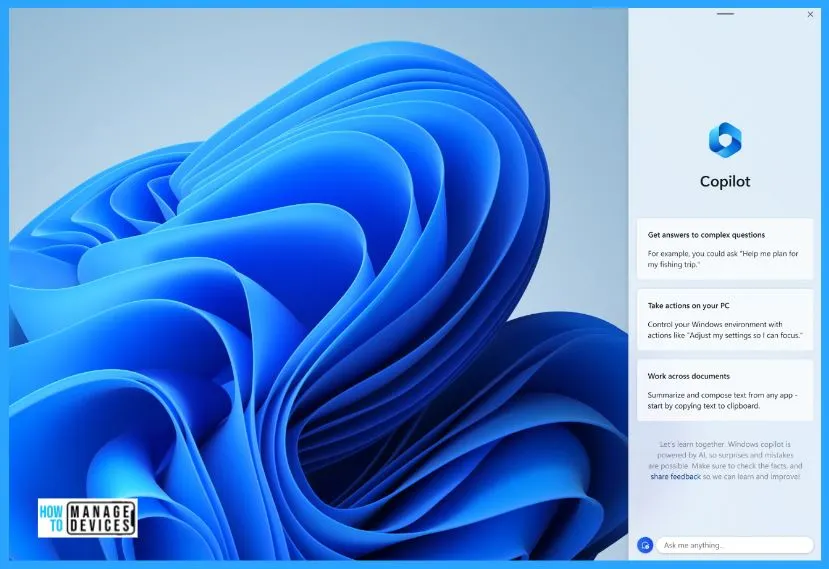
Video -Windows Copilot Explained | AI Powered First Operating System
In this video, let’s discuss Windows Copilot First Impression. Microsoft has announced its plans to integrate AI into Windows 11 through a game-changing feature called “Copilot.” With the integration of Copilot, Windows 11 will harness the power of AI to provide users with enhanced assistance and support.
What is the License Cost or Pricing for Microsoft 365 Copilot?
Microsoft has recently announced the license cost or pricing details for Microsoft 365 Copilot, and it’s very expensive. This will be available only for enterprises with Microsoft 365 E3, E5, Business Standard, and Business Premium with licenses.
The licensing cost is $30 per user per month (and the M365 E3 license costs around $36 per user per month). This means you are talking about $66 per user per month in total.
Microsoft 365 E3
M365 Copilot
Total Pricing
Video about Microsoft 365 Windows Copilot License Cost Pricing Details. What is the License Cost or Pricing for Windows Copilot?
Windows Copilot First Impression – Introducing Windows Copilot
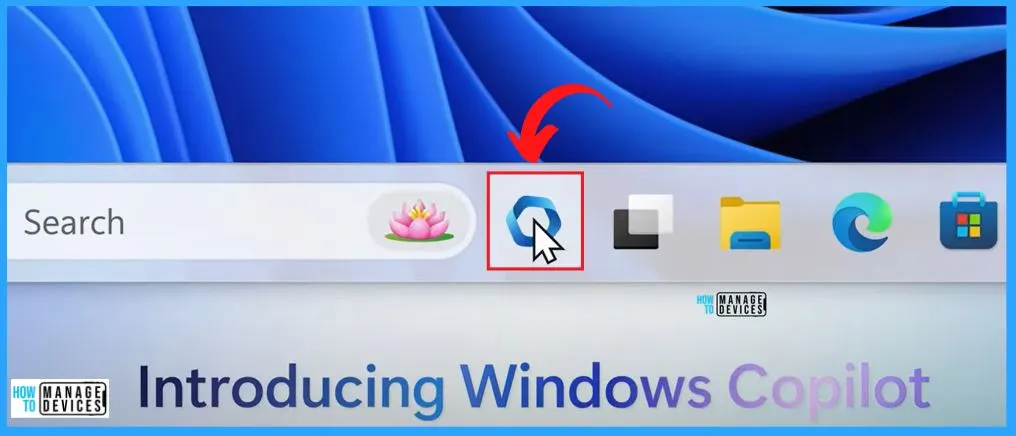
The power of AI to Windows 11 provides a new era of productivity for customers and developers with Windows Copilot. The below window shows the Copilot icon. This icon is very similar to Microsoft 365 icon. You can easily launch Windows Copilot by clicking this icon, and it is easy to ask questions.
Note! – Microsoft already share that On the initial Copilot page, there can be mistakes
- Copilot AI Integrated Outlook Coming Soon
- Copilot in Teams for Meeting Recap with Personalized Citations from the Transcript
System Settings using Windows Copilot
Microsoft is making some system settings change using Windows Copilot. Windows Copilot is poised to elevate user productivity and efficiency by offering contextual actions and suggestions based on the current on-screen content.
With the help of Copilot, you can easily bring your ideas to life, completing complex projects and collaborating instead of spending energy finding, launching, and working across multiple applications.
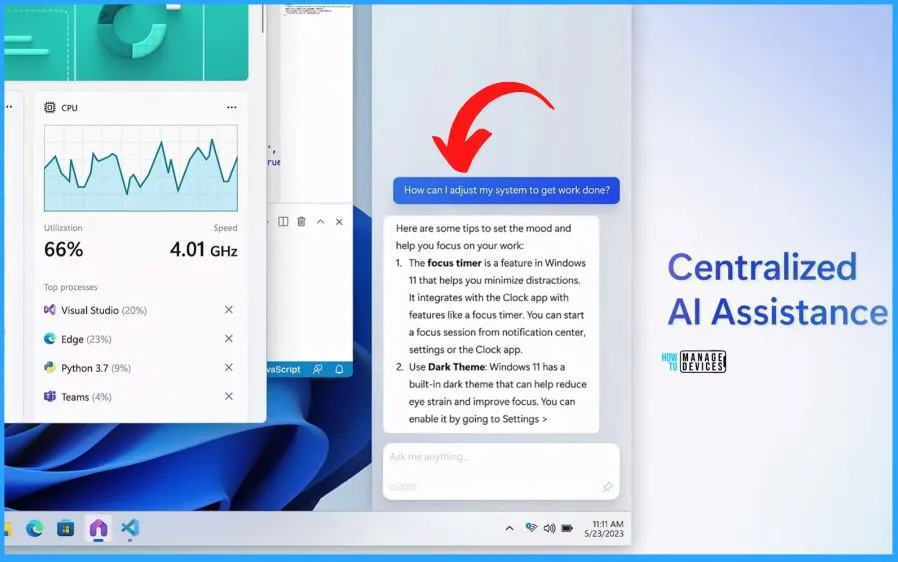
Copilot Focus Session in Windows 11
Once you have Copilot, there is no need to open the settings apps to change the Theme of Windows. The Windows Copilot does wonderful things like focus sessions, dark theme change, organizing Windows, etc.
- Windows Copilot empowers every user to become a power user, offering a suite of capabilities that enable you to take decisive action, customize settings to your liking, and seamlessly connect with your favorite apps.
- This revolutionary feature is poised to redefine how you interact with Windows, putting you in the driver’s seat of your computing experience.
- Windows Copilot enhances what you love about Windows, seamlessly integrating features like copy/paste, Snap Assist, Snipping Tool, and personalization into a cohesive and enhanced user experience.
- With Copilot by your side, these special features and every other aspect of the Windows platform are taken to new heights, offering even more convenience and efficiency.
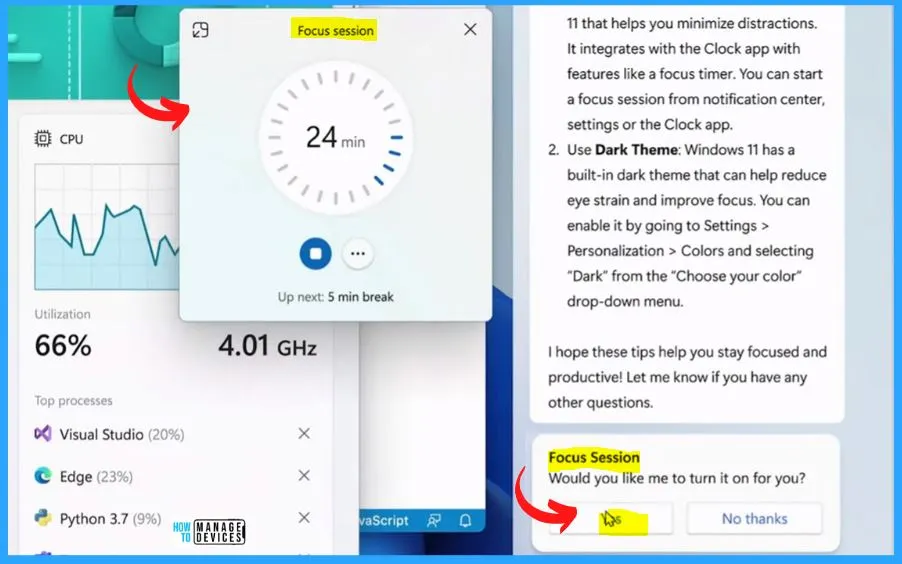
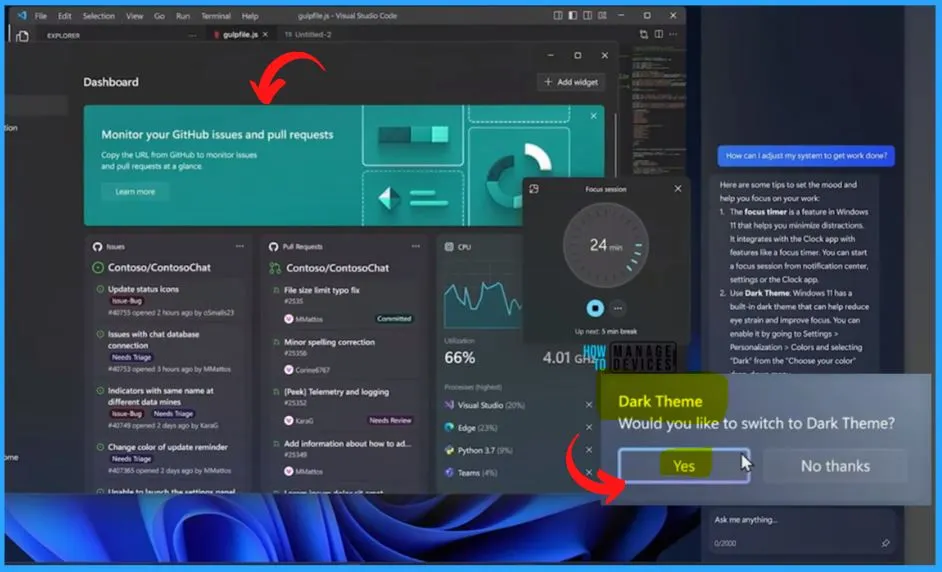
Copilot Dark Theme Feature in Windows 11
While using Copilot in Windows, there is no need to open the settings app to change the dark Theme in Windows 11. Microsoft AI Copilot is a built-in tool for enhancing productivity workflows. You can easily change the Theme of your Windows 11 pc with the help of Copilot.
- Click Yes to the below dark theme copilot window to change the Theme to a dark color.
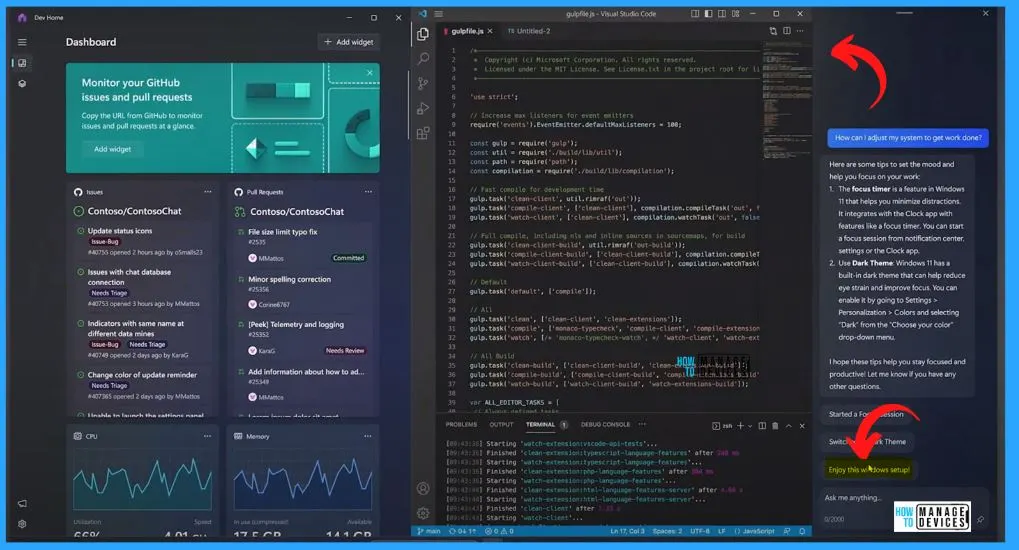
Organize Windows using Windows Copilot
You can easily organize Windows using Copilot. There is no need to go to snippets and manage it etc. With the help of Copilot, you can copy and paste and ask Windows Copilot to rewrite, summarize or explain your content.
- Click the Yes button on the below “Copilot organize windows” in Windows 11.
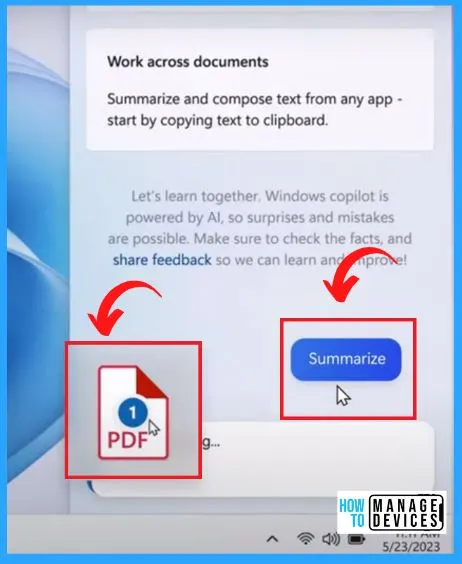
Copilot Work Across Documents
Like all the other Copilot scenarios in Word, Excel, and Powerpoint, you can easily upload a PDF to Copilot and ask it to summarize it. This feature helps you give a detailed summary of that PDF, and you can probably ask more questions about that PDF if you want, etc.
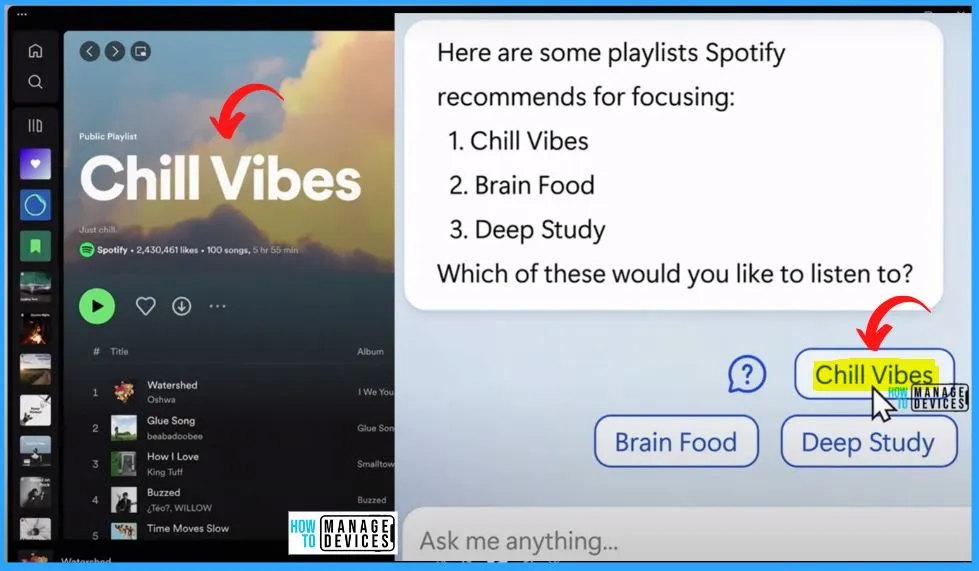
Copilot Integrated with the Spotify Application
Microsoft promises that Copilot works with all the apps ecosystem in Windows. The below window shows that the Copilot is integrated with the Spotify application. Also, it helps you to give the list of playlists available and play the music as per your suggestion.
Developers can use chat GPT plugins to develop AI capabilities for their applications and enhance applications within the Windows ecosystem using Windows Plug-in options.
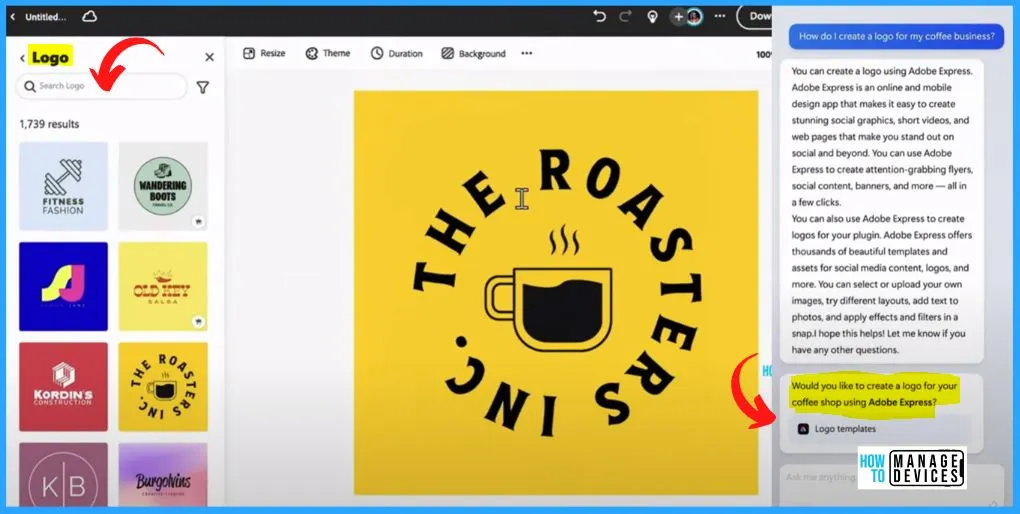
Copilot Logo Templates – Enhanced Experience with Windows Plugin for 3rd Party Apps
Windows Copilot helps you use Adobe Express to create logos for your organization or your customer, and then you can immediately share that logo to your Teams channel.
Author
About Author – Vidya is a computer enthusiast. She is here to share quick tips and tricks with Windows 11 or Windows 10 users. She loves writing on Windows 11 and related technologies. She is also keen to find solutions and write about day-to-day tech problems.




Discussion