






Revoke App Licenses for Apple VPP App using Intune
Let’s check, how you can Revoke App Licenses for Apple VPP using Intune. Revoking app licenses for iOS/iPadOS involves removing the license assignment from users or devices, thereby revoking their access to the licensed app.
It’s important to note that when you revoke a license, it doesn’t uninstall the app from the user’s device. It simply prevents the user from accessing the app. If you want to remove the app from the user’s device completely, you can consider using app uninstallation policies or device wipe actions available within Intune.
By revoking the app license assignment, you effectively remove access to the licensed app for the selected users or devices. They will no longer be able to use the app on their enrolled iOS or iPadOS devices.
Revoking app licenses allows you to manage app access and ensure compliance within your organization. You can easily adjust license assignments as needed, granting or revoking access based on user or device requirements.

Revoking app licenses for iOS/iPadOS involves the process of removing assigned licenses from users or devices, effectively terminating their access to the licensed app. To accomplish this, you can check to Manage User Or Device License For Apple Apps Using Intune.
- How To Schedule IOS Automatic Updates Using Intune Policies
- Configure Intune Enrollment Setup for iOS macOS Devices
Revoke App Licenses for Apple VPP using Intune
Here’s a step-by-step guide on revoking app licenses for iOS/iPadOS. This can be done through the Microsoft Intune admin center, where you manage your Intune configurations.
- Sign in to the Microsoft Intune admin center https://intune.microsoft.com/.
- Select Apps > iOS/iPadOS or macOS.
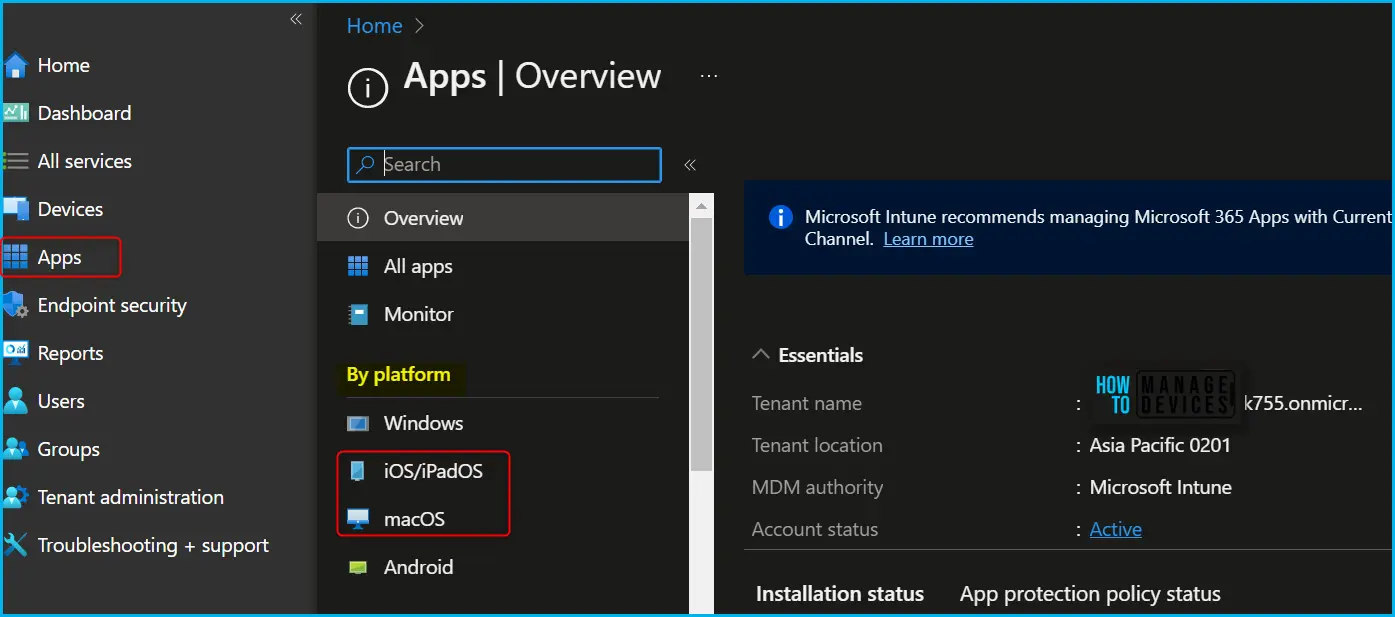
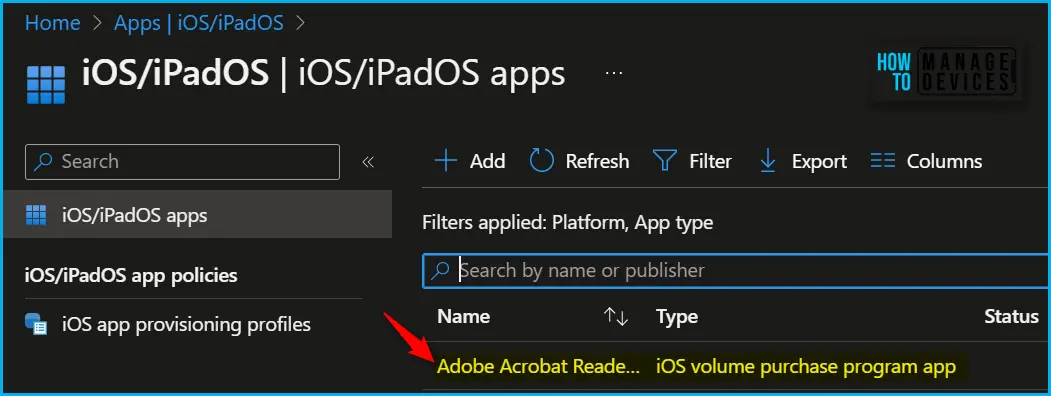
I have selected the existing volume purchase program app (VPP app), Adobe Acrobat Reader, from the list to revoke licenses.
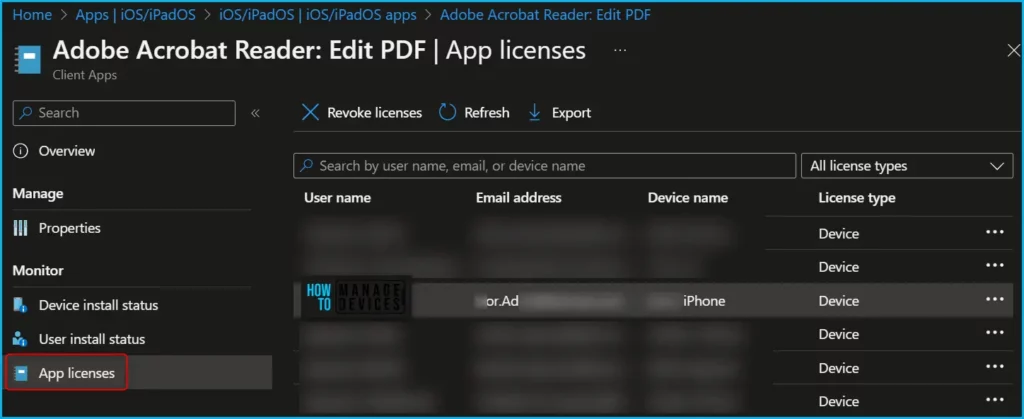
In the application, Click on the App Licenses tab under Monitor. You will get the details of users, device name, along with license type. Here you can also search by username, email, or device name from the list to get the user to whom you want to revoke licenses.
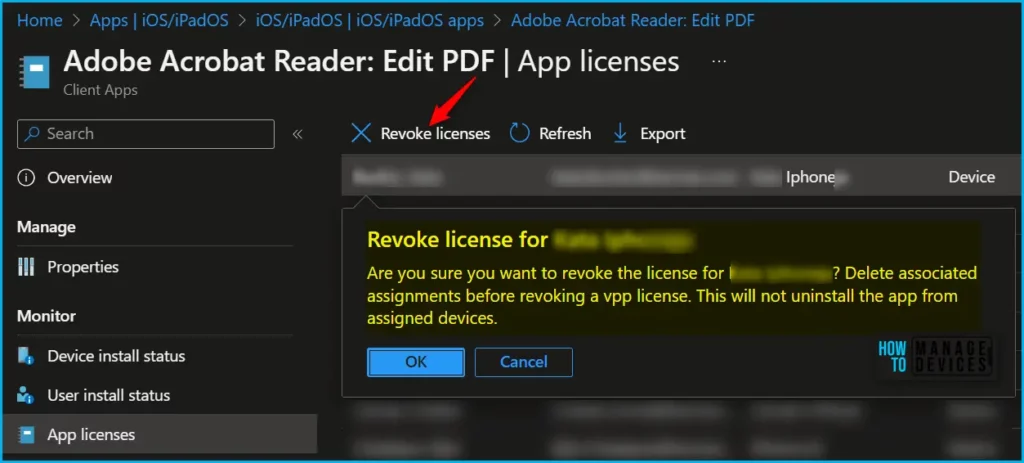
Once you select the user from the list, you need to click on the top banner, Revoke licenses button to initiate the action, or you can also click on three dots (…) to get the option for you.
You can revoke all associated iOS/iPadOS or macOS volume-purchase program (VPP) app licenses based on a given device, user, or app. But there are some differences between iOS/iPadOS and macOS platforms. Let’s check the details shared by Microsoft.
| Action | iOS/iPadOS | macOS |
|---|---|---|
| Remove App Assignment | Removing an app assignment is a prerequisite to revoking an app license. When you remove an app assignment for a user, Intune does not reclaim the user or device license until you change the assignment to Uninstall. If the app assignment is removed while the app is installed and never assigned as Uninstall, it will remain installed, but it will no longer be offered for installation to the user or device. | Removing an app assignment is a prerequisite to revoking an app license. When you remove an app assignment for a user, Intune does not reclaim the user or device license until you change the assignment to Uninstall. If the app assignment is removed while the app is installed and never assigned as Uninstall, it will remain installed, but it will no longer be offered for installation to the user or device. |
| Revoke App License | After changing the app assignment to Uninstall, you can reclaim an app license from the user or device using the Revoke license action. You must change the assignment to Uninstall to remove the app from the device and revoke the app license. | After changing the app assignment to Uninstall, you can reclaim an app license from the user or device using the Revoke license action. The macOS app with revoked license remains usable on the device, but cannot be updated until a license is reassigned to the user or device. According to Apple, such apps are removed after a 30-day grace period. You must change the assignment to Uninstall to remove the app from the device and revoke the app license. |
Once you click on Revoke licenses, A prompt will appear asking you to confirm Revoke license for user. Are you sure you want to revoke the license for user? Delete associated assignments before a vpp license. This will not uninstall the app from assigned devices.
You will also get a checkbox to confirm, Notify Users when app is no longer assigned to them. You can select the option if you wish and OK to proceed.
It’s important to note a few points here, When an employee leaves the company or is no longer part of the Azure Active Directory (AAD) groups, Intune automatically reclaims app licenses associated with their account.
When you assign a purchased app with the “Uninstall” intent in Intune, it not only reclaims the license for the app but also initiates the uninstallation of the app from the user’s device.
Please note that app licenses are not reclaimed when a device is removed from Intune management. License reclamation only occurs when a user is no longer part of the AAD groups or when their account is deleted from Azure AD.
In the event that a user is deleted from Azure AD, Intune will revoke the app licenses associated with their account.
Author
About Author – Jitesh, Microsoft MVP, has over six years of working experience in the IT Industry. He writes and shares his experiences related to Microsoft device management technologies and IT Infrastructure management. His primary focus is Windows 10/11 Deployment solution with Configuration Manager, Microsoft Deployment Toolkit (MDT), and Microsoft Intune.


If the license isn’t reclaimed when the device is removed from Intune management, does that mean the user needs to be deleted in order to reclaim that license, or can that user be set to ‘disabled’ instead?
Why would I see no assigned users, no users showing the app installed and all licenses revoked but it still shows that there are x number of licenses used in both Intune and ABM. How do I force the reclaim of the license so I can delete the app all together?