






SCCM Firewall Ports Download the List of ConfigMgr Firewall Ports
Let’s discuss the SCCM Firewall Ports. Download the List of ConfigMgr Firewall Ports. SCCM Firewall Ports and communications between Current Branch Site servers, Site Systems, Domain Controllers, and Clients are essential when performing SCCM CB architecture and design.
In this post, I’ll share the spreadsheet containing the SCCM Firewall Ports requirement details. The latest SCCM communication port details are in “Ports used in System Center Configuration Manager.”
Do you know RPC Dynamic Ports? TCP 49152-65535—Generally, we can segregate the Firewall ports into two categories: 1. Configurable ports (custom ports) and 2—non-configurable ports.
I cover only the documented default recommended ports. The list and spreadsheet below do not cover the additional custom communication ports mentioned. When you have an SCCM CB hierarchy with CAS and primary servers, you need to be more conscious of the SCCM Firewall port requirement.

Table of Contents
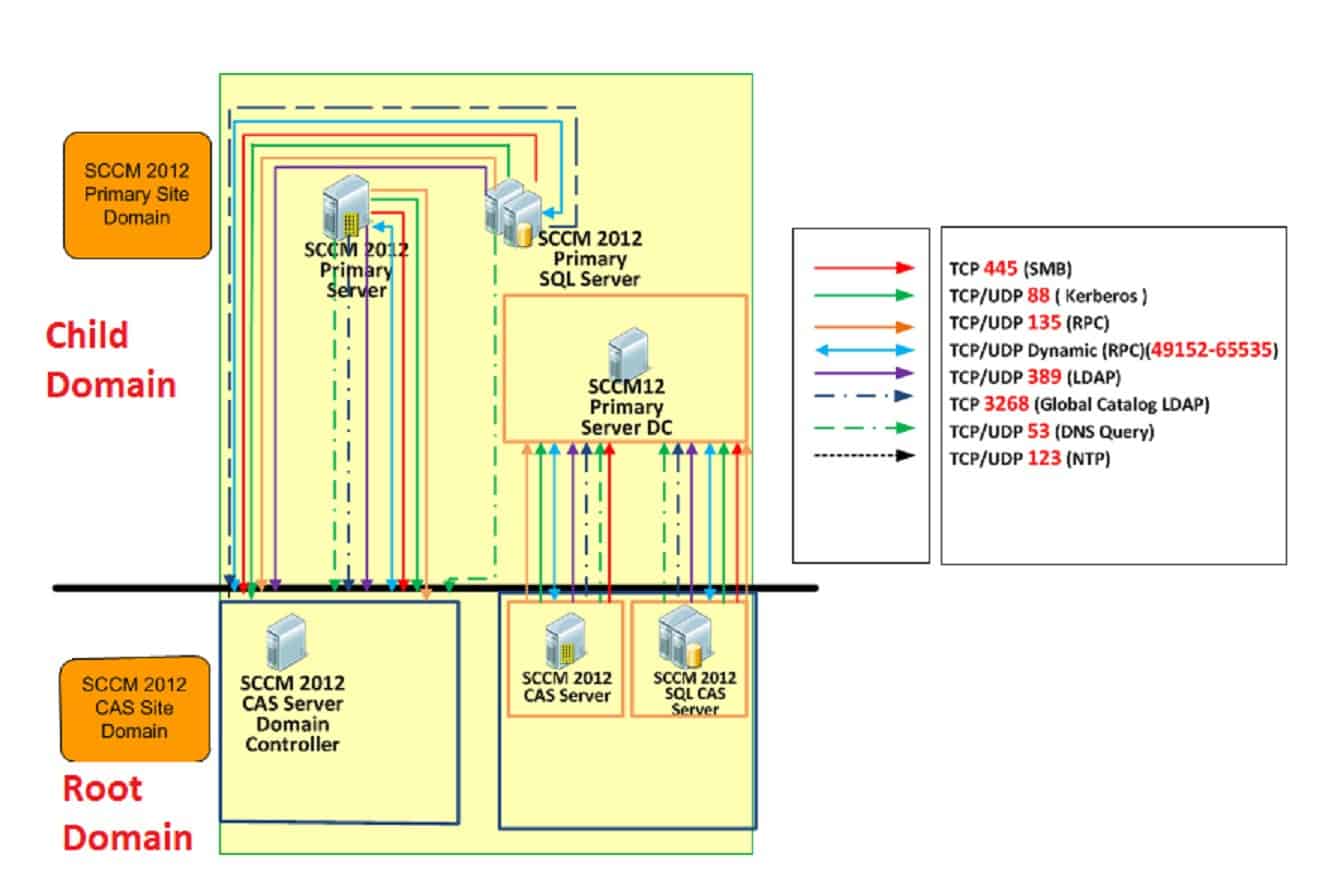
- SCCM Firewall Ports Details Direction with DC Other Servers | Configuration Manager | Bi-direction
- SCCM ConfigMgr How to Setup Co-Management – Firewall Ports Proxy Requirements
SCCM Firewall Ports Download the List of ConfigMgr Firewall Ports
I have a post related to this topic that discusses SCCM Firewall port Requirements here (there is not much change between SCCM Firewall ports). Update: The internet access requirement or proxy exception list for SCCM CB is also very important when you deploy SCCM’s current branch within organizations.
Download the List of SCCM Firewall Ports here.
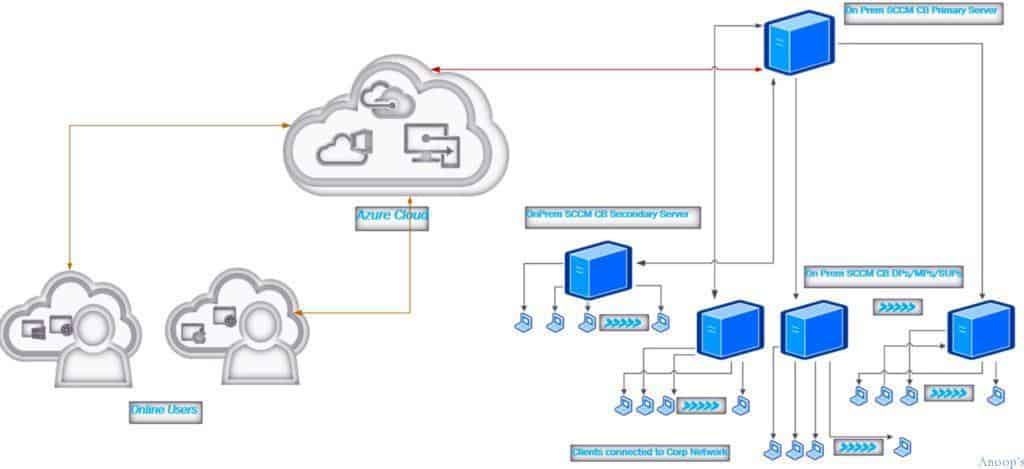
| From | TO | UDP | TCP | Description | Direction |
|---|---|---|---|---|---|
| Asset Intelligence Synchronization Point | Microsoft | 443 | HTTP | Unidirectional | |
| Asset Intelligence Synchronization Point | SQL Server | 1433 | SQL Over TCP | Unidirectional | |
| App Catalog Web Service Point | SQL Server | 1433 | SQL Over TCP | Unidirectional | |
| App Catalog Website Point | App Catalog Web Service Point | 80/443 | HTTP/HTTPS | Unidirectional | |
| Client | App Catalog Website Point | 80/443 | HTTP/HTTPS | Unidirectional | |
| Client | Client (wol) | 9/25536 | WOL/WUP | Unidirection | |
| Client | NDES | 80/443 | http/https | Unidirection | |
| Client | Cloud DP | 443 | https | Unidirection | |
| Client | DP | 80/443 | http/https | Unidirection | |
| Client | DP with Multi Cast | 63000-64000 | 445 | Multi Cast/SMB | Unidirection |
| Client | DP with PXE | 67/68/69/4011 | DHCP/TFTP/BINL | Unidirection | |
| Client | FSP | 80 | http | Unidirection | |
| Client | Domain | 3268/3269 | LDAP/LDAP SSL | Unidirection | |
| Client | MP | 10123/80/443 | Client Notification/http/https | Unidirection | |
| Client | SUP | 80/8530/443/8531 | http/https | Unidirection | |
| Client | SMP | 80/443/445 | http/https/SMB | Unidirection | |
| Console | Client | 2701/3389 | RC/RDP/RTC | Unidirection | |
| Console | Internet | 80 | http | Unidirection | |
| Console | Reporting Service Point | 80/443 | http/https | Unidirection | |
| Console | Site Server | 135 | RPC Endpoint Mapper | Unidirection | |
| Console | SMS Provider | 135 | RPC Dy/135 | RPC endpoint Mapper/RPC Dynamics | Unidirection |
| NDES Policy Module | Certificate Registration Point | 443 | https | Unidirection | |
| DP | MP | 80/443 | http/https | Unidirection | |
| Endpoint Protection | Internet | 80 | http | Unidirection | |
| Endpoint Protection | SQL Server | 1433 | SQL Over TCP | Unidirection | |
| Enrollment Proxy Point | Enrollment Point | 443 | https | Unidirection | |
| Enrollment Point | SQL Server | 1433 | SQL Over TCP | Unidirection | |
| Exchange Server Connector | Exchange Online | 5986 | WRM with https | Unidirection | |
| Exchange Server Connector | On Prem Exchange Server | 5985 | WRM with http | Unidirection | |
| Mac Computer | Enrollment Proxy Point | 443 | https | Unidirection | |
| MP | DOMAIN | 135/636 | 389/636/3268/3269/135/RPC Dy | LDAP/GC LDAP/RPC EPM/RPC Dynamic | Unidirection |
| MP | Site Server | 135/RPC Dyn/445 | RPC EPM/RPC Dynamic/SMB | Bidirection | |
| MP | SQL Server | 1433 | SQL Over TCP | Unidirection | |
| Mobile Device | Enrollment Proxy Point | 443 | https | Unidirection | |
| Mobile Device | Intune | 443 | https | Unidirection | |
| Reporting point | SQL Server | 1433 | SQL Over TCP | Unidirection | |
| Site Server | App Catalog Web Service point | 135 | 445/135/RPC Dyn | RPC EPM/RPC Dynamic/SMB | Bidirection |
| Site Server | App Catalog Website Point | 135 | 445/135/RPC Dyn | RPC EPM/RPC Dynamic/SMB | Bidirection |
| Site Server | Asset Intelligence Synchronization Point | 135 | 445/135/RPC Dyn | RPC EPM/RPC Dynamic/SMB | Bidirection |
| Site Server | Client (WOL) | 9 | WOL | Unidirection | |
| Site Server | Cloud DP | 443 | https | Unidirection | |
| Site Server | DP | 135 | 445/135/RPC Dyn | RPC EPM/RPC Dynamic/SMB | Unidirection |
| Site Server | DOMAIN | 135/636 | 389/636/3268/3269/135/RPC Dy | LDAP/GC LDAP/RPC EPM/RPC Dynamic | Unidirection |
| Site Server | Certificate Registration Point | 135 | 445/135/Dyn RPC | RPC EPM/RPC Dynamic/SMB | Bidirection |
| Site Server | End Point Protection | 135 | 445/135/Dyn RPC | RPC EPM/RPC Dynamic/SMB | Bidirection |
| Site Server | Enrollment Point | 135 | 445/135/Dyn RPC | RPC EPM/RPC Dynamic/SMB | Bidirection |
| Site Server | Enrollment Proxy Point | 135 | 445/135/Dyn RPC | RPC EPM/RPC Dynamic/SMB | Bidirection |
| Site Server | FSP | 135 | 445/135/RPC Dyn | RPC EPM/RPC Dynamic/SMB | Bidirection |
| Site Server | Internet | 80 | http | Unidirection | |
| Site Server | Issuing CA | 135 | 135/Dyn RPC | RPC EPM/RPC Dynamic | Bidirection |
| Site Server | Reporting Service Point | 135 | 445/135/RPC Dyn | RPC EPM/RPC Dynamic/SMB | Bidirection |
| Site Server | Site Server | 445 | SMB | Bidirection | |
| Site Server | SQL Server | 1433 | SQL Over TCP | Unidirection | |
| Site Server | SQL Server | 135 | 445/135/RPC Dyn | RPC EPM/RPC Dynamic/SMB | Unidirection |
| Site Server | SMS Provider | 135 | 445/135/RPC Dyn | RPC EPM/RPC Dynamic/SMB | Unidirection |
| Site Server | SUP | 445/80/8530/443/8531 | http/https/SMB | Bidirection | |
| Site Server | SMP | 135 | 445/135 | RPC EPM/SMB | Bidirection |
| SMS Provider | SQL Server | 1433 | SQL Over TCP | Unidirection | |
| SUP | Internet | 80 | http | Unidirection | |
| SUP | Upstream WSUS Server | 80-8530/443-8531 | http/https | Unidirection | |
| SQL Server | SQL Server | 4022/1433 | SQL Over TCP/SQL SSB | Unidirection | |
| SMP | SQL Server | 1433 | SQL Over TCP | Unidirection | |
| Service Connection Point | Intune | 443 | https | Unidirection | |
| Site Server | Site System | 135 | 135/RPC Dyn | RPC EPM/RPC Dynamic | Unidirection |
| Site Server | Domain/DNS | 53/67/68/137/138 | 139/53 | DHCP/DNS/NetBIOS | Unidirection |
- Overview Windows 10 Co-Management with Intune and SCCM Custom
- Report to Identify Machines Connected via SCCM CMG
- How to Setup Co-Management – Introduction – Prerequisites Part 1
- How to Setup Co-Management – Firewall Ports Proxy Requirements Part 2(This Post)
- Setup Co-Management – AAD Connect UPN Suffix Part 3
- Setup Co-Management – CA PKI & Certificates Part 4
- Setup Co-Management Cloud DP Azure Blob Storage Part 5
- Setup Co-Management Azure Cloud Services CMG Part 6
- SCCM Configure Settings for Client PKI certificates Part 7
- How to Setup SCCM Co-Management to Offload Workloads to Intune – Part 8
- How to Deploy SCCM Client from Intune – Co-Management – Part 9
- End User Experience of Windows 10 Co-Management – Part 10
We are on WhatsApp now. To get the latest step-by-step guides, news, and updates, Join our Channel. Click here. HTMD WhatsApp.
Author
Anoop C Nair is Microsoft MVP! He is a Device Management Admin with more than 20 years of experience (calculation done in 2021) in IT. He is a Blogger, Speaker, and Local User Group HTMD Community leader. His main focus is on Device Management technologies like SCCM 2012, Current Branch, and Intune. He writes about ConfigMgr, Windows 11, Windows 10, Azure AD, Microsoft Intune, Windows 365, AVD, etc.




Hi, Asset Intelligence Synchronization Point, you mean port 443, right?
StaffYes, thank you … Corrected it 🙂
Great Excel file.
Thanks!!
First , thank you for all your great articles. Now my question is, is there any specific port / firewall rule for running powershell scripts directly from the SCCM console ? it has been bugging me for a while why i still can’t run it given that i have full admin permission and also have that role too.
Hi Anoop,
I want to give the below requirement to network team to open the port.
Console Client 2701/3389 RC/RDP/RTC
Here Console means Do I need provide the Primary Site server name?
Please suggest.
Thanks and Regards,
Surendra
StaffAre you using the Primary server console to take remote of the client machine? If so, the answer is YES
Thanks for your reply.
Yes. I am taking the remote from primary server console.
Network team confirmed that, they have configured the ports.
But I am able to take RDP from server not from console.
Please suggest.
Hi Anoop! Do you have recommendations for the firewall profile type? Since most of us are home we only used to manage the domain firewall configs. We do not manage private or public. However, we see some communication issues that some can be resolved if we just temp disable the firewall for testing purposes. I am wondering do we have to manage public and private now as well….if so which port configs that you mean are required?
StaffHello Julie – Is this a related firewall client on Windows 10 device or Symantec firewall rules? If so, these are the exception you need to put in … https://docs.microsoft.com/en-us/mem/configmgr/core/clients/deploy/windows-firewall-and-port-settings-for-clients#programs-and-ports-that-configuration-manager-requires
Any specific ports required between SCCM Client machines and PKI/CRL server.
StaffIt’s all via HTTPS – 443 in normal scenarios.
Hi Anoop,
I have downloaded all the Patch on Patch Repository (Dedicated file Server) File Server .. Kindly let me know the Port Requirements (Port and Traffic Flow) DP to Patch Repository Vice Versa
Hi Anoop (et al),
For those of us with offsite management using PKI, is it recommended to open 10123 to the world on the offsite client MP?