






How to Create and Deploy Compliance Policies Using SCCM CB Hybrid and Intune Environments
How do you create and deploy compliance policies using SCCM CB Hybrid and Intune Environments? We will discuss developing and deploying compliance policies using SCCM CB Hybrid and Intune Environments. Ok, at 3 topics in this post.
- 1. How to Create Compliance policies using Intune and SCCM CB Hybrid environment.
- 2. How to deploy Compliance policies and
- 3. Differences between the compliance policy settings !!
I have created a quick and dirty video tutorial to explain all these steps, and the video is embedded in this post as well 🙂 First and foremost, the compliance policies work along with Conditional Access policies.
The device must comply with our policies to have permission to access corporate resources like emails, SharePoint Online, etc. SCCM CB and Intune Compliance policies can be deployed only to users, not device collections or groups.
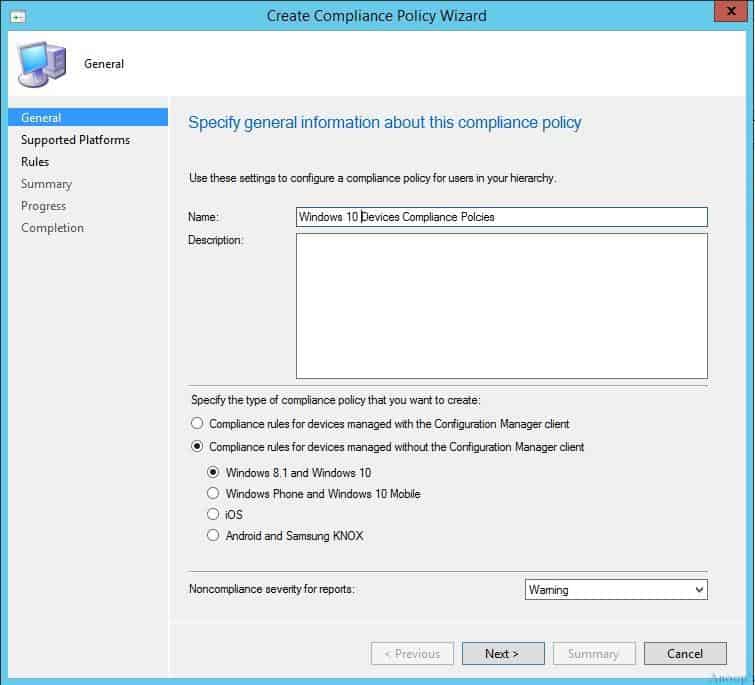
As you can see in the following picture, we can specify the type of compliance policy that you want to create in SCCM CB. There are two options: 1. Compliance rules for devices managed with SCCM clients; 2. Compliance rules for devices managed without SCCM clients (MDM clients, etc.).

Table of Contents
- Create Custom Compliance Policies for Linux Devices in Intune
- Export Intune Device Compliance Policies
- Intune Device Compliance Reports | Endpoint Manager
- Automate Microsoft Intune Device Compliance Report using Graph API
How Do You Create An SCCM CB Hybrid Compliance Policy?
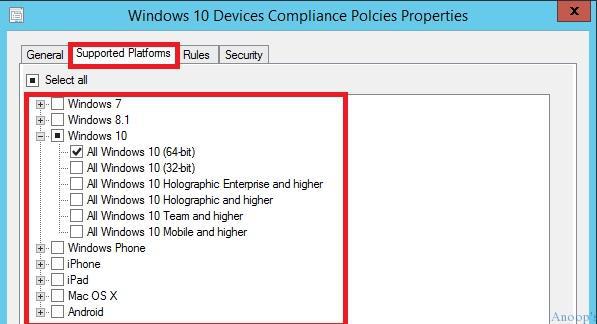
Moreover, it allows you to select different device platforms, such as Windows 8.1, Windows 10 mobile, iOS, Android, and KNOX. This is a handy option in SCCM CB Hybrid compliance settings! The video tutorial above explains the steps to create an SCCM CB compliance policy.
How Do You Create a Compliance Policy using Intune?
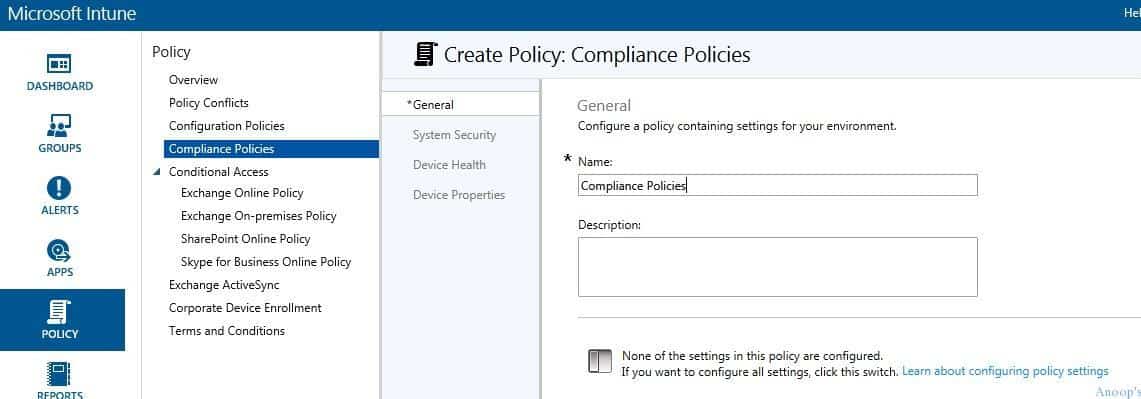
As you must have noticed, all platforms have one general compliance policy. There is no option to create compliance policies for various device platforms, such as iOS, Android, and Windows.
Yes, we don’t have the option to select a specific OS platform in Intune compliance policies. The three common segregations available are as follows. The video tutorial above explains all the steps to create an Intune compliance policy.
| Three Common Segregations |
|---|
| System Security |
| Device Health |
| Device Properties |
How Do You Deploy Compliance Policies Using SCCM CB Hybrid?
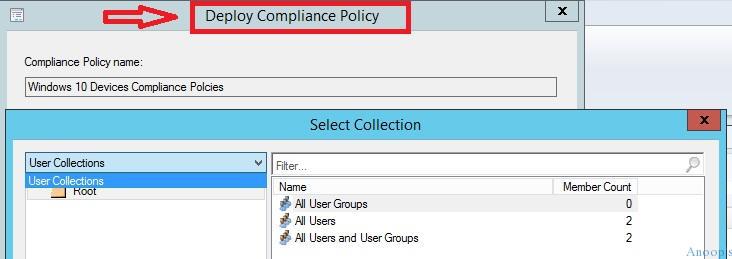
Yes, compliance policies can deploy only to User Collections, not device collections, in SCCM. There are no DEVICE Collections in the drop-down menu!! Yes, this makes sense because compliance policies are associated with conditional access policies in BYOD and CYOD scenarios.
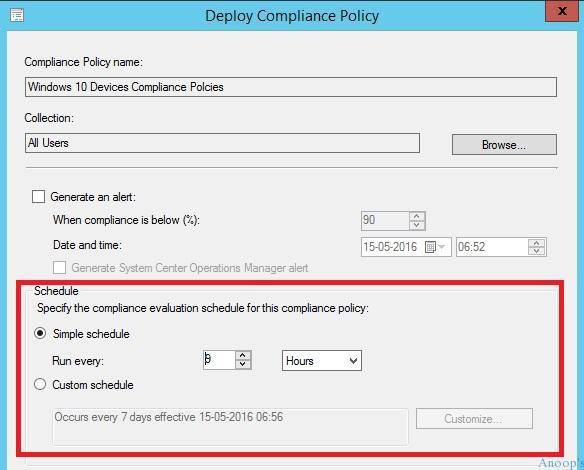
Another point is SCCM CB’s granularity regarding Compliance rules/policy evaluation schedules. You can change the Compliance policy evaluation schedule!!! By default, the SCCM CB compliance policy evaluation schedule is 23 hours. You can change and customize it according to your needs. The video tutorial above explains the steps to deploy the SCCM compliance policy.
How to Deploy Compliance Policy using Intune?
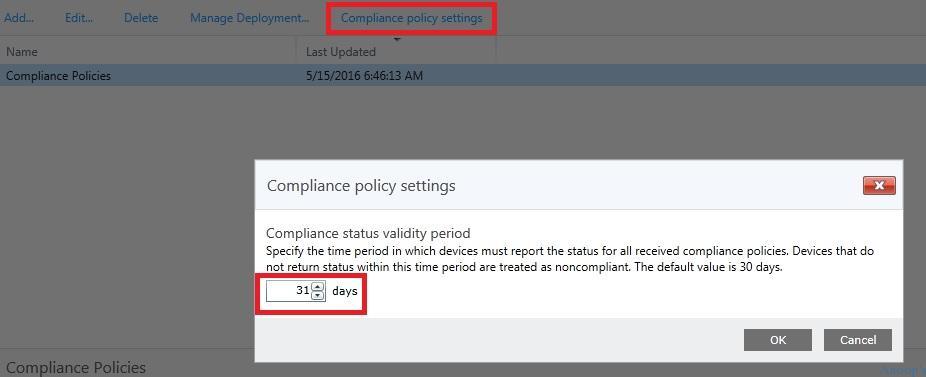
Yes, compliance policies can be deployed only to user groups in Intune, not device groups. Moreover, compared with SCCM CB, the scheduling of compliance policies is not granular. Instead, Intune provides global settings for all the compliance policies we create for that tenant.
Check out the Intune compliance policy settings. What is that? It’s the compliance status validity period. Nice!! It’s a global setting—we can’t specify 31 days for one compliance setting and 20 days for another!! The video tutorial above explains all the steps to deploy the Intune compliance policy.
Difference Between Intune vs SCCM CB Hybrid Compliance Policies
Following are the differences that I have noticed in Intune vs SCCM CB Hybrid Compliance Policies:-
Intune does not allow users to select a specific supported platform. However, with SCCM CB, we can create platform-specific compliance policies.
There is no Granularity in Deploy Scheduling options with Intune. However, many more scheduling options are available for SCCM CB compliance policies.
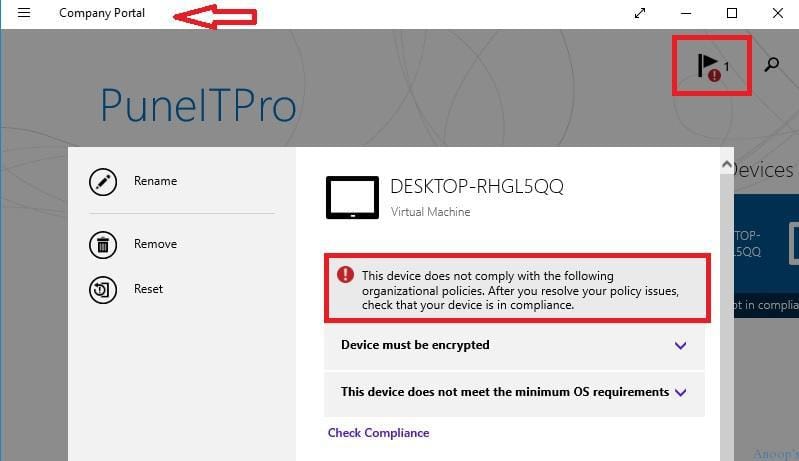
Outcome/Result of Compliance Policies – Windows 10 Device
The following is an example of a Windows 10 machine that AAD and MDM joined, but it’s not compliant. Device encryption is not enabled on Windows 10 machines.
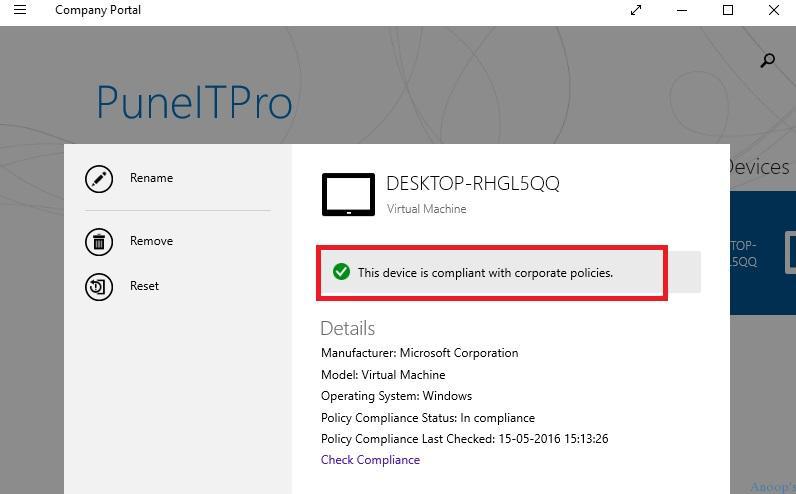
The following is an example of a Windows 10 device compliant with an organization’s policies. Once Windows 10 is compliant, the user can access corporate mail and other resources.
We are on WhatsApp now. To get the latest step-by-step guides, news, and updates, Join our Channel. Click here. HTMD WhatsApp.
Author
Anoop C Nair is Microsoft MVP! He is a Device Management Admin with more than 20 years of experience (calculation done in 2021) in IT. He is a Blogger, Speaker, and Local User Group HTMD Community leader. His main focus is on Device Management technologies like SCCM 2012, Current Branch, and Intune. He writes about ConfigMgr, Windows 11, Windows 10, Azure AD, Microsoft Intune, Windows 365, AVD, etc.


Discussion