






Unable to Start SCCM ConfigMgr CB Setup Installation Invalid Object Name SetupInfo Configuration Manager
Unable to Start SCCM ConfigMgr CB Setup Installation: Invalid object name SetupInfo Configuration Manager? I stumbled across an issue where I can’t proceed to the second page of the SCCM / ConfigMgr Current Branch (CB) installation wizard.
Moreover, it was giving me SQL-related error/s (ConfigMgrSetupWizard Error: 1 : Exception message: [Invalid object name ‘SetupInfo’.], Exception details: [System.Data.SqlClient.SqlException (0x80131904): Invalid object name ‘SetupInfo’.) in “ConfigMgrSetupWizard.log“.
Introduction—Unable to Start SCCM ConfigMgr CB Setup Installation Invalid object—I tried restarting the server without any luck. Initially, when I tried to install the SCCM CB primary server, I got a Database creation error (*** [42000][5170][Microsoft][SQL Server Native Client 11.0][SQL Server]Cannot create file ‘P: DBSQLMSSQL12.MSSQLSERVERMSSQLDATACM_AN1.mdf’ because it already exists), and I gave a retry.
However, the SCCM CB installation wizard could not proceed to the second page, so I’m stuck. I didn’t find any installation traces in “Control Panel—Add Remove Programs,” so the only thing left was the registry key.

Table of Contents

- SCCM CB CCMSetup Exit Code Collector PowerShell Script ConfigMgr
- How to Setup SCCM CB Intune Co-Management Configuration Manager ConfigMgr
- SCCM CB Release has Changed 2 Versions per Year | March and September
- SCCM CB 1803 Review of Upgrade and Features Configuration Manager ConfigMgr
- Video Review of SCCM CB 1802 New Features
- Reset SCCM CB Critical Site Component Status Summarizer Counter ConfigMgr
Unable to Start SCCM ConfigMgr CB Setup Installation Invalid Object Name SetupInfo Configuration Manager
I found that the setup had created SMS keys under HKEY_LOCAL_MACHINE\SOFTWARE\Microsoft\SMS. I exported those keys (just in case) and then deleted them. I tried to rerun the SCCM CB setup. It worked like a champ!
Error Details – Setup Installation Invalid Object Name SetupInfo
This Wizard walks you through the necessary steps to install or upgrade Configuration Manager. Setup also provides you with options to recover a site, perform site maintenance, and uninstall the site.
ConfigMgrSetupWizard Information: 1 : Sql connection is established.
ConfigMgrSetupWizard Error: 1 : Exception message: [Invalid object name 'SetupInfo'.], Exception details: [System.Data.SqlClient.SqlException (0x80131904): Invalid object name 'SetupInfo'.   at System.Data.SqlClient.SqlConnection.OnError(SqlException exception, Boolean breakConnection, Action`1 wrapCloseInAction)    at  system.Data.SqlClient.TdsParser.ThrowExceptionAndWarning(TdsParserStateObject stateObj, Boolean callerHasConnectionLock, Boolean asyncClose)
Error Number:208,State:1,Class:16].
| Configuration Manager |
|---|
| Invalid Object Name Setupinfo |
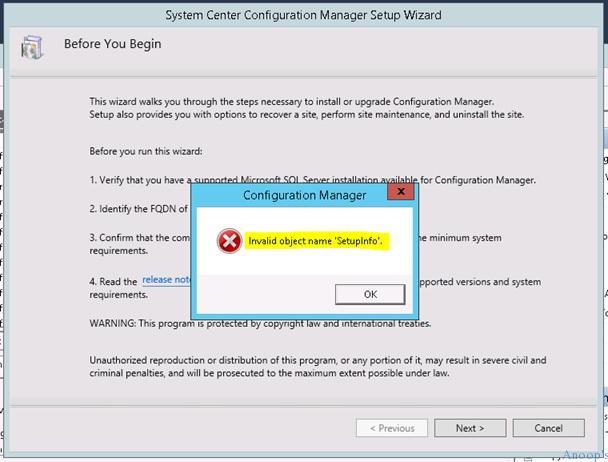
Solution – Unable to Start SCCM ConfigMgr CB Setup Installation Invalid Object
Details of the SCCM CB SQL DB creation errors mentioned above: We’ve re-created the Data Files and Transaction log files according to best practices with the recommended size. There were multiple data files and transaction log files according to the SCCM CB server’s vCPU or CPU count.
For testing, I detached the created DB base and files and forgot to attach the SQL DB (before running the SCCM CB setup wizard). That was the root cause of the following error.
*** CREATE DATABASE [CM_AN1] ON ( NAME=CM_AN1,FILENAME='P:\DBSQL\MSSQL12.MSSQLSERVER\MSSQL\DATA\CM_AN1.mdf') LOG ON ( NAME=CM_GW1_log,FILENAME='G:\DBSQL\MSSQL12.MSSQLSERVER\MSSQL\Data\CM_GW1_log.ldf')
*** [42000][5170][Microsoft][SQL Server Native Client 11.0][SQL Server]Cannot create file 'F:\DBSQL\MSSQL12.MSSQLSERVER\MSSQL\DATA\CM_GW1.mdf' because it already exists. Change the file path or the file name, and retry the operation.
INFO: Executing SQL Server command: <CREATE DATABASE [CM_AN1] ON ( NAME=CM_AN1,FILENAME='P:\DBSQL\MSSQL12.MSSQLSERVER\MSSQL\DATA\CM_AN1.mdf') LOG ON ( NAME=CM_AN1_log,FILENAME='Q:\DBSQL\MSSQL12.MSSQLSERVER\MSSQL\Data\CM_AN1_log.ldf')>
ERROR: Failed to create database 'CM_AN1'.
ERROR: Init_Database - Failed to create database.
~===================== Completed Configuration Manager 2012 Server Setup =====================
Resources
Learn Microsoft Intune Related Posts Real World Experiences (anoopcnair.com)
SCCM Related Posts Real World Experiences Of SCCM Admins (anoopcnair.com)
Intune Device Management – HTMD Blog #2 (howtomanagedevices.com)
We are on WhatsApp now. To get the latest step-by-step guides, news, and updates, Join our Channel. Click here. HTMD WhatsApp.
Author
Anoop C Nair is Microsoft MVP! He is a Device Management Admin with more than 20 years of experience (calculation done in 2021) in IT. He is a Blogger, Speaker, and Local User Group HTMD Community leader. His main focus is on Device Management technologies like SCCM 2012, Current Branch, and Intune. He writes about ConfigMgr, Windows 11, Windows 10, Azure AD, Microsoft Intune, Windows 365, AVD, etc.




Just had this issue when installing 1802 – your fix worked a charm. Thank you!
StaffGreat news. Glad to know this helped you!
Confirmed still working with 1810 installers
Oh Man Thanks A lot
Worked for 2002
Thanks Anoop, I was installing 2103 with SQLAlwaysOn, I pointed the installer to the secondary node by accident, this fix works perfect
I was about to reinstall Windows!!!
Thanks much.
Thanks!!!