






Are You Having Issue with Windows 10 WIP EDP SCCM CB Configuration Manager ConfigMgr
Are You Having an Issue with Windows 10 WIP EDP SCCM CB Configuration Manager ConfigMgr?
Are you having issues with Windows Information Protection (WIP, previously known as “Enterprise Data Protection – EDP” policies configured through the SCCM ConfigMgr CB 1606 production version?
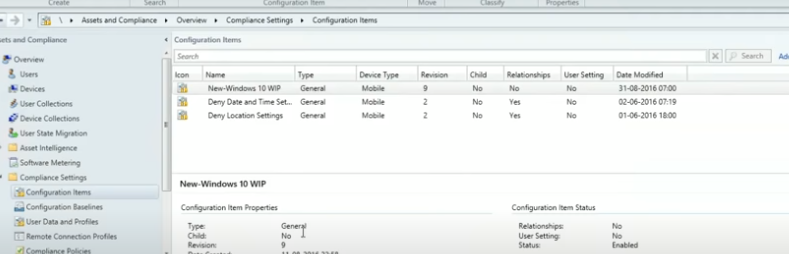
If so, I was one of you. I’m talking about the issue I faced while deploying the WIP policy via the Windows 10 MDM channel. I will try to explain the problem which I had with WIP CI (for the specific scenario which I tested):-
When you open WIP CI, try to check whether everything is okay or not and exit out of CI with/without making any changes. Some values in CI XML will automatically change, breaking the entire CI.

Table of Contents
- How to Create Configure Deploy Windows 10 WIP Policies Using SCCM Intune Endpoint Protection
- SCCM CB Release has Changed 2 Versions per Year | March and September
Windows Information Protection WIP – Are You Having Issue with Windows 10 WIP EDP SCCM CB Configuration Manager ConfigMgr
I’ve embedded a video below explaining this bug/issue. If you are new to WIP/EDP and want to know how to create, deploy, and test WIP with Windows 10, look at my previous post and video here.
The good news is that Microsoft’s new rollup update (KB3186654) most probably fixed this issue. I have done extensive testing with Windows Information Protection (WIP) policies/CIs after installing the new rollup on the SCCM CB 1606 server, and the results are very promising.
| Name | Type |
|---|---|
| New Windows 10 WIP | General |
How to Create – Deploy WIP EDP Using SCCM CB 1606 and End-user experience of WIP
I tried creating new WIP CIs, editing the existing WIP CIs, etc. All the scenarios I tested worked well for me. I tested this with Windows 10 1607 build numbers 14393.00 and 14393.82 (via MDM channel). Are You Having an Issue with Windows 10 WIP EDP SCCM CB Configuration Manager ConfigMgr Endpoint Protection?
Sample of the correct WIP CI with correct ConstantValue
Let’s discuss the Sample of the correct WIP CI with the correct ConstantValue. The below section helps you show the sample of the correct WIP CI with the correct ConstantValue.
<Condition> <Expression> <Operator>NotEquals</Operator> <Operands> <SettingReference AuthoringScopeId="GLOBAL" LogicalName="EnterpriseDataProtection" DataType="String" SettingLogicalName="AllowedEXEHash" SettingSourceType="CIM" Method="Value" Changeable="false" /> <ConstantValue Value="EB9D585A55FAEA4A913BBAB7101911F5BAEA7CA84A8D8AD6BBB7FB50363117F1" DataType="String" /> </Operands> </Expression> </Condition>
Resources
Learn Microsoft Intune Related Posts Real World Experiences
SCCM Related Posts Real World Experiences Of SCCM Admins
Intune Device Management – HTMD Blog #2
We are on WhatsApp now. To get the latest step-by-step guides, news, and updates, Join our Channel. Click here. HTMD WhatsApp.
Author
Anoop C Nair is Microsoft MVP! He is a Device Management Admin with more than 20 years of experience (calculation done in 2021) in IT. He is a Blogger, Speaker, and Local User Group HTMD Community leader. His main focus is on Device Management technologies like SCCM 2012, Current Branch, and Intune. He writes about ConfigMgr, Windows 11, Windows 10, Azure AD, Microsoft Intune, Windows 365, AVD, etc.


Discussion