






How to Exclude a Device from Azure AD Dynamic Device Group | Azure Active Directory Dynamic Groups
Let’s discuss how to Exclude a Device from Azure AD Dynamic Device Group or Azure Active Directory Dynamic Group.
In my previous post, “How to Create Azure AD Dynamic Groups for Managing Devices via Intune,” we discussed creating Azure AD Dynamic Device or User groups. Another question I usually get is, “How do you remove or Exclude a device from Azure Active Directory Dynamic Device Group?”.
I expect this could be one of the scenarios used in deploying security/configuration policies via Intune. It is a very valid scenario; you can’t avoid it in device management. If you are an experienced SCCM Admin, no explanation is needed.
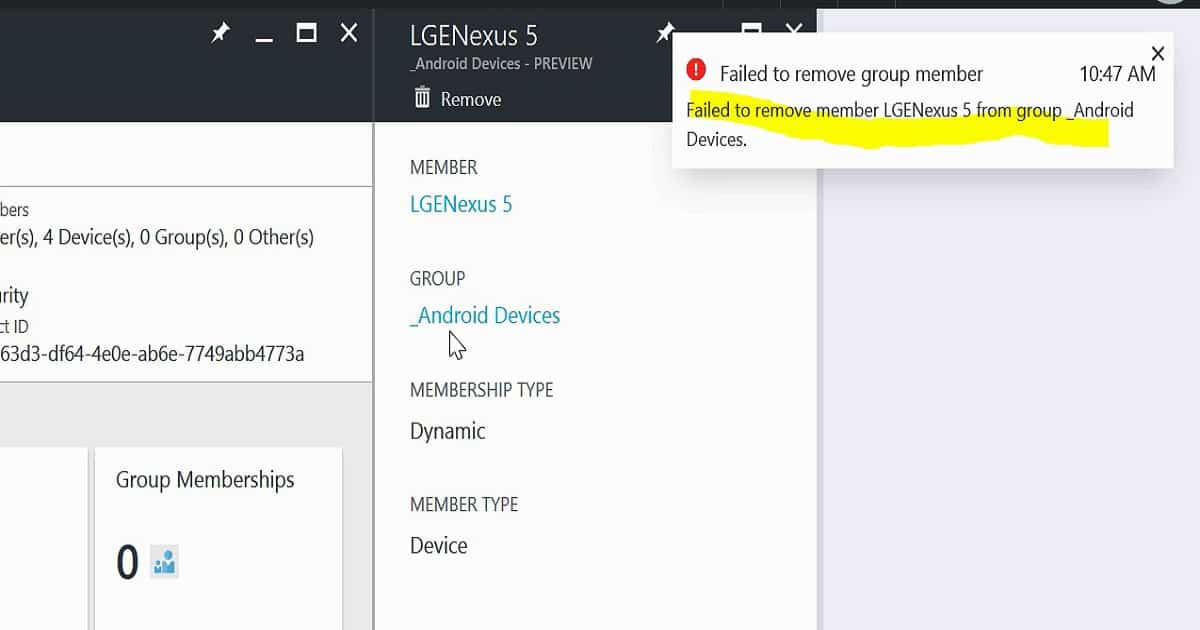
Removing a single device directly from the AAD Dynamic device group is impossible. Yes, a remove button is available, but when you select a device and click on it, a confirmation popup with a YES button will appear.

- Azure AD Dynamic Device Group Managed by MDE Defender for Endpoint | MicrosoftSense
- Create AVD Azure AD Dynamic Device Group using systemLabels Property
- How to Create Nested Azure AD Dynamic Groups
- Create AAD Dynamic Groups Based On Domain Join Type Hybrid Azure AD And Azure AD
- Create AAD Dynamic Groups Based On MDM Intune SCCM Management
Table of Contents
Exclude a Device from Azure AD Dynamic Device Group
Clicking the YES button will give an error message stating that you can’t remove the device from the Azure AD dynamic device group: “Failed to remove member LENexus 5 from group _Android Devices.” However, this can be achieved by adding some conditions to the advance membership rule query in AAD dynamic groups.
| Device | Details |
|---|---|
| Member | LGENexus 5 |
| Group | Android Devices |
| Membership Type | Dynamic |
| Member Type | Device |
Advanced rules for AAD Dynamic membership are based on binary expressions. One Azure AD dynamic query can have more than one binary expression. Each binary expression is separated by a conditional operator, either ‘and” or “or“. You can play around with this conditional operator to remove the devices from the AAD dynamic device or user groups.
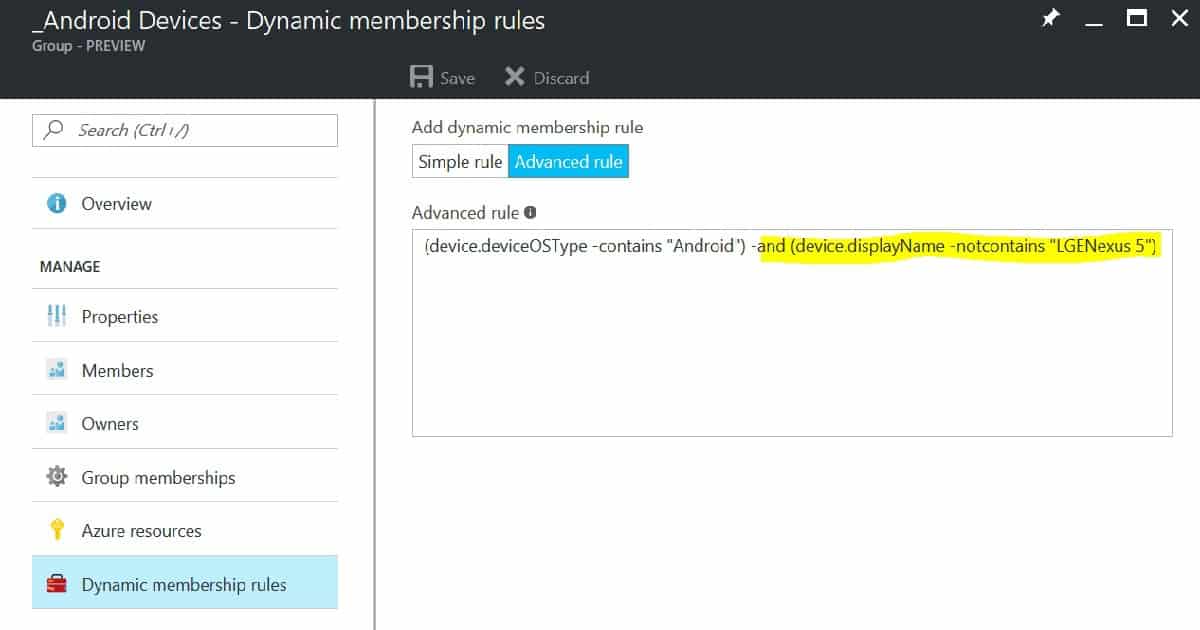
Following is the advanced membership rule query I used to remove a device in the AAD dynamic device group. In this query, the conditional operator between 2 binary expressions is -and.
(device.deviceOSType -contains "Android") -and (device.displayName -notcontains "LGENexus 5")
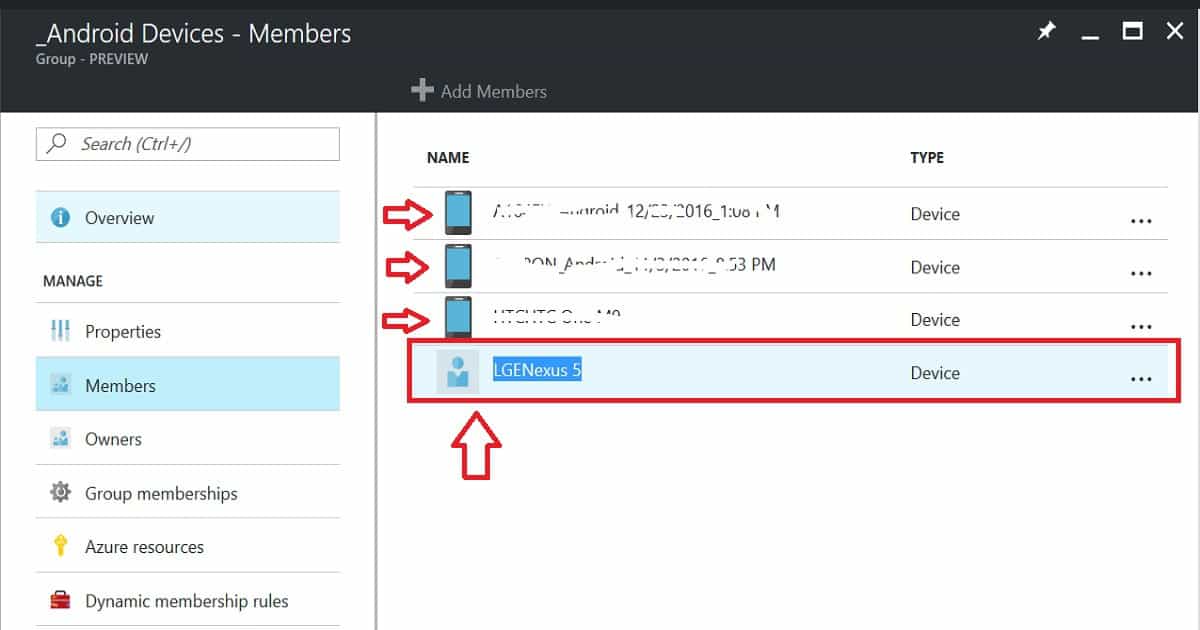
I don’t know the result or whether this will work effectively when we deploy a configuration policy via Intune to this AAD device group. I assume it will work because I can see a difference in the device icon called “LGENexus 5.” That is the device that I tried to exclude using the above query.
We are on WhatsApp now. To get the latest step-by-step guides, news, and updates, Join our Channel. Click here. HTMD WhatsApp.
Author
Anoop C Nair is Microsoft MVP! He is a Device Management Admin with more than 20 years of experience (calculation done in 2021) in IT. He is a Blogger, Speaker, and Local User Group HTMD Community leader. His main focus is on Device Management technologies like SCCM 2012, Current Branch, and Intune. He writes about ConfigMgr, Windows 11, Windows 10, Azure AD, Microsoft Intune, Windows 365, AVD, etc.


how about if you need to exclude more than 6 devices?
StaffI think the better way at the moment is to create a different Azure AD group with those 6 devices…then use exclude option from Intune assignment to exclude.
Hi,
I’ve got a dynamic group to auto add new devices to a profile which works. A supplier has added 20 new devices and I need those 20 devices to use a different enrolment profile. I’ve created a static group and added the 20 devices into it. I’ve then excluded that group from my dynamic group profile and setup and included it in a new profile that the 20 will use.
For some reason the devices as still assigned to the original dynamic device profile and will not move over. To test I’ve even tried removing the dynamic group from the assigned devices but they are still showing?
Does this just take time or is there something else I need to do?
As I see it, dynamic AAD groups don´t work like “excluded overrules included. You need to exclude certain objects explicitely in the include rule, but as for Devices, the documentet “memberof” attribute does not work in the syntax
This seems to work fine if I have a single device to exclude, but doesn’t work if I have two.
I’ve tried the following:
(device.devicePhysicalIds -any “(_ -contains “[ZTDId]”) and (device.displayName -notContains “Machine1”) and (device.displayName -notContains “Machine2”)
as well as:
(device.devicePhysicalIds -any “(_ -contains “[ZTDId]”) and (device.displayName -notContains “Machine1”) or (device.displayName -notContains “Machine2”)
Both display the error “Faiiled to save dynamic group. Dynamic membership rule validation error: Invalid characters found in the rule.
I need to pilot a new set of Intune profiles without impacting my existing deployments, and I cannot do it without this capability.
Should the or not be an and machine name not and machine name not and machine name not?