






Windows and Android Support for 4096-bit Key Size for Intune SCEP and PFX Certificate Profiles
The latest update to device configuration profiles allows Windows and Android Support for 4096-bit Key Size for Intune SCEP and PFX Certificate Profiles. Intune uses a certificate profile to provide a user or device with a specific type of certificate.
Intune supports Simple Certificate Enrollment Protocol (SCEP), Public Key Cryptography Standards (PKCS), and imported PKCS certificates as methods to provision certificates on devices. In addition to these certificate types and provisioning methods, you need to create and deploy other supportive certs chains.
A Key size of 4096 for SCEP Profile is supported for platforms Android (all), iOS/iPadOS 14 and later, macOS 11 and later and Windows (all). For PCKS certificate profiles, Windows and Android devices support the use of 4096-bit key size. To use this key size, specify 40496 as the Minimum key size.
Intune SCEP certificate profiles and PKCS certificate profiles for Windows and Android devices now support a Key size (bits) of 4096. This key size is available for new profiles and existing profiles you choose to edit.

- SCEP profiles have always included the Key size (bits) setting and now support 4096 as an available configuration option.
- PKCS profiles don’t include the Key size (bits) setting directly. Instead, an admin must modify the certificate template on the Certification Authority to set the Minimum key size to 4096.
If you use a third-party Certificate Authority (CA), you might need to contact your vendor for assistance implementing the 4096-bit key size.
- Learn The Basic Concepts Of PKI – Intune PKI Made Easy With Joy
- Knowing SCEP – The General Workflow – Intune PKI
Windows and Android Support for 4096-bit Key Size for Intune SCEP and PFX Certificate Profiles
Admin configures the device with the information required to make the certificate enrolment request, The device admin then configures the device with the Key size to define the size of keys to be used while creating the certificate.
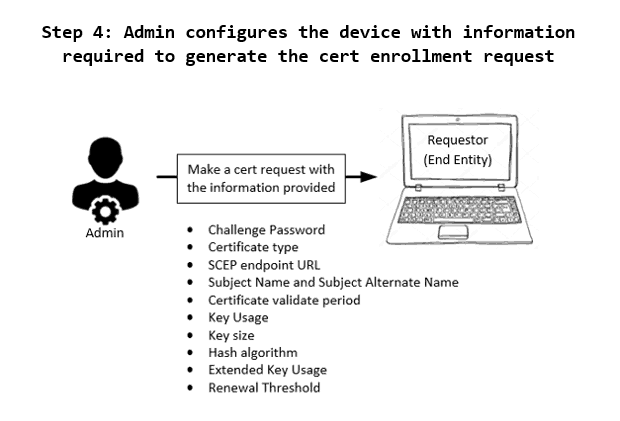
You must navigate to the Intune Admin Center to create SCEP and PKCS certificate profiles for Windows and Android devices. Before creating the profiles, you must take care of all prerequisites for deploying the profile to the devices for communication.
You need to have on-prem infrastructure components available before creating SCEP cert profiles in Intune. Check more details, Intune SCEP HTTP Errors Troubleshooting.
When updating or deploying new certificate profiles to take advantage of this new key size for Intune SCEP and PFX Certificate Profiles, It is recommended to use a staggered deployment approach to help avoid creating excessive demand for new certificates across a large number of devices at the same time.
With this update to Key Size for Intune SCEP and PFX Certificate Profiles, be aware of the following limitations on Windows devices:
- 4096-bit key storage is supported only in the Software Key Storage Provider (KSP). The following does not support storing keys of this size:
- The hardware TPM (Trusted Platform Module). As a workaround, you can use the Software KSP for key storage.
- Windows Hello for Business. There is no workaround at this time.
Intune SCEP Certificate Deployment
In this video, you can learn more about Intune SCEP Workflow overview, Challenge Generation and Profile Validation – Behind the Scenes. The HTMD Learning training was delivered by Joy.
Author
About Author – Jitesh, Microsoft MVP, has over six years of working experience in the IT Industry. He writes and shares his experiences related to Microsoft device management technologies and IT Infrastructure management. His primary focus is Windows 10/11 Deployment solution with Configuration Manager, Microsoft Deployment Toolkit (MDT), and Microsoft Intune.


Discussion