






SCCM ConfigMgr Remote Site System Installation Error Cannot Open Registry | Configuration Manager
SCCM ConfigMgr Remote Site System Installation Error Cannot Open Registry | Configuration Manager? After restoring the SCCM/ConfigMgr central server, I tried installing a remote site system.
After creating a new site server in the SCCM/ConfigMgr console, I waited enough time to install the site system role (SUP) on the remote server.
But nothing was happening; there were no specific log entries at all. I was continuously checking sitecomp.log and suddenly noticed an error related to registry access on the remote server.
However, the error did not clarify the remote registry access issue with the SCCM site server. The following is the error snippet from sitecomp.log. SCCM CB releases usually happen twice a year, in March (ending with “03”) and September (ending with “09”). The HTMD community expected and reported this, as mentioned in their post titled “Windows Client OS Release Cycle Getting Changed to 3 Years.“

- List of Issues Fixed with SCCM 2403 KB26186448
- New Features in SCCM Technical Preview 2401
- New Key Features of SCCM 2309 | Top Improvements
- Download SCCM 2309 Early Ring Version using PowerShell Script
- SCCM Versions Build Numbers Client Console Site
- End of Support Dates for SCCM CB Current Branch | ConfigMgr | SCCM End of Life
- SCCM Unsupported Deprecated or Removed Features
Table of Contents

SCCM ConfigMgr Remote Site System Installation Error Cannot Open Registry | Configuration Manager
ERROR: Cannot open the HKEY_LOCAL_MACHINE\SYSTEM\CurrentControlSet\Control\ProductOptions registry key for reading on server SUPRemote.  The operating system reported error 0: The operation completed successfully.

STATMSG: ID=1026 SEV=I LEV=M SOURCE="SMS Server" COMP="SMS_SITE_COMPONENT_MANAGER" SYS=SCCMPri SITE=PL0 PID=2276 TID=8576 GMTDATE=Sat Jan 28 03:33:42.032 2017 ISTR0="\\SUPRemote" ISTR1="" ISTR2="" ISTR3="" ISTR4="" ISTR5="" ISTR6="" ISTR7="" ISTR8="" ISTR9="" NUMATTRS=0

Cannot access Software\Microsoft\SMS\Security registry key on server SUPRemote.  The operating system reported error 0: The operation completed successfully.
When I tried to connect to the new site system’s remote registry from the SCCM/ConfigMgr central server, I received the following error, which gave me some clues that the SCCM site server’s remote registry was inaccessible.
Unable to connect to SUPRemote. Make sure that this computer is on the network, has remote administrator enabled, and that both computers are running the remote registry service.
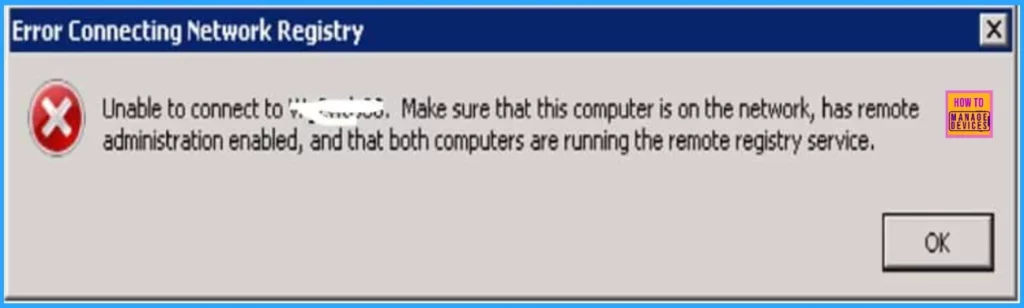
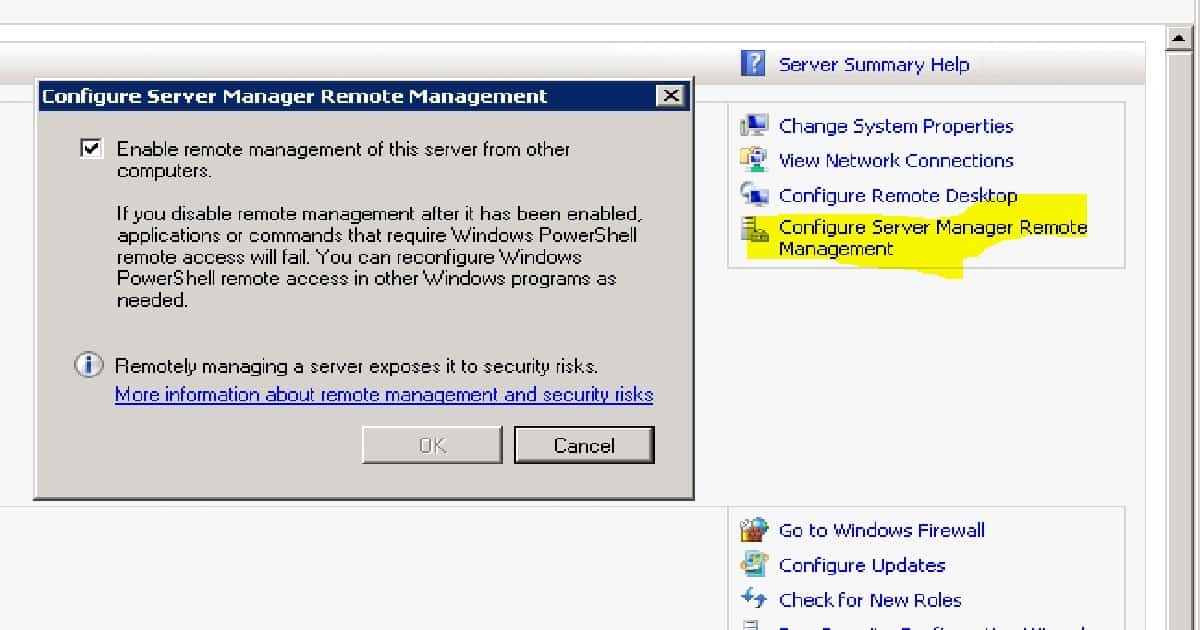
There are 2 possible issues in the above remote registry error. The first one checks whether the remote administrator is enabled or not. I have checked the server manager of the remote site server.
There is a setting called “configure server manager remote management“. “Enable remote management of this server from another computer” was already enabled for the remote site system.
| Server Summary Help |
|---|
| Change System Properties |
| View Network Connections |
| Configure Remote Desktop |
| Configure Server Manager Remote Management |
The second part of the error is to check whether both computers are running the remote registry service. When I checked the SCCM remote site server’s remote registry service, it was set to manual, and I was not in a running state.
- I started the “remote registry” service and changed its startup type to automatic (delayed).
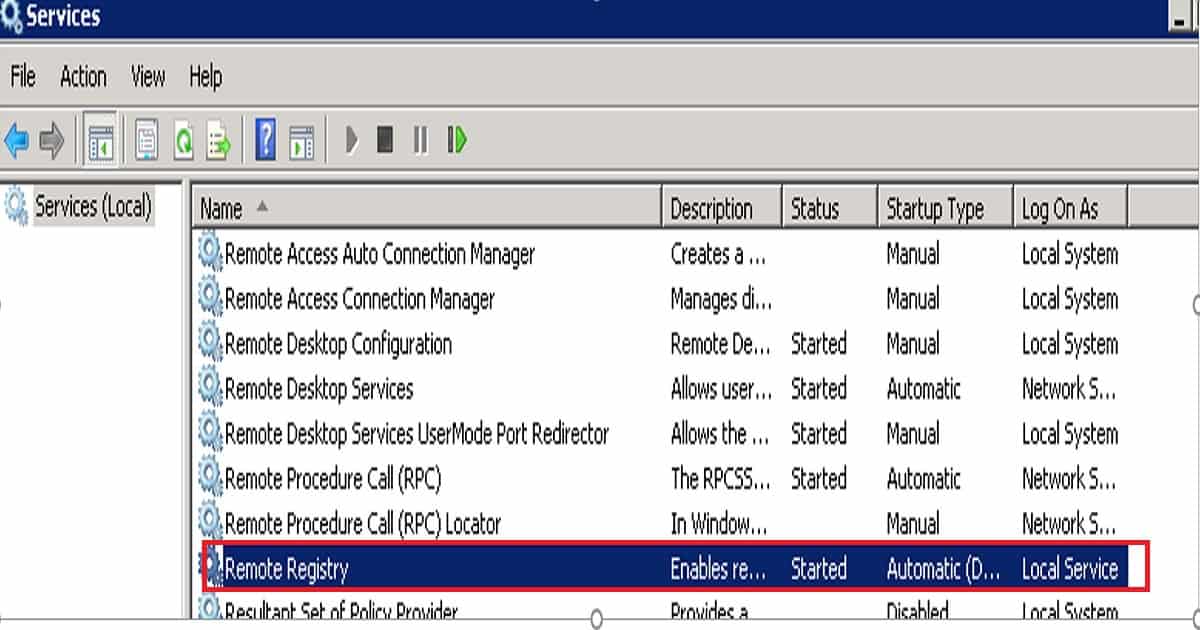
The remote registry server was not started, which was the SCCM/ConfigMgr remote system issue. After starting this service, SCCM/ConfigMgr was able to connect to the site server’s remote registry successfully. Also, the installation of the remote SUP role has been completed successfully.
Starting service SMS_SERVER_BOOTSTRAP_SCCMPri with command-line arguments "CA0 D:\SMS /install \\SUPRemote\D$\SMS\bin\i386\comregsetup.exe "...
        "\\SUPRemote\D$\SMS\bin\i386\comregsetup.exe /install /siteserver:SCCMPri" executed successfully on server SUPRemote.
        Starting service SMS_SERVER_BOOTSTRAP_SCCMPri with command-line arguments "PL0 D:\SMS /install \\SUPRemote\ADMIN$\system32\smsmsgs\srvmsgs.cmd "...
STATMSG: ID=1014 SEV=I LEV=M SOURCE="SMS Server" COMP="SMS_MP_FILE_DISPATCH_MANAGER" SYS=SUPRemote SITE=PL0 PID=2248 TID=4788 GMTDATE=Sat Jan 28 05:13:50.430 2017 ISTR0="" ISTR1="" ISTR2="" ISTR3="" ISTR4="" ISTR5="" ISTR6="" ISTR7="" ISTR8="" ISTR9="" NUMATTRS=0
   Successfully called IAbstractNetwork::CreatePath() with NAL path "MSWNET:\\SUPRemote\admin$\".
<01-28-2017 06:14:08> Invoking process "C:\Windows\Microsoft.NET\Framework\v2.0.50727\RegAsm.exe" "D:\SMS\bin\i386\wsusmsp.dll"
<01-28-2017 06:14:34> Registered DLL D:\SMS\bin\i386\wsusmsp.dll
<01-28-2017 06:14:34> Installation was successful.
Here are some more tips: If you are struggling to remove your orphan remote site systems from the SCCM/ConfigMgr console, here is how. I don’t recommend editing the SCCM database; however, removing the server name from the SCCM/ConfigMgr primary registry is better.
Once the registry is deleted, these changes will automatically be reflected in the SQL DB. Then, we will also have the option to delete the remote site system from the SCCM console. Yes, SMS/SCCM is a slow-moving server, so patience is key. You must wait at least a good amount of time to get the above changes in the SCCM console.
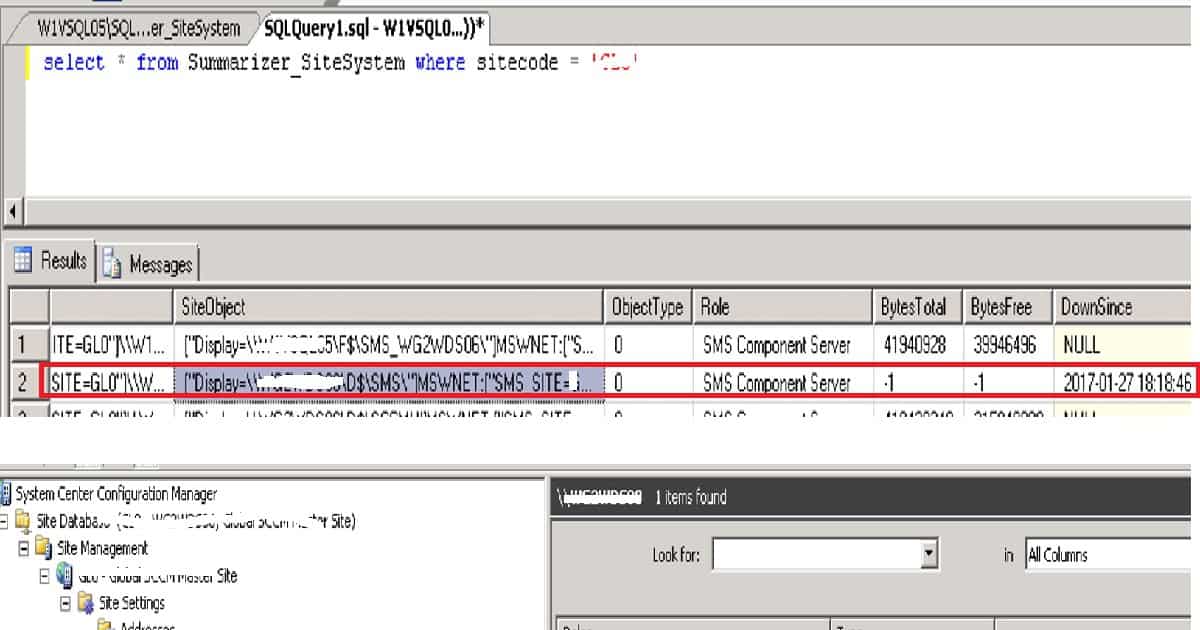
Registry entry :- HKLM/Software/Microsoft/SMS/Components/SMS_SITE_COMPONENT_MANAGER/Component/Servers
We are on WhatsApp now. To get the latest step-by-step guides, news, and updates, Join our Channel. Click here. HTMD WhatsApp.
Author
Anoop C Nair is Microsoft MVP! He is a Device Management Admin with more than 20 years of experience (calculation done in 2021) in IT. He is a Blogger, Speaker, and Local User Group HTMD Community leader. His main focus is on Device Management technologies like SCCM 2012, Current Branch, and Intune. He writes about ConfigMgr, Windows 11, Windows 10, Azure AD, Microsoft Intune, Windows 365, AVD, etc.




Discussion