






How to Configure Automatic Intune MDM Enrollment | Auto Enrollment
Microsoft Intune will automatically enroll CYO or BYO devices. You can scope automatic enrollment to some Azure AD users, all users, or none. This is an old post, but the concepts are still the same.
The old classic Azure portal offers an option to set up Automatic Intune MDM enrollment for Windows 10 devices. A similar option is available in the new Azure portal, which has new names and a new look. This post explains more details about the Windows 10 Intune Auto Enrollment Process.
One of the first things you must learn is how to use the Intune Admin Portal. This post will help you understand where the Intune admin portal is, officially known as the Microsoft Intune Admin Center.
The Intune Auto Enrollment option will help you perform two (2) things, as explained in the video below. It’s an old video now; the patch to configure auto-enrollment has changed a bit, and I have described it in the new Intune portal walkthrough video below.

First, whenever a Windows 10 device is joined to Azure AD, it will automatically enroll in Intune for MDM Management. Second, only the allowed users in the MDM user scope group can enroll devices in Intune.
Table of Contents
How to Configure Automatic Intune MDM Enrollment | Auto Enrollment – Intune Portal Walkthrough | MEM Admin Center | Training
The Intune Admin Portal, officially known as the Microsoft Endpoint Manager (MEM) Admin Center, is a crucial tool for managing devices and applications within an organization. IT administrators must effectively navigate this portal to oversee and control various aspects of their endpoints.
NOTE! – For Windows 10 BYOD devices, the MAM user scope takes precedence if both the MAM user scope and MDM user scope (automatic MDM enrollment) are enabled for all users (or the same groups of users). The device will use Windows Information Protection (WIP) Policies (if you configure them) rather than being enrolled by MDM.
- Learn Intune Beginners Guide MDM MAM MIM | EndPoint Manager
- LinkedIn Learning Courses for Microsoft Intune,
- Learning How to Learn SCCM Intune Azure
- Learn Intune Beginners Guide MDM MAM MIM,
- Microsoft Intune for SCCM Admins Part 1
Windows 10 Intune Auto Enrollment Process
The following is where you can set the MDM enrollment configuration in the new Azure portal. When your MDM User scope is set to None, none of the enrolled devices get the proper policies, and those devices won’t work as expected.
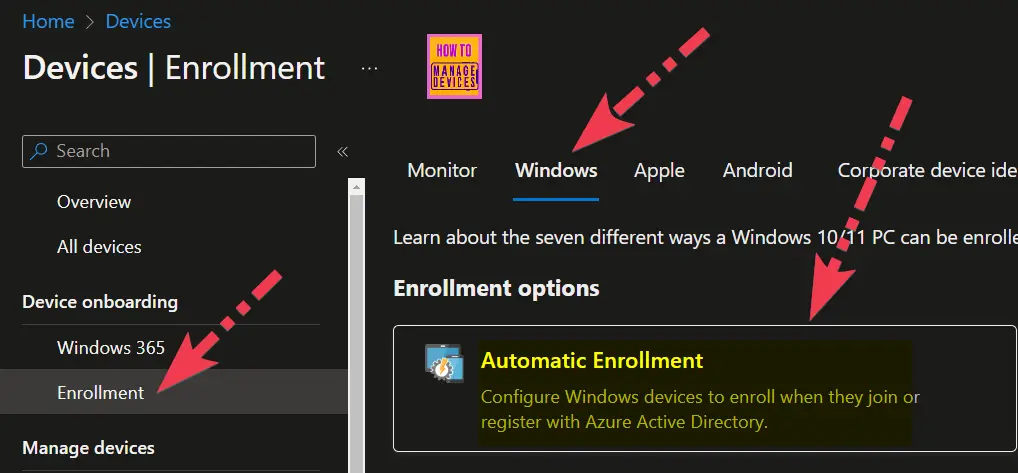
- Choose Devices -> Device Onboarding – Enrollment -> Windows in the Microsoft Intune admin centre.
- Click on the Automatic Enrollment button.
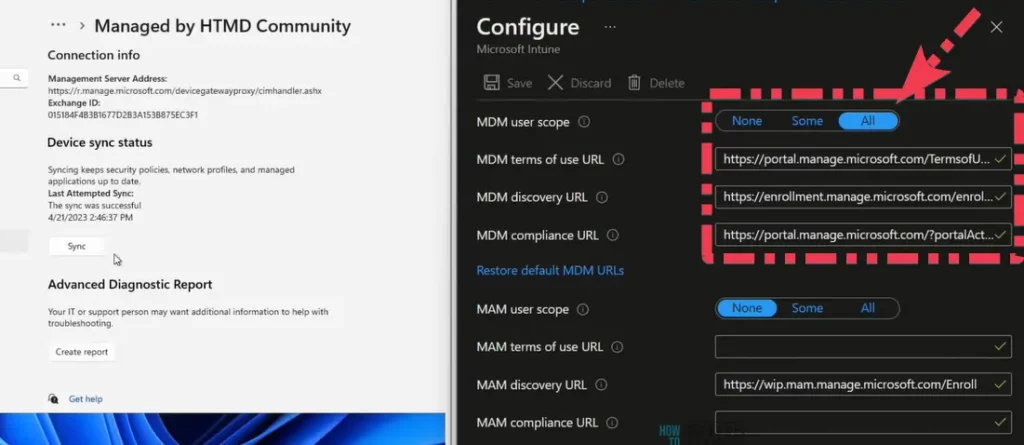
Select the MDM user Scope to All or Custom Azure AD group per your requirement. If it is set to None, users won’t be able to enroll the devices into Intune management.
- The simplest option is to specify “all users” in the MDM user scope so that all the users in your organization can enroll their devices into Intune. Windows 10 devices will automatically enroll in Intune when the users perform Azure AD Join.
- User groups can manage this option. When you want to allow a specific group of users to enroll their devices into MDM/Intune, this is the place to configure that user group. Click on the SOME option in the MDM User scope and select the user group to which you want to provide access.
- From the same place, you can perform a granular or phase-wise approach to moving users to new MDM management from the same place. This blade has 3 URL options; you can configure these URLs according to your MDM vendor.
Video Windows 10 Intune Auto Enrollment Process
This is an old video recorded using the Azure portal UI. The concept is the same, but the new portal UI has different options.
Windows 10 Airwatch Mobileiron Auto Enrollment Process?
If Airwatch or Mobileiron manages your devices, you can specify those. The new Azure portal for Intune automatically configures all the URLs in MDM. This blade has three different URLs.
| New Azure Portal for Intune MDM | Description | Link |
|---|---|---|
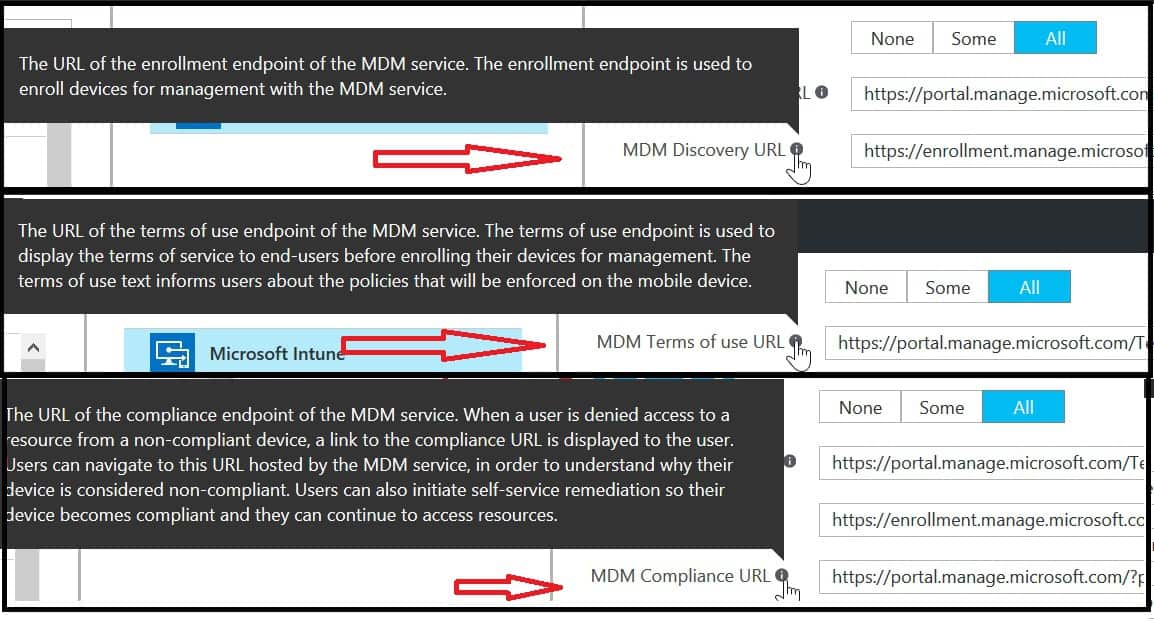
| MDM Terms of use URL | The URL of the terms of use endpoint of the MDM service | https://portal.manage.microsoft.com/TermsofUse.aspx |
| MDM Discovery URL | This is the URL of the enrollment endpoint of the MDM service. The enrollment endpoint is used to enroll devices for management with the MDM service. The URL given below is the Intune enrollment endpoint URL. | https://enrollment.manage.microsoft.com/enrollmentserver/discovery.svc |
| MDM Compliance URL | This is the URL of the compliance endpoint of the MDM service. When a user is denied access to a resource from a non-compliance device.URL can navigate to this URL hosted by Intune service in order to understand why their device is considered noncompliant. Users can also initiate self-service remediation so their devices become compliant and they can continue to access resources. | https://portal.manage.microsoft.com/?portalAction |
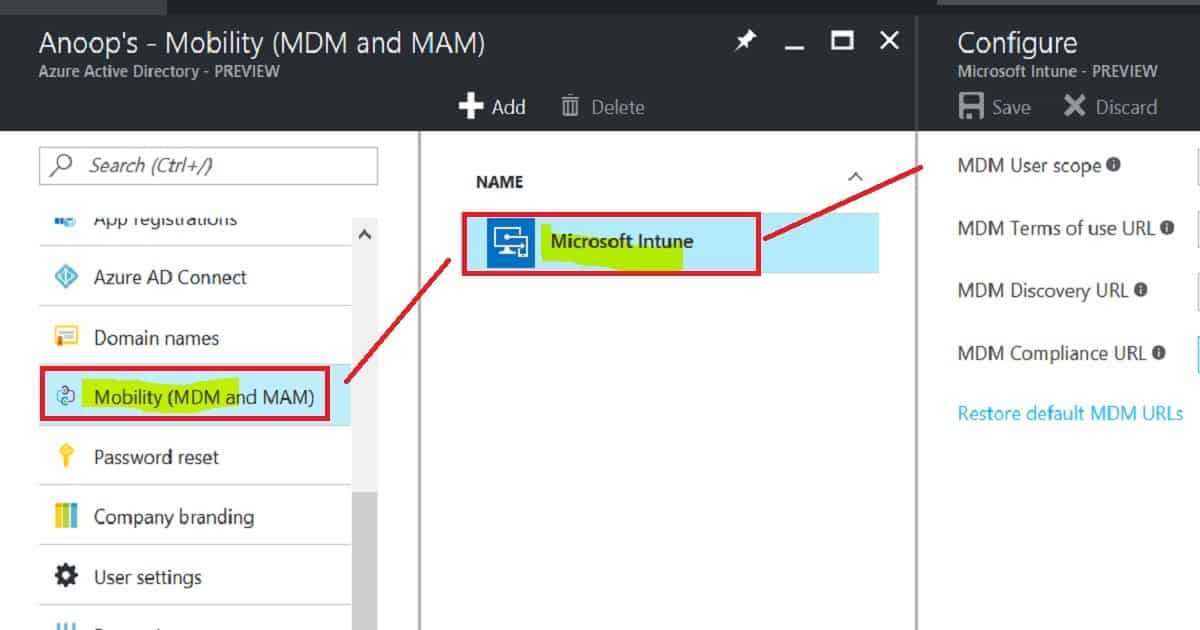
So, where is the option in the new Azure portal to configure the MDM auto-enrollment setting for Windows 10 devices and MDM enrollment for the rest of the devices (Android, iOS, and macOS)? The following is where you can configure the Intune MDM enrollment option: Microsoft Azure—Mobility (MDM and MAM).
- Windows 10 Intune Auto Enrollment Process Screen capture.
Reference Link
Sign in to your account (microsoftonline.com)
We are on WhatsApp now. To get the latest step-by-step guides, news, and updates, Join our Channel. Click here. HTMD WhatsApp.
Author
Anoop C Nair is Microsoft MVP! He is a Device Management Admin with more than 20 years of experience (calculation done in 2021) in IT. He is a Blogger, Speaker, and Local User Group HTMD Community leader. His main focus is on Device Management technologies like SCCM 2012, Current Branch, and Intune. He writes about ConfigMgr, Windows 11, Windows 10, Azure AD, Microsoft Intune, Windows 365, AVD, etc.


Hello Anoop, great article!
When integrating a third party vendor like MobileIron with Azure is it also possible to use Conditional Access policies in Azure with devices that are managed by that third party MDM vendor? Or what is the benefit if that integration?
Thank you!
Mike
StaffHey Mike – This was not possible one year back.Azure AD APIs were not publicly available to support 3rd party MDM solution. But not sure whether it’s supported now or not.
I HAVE QUATION FOR Intune on my admin portal I have client list with their pc and they are in classic veiew
and that way I manage all that pc
Now how can I transfer all that pc to their respective azure Intune portal appreciated if you
send me step by step processor naresh_doshi@hotmail.com
We are in the same boat. We have clients in the Classic Intune with the intune client installed.
We want to move the devices to use MDM so what is the process of this.
How long should it take between when you see a device enrolled in Azure AD (via an AD sync in a hybrid environment) and when that device appears in intune/MDM. Can it take a long time? Hours? Days? I have a number of devices that have enrolled in Azure AD but still haven’t shown up in MDM. It has been about 18 hours.
StaffAzure AD joined devices should be visible in Intune immediately
You are talking about Azure AD registration scenario via AAD sync … this won’t automatically happen…
StaffYou should have a group policy to get azure ad registered devices to enroll into Intune
I have the group policy enabled but it doesn’t seem to be working. I have even gone into individual machines and activated the policy at the desktop level, but still no joy. I have unregistered and reregistered these PCs several times.
Many PCs have already been registered through this process. It just seems to have stopped working or at least for the test machines I am playing with.
I have new devices enrolling with Intune. After time (15 minutes or so), they are added by query-based collection to a pilot for co-management. They initially enroll in Intune with display name (BCD123456) and show ‘ConfigMgr’ as the ‘Managed by’. Once ‘co-managed’ (they’re really not) in Intune, Intune displays the Management Name as the display name.
Interestingly, devices that have been SCCM managed for some time when added to pilot collection, enroll with correct name and are co-managed. (all devices built with same OSD task sequence).
This appears as some kind of timing, missing record update issue.
I have had a ticket(s) with Microsoft (Intune, SCCM and Azure) for a month with no traction or solution or even response.
My posting here is an act of desperation, a cry for help.
Have you seen this behavior? Any suggestions as to where to look for the root cause of why the Management name is being used once co-managed?
Thank you.