






SCCM 2303 KB25073607 Hotfix Client Update Fixes
Let’s see the latest SCCM 2303 KB25073607 Hotfix Client Update fixes. Microsoft released KB25073607 hotfix for Configuration Manager 2303 to address important issues.
The KB25073607 addresses the issue if Windows 11 version 22H2 clients configured with a deferral policy for Windows Updates and managed by Configuration Manager current branch, version 2303, may not show updates as applicable, also The clients may incorrectly display a Windows Hello for Business toast notification.
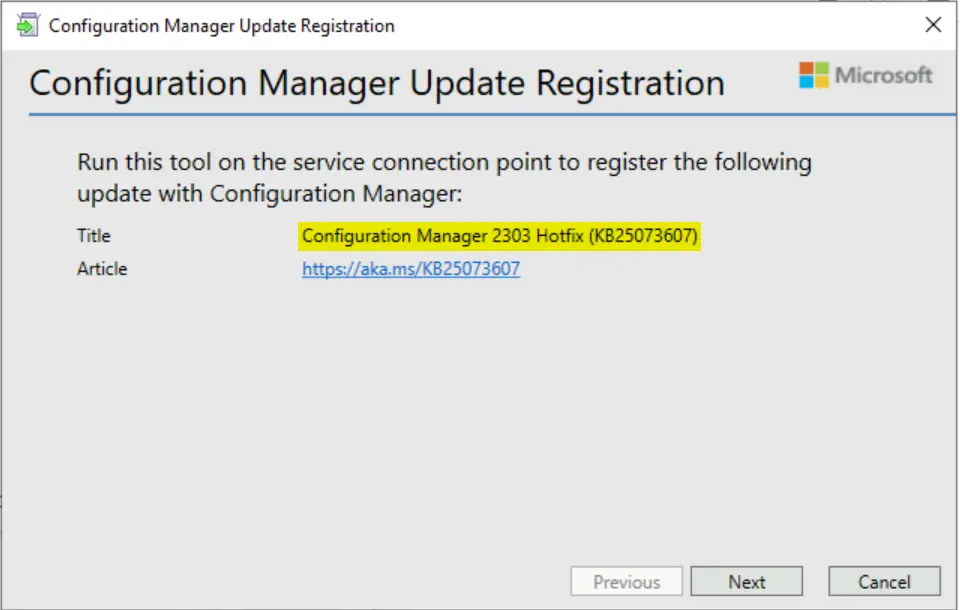
SCCM 2303 hotfix KB25073607 won’t be available in the Updates and Servicing node. However, you need to download the EXE and complete the Microsoft Configuration Manager Update Registration wizard to make the update available in the SCCM console.
Some updates for Configuration Manager aren’t available from the Microsoft cloud service and are only obtained out-of-band. The update registration tool imports the update to the Configuration Manager console. It enables you to extract and transfer the update package to the site server and register the update with the Configuration Manager console.

- Latest Fixes For SCCM 2303 KB24719670 Hotfix Update Rollup
- SCCM 2303 KB24719670 Hotfix Rollup Update FIX Performance Issue
Summary of Hotfix SCCM 2303 KB25073607
The following is the list of fixes available with the KB25073607 update with the Configuration Manager current branch, version 2303.

- Windows 11 version 22H2 clients configured with a deferral policy for Windows Updates and managed by Configuration Manager current branch, version 2303, may not show updates as applicable. This happens because the value for the UseUpdateClassPolicySource registry key under HKEY_LOCAL_MACHINE\ SOFTWARE\ Policies\Microsoft\Windows\WindowsUpdate\AU isn’t correctly set. This update correctly sets the value for Configuration Manager clients.
- Clients may incorrectly display a Windows Hello for Business toast notification that resembles the following below.
This system is configured to use Windows Hello for Enterprise. Click here to configure your PINThis company resource access feature was deprecated in Configuration Manager version 2203, but if the client receives Windows Hello for Business policy through other means, such as group policy, the message can be displayed.
Download KB25073607 Hotfix for SCCM 2303
The following SCCM 2303 KB25073607 hotfix to resolve this problem is available for download from the Microsoft Download Center:
Import SCCM 2303 KB25073607 Hotfix using Update Registration Tool in SCCM
After you download the hotfix, Use the Update Registration Tool to import hotfixes to Configuration Manager
- Run the following command to start the update registration tool:
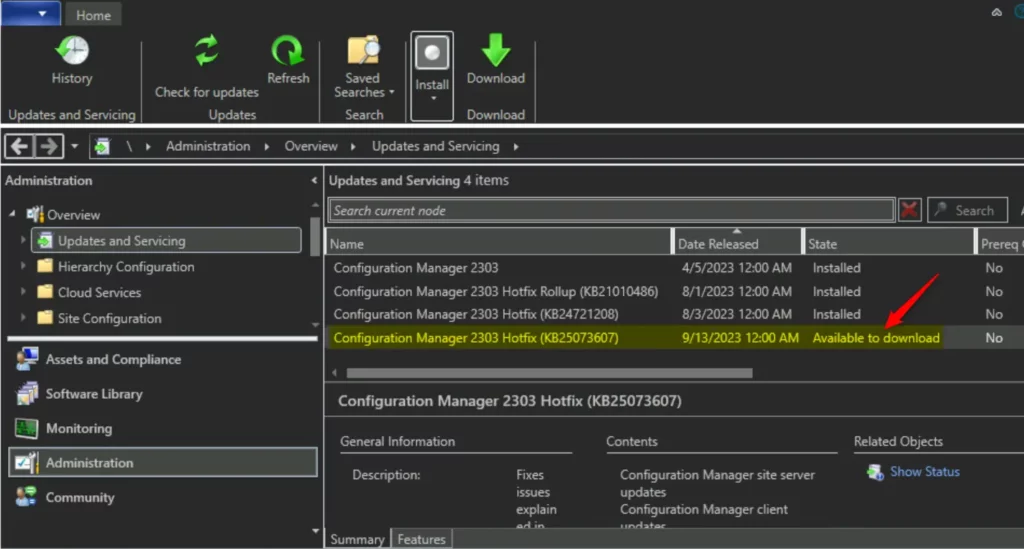
<Product>-<product version>-<KB article ID>-ConfigMgr.Update.exe - After the hotfix is registered, it appears as a new update in the console within 24 hours. To accelerate this process: in the Configuration Manager console, go to the Administration workspace, and select the Updates and Servicing node. In the ribbon, select Check for Updates.
- The update registration tool logs its actions to a .log file on the local computer. The log file has the same name as the hotfix file and is in the %SystemRoot%/Temp folder. After the update is registered, you can close the update registration tool.
In the Configuration Manager console, go to the Administration workspace, and select the Updates and Servicing node. KB25073607 Hotfix that you have imported are now available to install. You can now proceed to install the KB25073607.
Note! To apply this hotfix, you must use Configuration Manager, version 2303, and the Latest Fixes For SCCM 2303 KB21010486 Hotfix Update Rollup.
Install Hotfix Rollup KB25073607 on Secondary Server
You can follow the steps to install the 2303 Hotfix Rollup (KB25073607) on SCCM secondary servers. The following blog posts provide more details about the secondary server installation, troubleshooting, and update installation, Recommended Post.
- SCCM Secondary Server Hotfix Installation Guide | ConfigMgr
- Check SCCM Secondary Server Hotfix Installation Status
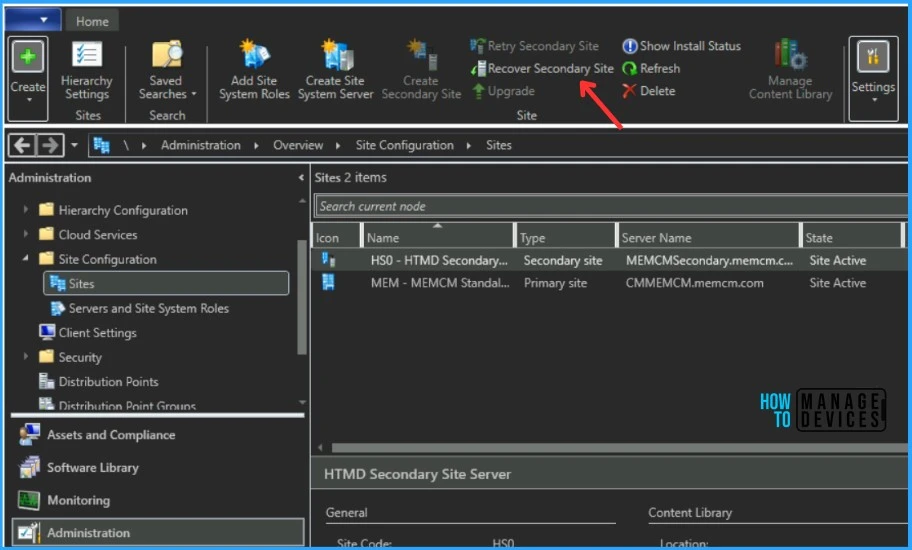
After you install this update on a primary site, pre-existing secondary sites must be manually updated. To update a secondary site in the Configuration Manager console, select Administration > Site Configuration > Sites > Recover Secondary Site, and then select the secondary site.
The primary site then reinstalls that secondary site by using the updated files. Configurations and settings for the secondary site are not affected by this reinstallation. The new, upgraded, and reinstalled secondary sites under that primary site automatically receive this update.
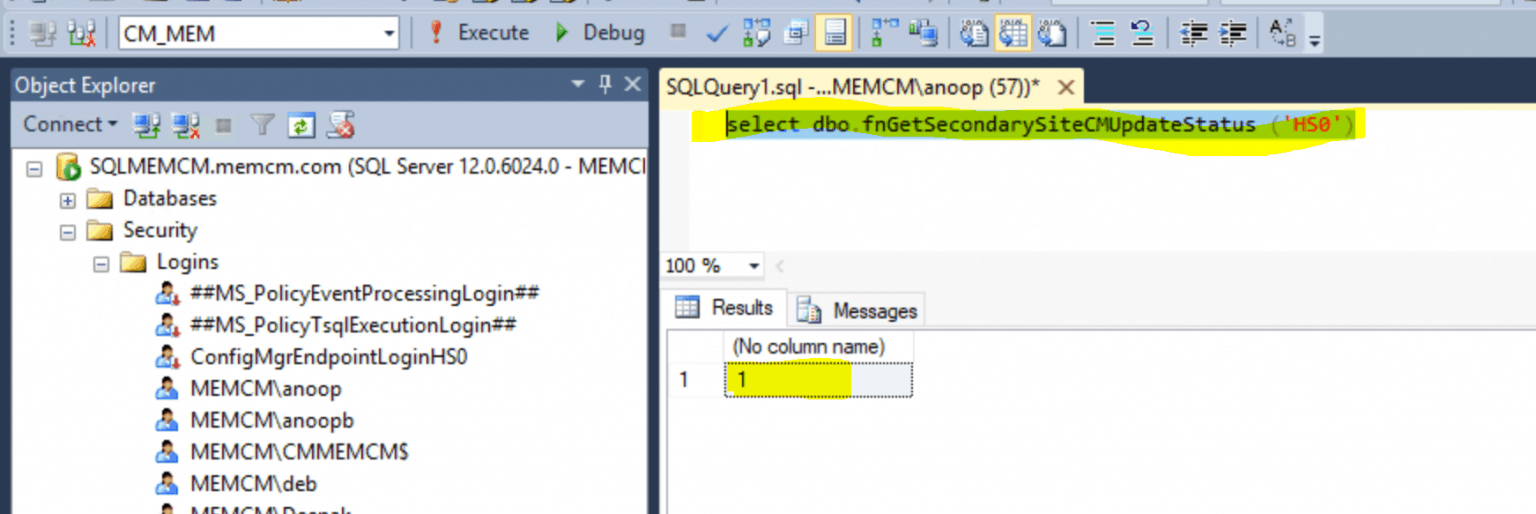
Run the following SQL Server command on the site database to check whether the updated version of a secondary site matches that of its parent primary site:
select dbo.fnGetSecondarySiteCMUpdateStatus ('SiteCode_of_secondary_site')
If the value 1 is returned, the site is up to date, with all the hotfixes applied on its parent primary site.
If the value 0 is returned, the site has not installed all the fixes that are applied to the primary site, and you should use the Recover Secondary Site option to update the secondary site.
Author
About Author – Jitesh, Microsoft MVP, has over six years of working experience in the IT Industry. He writes and shares his experiences related to Microsoft device management technologies and IT Infrastructure management. His primary focus is Windows 10/11 Deployment solution with Configuration Manager, Microsoft Deployment Toolkit (MDT), and Microsoft Intune.




Discussion