






How to Restrict Personal Android Devices from Enrolling into Intune
How can I restrict Personal Android Devices from Enrolling in Intune? Are you still waiting to migrate from Intune Silverlight to the Azure portal?
The video post provides a quick overview and comparison between the Intune Azure and Intune Silverlight portals. It highlights the differences and improvements in the new Intune experience within the Microsoft Endpoint Manager (MEM) portal, showcasing the enhanced features and user interface of the Azure-based Intune portal compared to the older Silverlight version.
The new Intune portal allows for more granular restrictions for MDM enrollments. It’s amazing to see new features in the MEM Intune portal. One month ago, I blogged about restricting personal iOS devices from enrolling in Intune via enrollment restriction rules.
This post provides detailed instructions on restricting personal Android devices from enrolling into Intune using Endpoint Manager (MEM). It covers the steps necessary to configure enrollment restrictions, ensuring that only corporate-owned devices can be enrolled and managed through Intune.

- Onboard iOS/iPadOS Devices to Microsoft Defender for Endpoint
- Use MTD To Protect IOS And Android Devices With Microsoft Defender For Endpoint
- Intune Onboard Android Devices to Microsoft Defender for Endpoint
- Intune Working Time Limit Access Feature for Android Devices
Table of Contents
How to Restrict Personal Android Devices from Intune Enrollment
Let’s discuss how to restrict personal Android devices from enrolling in Intune. This video provides a detailed guide on configuring Intune settings to ensure that only corporate-owned devices can be enrolled, helping you maintain control over device management within your organization.
How to Restrict Personal Android Devices from Enrolling into Intune
iOS personal devices can be restricted from enrolling in Intune MDM. However, there was no option to restrict personal Android devices from enrolling into Intune MDM. The Intune team has lighted up the feature to restrict personal Android devices from enrolling into Intune.
This was one of the features I was looking for to appear in the Azure portal. So, can we allow only Android devices for work-supported enrollment in Intune MDM? With this enrollment or device type restriction option, the answer is NO. So, what is the difference between company-owned Android devices and personally-owned Android devices?
| Features | Company-owned device | Personal device |
|---|---|---|
| Opt-out of Device Owner mode | No | Yes |
| With device approvals enabled, the administrator must approve the device | No | Yes |
| Administrators can receive an inactivity report every 30 days | Yes | No |
| Factory resets that users initiate block device re-enrollment | Yes | No |
| Account wipe available | No | Yes |
All personal Android devices will be blocked from enrollment when you turn on the “Block Android Personal Device” option from Intune Blade in the Azure portal. Personal Android devices can be Android for Work (AfW) supported devices and non-Android for Work devices.
Initially, I thought Android for Work would not be treated as a personal device but as a corporate-owned device. But I was wrong. For corporate-owned devices, Android for Work can be deployed in a Work Managed mode, which provides full device management.
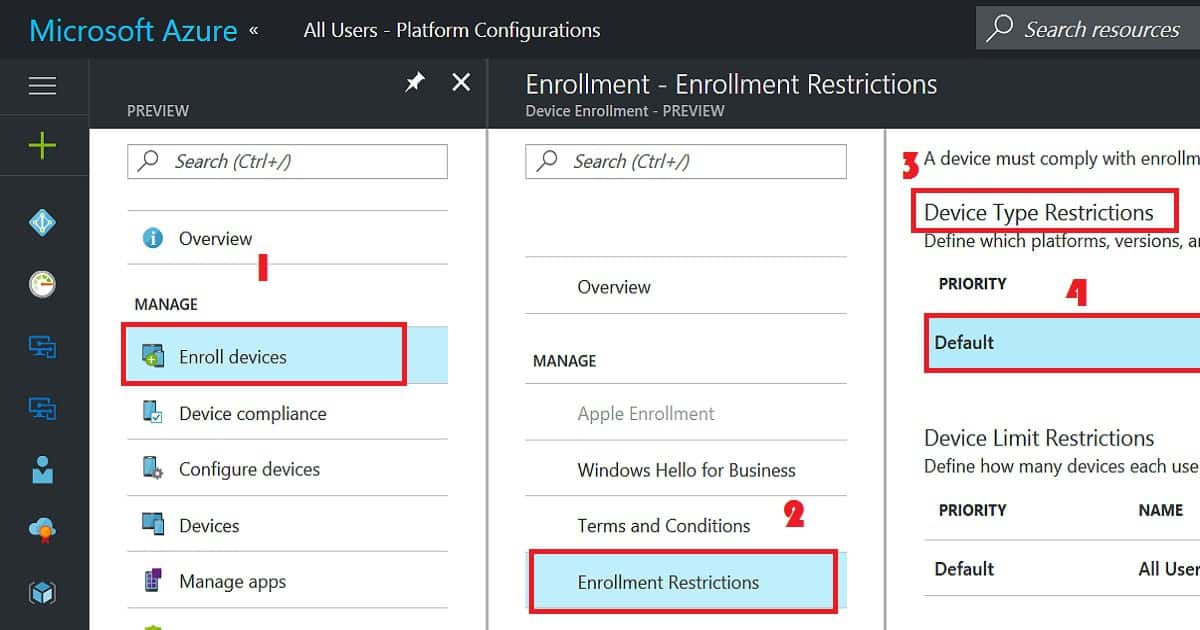
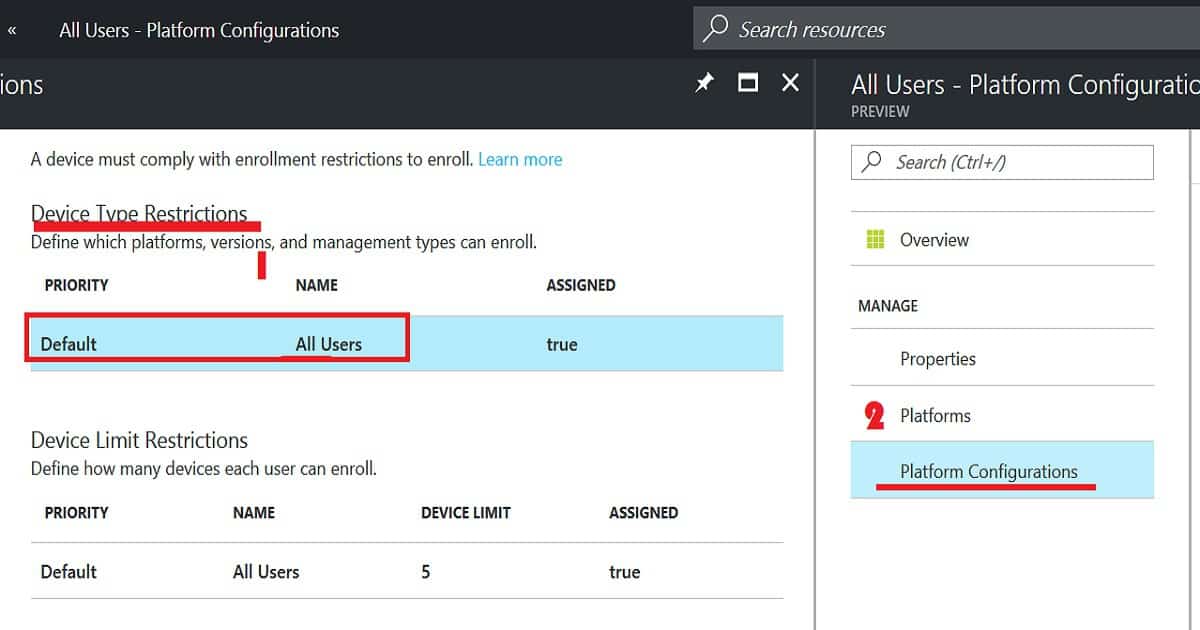
The Enroll Devices node is the place in the Intune Azure portal where you can set up a restriction policy for personally owned Android devices. Within enrolment restrictions rules, we can have two types of restrictions: Device Type restrictions and Device Limit restrictions.
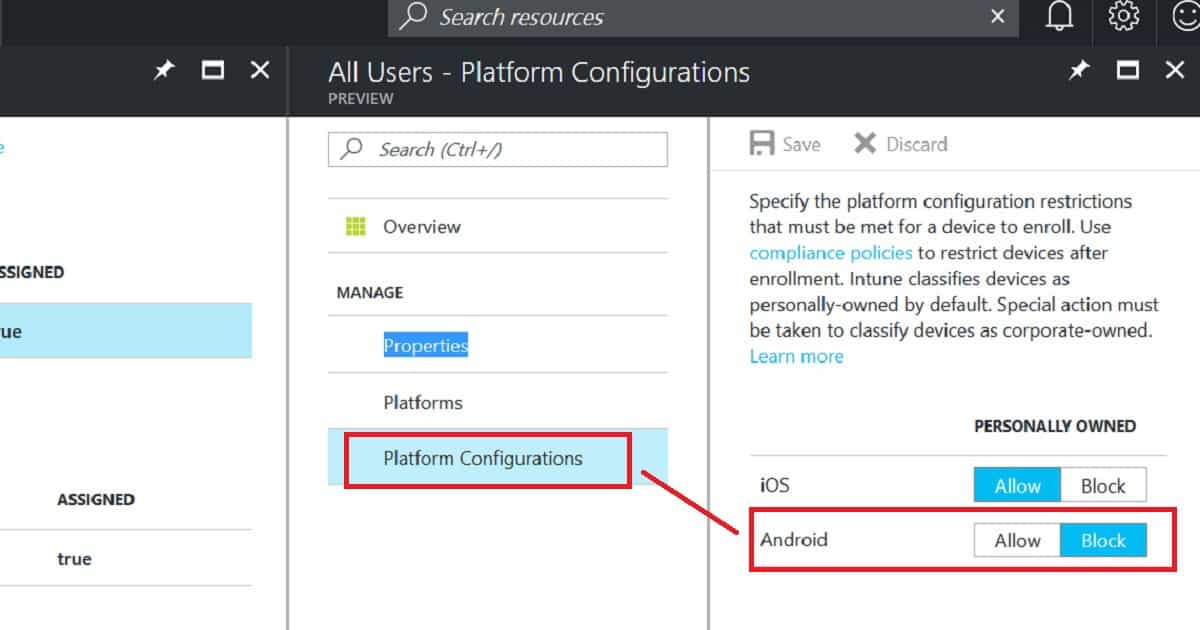
In this scenario, we want to restrict personal Android devices. We need to create an enrollment type policy to allow the Android platform to enroll in Intune. Once the Android platform has enabled enrollment, go to Platform Configurations and then BLOCK personally owned iOS devices.
Conclusion
Ideally, when you block personally owned Android devices from enrollment, all the Android devices enrolled via a non-corporate method should also be blocked.
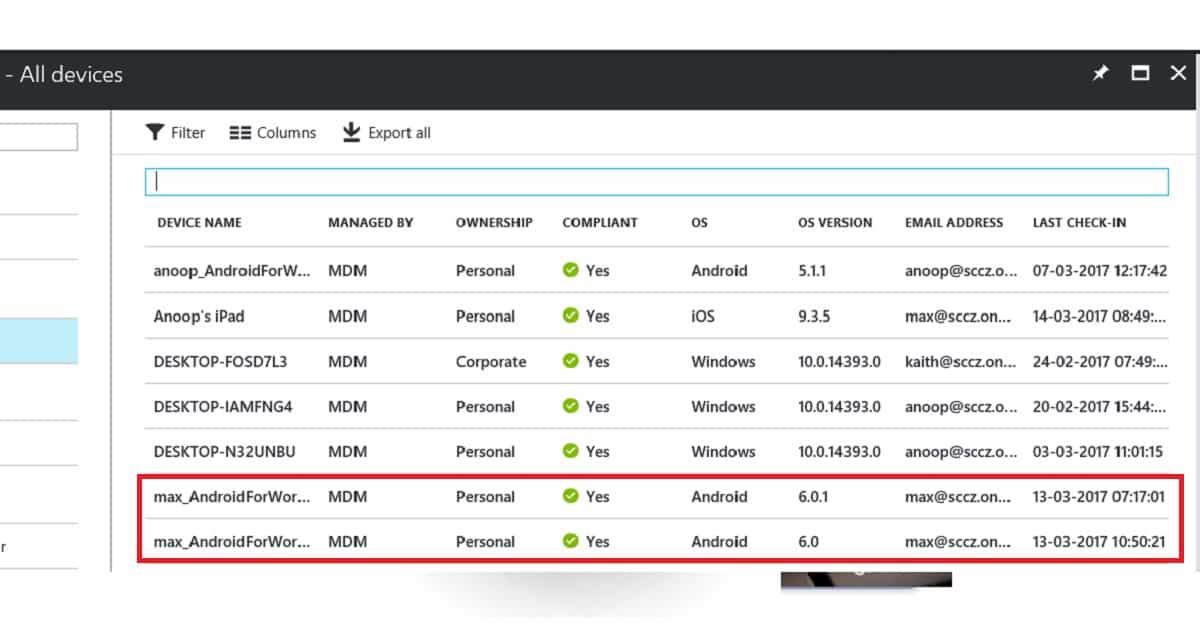
As per my testing, this is not working. After enabling the “block Android personally owned devices” policy, I enrolled a couple of Android devices, and those devices got enrolled without any issues.
In the screenshot below, I have enrolled two Android devices into Intune and the Intune console, and Intune detects those as personal devices. I’m not sure why they are not blocked.
References:-
- Evaluate Android enterprise features – Android Enterprise Help (google.com)
- Add company-owned devices to the inventory – Google Workspace Admin Help
- Overview: Manage devices with Google endpoint management – Google Workspace Admin Help
We are on WhatsApp now. To get the latest step-by-step guides, news, and updates, Join our Channel. Click here. HTMD WhatsApp.
Author
Anoop C Nair is Microsoft MVP! He is a Device Management Admin with more than 20 years of experience (calculation done in 2021) in IT. He is a Blogger, Speaker, and Local User Group HTMD Community leader. His main focus is on Device Management technologies like SCCM 2012, Current Branch, and Intune. He writes about ConfigMgr, Windows 11, Windows 10, Azure AD, Microsoft Intune, Windows 365, AVD, etc.


Hi Anoop,
I found this as a great source. Keep sharing more articles, it increases our knowledge.
Thanks
Hello Anoop,
Is this still the same??
As I had a similar issue with Android
StaffI have not tested this recently but many things changed .. https://www.anoopcnair.com/block-personal-windows-devices/ I have not seen any known issue or bug related to this. What is the exact issue that you are facing