






How to Resolve Intune Android for Work Configuration Refresh Error
Let’s discuss how to Resolve Intune Android for Work Configuration Refresh Error. Android for Work configuration is straightforward in most scenarios.
I have configured “Android for Work” for several tenants without any issues. Recently, however, I encountered an issue while configuring this in the Intune Silverlight console.
When I click on the configure button to “add Android for Work Binding” on the “Android for Work Mobile Device Management Setup” page in the Intune Silverlight console, it initiates the process. Still, Intune cannot launch the Android for Work binding wizard (webpage).
In one of our posts, we will show you how to configure the Android Enterprise platform for use with Intune Device Management. You can efficiently manage Android Enterprise corporate-owned devices with Microsoft Intune.

- Enroll Android Devices to Android for Work in Intune
- How to Resolve Intune Android for Work Configuration Refresh Error
- Migrate Devices Enrolled in Device Admin Mode to Android for Work in Intune Easy Steps
- Intune Best Guide to Enrol Corporate Android Devices with Work Profile
- Block Android Work Profile Lock Screen Notifications using Intune
Table of Contents
Android for Work Refresh Error in Intune SilverLight Console
The video below demonstrates resolving the Intune Android for Work Configuration Refresh Error. Generally, configuring Android for Work is straightforward in most scenarios. I have successfully set up “Android for Work” for several tenants without issues.
Introduction – How to Resolve Intune Android for Work Configuration Refresh Error
I have already posted about Android for Work configuration and set it up in a different post (How to Enroll Android for Work Supported Devices into Intune). This post and video tutorial will provide a step-by-step process to enable Android for Work management.
As I explained in the first paragraph, the Intune console could not complete Android for Work binding. When I checked the Intune console, there was an Intune console page loading error: “Microsoft Intune was not able to retrieve all data. REFRESH.“
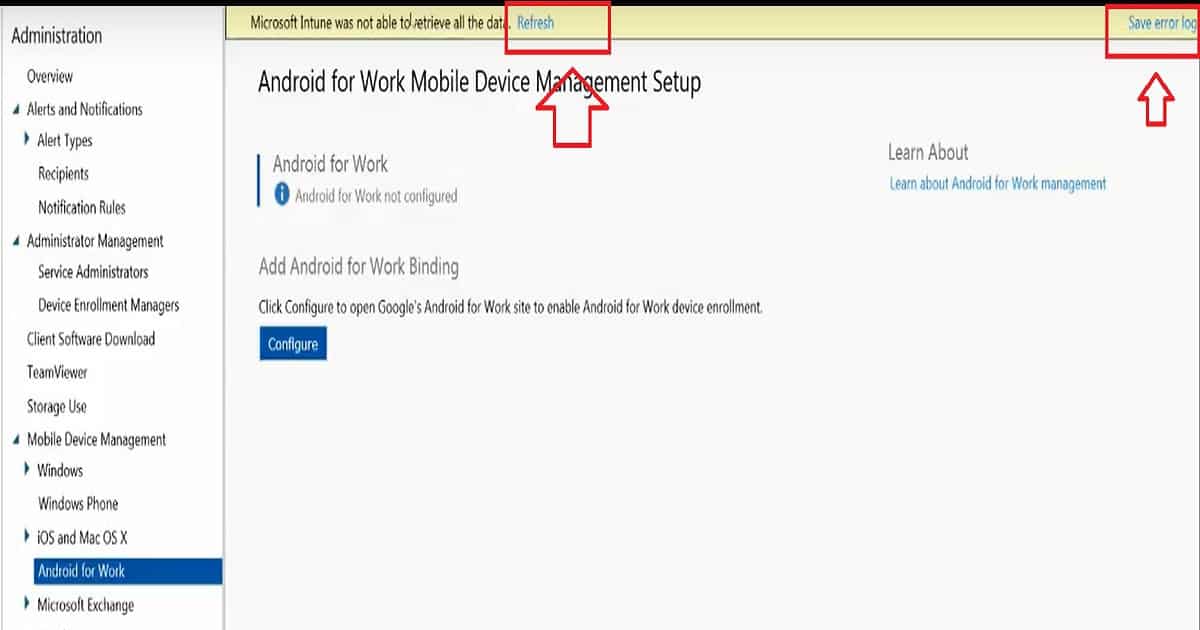
I tried clicking on the Refresh button several times to see if it worked, but nothing did. There was another button on the Intune Silverlight page, and that was the Save Error Log.
I clicked on the button, and it asked me to save the text log file. For this, I could not retrieve all data errors for the Intune console. I opened the text file, which contains details about the error and possibly the root cause of this issue as well.
| Error Message |
|---|
| Error occurred while retrieving JWT token, check that current user has an Intune license and try again. |
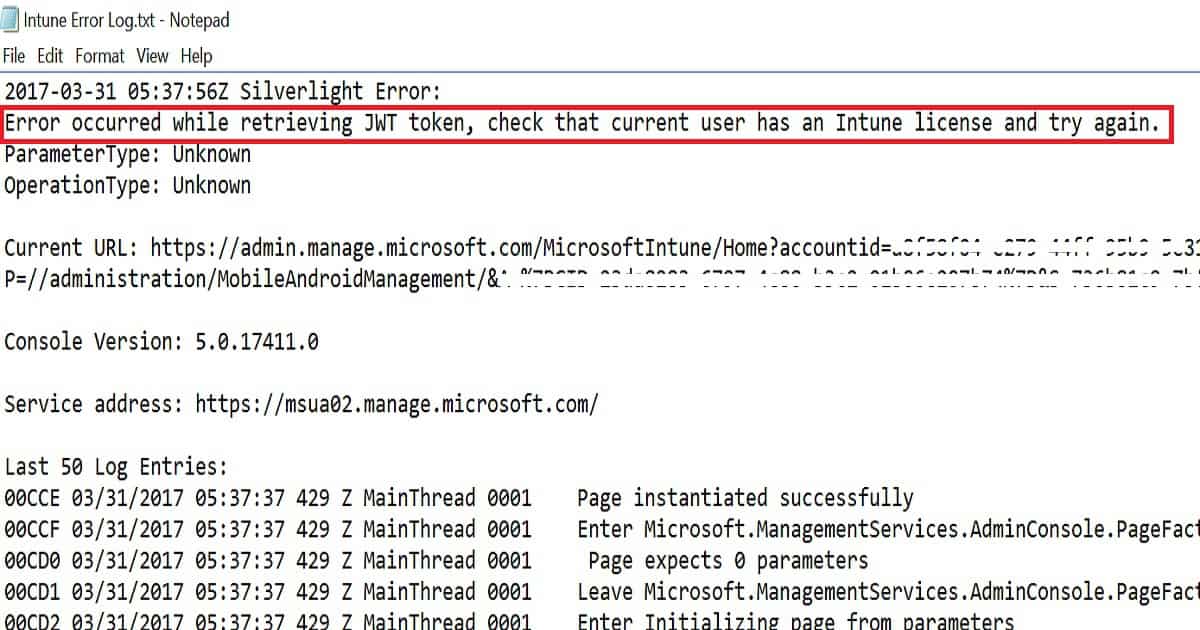
As per the Intune Save Error LOG file, the Intune Silverlight error occurred while retrieving the JWT token, and the error log suggests we check whether the current user has an Intune license and try again. Following is the snippet of the log file.
2017-03-31 05:37:56Z Silverlight Error:
Error occurred while retrieving JWT token, check that current user has an Intune license and try again.
ParameterType: Unknown
OperationType: Unknown
Current URL: https://admin.manage.microsoft.com/MicrosoftIntune/Home?accountid=a8f58f04-e279-44ff-95b9-5e81532915e6#Workspace/administration/index%23?P=//administration/MobileAndroidManagement/&A=%7BGID=23363773-6797-4c777-b3c2-01b06e207b74%7D&S=7sh74c9-7bf5-45ac-9fbb-67369263b9
Console Version: 5.0.17411.0
Service address: https://msua02.manage.microsoft.com/
Last 50 Log Entries:
00CCE 03/31/2017 05:37:37 429 Z MainThread 0001    Page instantiated successfully
Resolution
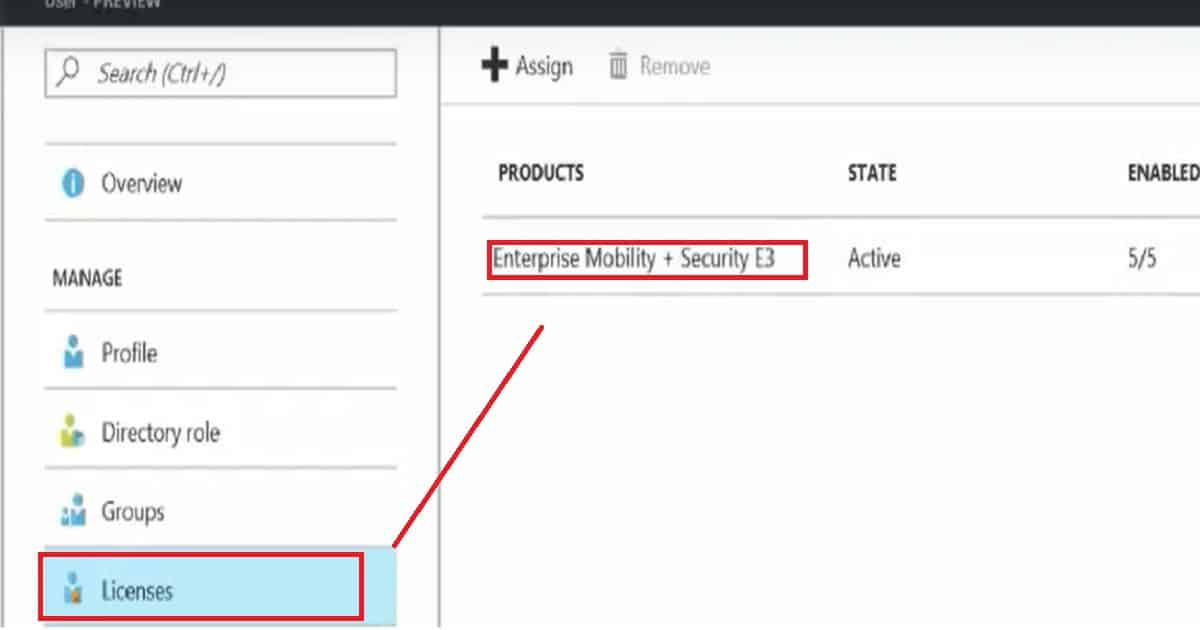
I have added an Intune/EMS license to the Intune Administrator from the new Azure Active Directory portal. It might not work straight away after assigning the license. You may need to wait 3-4 minutes before configuring “Android for Work.” I recommend logging off and logging back into the Intune Silverlight console before configuring “Android for Work.”
We are on WhatsApp now. To get the latest step-by-step guides, news, and updates, Join our Channel. Click here. HTMD WhatsApp.
Author
Anoop C Nair is Microsoft MVP! He is a Device Management Admin with more than 20 years of experience (calculation done in 2021) in IT. He is a Blogger, Speaker, and Local User Group HTMD Community leader. His main focus is on Device Management technologies like SCCM 2012, Current Branch, and Intune. He writes about ConfigMgr, Windows 11, Windows 10, Azure AD, Microsoft Intune, Windows 365, AVD, etc.


Discussion