






Intune MDE Onboarded Devices Count Report is Wrong Microsoft Confirmed
Let’s discuss the Intune MDE Onboarded Devices Count Report is Wrong. Microsoft recently announced an issue where devices onboarded to Microsoft Defender for Endpoint are not properly reflected in the Microsoft Intune Admin Center.
Microsoft Defender for Endpoint (MDE) is an enterprise endpoint security platform. Intune integrates with MDE to support end-to-end device management. Integrating Microsoft Defender for Endpoint with Intune offers organizations a powerful combination for managing security workflows.
Usually, MDE provides accurate counts of devices; at the moment, a problem with Microsoft is causing this inaccurate counting. This alert is a reporting bug and does not impact onboarding to Defender for Endpoint.
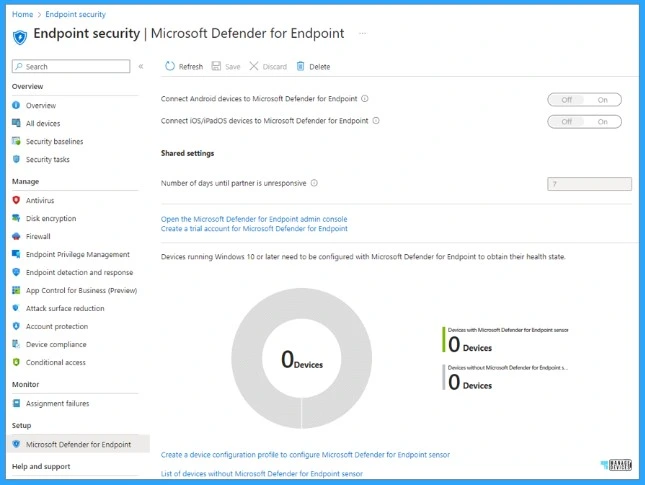
Microsoft identified a bug that is the reason for the incorrect count for the number of devices to Defender. As a result, MDE is not properly reflected in the Microsoft Intune admin center report for devices with/without the Defender for Endpoint sensor.

- Free Microsoft Defender for Endpoint MDE Training Videos
- Microsoft Defender for Endpoint Onboarding Process using Intune
- Latest MDE Architecture Changes to Enhance Onboarding Experience
What is Microsoft Defender for Endpoint Onboarding Process using Intune?
1. Windows Defender Advanced Threat Protection (WDATP) empowers It administrators to onboard
2. The CSP process establishes a secure connection between the devices and the cloud-based security service
3. WDATP CSP enables real-time threat detection, proactive monitoring, and response capabilities
Microsoft Confirmed Intune MDE Onboarded Devices Count Report is Wrong
Microsoft recently identified and announced the incorrect count for onboarded MDE. This known issue does not impact onboarding to Defender for Endpoint. Microsoft is trying to fix this known issue as soon as possible, and it is expected to be released later this year.
You can quickly check this report on Endpoint Security. From Endpoint Security, select Microsoft Defender for Endpoint.
Temporary Workaround for MDE Onboarding Status
Microsoft provides a temporary workaround for checking the MDE onboarding status on the Microsoft Intune Admin Center. From this Admin Center, onboarding status is in the Antivirus agent status report. This report provides the agent status of your organization’s device.
The report is available from the primary Microsoft Defender Antivirus workload. It also provides filtering, searching, paging, and sorting. The data in the report gives some details.
| Details of the Data in the Report |
|---|
| If a device has real-time or network protection, and the state |
| The status of Windows Defender |
| f Tamper protection is enabled |
| If the device is a virtual machine, or a physical device |
| Calls out the unhealthy device, the user name, and the severity |
Devices Onboarded in Microsoft Defender for Endpoint
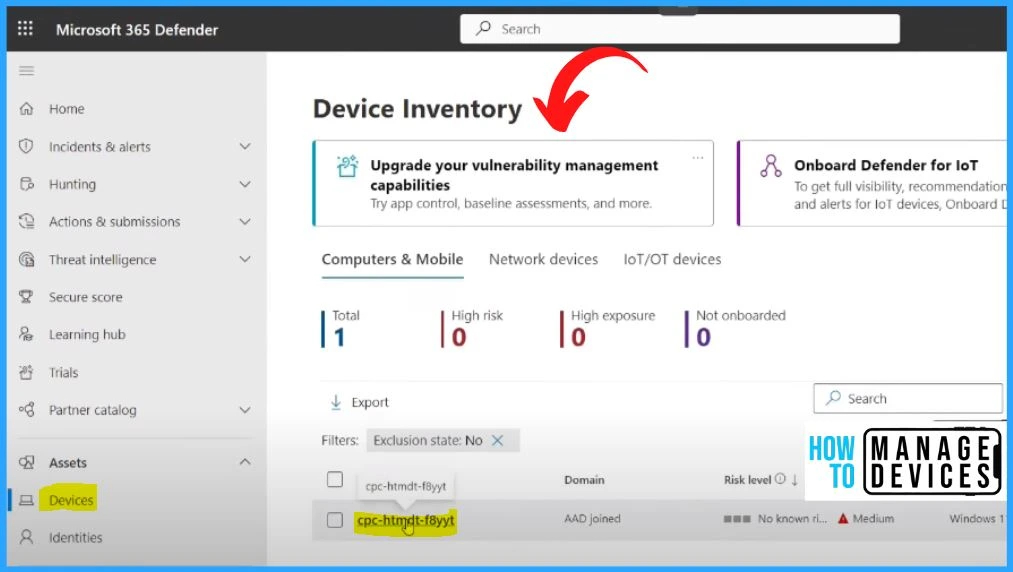
Onboarded devices can be easily viewed in the Microsoft 365 Defender portal. Log in to the Microsoft 365 Defender portal and select the Devices tab. You can see the total number of onboarded devices in this window.
We are on WhatsApp. To get the latest step-by-step guides and news updates, Join our Channel. Click here – HTMD WhatsApp
- Microsoft Defender for Endpoint Portal Walkthrough
- MDE Microsoft Defender for Endpoint Telemetry Issues
- Workgroup Joined Device Enrollment to MDE Defender for Endpoint
Author
Gopika S Nair is a computer enthusiast. She loves writing on Windows 11 and related technologies. She is here to share quick tips and tricks with Windows 11 or Windows 10 users.



Discussion