






Intune Create Device Restriction Policy Profiles Deploy Security Policies to Windows 10 Devices
Let’s discuss the Intune Create Device Restriction Policy Profiles Deploy Security Policies to Windows 10 Devices. Intune configuration restriction policies are critical in modern device management strategy. Intune device restriction policy is the security settings applied on your Windows 10 CYOD device.
As part of your organization’s security policies, you may need to lock down mobile or Windows devices with corporate data and app access. Yes, Intune configuration restriction policies help you lock down Windows devices as per your organization’s security requirements.
In this post, you will learn everything you need to create device restriction policy profiles in Intune and deploy security policies to Windows 10 devices. We will guide you step-by-step through setting up these policies to ensure your devices are secure and comply with your organization’s requirements.
Whether you’re new to Intune or looking to enhance your device management skills, this guide will provide clear and straightforward instructions to help you effectively manage and protect your Windows 10 devices.

- Intune SCEP HTTP Errors Troubleshooting Made Easy
- New Device Restriction Settings Available in Apple Settings Catalog
- Additional App Configuration Permissions for Android Apps
- Microsoft Intune Extends Support to Android 10 and Later from October 2024
Table of Contents
Intune Configuration Restriction Policy Deployment with Windows 10
In this video, you’ll learn all about deploying Intune Configuration Restriction Policies on Windows 10. We’ll show you each process step, making it easy to follow. Whether setting up new policies or adjusting existing ones, this video will help you understand how to use Intune to keep your Windows 10 devices secure and well-managed.
Create Intune Device Restriction Policy for Windows 10 Devices
You can create an Intune device restriction policy for Windows 10 from Microsoft Intune—Device Configuration—Profiles—Create New Profile. I selected Windows 10 as the platform, and platform Selection is essential.
Also, it would be best to select the profile type while creating an Intune Configuration Restriction policy. In my scenario, the Device restriction policy is named “Windows 10 CYOD Restrictions.”
| Platform | Profile Type |
|---|---|
| Windows 10 and Later | Device Restrictions |
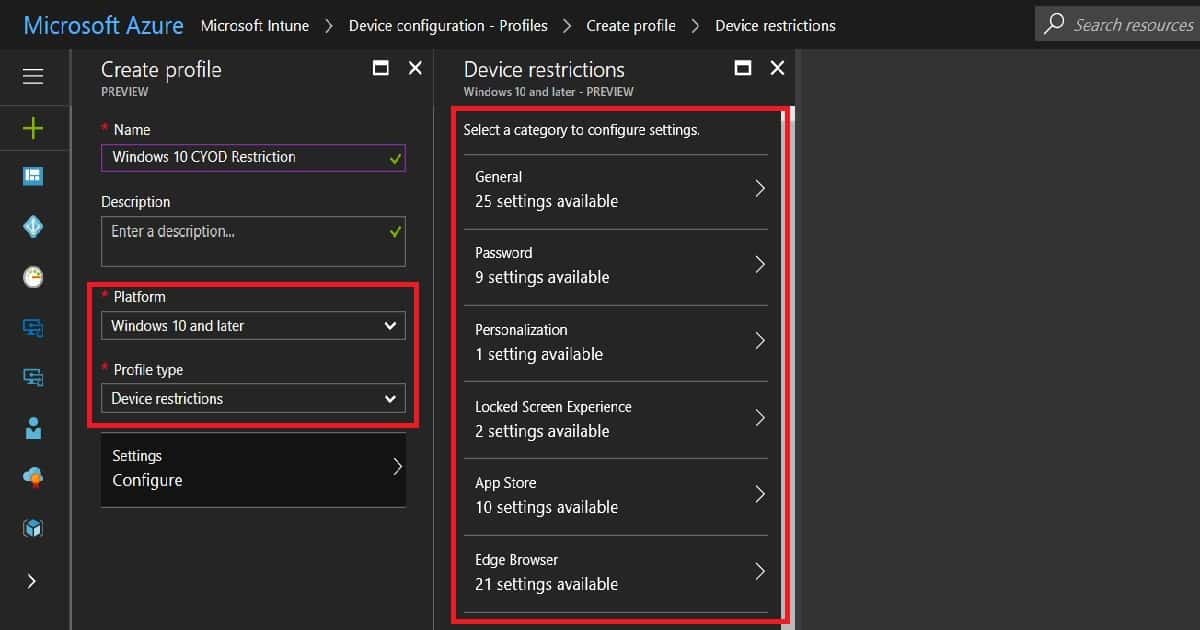
As shown below, the Windows platform Intune device restriction policy for out-of-box settings is segregated into 16 sections. This list is comprehensive, and we can lock down Windows 10 machines as required.
Is this Intune device restriction policy a replacement for group policies? No, it’s still not a replacement for AD group policies.
- General
- Password
- Personalization
- Locked screen experience
- App Store
- Edge Browser
- Search
- Cloud and Storage
- Cellular and Connectivity
- Control Panel and Settings
- Defender
- Defender Exclusions
- Network Proxy
- Windows Spotlight
- Display
- Start
Deploy Windows 10 Intune Device Restriction Policy
You can deploy the Windows 10 Intune Device Restriction Policy to either Windows 10 CYOD dynamic devices or Windows 10 user groups. Dynamic device groups are still in preview, and the group typos are not always stable. So, at least for the next two months, I will prefer to deploy policies to user groups rather than dynamic device groups.
Windows 10 End-user Experience of Intune Device Restriction Policy
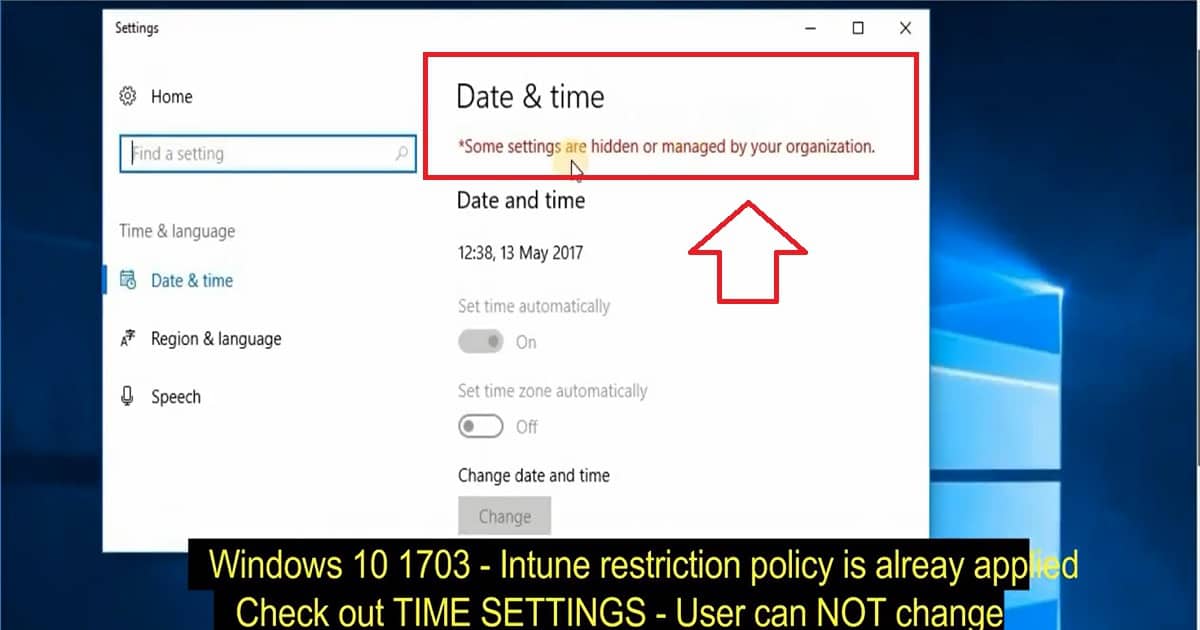
As you can see in the video tutorial at the top of this post, I’ve enabled the time settings to disable the option as part of the initial Windows 10 device restriction policy. The end-user logged in to the Windows 10 machine can’t change the time on the system.
After that, I changed the Windows time setting policy again, and after applying the new policy, the user can change the time on the Windows 10 system.
We are on WhatsApp now. To get the latest step-by-step guides, news, and updates, Join our Channel. Click here. HTMD WhatsApp.
Author
Anoop C Nair is Microsoft MVP! He is a Device Management Admin with more than 20 years of experience (calculation done in 2021) in IT. He is a Blogger, Speaker, and Local User Group HTMD Community leader. His main focus is on Device Management technologies like SCCM 2012, Current Branch, and Intune. He writes about ConfigMgr, Windows 11, Windows 10, Azure AD, Microsoft Intune, Windows 365, AVD, etc.


How to test device restrictions policy on user or client ?
StaffManual enrollment? https://www.anoopcnair.com/windows-11-intune-enrollment-process-manual/ to test the BYOD block setting for example … same is applicable for iOS and Android as well.