






Policy to Turn Off Downloading of Print Drivers Over HTTP using Intune
In this post, we will see how to set the Policy To Turn Off Downloading Of Print Drivers Over HTTP Using Intune. We will achieve this policy using Intune’s Configuration Profiles. The main aspect of this post is getting familiar and hands-on experience in configuring and setting Policy To Turn Off Downloading Of Print Drivers Over HTTP Using Intune.
Policy To Turn Off Downloading Of Print Drivers Over HTTP Using Intune defines whether the client is permitted to obtain print driver packages via HTTP. When implementing HTTP printing, it becomes necessary to retrieve non-inbox drivers via this protocol. It’s important to note that this policy does not restrict the client from printing to HTTP-connected printers on the Intranet or Internet.
It solely restricts the downloading of drivers that are not already present locally. Enabling this policy prohibits the downloading of print drivers over HTTP while disabling or leaving it unconfigured allows users to download print drivers via HTTP.
This policy setting specifies whether the client has the authorization to fetch print driver packages via HTTP. In scenarios where HTTP printing is utilized, the client may need to retrieve non-inbox drivers through this method. It’s essential to clarify that this policy doesn’t impede the client’s ability to print to HTTP-connected printers on the Intranet or Internet; it exclusively focuses on the downloading of drivers that are not already installed on the local system.

Activating this policy setting restricts the downloading of print drivers over HTTP, while deactivating it or leaving it unconfigured allows users to continue downloading print drivers through HTTP.
- Do Not Display Network Selection UI Policy using Intune
- Allow Upload of User Activities Policy using Intune
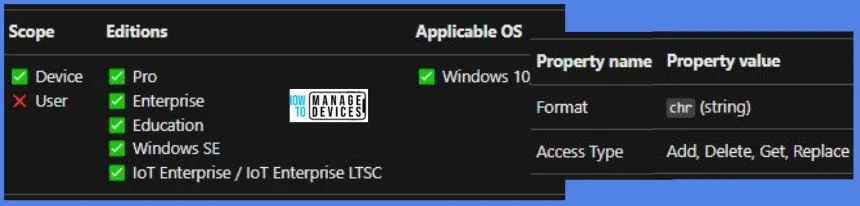
Windows CSP Details DisableDownloadingOfPrintDriversOverHTTP
We will see Windows CSP Details for this Policy setting DisableDownloadingOfPrintDriversOverHTTP. This policy configuration defines whether the client is granted permission to obtain print driver packages using HTTP. When employing HTTP printing, the need to retrieve non-inbox drivers over HTTP may arise.
It’s important to emphasize that this policy does not limit the client’s ability to print to printers connected via HTTP on the Intranet or the Internet; it solely pertains to the downloading of drivers that are not already present locally. Enabling this policy prevents the downloading of print drivers via HTTP while disabling or leaving it unconfigured permits users to download print drivers using HTTP.
CSP URI – ./Device/Vendor/MSFT/Policy/Config/Connectivity/DisableDownloadingOfPrintDriversOverHTTP
Policy To Turn Off Downloading Of Print Drivers Over HTTP using Intune
To set the Policy To Turn Off Downloading Of Print Drivers Over HTTP Using Intune, follow the steps stated below:
- Sign in to the Intune Admin Center portal https://intune.microsoft.com/.
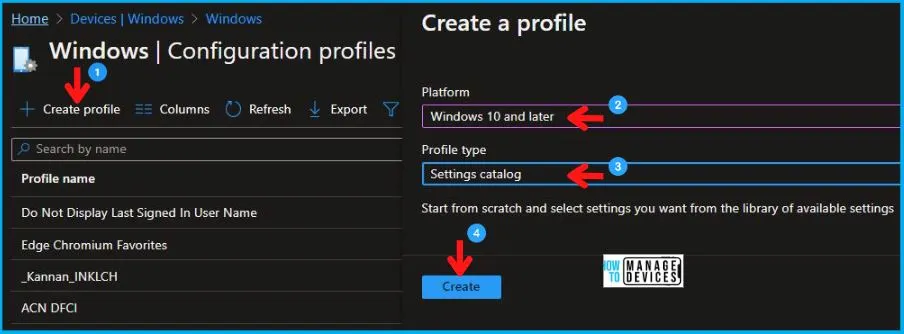
- Select Devices > Windows > Configuration profiles > Create a profile.
In Create Profile, Select Windows 10 and later in Platform, and Select Profile Type as Settings catalog. Click on the Create button.
| Platform | Profile Type |
|---|---|
| Windows 10 and later | Settings Catalog |
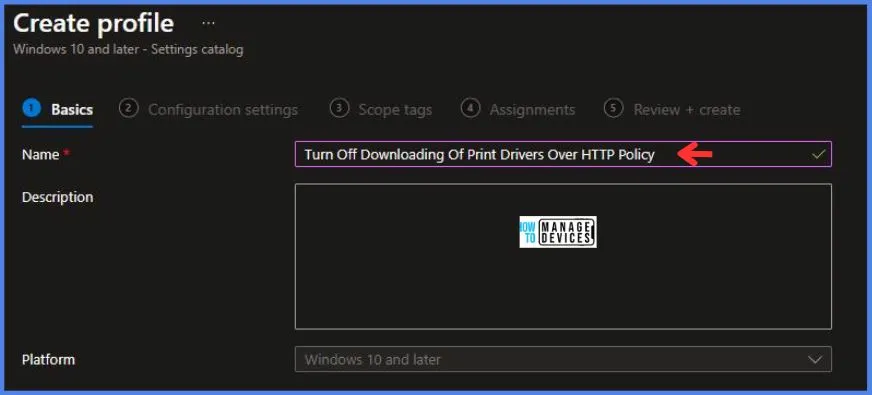
On the Basics tab pane, provide a name for the policy as “Turn Off Downloading Of Print Drivers Over HTTP Policy.” Optionally, you can enter a policy description and proceed by selecting “Next.“
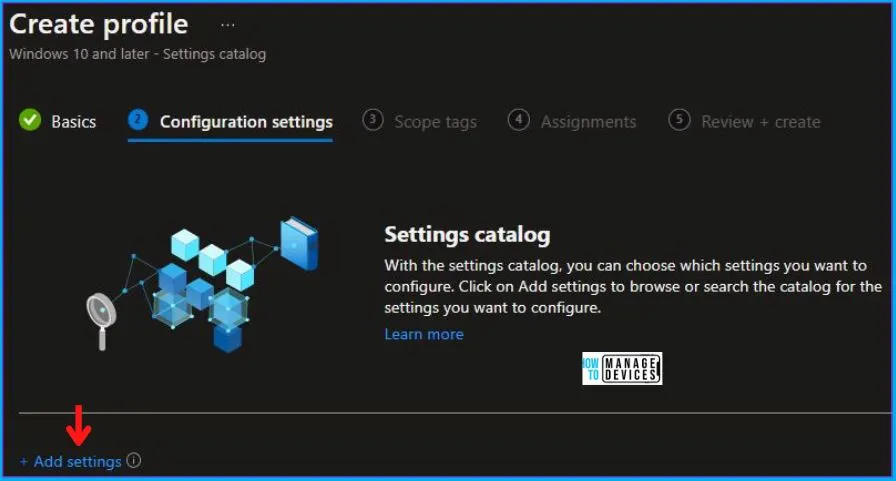
Now in Configuration Settings, click Add Settings to browse or search the catalog for the settings you want to configure.
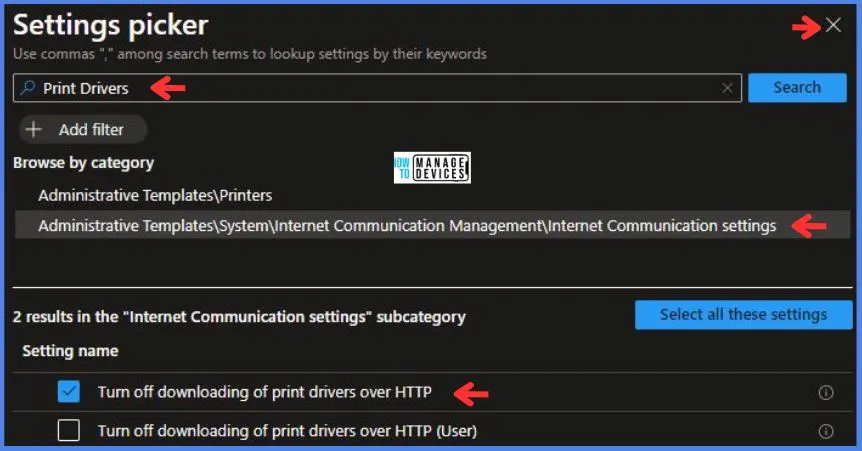
In the Settings Picker windows, search by the keyword Print Drivers, you’ll get the category Administrative Templates\System\Internet Communication Management\Internet Communication settings, and select this.
When you select the option stated above, you will see one option: Turn off downloading of print drivers over HTTP. After selecting your setting, click the cross mark at the right-hand corner, as shown below in the image.
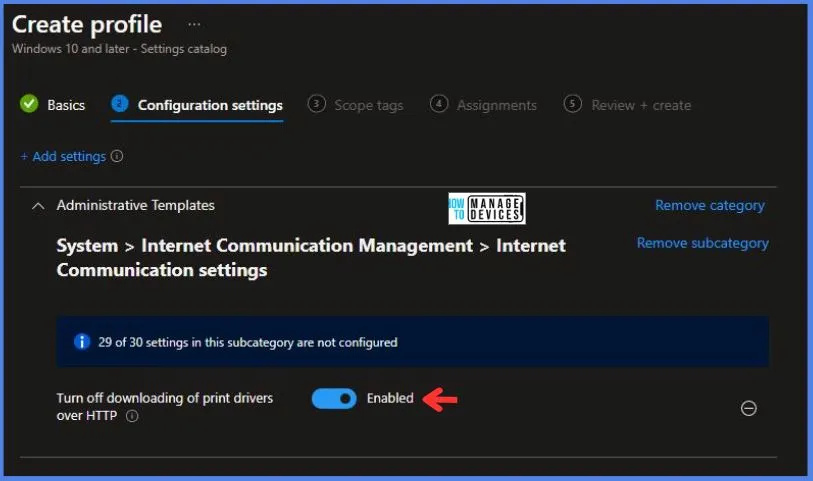
In the Administrative Templates, we now have to set Turn off downloading of print drivers over HTTP to Enabled.
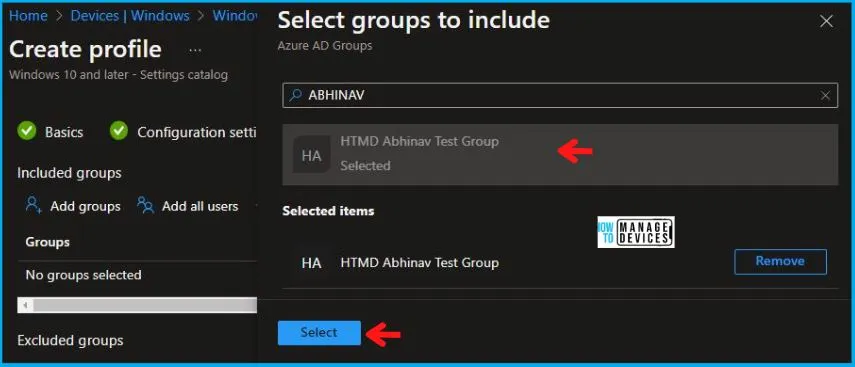
Using Scope tags, you can assign a tag to filter the profile to specific IT groups. One can add scope tags (if required) and click Next to continue. Now in Assignments, in Included Groups, you need to click on Add Groups, choose Select Groups to include one or more groups, and click Next to continue.
In the Review + Create tab, you need to review your settings. After clicking on Create, your changes are saved, and the profile is assigned.
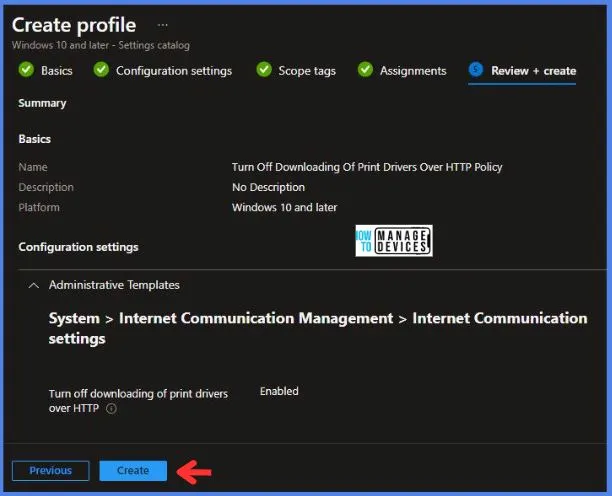
Upon successfully creating the “Turn Off Downloading Of Print Drivers Over HTTP Policy,” notification will appear in the top right-hand corner, confirming the action. You can also verify the policy’s existence by navigating to the Configuration Profiles list, where it will be prominently displayed.
Your groups will receive your profile settings when the devices check in with the Intune service. The Policy applies to the device.
Intune Report for To Turn Off Downloading Of Print Drivers Over HTTP Policy
From Intune Portal, you can view the Intune settings catalog profile report, which provides an overview of device configuration policies and deployment status.
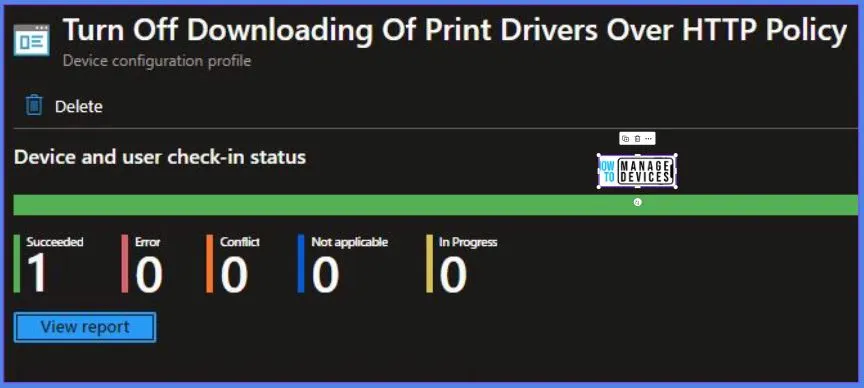
To monitor the implementation of the policy, you must choose the appropriate policy from the Configuration Profiles list. Here I choose To Turn Off Downloading Of Print Drivers Over HTTP Policy from the list. By examining the status of device and user check-ins, you can ascertain the successful application of the policy. If you need more comprehensive details, you can click the “View Report” option to access supplementary insights. As you can see, it is successfully implemented on the targeted device.
Registry-Key Verification for DisableDownloadingOfPrintDriversOverHTTP
To access the registry settings that hold the group policy configurations on a specific computer, you can execute “REGEDIT.exe” on the target computer and navigate to the precise registry path mentioned below where these settings are stored.
- Computer\HKEY_LOCAL_MACHINE\SOFTWARE\Microsoft\PolicyManager\providers\5B88AEF1-09E8-43BB-B144-7254ACBBDFF3E\default\Device\Connectivity
When you navigate the above path in the Registry Editor, you will find the registry key DisableDownloadingOfPrintDriversOverHTTP. Refer to the table and image below.
| Registry Name | Data |
|---|---|
| DisableDownloadingOfPrintDriversOverHTTP | Enabled |
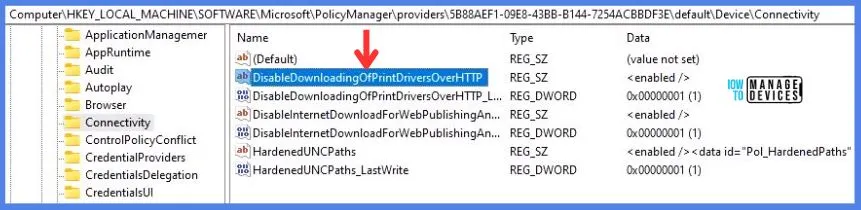
As you can confirm from the above image, the Registry key has been created, and we can confirm that the policy has been implemented on the target device successfully.
We are on WhatsApp. To get the latest step-by-step guides and news updates, Join our Channel. Click here – HTMD WhatsApp.
Author
Abhinav Rana is working as an SCCM Admin. He loves to help the community by sharing his knowledge. He is a B.Tech graduate in Information Technology.


Discussion