





How to Use SCCM ConfigMgr Deployment Monitoring Tool
How to Use SCCM ConfigMgr Deployment Monitoring Tool. Deployment Monitor Tool (DeploymentMonitoringTool.exe) is a new addition to the ConfigMgr 2012 Toolkit.
This tool is a graphical user interface designed to assist in troubleshooting applications, updates, and baseline deployments. Deployment Monitoring Tool is part of ConfigMgr2012 Toolkit.
I‘m exploring the Deployment Monitoring tool in more detail in this post. How can it be used more effectively? The documentation provided with this toolkit is excellent (ToolkitHelp); however, I’ve seen many of us never look into that documentation.
This is a continuation of my previous posts about Client Spy and Policy Spy.

- Manage Microsoft Intune Devices using the ControlUp Enrich Monitoring Tool
- SCCM 2309 for Beginners: A Step-by-Step Tutorial for Upgrade Process (youtube.com)
- Top 50+ Latest SCCM Interview Questions and Answers
- Uninstall Azure Monitoring Agent from AVD VMs
| Index |
|---|
| SCCM ConfigMgr Deployment Monitoring Tool |
| Actions |
| Client Properties |
| Deployments |
| All Updates |
SCCM ConfigMgr Deployment Monitoring Tool
Before going into depth, I want to remind you that the Deployment Monitoring Tool MUST be run as an administrator.
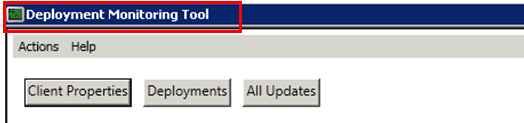
In this post, we’ll cover the following topics in detail with some examples.
- Actions
- Client Properties
- Deployments
- All Updates
Actions
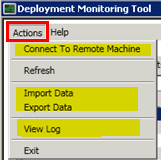
Through the actions menu, you can (a) Connect to A remote Computer, (b) Import and Export XML files of a system for further troubleshooting, and (c) Review the log files depending upon which TAB is selected. i.e., Application and Baseline Deployments Tab –> PolicyAgent.log: Update Deployments –> updatesDeployment.log and All Updates Tab –> WindowsUpdate.log:
Client Properties
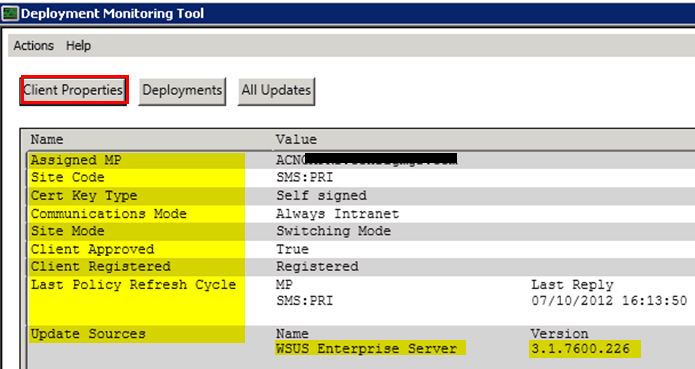
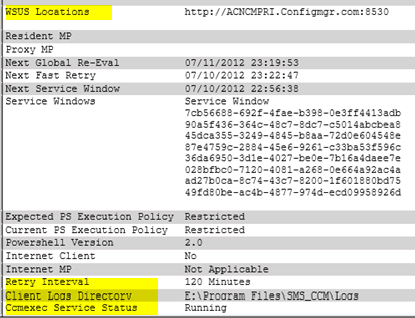
The Client Properties tab will help us to get all the client details. The following information is very helpful during troubleshooting. Client Logs Directory, ccmexec service Status, Service Window (maintenance window) status, Proxy MP, Resident MP details, WSUS Locations, Update Sources, Last Policy refresh Cycle, Assigned MP, Site Code, Client Approved status and certificate information, etc.
Deployments
The deployments tab will help list the details of each targeted deployment (advertisements in SCCM 2007). This tab will provide more details of the deployments, such as Name, Deadline, State, Type, and ID.
For example, in the following picture, you can see an application called Operation Basics. The deployment is optional, the deployment state is APP_CI_ASSIGNMENT_EVALUATION, the Deployment ID is Application, and the Deployment Type is Application. However, looking at the other two deployments, you can see that one is a Software Update and another is a mandatory application deployment with a deadline.

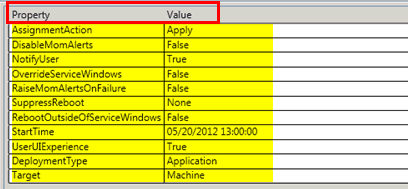
At the bottom of the tool, you will find in-depth characteristics of the selected deployment. This information contains all the following details, which are very, very helpful when troubleshooting.
AssignmentAction, DisableMomAlerts, NotifyUser, SuppressReboot, OverrideServiceWindows, RaiseMomAlertOnFailure, StartTime, StartTime, Target, RebootOutsideOfServiceWindows, UserUIExperience, DeploymentType, etc.
You will also get in-depth details about the selected deployment at the bottom (each and every detail that you specified at the time of the creation of the new application). For example – Properties (as mentioned above), Policy, Evaluation, Content, Enforcement, Reporting, and Requirement Violations.

All Updates
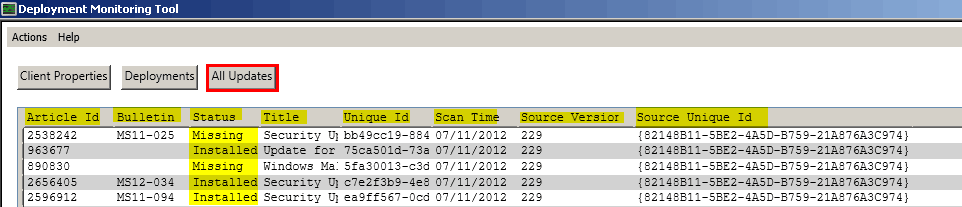
All updates tab will provide the details about all the required updates and their status.
Article ID, Bulletin, Status, Title, Unique ID, Scan Time, Source Version and Source Unique ID
For example – 2676562, MS12-034, Missing, Security Update for Windows 7 (KB2676562),
d4086c7b-d238-4790-b160-c01af8350d94, 07/11/2012 10:16:43, 229,
{82148B11-5BE2-4A5D-B759-21A876A3C974}
We are on WhatsApp. To get the latest step-by-step guides and news updates, Join our Channel. Click here –HTMD WhatsApp.
Author
Anoop C Nair has been Microsoft MVP from 2015 onwards for 10 consecutive years! He is a Workplace Solution Architect with more than 22+ years of experience in Workplace technologies. He is also a Blogger, Speaker, and leader of the Local User Group Community. His main focus is on Device Management technologies like SCCM and Intune. He writes about technologies like Intune, SCCM, Windows, Cloud PC, Windows, Entra, Microsoft Security, Career, etc..




Great as always there is an update for the System Center 2012 Configuration Manager Service Pack 1 Component Add-ons and Extensions http://www.microsoft.com/en-us/download/details.aspx?id=36213&WT.mc_id=rss_alldownloads_all
Hi Anoop,
Thank you for the information.
I targeted a software to 50 users and made it available. How do I check the status of the deployment on all the machines?
Thanks & Regards,
Mohan
StaffHi Mohan ! – How about checking Monitoring pane Deployments node from SCCM 2012 console?
Thanks Anoop. Sorry I wasn’t clear with my question previously.
We have approx 10K machines and need some imp software’s to be deployed. We have made 15 collections and started deploying these applications. Is there a query to extract detailed status report of a specific application. Instead of the selecting “View Current Data” on each collection and selecting the type ” Success/Already Compliant” and so on….
Thanks,
Mohan..
Hi Anoop,
How do I get the deployment status of specific advertisement of an application in SCCM 2012. I used to get the report using the below query in SCCM 2007. Do we have anything like this?
SELECT DISTINCT
sys.Netbios_Name0,sys.User_Name0,sys.User_Domain0,
adv.AdvertisementID,adv.LastStateName
from v_R_System sys
left join v_ClientAdvertisementStatus adv on sys.ResourceID=adv.ResourceID
where AdvertisementID in (‘AM12020B’,’AM12020C’)
Thanks,
Mohan