






SCCM Keyboard Shortcuts
Let’s discuss the SCCM Keyboard Shortcuts. SCCM console shortcuts are handy in some scenarios, like during demos, training sessions, etc. We can just “show off” that we have some handy SCCM CB Console keyboard shortcuts.
This video post will discuss some very useful SCCM Console keyboard shortcuts. How many of you have used MMC keyboard shortcuts with the SCCM 2007 MMC console? Those MMC shortcuts won’t work with SCCM CB versions.
The SCCM CB preview version introduced new keyboard shortcuts, such as CTL + M, CTL + T, etc. I’m not a frequent user of SCCM console keyboard shortcuts, but I think they could be useful at times.
As you can see in the video below, I have not used MOUSE at all to move around the SCCM CB console.

- Free SCCM Training 37 Hours of Latest Technical Content Lab Setup
- List of Issues Fixed with SCCM 2403 KB26186448
- SCCM Life Cycle – End of Support Dates for SCCM CB Current Branch
- New Key Features of SCCM 2309 | Top Improvements
- SCCM 2403 New Key Features and Improvements
- Free SCCM Training 37 Hours of Latest Technical Content Lab Setup
Table of Contents
SCCM Keyboard Shortcuts
This video provides a detailed explanation of the SCCM Keyboard Shortcuts Quick Video Guide. It covers a comprehensive range of keyboard shortcuts designed to enhance your efficiency and productivity when using SCCM.
SCCM Workspace Keyboard Shortcuts – SCCM Console Keyboard Shortcuts
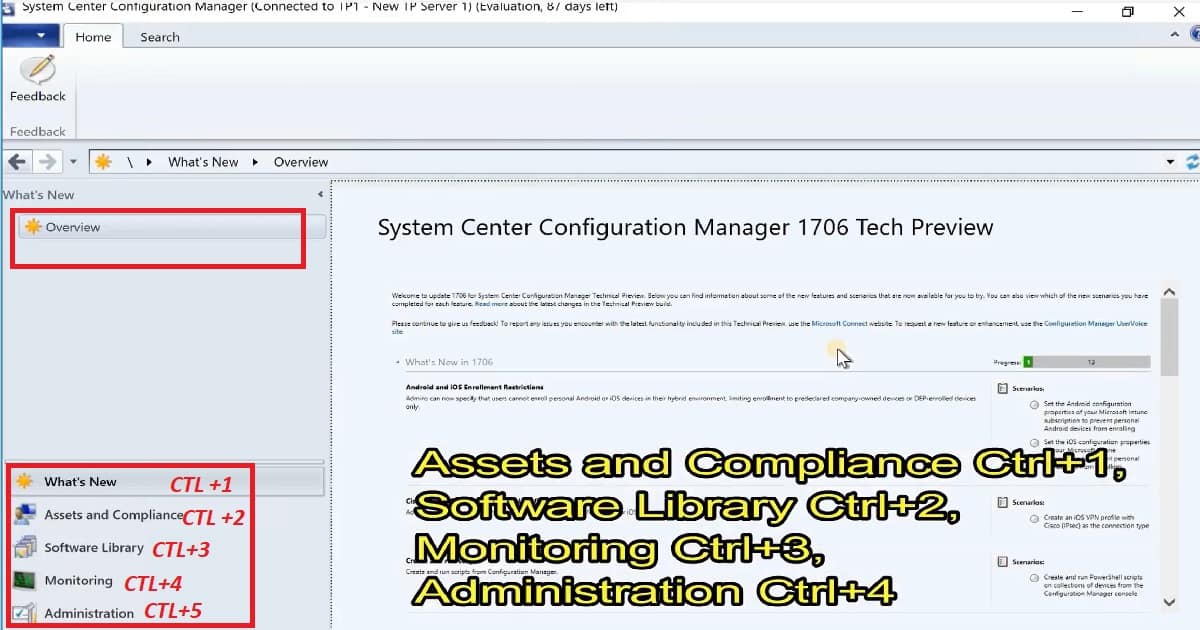
Some extra shortcut keys are available for the SCCM CB Preview 1706 version (I’ve shown them in the video and the screen capture below).
- Assets and Compliance – Ctrl+1
- Software Library – Ctrl+2
- Monitoring – Ctrl+3
- Administration – Ctrl+4
| SCCM Keyboard shortcut | Workspace |
|---|---|
Ctrl + 1 | Assets and Compliance |
Ctrl + 2 | Software Library |
Ctrl + 3 | Monitoring |
Ctrl + 4 | Administration |
Ctrl + M Sets focus on the main (central) pane. As I showed in the video, you can select each computer using the CTL + M SCCM CB console keyboard shortcut.
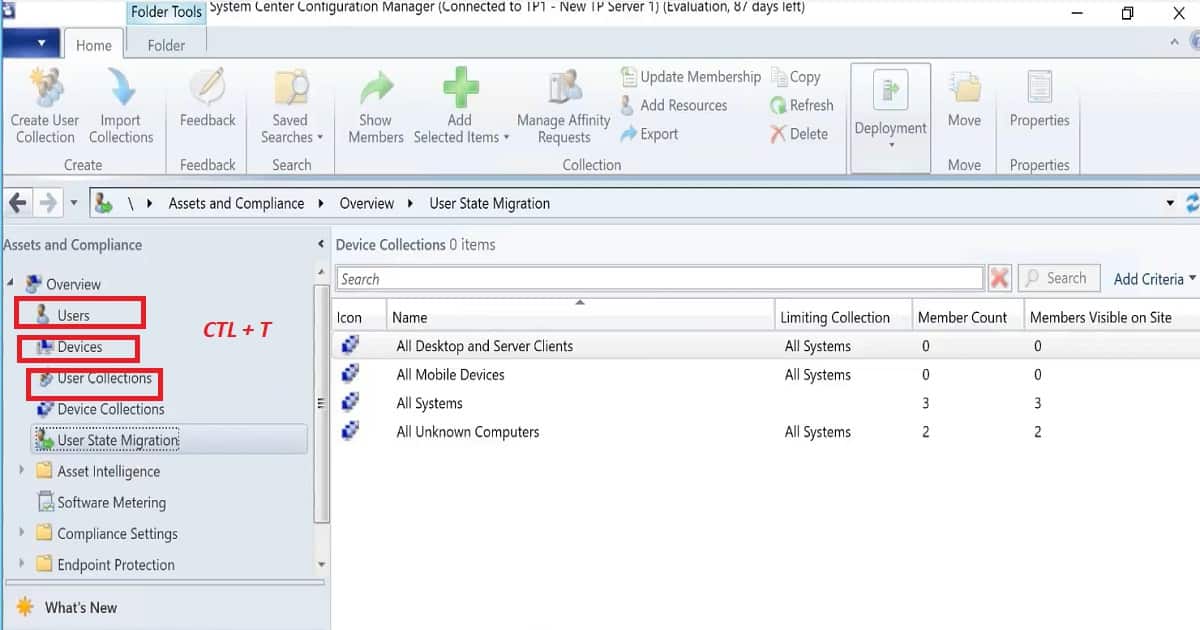
As I showed in the video, the left pane selects users, devices, and user collections. Ctrl + T – Sets focus on the navigation pane’s top node. If the focus was already in that pane, the focus is set to the last node you visited.
| SCCM Keyboard Shortcut | Purpose – Use of Shortcuts |
|---|---|
Ctrl + M | Set the focus on the main (central) pane. |
Ctrl + T | Set the focus to the top node in the navigation pane. If the focus was already in that pane, the focus is set to the last node you visited. |
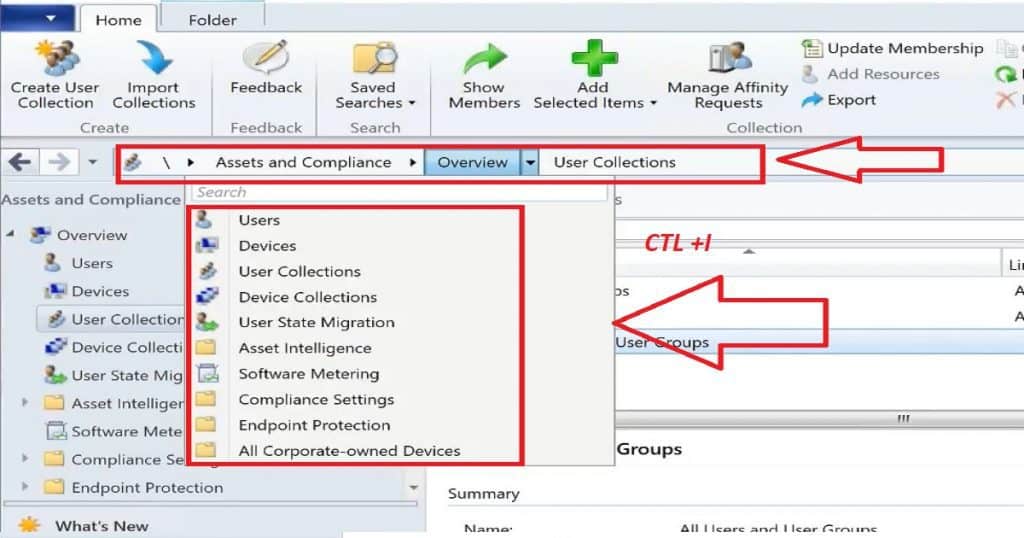
Ctrl + I | Set the focus to the breadcrumb bar, below the ribbon. |
Ctrl + L | Set the focus to the Search field, when available. |
Ctrl + D | Set the focus to the details pane, when available. |
Alt | Change the focus in and out of the ribbon. |
Set focus to search when the SEARCH option is available. Ctrl + L Sets focus on the Search field when available. I have shown this search in the embedded video. Press the CTL + T keyboard shortcut to focus on search and start searching computers/users/Site servers, etc.
Focus Summary Details pane to Ctrl + D. Sets focus to the details pane when available. Press the ALT button from the keyboard to change focus in and out of the ribbon.
Ctrl + I – Sets focus on the breadcrumb bar below the ribbon. This shortcut will focus on the path, for example, \Assets and Compliance\Overview\Users.
CMPivot Console Keyboard Shortcuts
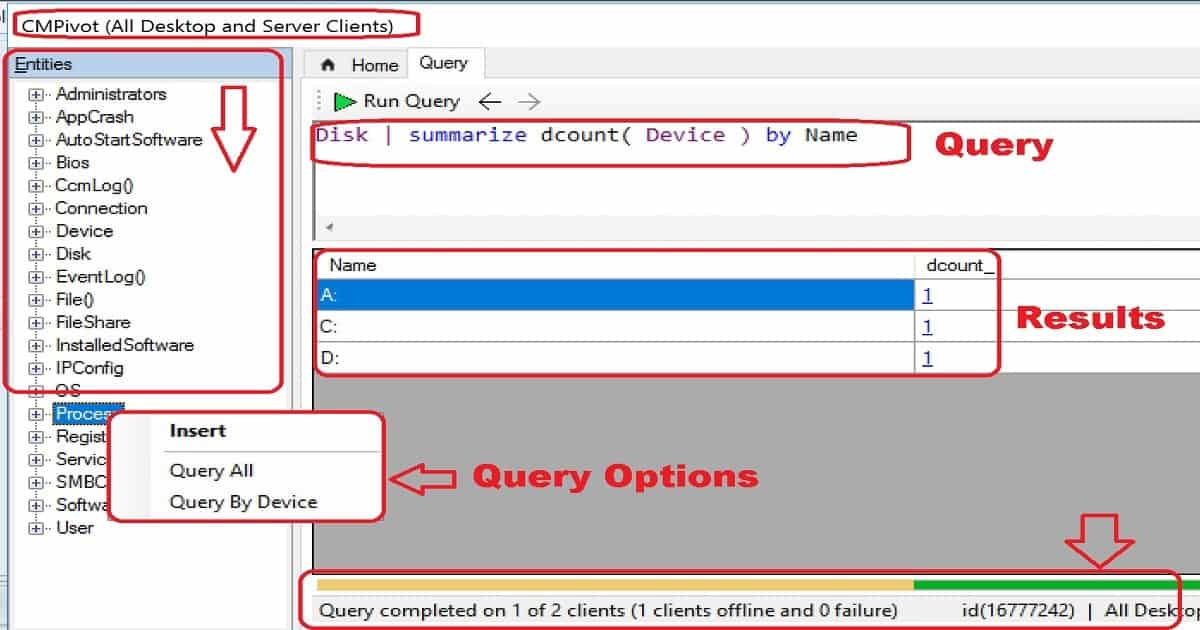
Let’s check the CMPIvot Keyboard shortcuts available to make the SCCM admin’s life easy. The table below shows the CMPivot Console Keyboard Shortcuts.
| Keyboard shortcut | Purpose |
|---|---|
Ctrl + 1 | Set the focus on the first tab. |
Alt + < | To back to the address |
We are on WhatsApp now. To get the latest step-by-step guides, news, and updates, Join our Channel. Click here. HTMD WhatsApp.
Author
Anoop C Nair is Microsoft MVP! He is a Device Management Admin with more than 20 years of experience (calculation done in 2021) in IT. He is a Blogger, Speaker, and Local User Group HTMD Community leader. His main focus is on Device Management technologies like SCCM 2012, Current Branch, and Intune. He writes about ConfigMgr, Windows 11, Windows 10, Azure AD, Microsoft Intune, Windows 365, AVD, etc.




Discussion