






Server 2016 Domain Join Error Code 0x0000267C Windows Server Troubleshooting Issues on Domain Join
Let’s discuss the Server 2016 Domain Join Error Code 0x0000267C Windows Server Troubleshooting Issues on Domain Join. Editing a host file can be dangerous, and it can be misleading. This is the first lesson of this post.
We will see how to perform the domain join operation for Server 2016 and How to avoid Server 2016 Domain Join Error Code 0x0000267C. I was not able to join the server to the domain.
I tried using the domain’s NetBIOS name to complete FQDN without success. However, I was confident that the DNS server was configured correctly on the newly built server. The troubleshooting and domain join processes are explained in the video here.
The DC server was unreachable from the newly built server because of firewall configurations on the local server. Disabling the firewall on the server resolved the reachability issue.

The Basic Checks We Need to Perform before Joining a Server 2016 to Domain are
- Ping DC server with IP
- Ping DC server with a short name
- Ping DC server with FQDN
- Remove the host file entries if there is an entry with the domain name or DC server name.
- Check that the required Firewall ports are opened between the member and DC servers.
- Check the antivirus software (Symantec/MacAfee) is NOT blocking the communication.
- SUG Software Update Group Patch Deployments SCCM Report using SQL Query
- How to Create Deploy New Software Update Patch Package Using SCCM | ConfigMgr
- How to Add New Patches to Existing Software Update Group|SCCM
Table of Contents
How to Domain Join Server 2016 Error Code 0x0000267C
This video provides a comprehensive guide on resolving the Domain Join error code 0x0000267C on Windows Server 2016. This error typically indicates issues with DNS configuration or network connectivity, which are crucial for successfully joining a server to a domain.
Server 2016 Domain Join Error Code 0x0000267C Windows Server Troubleshooting Issues on Domain Join
I received the following domain join error on the server 2016 machine. An Active Directory Domain Controller (AD DC) for the domain “Intune.com” could not be contacted. Ensure that the domain name is typed correctly. If the name is correct, click details for troubleshooting information. I made sure that the domain name was correctly entered.
C:\Windows\Debug\dcdiag.txt is the log file that can provide more details when you have any issues with domain join. I checked the DCDIAG.log file, and it gave more information about the domain join issue.
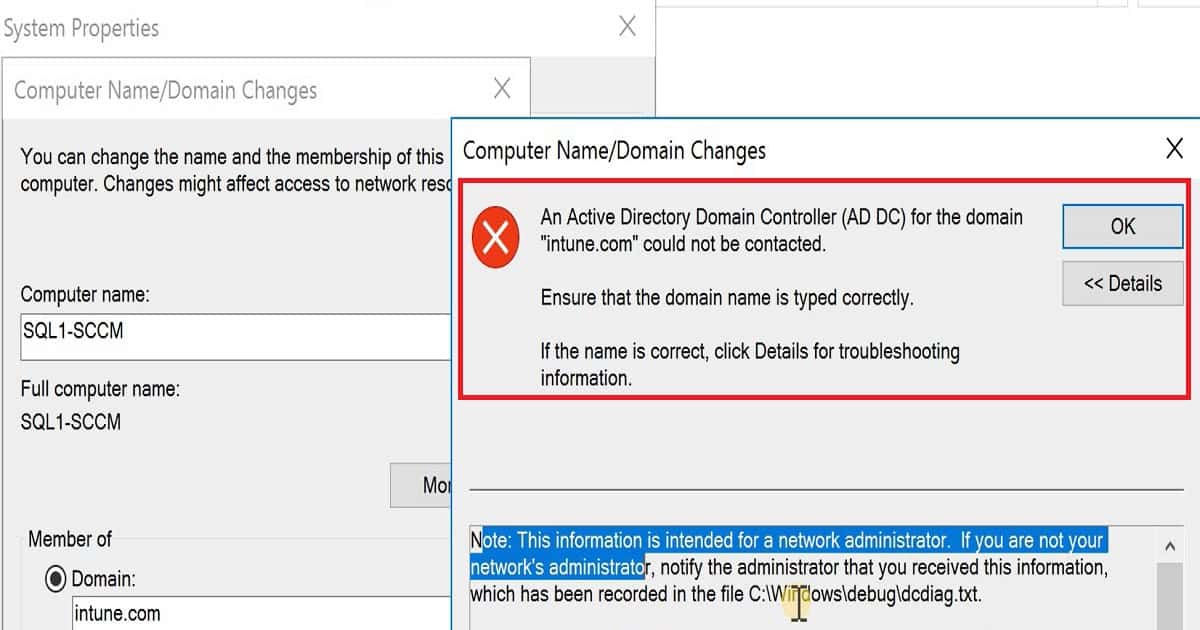
Domain Join Error Details
Let’s discuss the details of the Domain Join Error. The screenshot below will provide more information to help you understand the issue better. This error typically occurs when there are problems with DNS configuration or network connectivity, which are essential for successfully joining a Windows Server 2016 to a domain.
- The screenshot will highlight the specific error messages and details that can guide us in troubleshooting and effectively resolving the problem.
An error occurred when DNS was queried for the service location (SRV) resource record used to locate an Active Directory Domain Controller (AD DC) for domain "intune.com".
The error was: "No DNS servers configured for local system."
(error code 0x0000267C DNS_ERROR_NO_DNS_SERVERS)
The query was for the SRV record for _ldap._tcp.dc._msdcs.intune.com
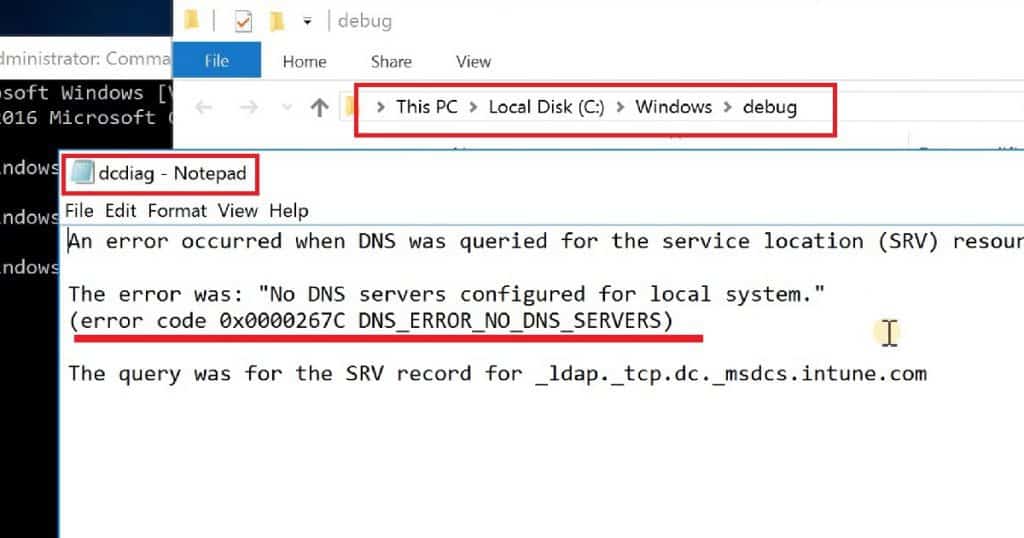
Resolution
The domain name was correctly mentioned during the server 2016 domain join process. Also, the server can ping the domain and DC. However, when I checked the host file of the local 2016 server, I found some domain name mapping entries. I deleted those entries from the host file.
Also, I checked the IPCONFIG information on the server and noticed that the DNS server IP was not configured. Rather, it was configured as a gateway device IP. I removed the gateway IP and correctly configured the DNS server IP in the IPCONFIG utility.
We are on WhatsApp now. To get the latest step-by-step guides, news, and updates, Join our Channel. Click here. HTMD WhatsApp.
Author
Anoop C Nair is Microsoft MVP! He is a Device Management Admin with more than 20 years of experience (calculation done in 2021) in IT. He is a Blogger, Speaker, and Local User Group HTMD Community leader. His main focus is on Device Management technologies like SCCM 2012, Current Branch, and Intune. He writes about ConfigMgr, Windows 11, Windows 10, Azure AD, Microsoft Intune, Windows 365, AVD, etc.




Discussion