






SCCM Reboot Task for Collection of Devices via Fast Channel Push Notification
Let’s discuss the SCCM Reboot Task for Collection of Devices via Fast Channel Push Notification. SCCM CB 1708 version added a new feature called the “Reboot” action to the fast channel push client notification.
SCCM CB preview version 1708 has been released. I have the pleasure of upgrading my lab environment to this preview version.
We can use the SCCM console to identify client devices that are pending reboot. Once identified, the devices can be restarted using a client notification action.
This post will show the Video Experience of the SCCM Reboot Task for the Collection of Devices via Fast Channel Push Notification. The YouTube video tutorial is here.

Table of Contents
- Suppress SCCM Task Sequence Notifications
- Disable SCCM Task Sequence Deployment
- Run SCCM Task Sequence with High Performance Power Plan | ConfigMgr
- SCCM Customize Windows Out of Box Experience OOBE Using ConfigMgr
Reboot Task via Fast Channel SCCM CB 1708
This video provides all the details of the Reboot Task via Fast Channel SCCM CB 1708. The video details are shown below.
How to Restart Computers from the SCCM Console – SCCM Reboot Task for Collection of Devices via Fast Channel Push Notification
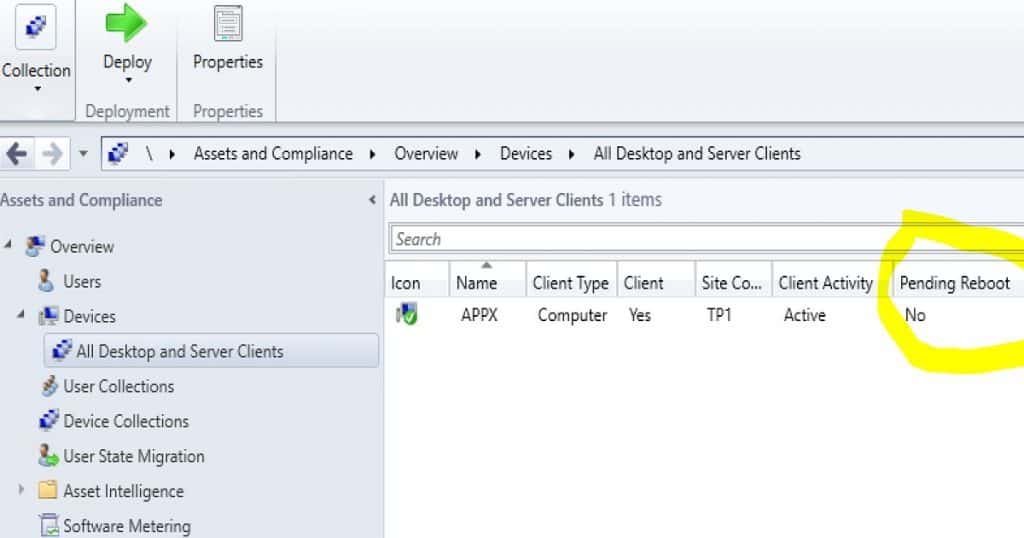
Using the SCCM CB 1708 preview version, you can restart the computers in a device collection. The first step is to identify the computers in a “pending restart” state.
How Do you Find Out the Restart/Reboot of Pending Devices?
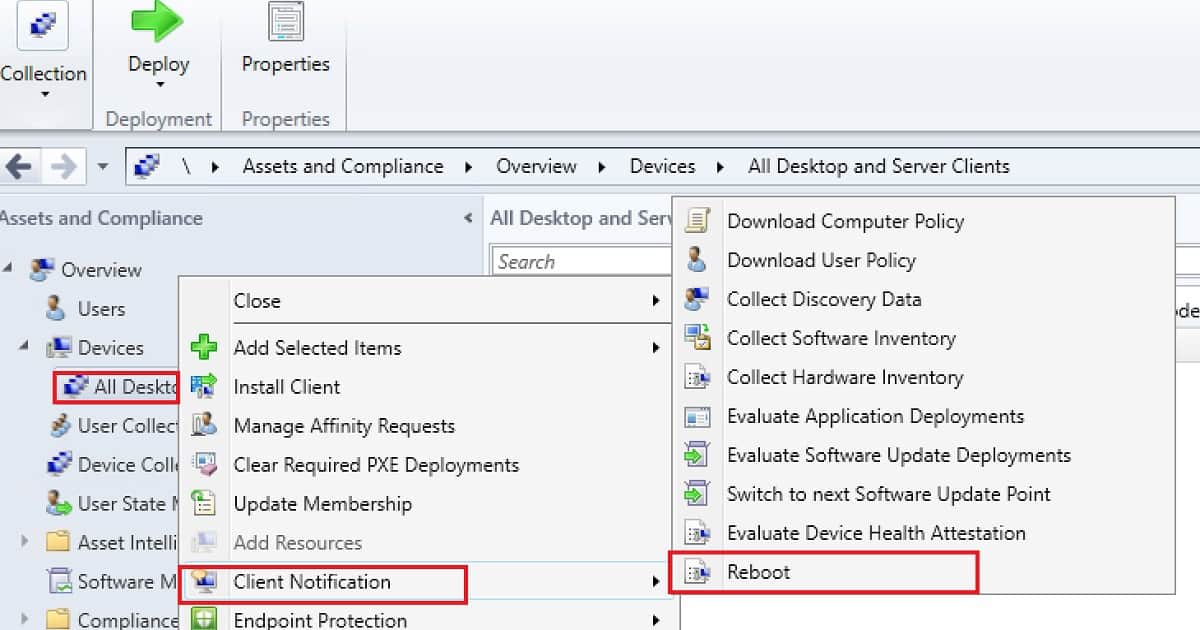
Once restart pending devices are identified, right-click on collection or device to initiate the REBOOT action. This reboot action is created via the FAST client notification channel.
We don’t have a reboot script that can be deployed to machines. Most importantly, this “REBOOT” action is triggered via the PUSH channel of SCCM CB client notification.
| SCCM Reboot Task for Collection of Devices |
|---|
| Assets and Compliance |
| Overview |
| Devices |
| All Desktop and server clients |
| Client Notification |
| Reboot |
Restart Action Failed on a Client Device?
I initiated a reboot action for the Pending reboot machine, and it didn’t work. Why? I checked the log files and ConfigMgr applet on a Windows 10 machine.
I realized that I had upgraded the SCCM CB server version (5.00.8549.1000) to 1708, but we didn’t upgrade the Windows 10 machine’s SCCM client version (5.00.8542.1000) to 1708.
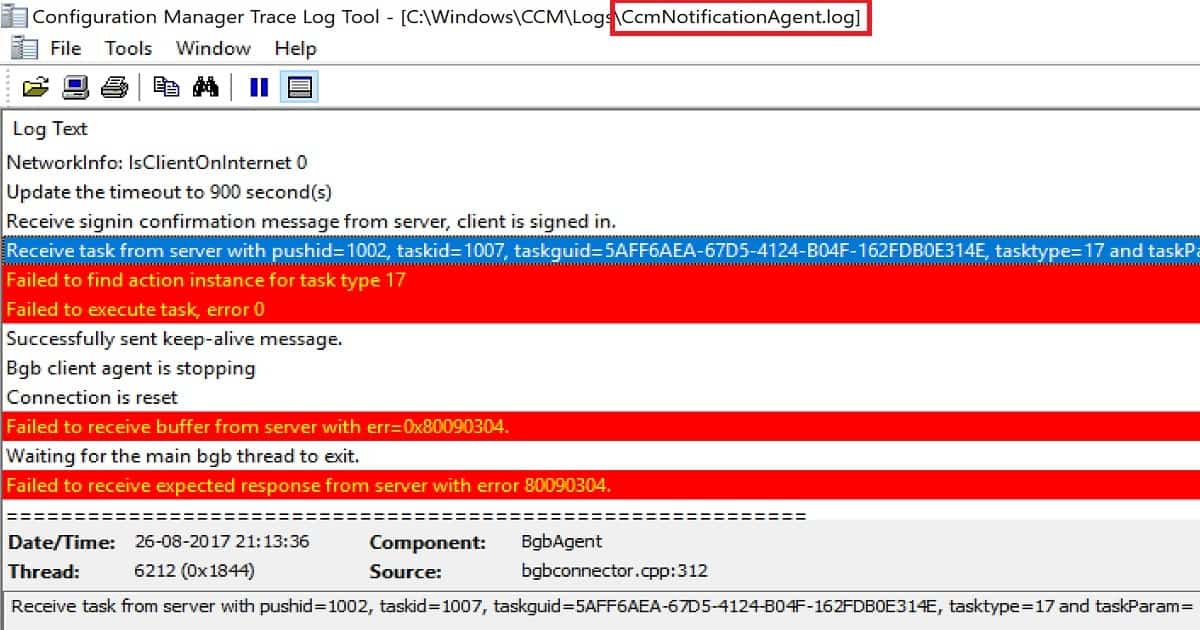
CcmNotificationAgent.log is the best log to check for troubleshooting fast-channel push notification tasks.
You can check the status of the REBOOT action in the monitoring workspace, the “Client Operations” node in the SCCM console.
The operation name for the REBOOT action is Task 17! But I’m sure this will be changed in the production version of the release. The error logging can be improved because the error message was “Failed to execute task, error 0.”
CcmNotificationAgent LOG with Errors
<![LOG[NetworkInfo: IPAddress 20.20.20.23,fe80::b09e:95a3:172a:4212]LOG]!><time="21:07:18.726-330" date="08-26-2017" component="BgbAgent" context="" type="1" thread="6212" file="bgbconnector.cpp:124">
<![LOG[NetworkInfo: IPSubnet 255.0.0.0,64]LOG]!><time="21:07:18.726-330" date="08-26-2017" component="BgbAgent" context="" type="1" thread="6212" file="bgbconnector.cpp:147">
<![LOG[NetworkInfo: AccessMP SCCMTP1.Intune.com]LOG]!><time="21:07:18.757-330" date="08-26-2017" component="BgbAgent" context="" type="1" thread="6212" file="bgbconnector.cpp:155">
<![LOG[NetworkInfo: IsClientOnInternet 0]LOG]!><time="21:07:18.757-330" date="08-26-2017" component="BgbAgent" context="" type="1" thread="6212" file="bgbconnector.cpp:159">
<![LOG[Update the timeout to 900 second(s)]LOG]!><time="21:07:18.757-330" date="08-26-2017" component="BgbAgent" context="" type="1" thread="6212" file="bgbtcpclient.cpp:916">
<![LOG[Receive signin confirmation message from server, client is signed in.]LOG]!><time="21:07:18.851-330" date="08-26-2017" component="BgbAgent" context="" type="1" thread="6212" file="bgbconnector.cpp:221">
<![LOG[Receive task from server with pushid=1002, taskid=1007, taskguid=5AFF6AEA-67D5-4124-B04F-162FDB0E314E, tasktype=17 and taskParam=]LOG]!><time="21:13:36.115-330" date="08-26-2017" component="BgbAgent" context="" type="1" thread="6212" file="bgbconnector.cpp:312">
<![LOG[Failed to find action instance for task type 17]LOG]!><time="21:13:36.115-330" date="08-26-2017" component="BgbAgent" context="" type="3" thread="6212" file="bgbcontroller.cpp:682">
<![LOG[Failed to execute task, error 0]LOG]!><time="21:13:36.115-330" date="08-26-2017" component="BgbAgent" context="" type="3" thread="6212" file="bgbcontroller.cpp:646">
Results of Successful REBOOT PUSH Task
Upgraded the client version to 5.00.8549.1000 and reinitiated the REBOOT task by right-clicking on a collection – Client Notification – Reboot. This action created a new task for the devices (pending reboot) in that collection through SCCM PUSH fast channel notification.
What is the architecture flow of SCCM CB Fast channel push notification? I have explained fast channel architecture flow in the post here.
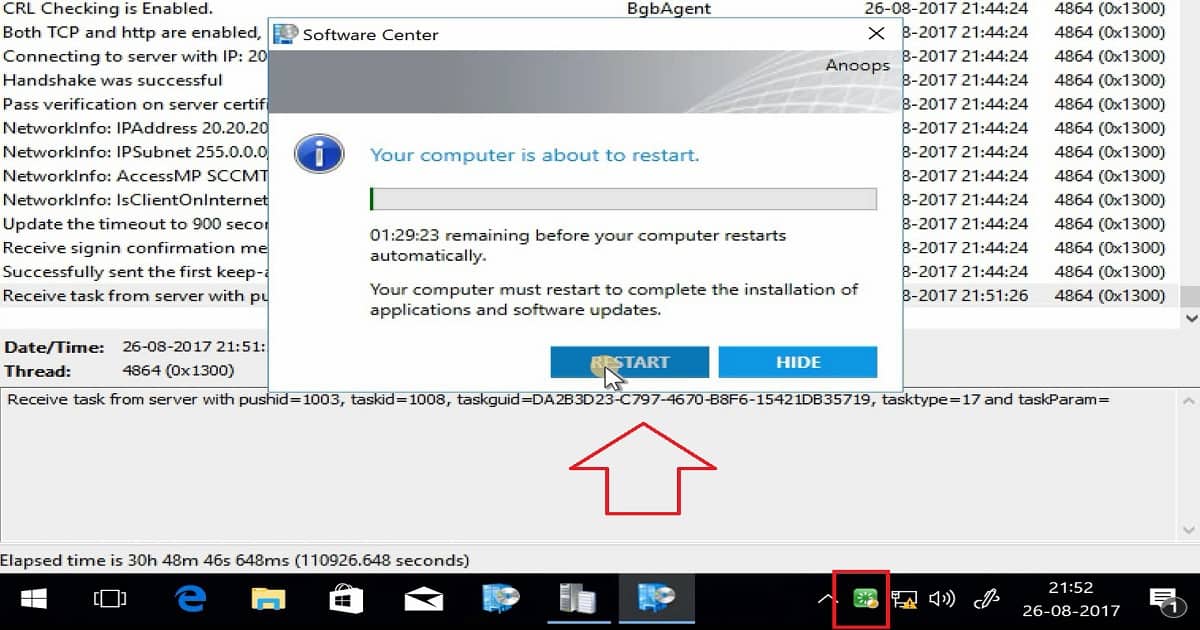
The SCCM fast channel push client notification service will immediately notify the client about the task assigned. However, the client won’t be restarted immediately after receiving the task from the notification server component. The SCCM client will check the policy settings for “Computer Restart” and schedule the restart per the policy.
The computer restart policy is 90 minutes by default, and you can customize this policy from the client settings tab. The reboot or restart notification is very well integrated with the “Software Center” experience, which is a great advantage of this feature.
Resources
- Update 1708 for Configuration Manager Technical Preview Branch – Available Now! – here
- Capabilities in Technical Preview 1708 for System Center Configuration Manager – here
- Video Guide to Troubleshoot SCCM CB Fast Channel Notification Issues – here
We are on WhatsApp now. To get the latest step-by-step guides, news, and updates, Join our Channel. Click here. HTMD WhatsApp.
Author
Anoop C Nair is Microsoft MVP! He is a Device Management Admin with more than 20 years of experience (calculation done in 2021) in IT. He is a Blogger, Speaker, and Local User Group HTMD Community leader. His main focus is on Device Management technologies like SCCM 2012, Current Branch, and Intune. He writes about ConfigMgr, Windows 11, Windows 10, Azure AD, Microsoft Intune, Windows 365, AVD, etc.




Discussion