






Let’s discuss about the Windows Update High-Level Architecture. The Windows Update High-Level Architecture diagram explains how Windows Update works behind the scenes.
It is a structured plan involving different components to keep your computer updated. The architecture helps you to show how the Windows updates work together to keep your system secure and running smoothly.
This post will give you a detailed overview of Windows Update High-Level Architecture. Based on the Windows Update High-Level Architecture diagram, different components work together to provide a perfect update experience.
Windows Update is a service provided by Microsoft for Windows operating systems. It is like a built-in tool that helps keep your computer secure and up-to-date. Windows Update is a helpful assistant that takes care of your computer’s performance by keeping it updated with the latest software enhancements.


- 2024 January KB5034123 KB5034121 Windows 11 Patches and 0 Zero-Day Vulnerability
- 2024 January KB5034122 Windows 10 Patches and 0 Zero-Day Vulnerability
- 2023 December KB5033375 KB5033369 Windows 11 Patches and 1 Zero-Day Vulnerability
- Windows 10 KB5021233 Patch Tuesday December 2022
How Does Windows Update Benefit for your Computer?
Windows Update, a service by Microsoft, is like a built-in tool that enhances your computer’s security and performance by ensuring it stays up-to-date with the latest software improvements.
Windows Update High-Level Architecture
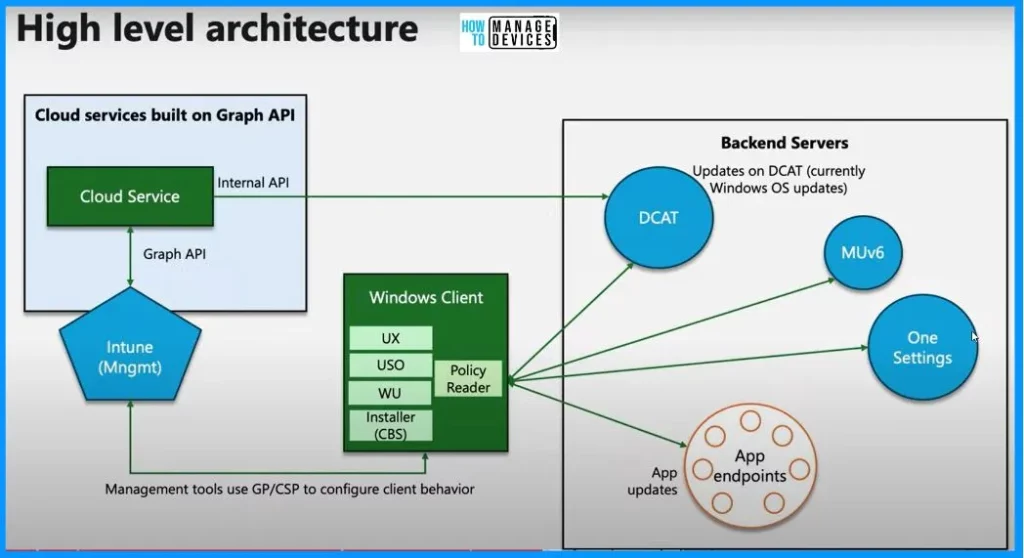
The diagram below shows that the Windows update high-level architecture. There are 2 parts in the high-level architecture: one is Cloud services built on Graph API, and the other is Backend servers. Intune is a tool for admins to set rules for how things should work in a company.
- Intune talks to the cloud service using the graph API, which is like a language for computers.
- This Cloud service is like a messenger connecting to DCAT, a place where updates are kept.
- It is like a store for updates. When your computer needs an update, it checks DCAT to find and get it.
- So, Intune helps to set rules; the Cloud service passes messages, and DCAT stores the updates.
- Intune sets rules, the Cloud service passes messages, DCAT stores updates, and the Windows client team ensures your computer stays updated and secure.
| Windows Client | Backend Servers |
|---|---|
| UX | DCAT |
| USO | MUv6 |
| WU | One Settings |
| Installer (CBS) | App Endpoints |
| Policy Reader |
Windows Update System Components
Let’s discuss about the Windows Update System components. The below table helps you to show the Windows Update system components. The list below shows the Windows Client Policy Reader options.
- UX (User Experience) – Shows update notifications and settings.
- USO (Update Stack Orchestrator) – Coordinates the update process.
- WU (Windows Update) – Actually downloads and installs updates.
- CBS (Component-Based Servicing) – Installer.
| Windows Update High Level Architecture Component | Used to |
|---|---|
| Intune | Helps configure policies for the organization. |
| Cloud Service | Connector between Intune and DCAT. |
| DCAT | Update storage |
| Windows Client Component | Takes care of updates on your computer |
Resources
(142) Troubleshooting Windows updates – YouTube
We are on WhatsApp. To get the latest step-by-step guides and news updates, Join our Channel. Click here – HTMD WhatsApp.
Author
About the Author – Vidya is a computer enthusiast. She is here to share quick tips and tricks with Windows 11 or Windows 10 users. She loves writing on Windows 11 and related technologies. She is also keen to find solutions and write about day-to-day tech problems.




Discussion