






Configuration Manager SCCM CB Preview 1711 Upgrade New Features ConfigMgr
This post and video tutorial will cover the SCCM CB preview 1711 upgrade and new features. This is not a production version of SCCM CB.
Hence, we are not supposed to install this version in production environments. SCCM CB 1711 is the preview version and should be installed only in a lab environment.
The preview version does not allow us to install CAS and secondary servers, and the prerequisite for installing the SCCM CB 1711 preview version has not changed.
The SCCM CB update and servicing process are the same as before. Once the latest version of the preview is released, the update will be available in the SCCM console.

Table of Contents
- SCCM CB Release has Changed 2 Versions per Year | March and September
- Changes to Windows Client OS Release Cycle and Moment Feature Drop Control
- SCCM CB 1803 Review of Upgrade and Features Configuration Manager ConfigMgr
What is the Importance of SCCM Preview Releases?
The SCCM CB preview version is similar to the Windows Insiders program, which helps SCCM admins test the new SCCM CB features. Before installing this technical preview, you can review the limitations of the SCCM CB version.
Configuration Manager SCCM CB Preview 1711 Upgrade New Features ConfigMgr
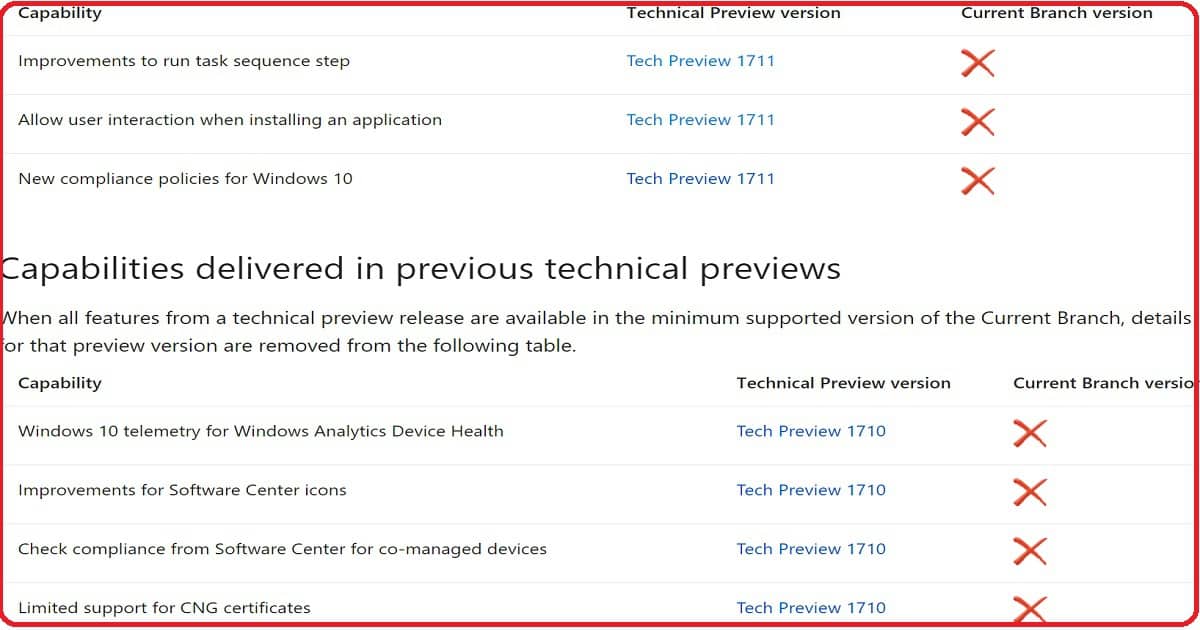
When all features from a technical preview release are available in the minimum supported version of the current branch details or that preview version is removed from the following table, shown in the screenshot below.
How to Create an SCCM CB Preview Version Lab Environment?
Have you installed an SCCM CB preview version? If not, you can download the latest baseline version of ConfigMgr SCCM CB Technical Preview. One version of the SCCM preview has a maximum validity of only 3 months (90 days).
How to Upgrade to the Latest Version of SCCM CB Preview?
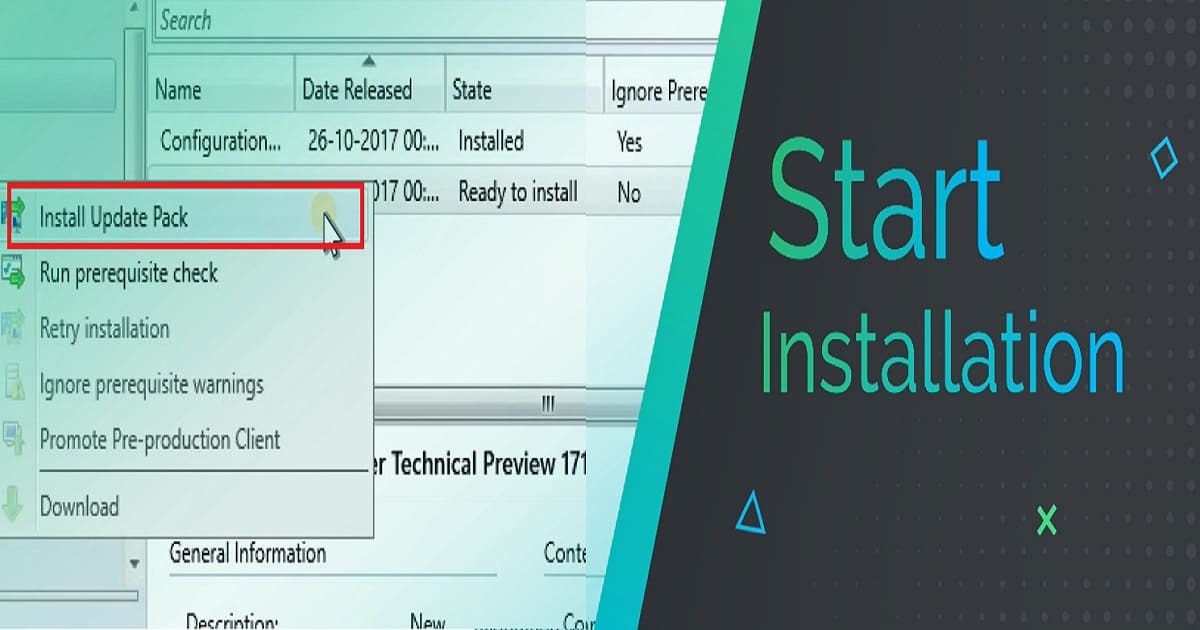
The update will automatically get downloaded to your server. Right-click on the update and select “Install Update Pack” to start the upgrade process.
| How to Upgrade to the Latest Version of SCCM CB Preview? |
|---|
| Install Update Pack |
| Run prerequisite check |
| Retry installation |
| Ignore prerequisite warnings |
| Promote Pre-production Client |
| Download |
New Features of SCCM CB 1711 Preview Version
Following are the three highlighted features of the SCCM CB 1711 preview version. But, Ronni has blogged about another exciting feature in his blog post. More details about that “SCCM: Enable Desktop Clients as PXE Servers.”
- Improvements to run task sequence step
- Allow user interaction when installing an application
- New compliance policies for Windows 10
Nesting of Task Sequence In the task sequence editor, click Add, select General, and click Run Task Sequence. Click Browse to choose the child task sequence.
Allow user interaction when installing an application. You can allow an end-user to interact with an application installation while running the task sequence.
During the task sequence progress, the application installation interface appears on the target end-user device. The task sequence progress pauses until the end-user completes the application installation workflow.
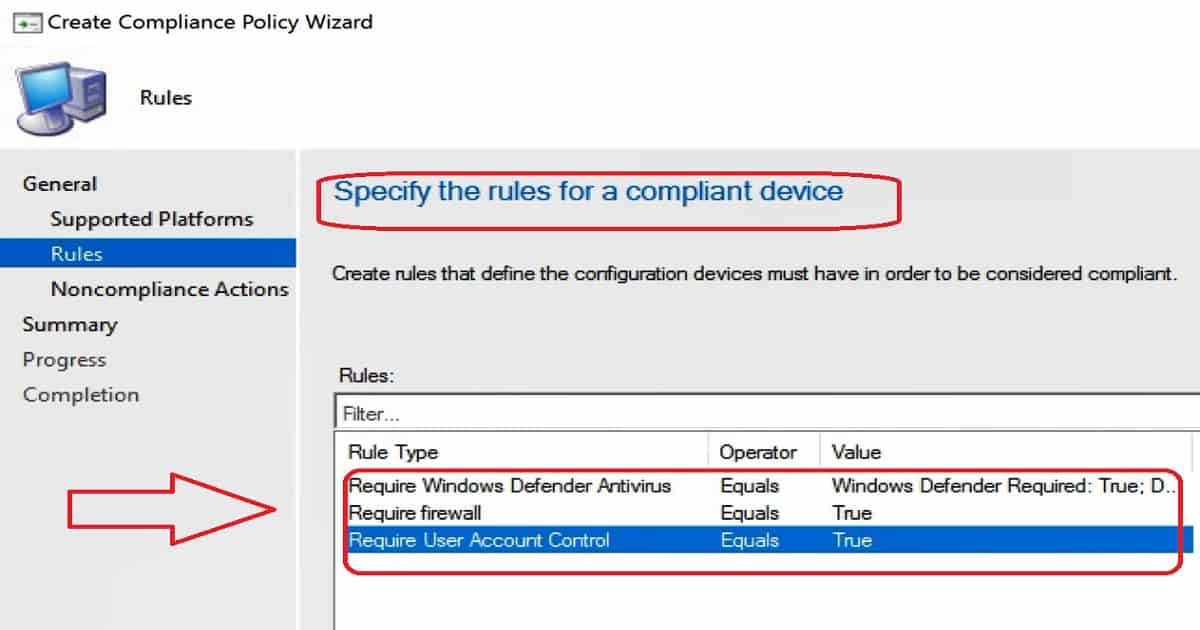
New compliance policy options for Windows 10: You can check whether the Firewall software is enabled on Windows 10 machines. If not enabled, you can block access to company resources. You can also check whether UAC is enabled on Windows machines.
If not enabled, you can block access to company resources. Defender verification is also possible via Windows 10 compliance policies through the SCCM console.
Resources
Capabilities in Technical Preview 1711 for System Center Configuration Manager
We are on WhatsApp now. To get the latest step-by-step guides, news, and updates, Join our Channel. Click here. HTMD WhatsApp.
Author
Anoop C Nair is Microsoft MVP! He is a Device Management Admin with more than 20 years of experience (calculation done in 2021) in IT. He is a Blogger, Speaker, and Local User Group HTMD Community leader. His main focus is on Device Management technologies like SCCM 2012, Current Branch, and Intune. He writes about ConfigMgr, Windows 11, Windows 10, Azure AD, Microsoft Intune, Windows 365, AVD, etc.




Discussion