






Let’s Discuss the Create Summary Report for Intune Assignment Filters. Microsoft Intune has the best surface as a powerful solution for managing devices, applications, and policies across organizations. One of its highly impactful features is Assignment Filters capability.
The Assignment filters in Intune are the best feature for improving the performance and flexibility of your Intune assignments. You can use filters to target policies to specific devices or apps based on your own rules. Filters help you limit a policy’s reach to only the relevant devices or apps.
With this assignment filter, you can assign a configuration profile or an app to all devices with this filter in include mode. You can also use filters to assign a policy only to devices that run a specific OS version or to apps from a specific manufacturer.
Intune Assignment Filters are a powerful and helpful feature that can help IT admins optimize their Intune workloads and achieve their device and app management goals. Intune Assignment Filters can be used for both managed devices and managed apps.

- Intune Supports Assignment Filters for Android AOSP
- MEM Intune: Create Assignment Filters for Azure Virtual Desktop Single Session Windows 10 | AVD
Create Summary Report for Intune Assignment Filters
Some organizations may quickly reach the maximum number of Assignment Filters per tenant. A report of Assignment Filters and their details can help IT Admins. The report that shows all the Assignment Filters, their rules, and their assignments can help IT Admins manage them better.
The PowerShell script generates the report using Graph API. The script saves the data as HTML for review and CSV for analysis. You can set the $ReportPath in Line #15 to choose where to save the three files.

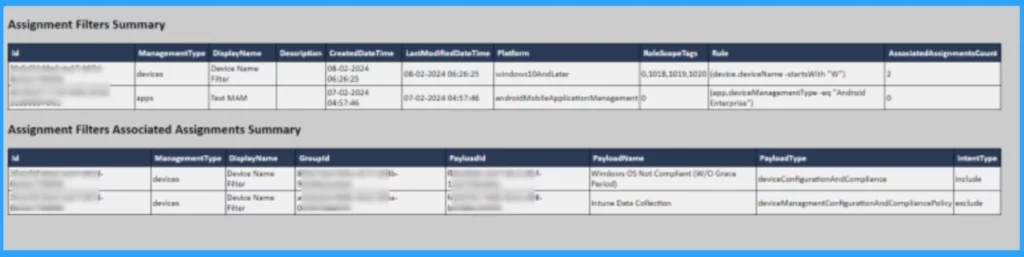
The report will show 2 tables: one with a summary of all Assignment Filters and their properties and another with the details of each assignment for each filter.
| Assignment Filters Summary | Associated Assignments Summary |
|---|---|
| Filter type | Payload id |
| Platform | Payload name |
| Rule | payload type |
| Assignments count |
- Check Associated Assignments for Intune Filters
- Intune Filters for Assigning Apps Policies and Profiles In Intune Portal | Endpoint Manager
Reference
If you want to create a report, please refer to the site Intune: Assignment Filters Summary Report
We are on WhatsApp now. To get the latest step-by-step guides, news, and updates, Join our Channel. Click here. HTMD WhatsApp.
Author
Krishna. R is a computer enthusiast. She loves writing about Windows 11 and Intune-related technologies and sharing her knowledge, quick tips, and tricks about Windows 11 or 10 with the community.


Discussion