






Overview Windows 10 Windows 11 Co-Management with Intune and SCCM
Let’s discuss the Overview of Windows 10 and Windows 11 Co-Management with Intune and SCCM. Co-management is another buzzword in the device management world.
What is co-management? Windows 10 or Windows 11 co-management is a dual management (with SCCM and Intune) capability available with the Windows 10 1709 version (Fall Creators Update).
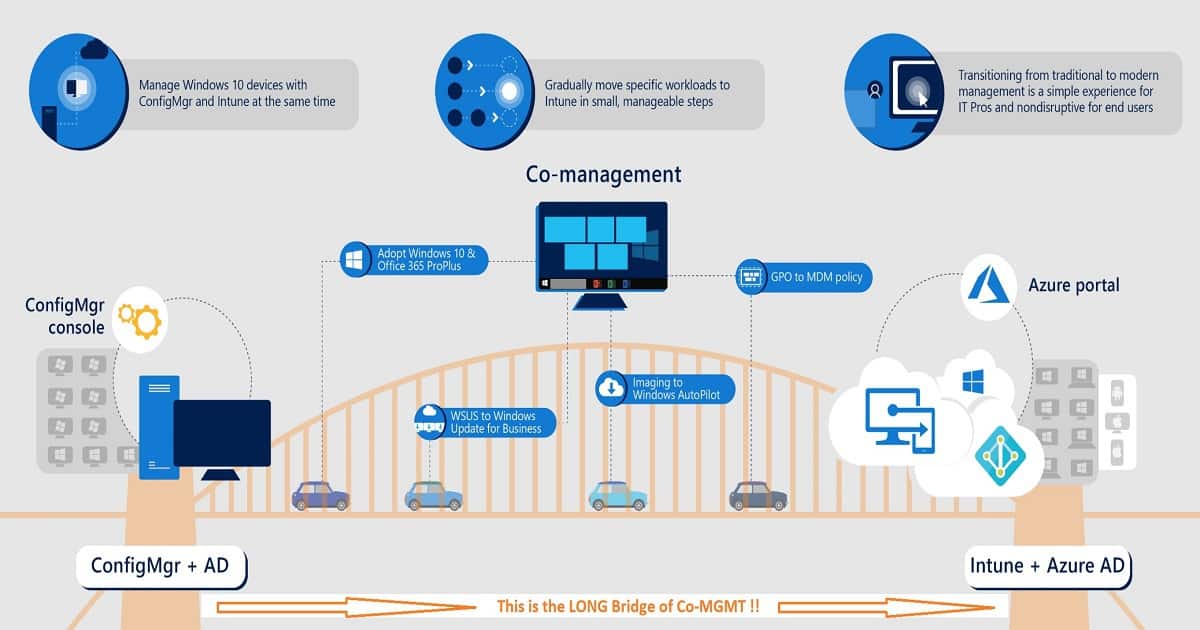
Co-management is the bridge between traditional management and modern management. Microsoft renamed the co-management node in the SCCM admin console to Cloud Attach.
In this post, we will see more details “Overview Windows 10 or Windows 11 Co-Management with Intune and SCCM.” I had a fascinating conversation with Bill Bernat about co-management, autopilot, and CMG.

Table of Contents
You can watch the E³ podcast video. This is my first interview experience!
Co-Management Related Posts
Let’s discuss the Co-Management-Related Posts. The list below helps you to show the Co-Management-Related Posts. All Co-Management Video tutorials in one post.
- Overview Windows 10 Co-Management with Intune and SCCM (This Post)
- Custom Report to Identify Machines Connected via SCCM CMG
- How to Setup Co-Management – Introduction – Prerequisites Part 1
- How to Setup Co-Management – Firewall Ports Proxy Requirements Part 2
- Setup Co-Management – AAD Connect UPN Suffix Part 3
- Setup Co-Management – CA PKI & Certificates Part 4
- Setup Co-Management Cloud DP Azure Blob Storage Part 5
- Setup Co-Management Azure Cloud Services CMG Part 6
- SCCM CMG Cloud Management Gateway Implementation Guide
- SCCM Configure Settings for Client PKI certificates Part 7
- How to Setup SCCM Co-Management to Offload Workloads to Intune – Part 8
- How to Deploy SCCM Client from Intune – Co-Management – Part 9
- End-User Experience of Windows 10 Co-Management – Part 10
Why Modern Management?
What are the problems with traditional management? Why are most organizations trying to get into modern management? It’s all about moving fast and adopting the agile scrum method.
I did a more detailed analysis of the IT industry in the Future of SCCM ConfigMgr Intune Admin Jobs post. I hope Airbnb and Uber stories will give you more thought points about modern management.
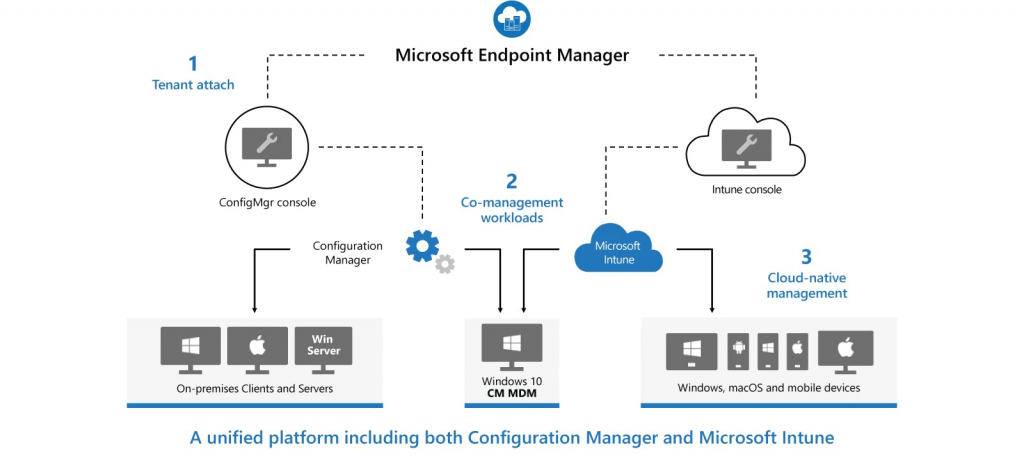
Traditional IT is designed to manage a single business-owned device that is always connected to the corporate network. However, the devices and users’ landscape have changed over the years, and IT needs to change to handle these changes in the modern world.
Modern IT management should be agile and handle multiple flavors of devices for users. It should also be able to manage cloud-managed SaaS applications. Automation, Pro-Activeness, and self-service are the other three trigger points for modern IT.
How to Move to Cloud Management?
Co-management is the transition method proposed by Microsoft to move to cloud management. In my opinion, this transition method will help organizations with tons of on-prem infrastructure.
The first step of this transition should be to co-manage Windows 10 with SCCM and Intune. Prominent organizations can’t take a big leap toward modern management. Co-management is the best approach to transformation in a controlled and iterative way.
Entry Points to Co-Management?
A more detailed explanation is available in the following post – SCCM CMG SCCM Cloud Management Gateway Workflow Scenarios 1 (anoopcnair.com).
- SCCM + Domain Joined Devices
- Intune + AAD Joined Devices
SCCM + Domain Joined Devices
Assume that your organization is already an SCCM shop, and SCCM manages all the devices. We can offload some of your SCCM workloads to Intune in this scenario.
For example
When you have a Windows 10 device that the SCCM client already manages, you can configure co-management to offload the compliance policy workload to Intune.
Setting up a compliance policy in Intune is a much better experience than in SCCM. Moreover, Intune compliance policies have some advanced controls.
After the co-management configuration, compliance policies can be deployed via Intune. We don’t need to create and implement compliance policies from SCCM.
Instead, we can use Intune to deploy compliance policies. Other workloads, like deploying Win 32 applications, can be handled through SCCM.
Intune + AAD Joined Devices
Assume that you have Intune set up and your organization has no on-prem infrastructure. The devices are already managed through Intune. Today, we have some gaps with Intune management, like Win 32 application deployment.
If your organization wants to deploy a Win 32 application with a complicated command line to an Intune-managed device, SCCM can help. This is where the second entry point of Co-management comes into the picture.
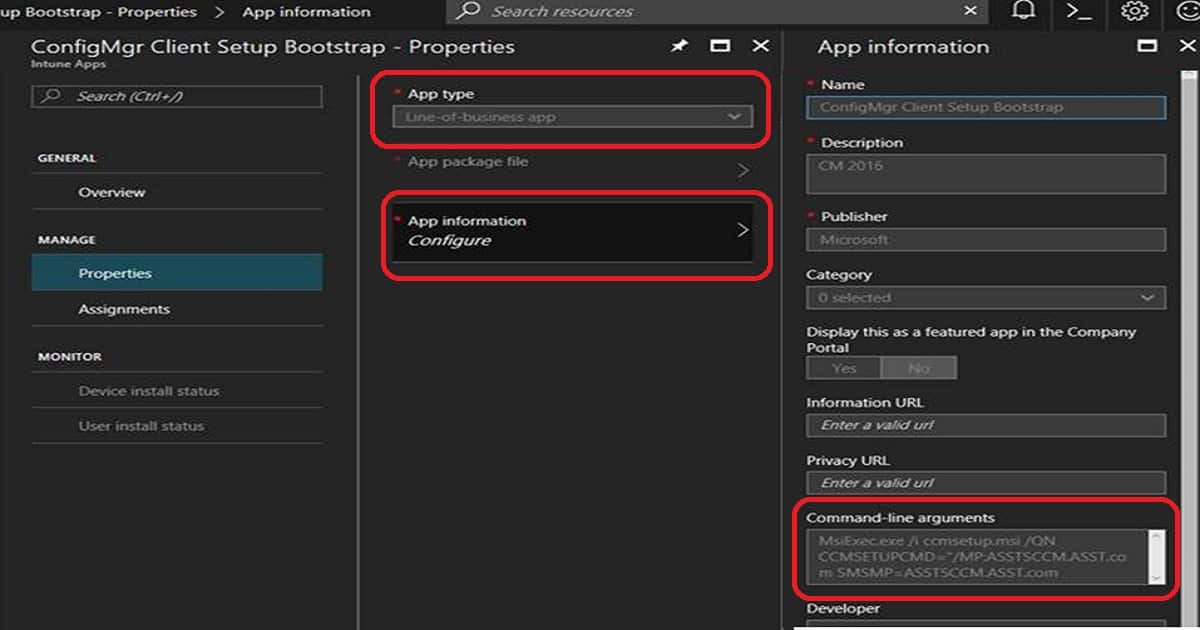
As seen in the co-management configuration video above, you can configure SCCM to co-manage that machine with Intune. Intune can deploy an SCCM client to Intune-managed devices so that the device can install Win 32 applications via SCCM.
Co-Management SCCM Pre requisites?
There is no specific prerequisite to enable co-management except some details outlined in Microsoft documents like Azure AD, Intune, etc.
| Co-Management SCCM Pre requisites? |
|---|
| Licensing |
| Configuration Manager |
| Azure Active Directory (Azure AD) |
| Microsoft Intune |
| Windows 10 |
| Permissions and roles |
When you want to use both the entry points to co-management, there are two prerequisites from the SCCM side. Those requirements are CMG (Cloud Management Gateway) and Cloud DP (CDP). CDP and CMG are platform-as-a-service (PaaS) solutions in Azure. CMG and CDP have prerequisites, which I will not cover in this blog.
NOTE! This CMG/CDP prerequisite is applicable only when you want to install the ConfigMgr/SCCM client on Intune Windows 10 devices from the internet when the client doesn’t have the SCCM on-prem infra reachability.
- Cloud Management Gateway (CMG)
- Cloud Distribution Point (CDP)
The Cloud Management Gateway is an SCCM proxy management point solution hosted in the Azure cloud service.
Example: A client from the internet contacts SCCM to get policies. The request reaches CMG, which forwards it to on-prem SCCM components. The on-prem SCCM component validates the request and provides policies via CMG.
The Cloud Distribution Point is another PaaS solution in Azure. It’s a content location in the cloud. The CDP role is similar to the on-prem Distribution Point role. Clients from the internet can easily access content from the Cloud Distribution Point.
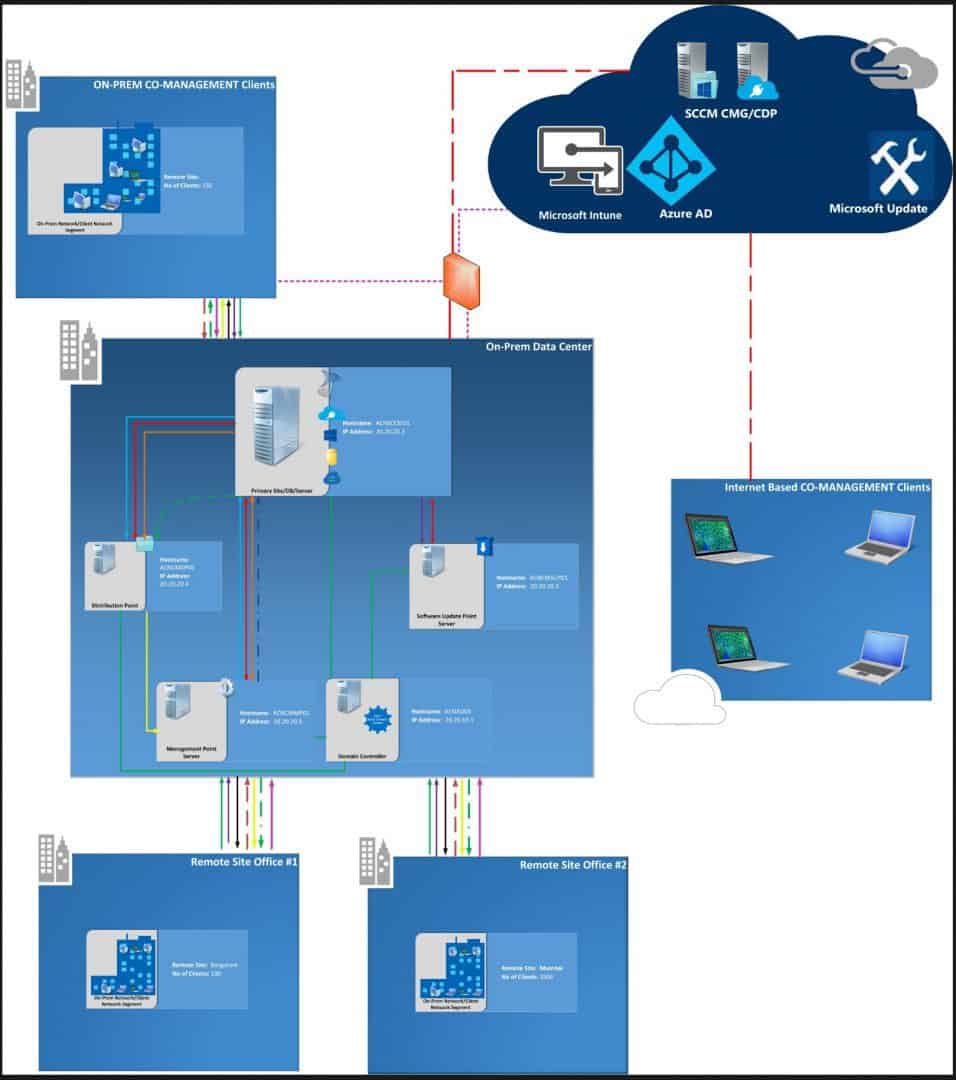
Sample High-Level Architecture of Co-Management with SCCM & Intune
Do you want to download the SCCM Architecture Visio Diagram? Check out the SCCM Architecture Visio Template Download from GitHub Throwback.
What is the Enterprise Endpoint Experts (E³) Podcast?
Adaptiva has insightful articles and videos from IT industry experts on its website, Adaptiva Academy. The podcast is an excellent resource for video/audio interviews with SCCM, Intune, and Security experts from the industry.
Bill is an excellent host of Adaptiva’s E³ podcasts. He is earnest in all his interviews. I had a unique experience being his guest for this month’s Enterprise Endpoint Experts (E³) Podcast.
Resources
Plan for the cloud management gateway in Configuration Manager

Co-Management - Ask Microsoft Anything (AMA) about Co-Management

How to Setup SCCM CB and Intune Co-Management

Co-management of Windows 10 and Office 365 ProPlus with SCCM and Intune
We are on WhatsApp now. To get the latest step-by-step guides, news, and updates, Join our Channel. Click here. HTMD WhatsApp.
Author
Anoop C Nair is Microsoft MVP! He is a Device Management Admin with more than 20 years of experience (calculation done in 2021) in IT. He is a Blogger, Speaker, and Local User Group HTMD Community leader. His main focus is on Device Management technologies like SCCM 2012, Current Branch, and Intune. He writes about ConfigMgr, Windows 11, Windows 10, Azure AD, Microsoft Intune, Windows 365, AVD, etc.




Hi Anoop, I have a question I hope you can answer. If we have on-prem AD joined Windows 10 device and have setup co-management do we have to configure (1) “hybrid Azure Active Directory joined devices” or (2) configure the GPO “Enroll a Windows 10 device automatically using Group Policy” or (3) does the ConfigMgr client do this and registers the device?
Secondly when we have on-prem AD joined Windows 10 device and have setup full co-management with client management gateway and cloud distribution point, and the device is off network for more than 30 days does the computer account/password expire or is this mitigated by the management gateway/internet facing?
StaffHey, I will try to answer. Are you using AAD Connect to sync on prem AD and AAD? That is the first requirement. I would prefer to use SCCM client policies instead of GPO. Do you have ADFS then, you may need perform some action on ADFS side also.
More details https://docs.microsoft.com/en-us/azure/active-directory/device-management-hybrid-azuread-joined-devices-setup
Are you looking for SSO experience for user? If so following article has loads of details.
More details https://jairocadena.com/2016/11/08/how-sso-works-in-windows-10-devices/
Hi Anoop, Yes we have AD Connect and ADFS. But is settings up ‘hybrid azuread joined devices’ a requirement. On TechNet I read
‘When you have Windows 10 devices that are Configuration Manager clients, you can enroll these devices and enable co-management from the Configuration Manager console. Configuration Manager triggers automatic enrollment into Intune based on the Azure AD tenant information.’
Is the registration done automatic by co-management or does the admin need to trigger something in co-management or sccm client to get the device registered? Above TechNet states that configuring ‘hybrid azuread joined devices’ would not be necessary.
For the 30 days offsite/offline question, a better approach would be to do AAD join and then install sccm client for co-management right?
StaffYes, I agree. You are the best one to understand your organisational requirement. I would prefer to go with Azure AD join wherever possible.
HI Anoop,
thanks for all the useful information shared above.
could you please help me with doc or KB article to understand the work flow while doing co-management.
StaffI already have detailed documents .. Can you please let me know….what kind of flow you are looking for? My posts are exactly in the same order which I setup my lab environment for Co-management …. All Co Management Video Tutorials in one post https://www.anoopcnair.com/setup-co-management-video-tutorials/
Hi Anoop,
We have standalone both Intune and SCCM but both being standalone. But now with a new requirement I want to have co management enabled for Intune managed devices. The requirement is only for reporting purpose(to run queries and reports like s/w and h/w inventory for intune managed devices). We have DA enabled for internet clients to access on prem resources. My question is do I still need to setup CMG or Cloud DP for this requirement?
StaffI have never tested this scenario. I think you don’t require CMG when your clients are connected to on-prem SCCM MP and DP…
HI Anoop- Please send me viso for High-Level Architecture of Co-Management with SCCM & Intune if you can . I need to use it in one of my design document. I hope it would not be problem for you.
Diagram mentioned above is not clear.
Thanks in advance!
StaffMailed you…
Thanks all and Anoop for all above details it really helped . if you could Please send me visio.
StaffHere you go https://www.anoopcnair.com/download-sccm-architecture-visio/
Hi Anoop,
here is a situation where we need to move the devices and apps to Intune standalone from SCCM co-management. Could you please assist me with migration steps with detailed procedures. Since after the successful movement to Intune standalone planed to removed SCCM from our environment.
StaffHi, I explained this very quickly with the following post. You can do it in many ways once your devices are already there in Intune or co-managed. Check out and let me know if you have any specific question https://www.anoopcnair.com/repurpose-existing-devices-windows-autopilot/
Hi Anoop,
Is it possible to apply device restriction in co-management mode ?
we basically need to block bluetooth file transfer while allowing audio device , with intune managed device its working but in co-managed deivce its not working.
Hi Anoop, one of the hybrid azure co managed device is not getting wipe command, can you help me waht could be the reason??