






Microsoft Defender Zero Day Vulnerability and FIX
Let’s discuss Microsoft Defender Zero Day Vulnerability and FIX. Microsoft patched the vulnerability of Microsoft Defender SmartScreen. Microsoft Defender has been affected by a critical issue recently, and it was patched in the February 2024 Patch Tuesday.
Patch Tuesday is a technical term used to refer to regularly releasing software patches of Microsoft, Oracle, etc. On Patch Tuesday, Microsoft always introduces new improvements, bug fixes, etc. The critical vulnerabilities are fixed in the Patch Tuesday day, announced as a Zero Day Vulnerability.
Microsoft Defender is a security solution that helps protect Windows devices from various threats, including zero-day vulnerabilities. Remember that addressing zero-day vulnerabilities promptly is crucial to maintaining the security of your systems.
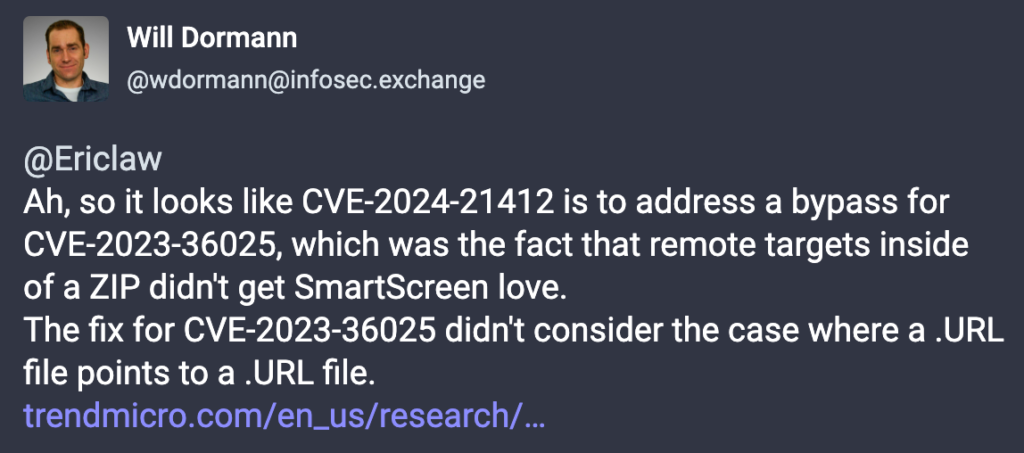
Tracked as Water Hydra and DarkCasino hacking groups try to exploit a zero-day vulnerability (CVE-2024-21412) in attacks on New Year’s Eve day Windows Defender SmartScreen. Trend Micro security researchers identified this exploitation of hackers.

The hackers try to attack crypto traders with malware. Microsoft explained this attack as an unauthenticated attacker “could send the targeted user a specially crafted file designed to bypass displayed security check Microsoft Defender Zero Day Vulnerability and FIXs.” This blog post details Microsoft Defender Zero Day Vulnerability and FIX.
- Windows 11 KB5034765 KB5034766 February 2024 Patches and 2 Zero-Day Vulnerabilities
- 2024 Cybersecurity Certifications for IT Professionals
Microsoft Defender Zero Day Vulnerability and FIX
Microsoft Windows Defender SmartScreen doesn’t correctly apply marks of the web when using shortcut files, which essentially leads to a bypass of the intelligent screen protections. The attack against Microsoft Defender is detected on December 30th.
The security researchers are tracking another security bypass vulnerability, CVE, and notified Microsoft immediately. Trend Micro can roll out protection to customers in January.
| CVE Number | CVE Number | Publicly Disclosed | Exploitability assessment | Exploited |
|---|---|---|---|---|
| CVE-2024-21412 | Internet Shortcut Files Security Feature Bypass Vulnerability | No | Exploitation Detected | Yes |
- 11 Microsoft Copilot Features of 2024
- Exciting Features Coming Soon to Latest Windows 11 Moment Drop Release
Microsoft Protection of Customers from Malware
Mark of the web is a security feature that helps us when we download content from the internet. Since there is a lot of malicious content on the internet, we want to ensure we don’t inadvertently click on something malicious.
It’s a feature that Microsoft has in place: if you download something from an untrusted source, it will get a mark of the web designation, forcing you to make a conscious decision on executing this file.
How could an Attacker Exploit the Vulnerability?
An unauthenticated attacker could send the targeted user a specially crafted file that is designed to bypass displayed security checks. However, the attacker would have no way to force a user to view the attacker-controlled content. Instead, the attacker would have to convince them to take action by clicking on the file link.
With zero-day being the new constant, organizations must defend and protect themselves, paying special attention to the user applications as most of the Defender zero day vulnerability out there fall within this environment.
To get more updates about the device management solutions, Please follow the HTMD Community and visit our website HTMD Forum, to keep up with our expert coverage. Also, follow us at X, @HTMDCommunity for the latest news and updates.
We are on WhatsApp. To get the latest step-by-step guides and news updates, Join our Channel. Click here –HTMD WhatsApp.
Author
Gopika S Nair is a computer enthusiast. She loves writing on Windows 11 and related technologies. She is here to share quick tips and tricks with Windows 11 or Windows 10 users. She is Post Graduate Diploma Holder in Computer Science.



Discussion