






Let’s see how to identify the devices that are connected to SCCM infra via Cloud Management Gateway. In this post, I shall provide the details of the WQL and SQL queries to Identify Devices Connected via SCCM CMG.
Introduction SCCM Cloud Management Gateway (CMG) is an Internet client management feature introduced by Microsoft as a pre-release feature in ConfigMgr CB 1610.
This feature simplifies management and reduces the complex configuration required to implement Internet-based client management (IBCM with reverse proxy).
With the release of the Co-Management feature in ConfigMgr CB 1710, the Cloud Management gateway plays an important role in transitioning from traditional management to modern management.

Related Post – Fix SCCM Client CMG Communication Failure Error 0x87d0027e | ConfigMgr.
Table of Contents
SCCM CMG Related Operational Question?
One of the major questions that arose after the successful implementation of the Cloud Management Gateway was, “How can I identify the machines connected via SCCM Cloud Management Gateway?”
It’s challenging to Identify the machines connected to the Internet via Cloud Management Gateway. Initially, the machines were identified by querying the last scan package source location update using the query below.
select count(*) as count,LastScanPackageLocation
   from v_updatescanstatus
   group by LastScanPackageLocation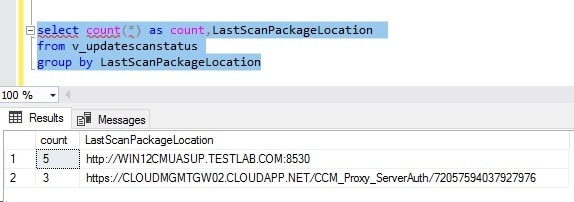
- How to Setup SCCM CMG in Virtual Machine Scale Set Model
- Best SCCM CMG Cloud Management Gateway Implementation Guide
- SCCM CMG SCCM Cloud Management Gateway Workflow Scenarios 1
- Download Content Using Cloud Management Gateway
- End-User Experience Of Windows 10 Co-Management
- How To Setup Co-Management – Firewall Ports Proxy Requirements
This query gives the machines scanned SUP from the intranet and the internet. However, we cannot find the last time these machines were online or connected via the cloud management gateway.
With the release of ConfigMgr CB 1710, Microsoft updated the schema to include the status of machines connected via Cloud Management Gateway. Similar to the client’s online/offline status, a new status is available for the client machines to monitor the Internet status and online Management Point name.
| Add respective fields |
|---|
| Device Online From Internet |
| Device Online Management Point |
Add respective fields (Device Online From Internet & Device Online Management Point)
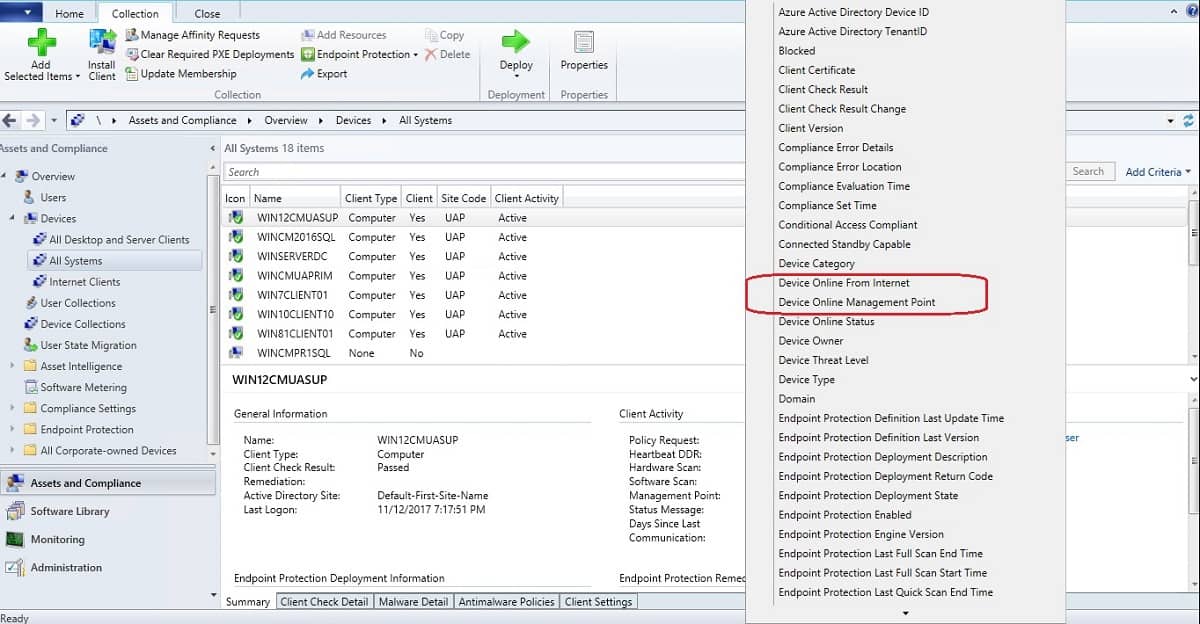
Collection Members view after adding the fields mentioned above.
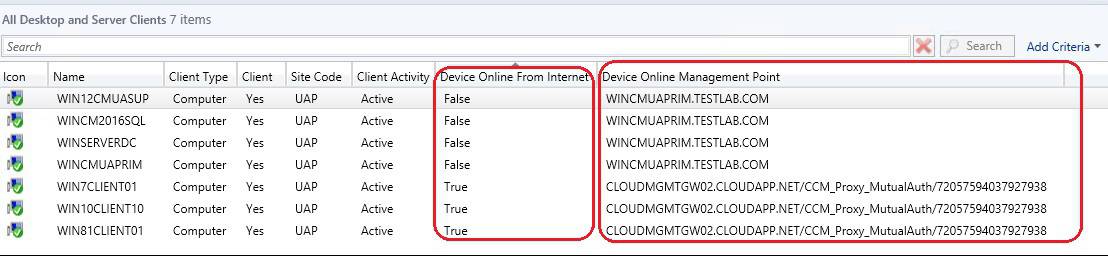
How to Create a Collection to Find Out CMG Connected Devices
This information would be more helpful if we could create a collection based on Device Online from Internet criteria. Use the below WQL query to create a collection based on Device Online from Internet status.
Download the WQL Query for collection – How-to-Create-Collection-to-Find-out-CMG-Connected-Devices/How to Create Collection.sql at main · AnoopCNair/How-to-Create-Collection-to-Find-out-CMG-Connected-Devices (github.com)
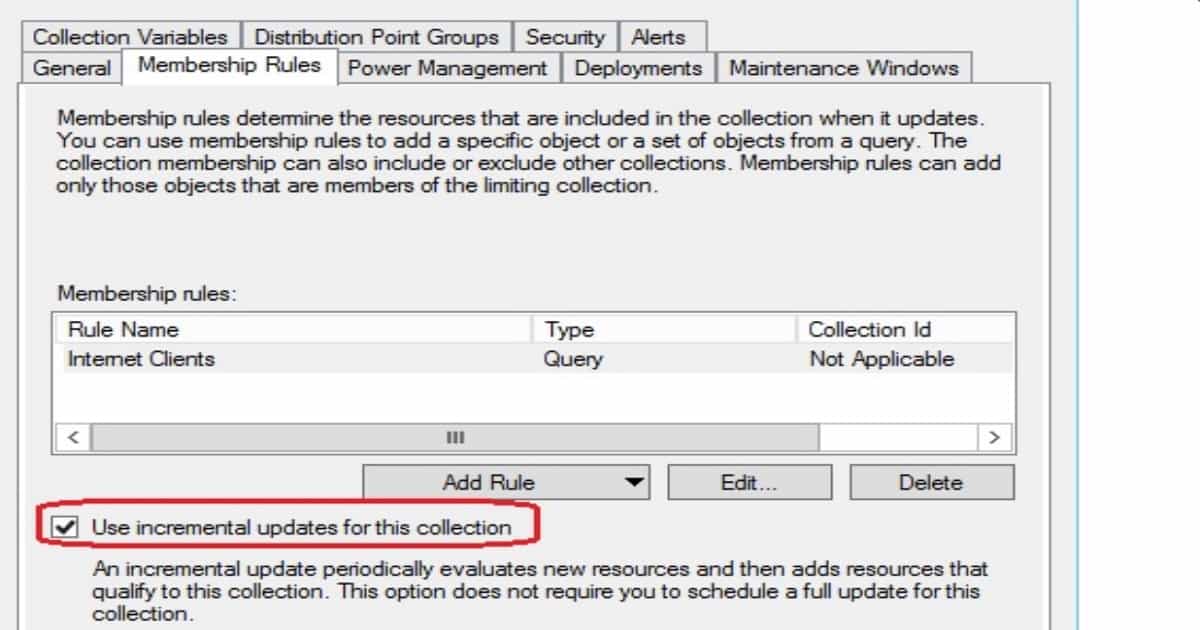
Create the collection with incremental updates that are to be updated automatically when the machines connect from the intranet or the Internet.
Once the collection is ready, if the admins want to restart the machines connected via the cloud management gateway, they can use the latest feature introduced in ConfigMgr 1710. Restart works perfectly on machines connected via the SCCM cloud management gateway.
How to Create the SSRS or SQL Reports to Find Out CMG Connected Devices
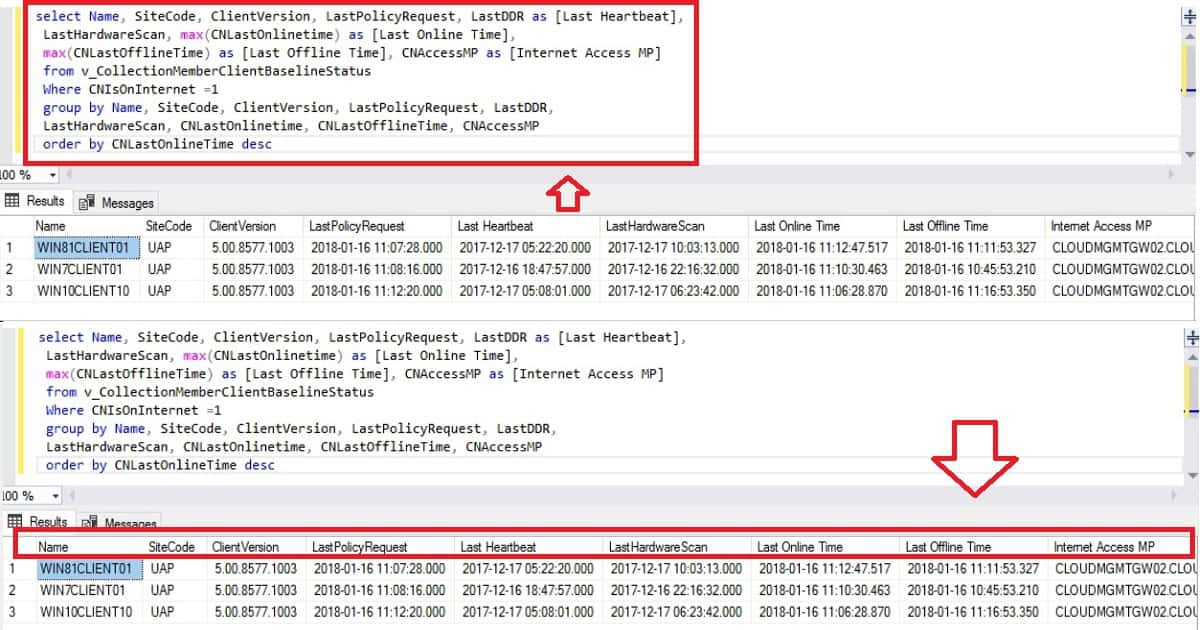
The same information can be queried from the CM database as well. If your management asks for a report of online machines from the Internet, an SSRS report can be created to pull this information. Use the below SQL query to pull the information.
select Name, SiteCode, ClientVersion, LastPolicyRequest, LastDDR as [Last Heartbeat],
   LastHardwareScan, max(CNLastOnlinetime) as [Last Online Time],
   max(CNLastOfflineTime) as [Last Offline Time], CNAccessMP as [Internet Access MP]
   from v_CollectionMemberClientBaselineStatus
   Where CNIsOnInternet =1
   group by Name, SiteCode, ClientVersion, LastPolicyRequest, LastDDR,
   LastHardwareScan, CNLastOnlinetime, CNLastOfflineTime, CNAccessMP
   order by CNLastOnlineTime desc
References:
- How to export database schema
- What’s new in ConfigMgr 1710
- Cloud Management Gateway
- All Co-Management Video tutorials are in one post here.
We are on WhatsApp now. To get the latest step-by-step guides, news, and updates, Join our Channel. Click here. HTMD WhatsApp.
Author
Anoop C Nair is Microsoft MVP from 2015 onwards for consecutive 10 years! He is a Workplace Solution Architect with more than 22+ years of experience in Workplace technologies. He is a Blogger, Speaker, and Local User Group Community leader. His main focus is on Device Management technologies like SCCM and Intune. He writes about technologies like Intune, SCCM, Windows, Cloud PC, Windows, Entra, Microsoft Security, Career, etc…




Very Informative and detailed info as usual 🙂
Is there a way to get a list of clients and the MP’s they’re connected to when they are connected via IBCM?
Very good post on managing CMG clients
Very informative post on managing CMG clients
This is what i was looking for. Thanks for the post.
I still have some confusion on the machines count which is reporting to CMG. You have give great idea so I can research more from here. Thanks
Thx for thoose reports but it seems to me that they show the client connected on “internet mode”, and not to the CMG this is different
Great post. This is my second one from your site to assist. Thanks!
Thank you for putting this together. I’m struggling to add a Collection parameter. I’ve tried a couple of tutorials with no luck.
is there a way to find machines which are connected to CMG in last 30 days
Please share if you have any query , i am unable to find .