






To Fix 13 Issues Install Hotfix KB4057517 of SCCM CB 1710 Configuration Manager ConfigMgr
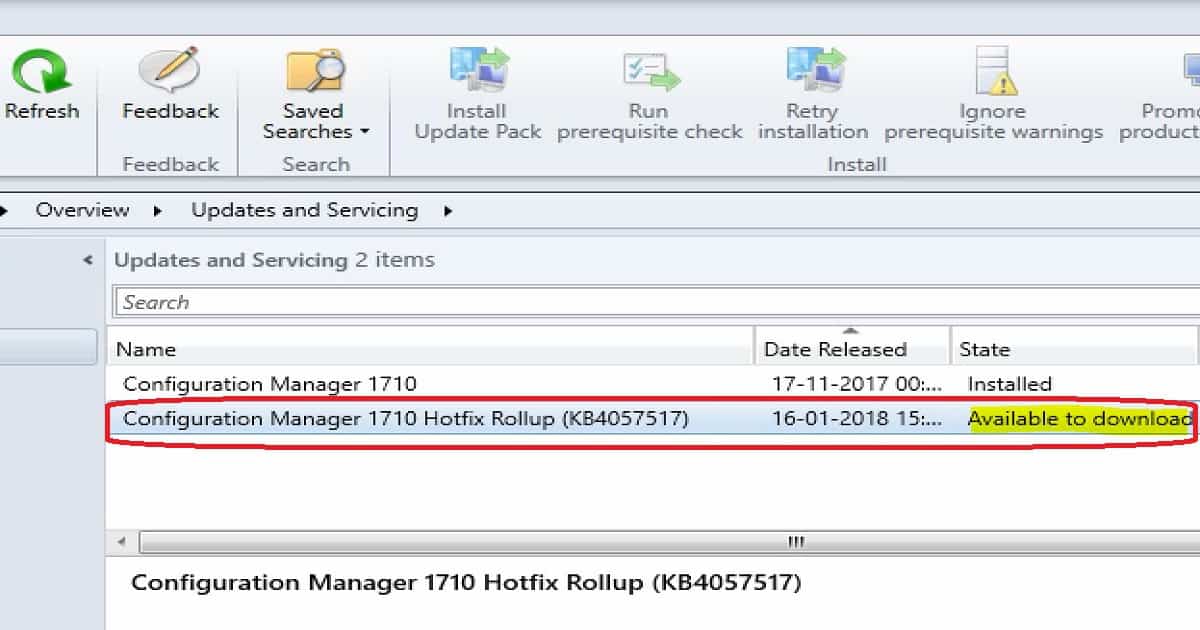
SCCM Product Group released the long-awaited rollup hotfix KB4057517 for SCCM CB 1710. You need not download the hotfix KB 40575517 separately; it will be available within your SCCM CB 1710 console.
This fix won’t be visible on the servers if you have not upgraded to the 1710 version of SCCM. From my perspective, this must install a hotfix for SCCM.
This fixes 13 documented issues with the current production version of SCCM. I completed the upgrade on my LAB environment and uploaded it.
One of our posts shows the List of Issues Fixed with SCCM 2403 KB26186448. The update addresses several key issues, enhancing the SCCM’s functionality and reliability.

Table of Contents
Subscribe to the YouTube channel for more Videos
Install Fix for SCCM CB 1710 Rollup KB4057517 – Windows Server 2008
HotFix Rollup KB4057517 is available to download for all online and connected SCCM 1710 site servers. HotFix Rollup KB4057517 is downloaded and started the installation process. This is not going to take a long time to install.
- New Features in SCCM Technical Preview 2401
- New Key Features of SCCM 2309 | Top Improvements
- Download SCCM 2309 Early Ring Version using PowerShell Script
- SCCM Versions Build Numbers Client Console Site
- End of Support Dates for SCCM CB Current Branch | ConfigMgr | SCCM End of Life
- SCCM Unsupported Deprecated or Removed Features
I recommend testing the rollup hotfix KB4057517 installation on your pre-prod or staging environment before installing it on production SCCM servers. Read the rollup hotfix KB4057517 release note here.
| To Fix 13 Issues Install Hotfix KB4057517 of SCCM CB 1710 Configuration Manager ConfigMgr |
|---|
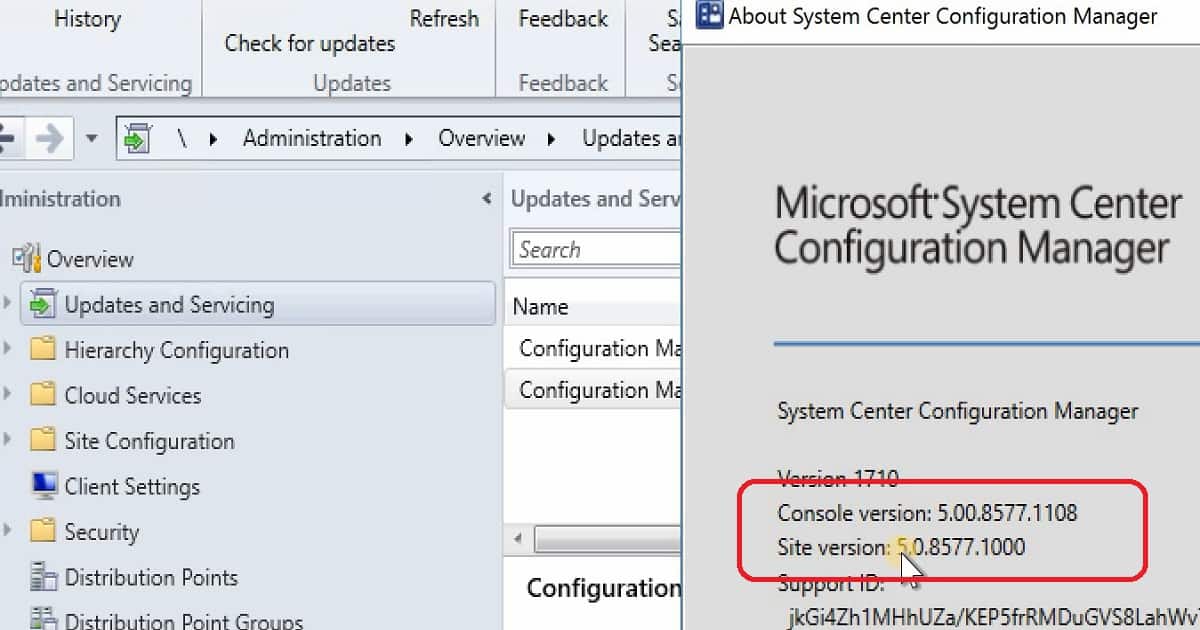
| Console Version 5.00.8577.1108 |
| Site Version 5.0.8577.1000 |
13 Fixes Included in SCCM CB 1710 in KB4057517
Let’s discuss the 13 Fixes Included in SCCM CB 1710 in KB4057517. The list below helps you see them.
- Azure AD Authentication with SCCM MP issue
- SCCM clients fall back faster than the time that is a specified issue
- Retrying a large single-file download – Office 365 update files
- Download failures-Office 365 Application Installation Wizard
- Persist content in the client cache related issues
- SCCM Client Notification Restart request is processed incorrectly
- Decommission-related State message – CO-Management incorrectly
- State messages sent by Azure AD users issues
- Windows Server 2008 SP2 – SCCM Clients are not upgraded issues
- The client restarts the issues process of retrying a TS policy download
- Conditional Access Policy Issues for Domain Joined machines
- The download of express updates may fail for Windows 10
- Office 365 Client Installation wizard-related issues
How to Install Hotfix KB4057517 on SCCM Secondary Servers
I don’t have secondary servers in my lab environment. But I recommend you follow the instructions in the release notes of rollup hotfix KB4057517. After installing this update on a primary site, pre-existing secondary sites must be manually updated.
To update a secondary site in the Configuration Manager console, click Administration, click Site Configuration, click Sites, click Recover Secondary Site, and select the secondary location. The primary site then reinstalls that secondary site by using the updated files.
This reinstallation will not affect the secondary site’s configurations and settings. The new, upgraded, and reinstalled secondary sites under that primary site automatically receive this update.
Please run the following SQL Server command on the site database to check whether the updated version of a secondary site matches that of its primary parent site.
dbo.fnGetSecondarySiteCMUpdateStatus (‘SiteCode_of_secondary_site’)
We are on WhatsApp now. To get the latest step-by-step guides, news, and updates, Join our Channel. Click here. HTMD WhatsApp.
Author
Anoop C Nair is Microsoft MVP from 2015 onwards for consecutive 10 years! He is a Workplace Solution Architect with more than 22+ years of experience in Workplace technologies. He is a Blogger, Speaker, and Local User Group Community leader. His main focus is on Device Management technologies like SCCM and Intune. He writes about technologies like Intune, SCCM, Windows, Cloud PC, Windows, Entra, Microsoft Security, Career etc…




I have noticed some content issues with Adaptiva purple flagging known good content after applying this patch are you noticing the same?
Hi Tony, my name is James Pitcher from Adaptiva Support.
Sorry to read about your experience here. This is not currently a known issue and is not something I have experienced in testing this update. Please do raise a support ticket with us support.adaptiva.com so we can investigate this issue further for you.
Thanks James,
I managed to resolve this i updated the package source version on the driver packages and this resolved my issue
Hi,
just a small question. We are going to upgrade to 1710 tomorrow. Is the Rollup (KB4057517) now already included in the major 1710 release or is there a need to install it after 1710 upgrade separatly?
StaffIt’s not included in the major release. You need to install it separately. It will be available once you install 1710 on your primary site.
Hi
i uipgared my ab with sccm 1710 and hotfix. but a issue stay present.
during build and capture or osd deployement, the step install software update failed. on the log file, a message is about wua not configured, and the scan detect 0 update. this is a big bug.hope Ms fix it soon.
for the moment don”t install it.
StaffI don’t understand your question After 1710 upgrade and KB 4057517 update you are getting software update error? I didn’t see this error yet. Can you please share the log details?
the software update installation step failed. this is a know issue.
I have updated to 1710 and KB 4057517. I’m seeing that they aren’t completely finished and I can’t open the updated console.
StaffCan you try to restart the server? Also check the log files to understand what is the happening in the background
Thank you Annop for the good article…
I have a Single Standalone Server with 2x Secondary Sites
One of my small clients requires a CB1710 upgrade…Quick questions with regards to the Hotfix?
Step 1 – Perform upgrade to CB 1710 on Primary SiteQuestion 1 – To upgrade the 2x Secondary Servers, do I follow the “Recovery Secondary Site”?
Step – 2 – Apply the Hotfix on Primary Site
Question 2 – Will the KB/Hotfix be applied to also 2x Secondary Servers or do I again have to “Recovery Secondary Site”?
Step 3 – Apply the Office365 Hotfix issued recently.
Question 3 – Question 2 – Will the KB/Hotfix be applied to also 2x Secondary Servers or do I again have to “Recovery Secondary Site”?
Question 4 – Where would I turn-on Auto-client upgrade, is it after Step 1 or 2?
Thank you for your time and your assistance.
@Lukholo jeneto – Once you upgrade to 1710 you can check for updates and apply the hotfix. Once successfully applied then upgrade the secondary sites so that they are receive the updated installation files.
You can turn-on Auto client upgrade from hierarchy settings in client upgrade tab