






Overview of Client Online Status in SCCM Console Configuration Manager ConfigMgr
Overview of Client Online Status in SCCM Console Configuration Manager ConfigMgr. I provided a bit more details about the Client’s online status & Types in the SCCM console, related components, SQL tables, and Logs.
As we all know, the client’s online status indicates whether the computer is online or offline. This feature was introduced in SCCM CB 1602 and worked through the BGB (Big Green Button) channel.
The client is considered offline if the management point doesn’t receive status in 5 minutes. Anoop has a “Fast Channel Online status” post; read about his experience in “Video Guide to Troubleshooting SCCM CB Fast Channel Push Notification Issues.”
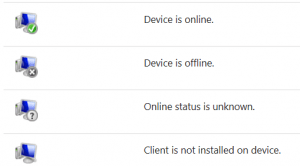
The icon below indicates the device’s status, and the SCCM console also shows the last offline and online status.

Table of Contents
Overview of Client Online Status in SCCM Console Configuration Manager ConfigMgr
Let’s discuss the Client’s Online Status overview in SCCM Console Configuration Manager ConfigMgr. More details are given in the below section.
- Quick Glance at the post
- SCCM Client Online Offline Flow Chart
- Log Flow – Notification agent(Client)
- Log Flow – Notification Server(Management Point)
- Log Flow – Notification Manager(Site Server)
- Registry Entries Related to Client Online Status in SCCM Console
- SQL Queries Related to Client Online Status in SCCM Console
- SCCM Client online status in Site Server WMI

- ConfigMgr Collection Full Incremental Evaluation Status Summary from Console | SCCM
- Monitor ConfigMgr Client Status from SCCM Console | Online | Offline
- FIX SCCM Agent Installation Error 0x80200010
SCCM Client Online Offline Flow Chart – Log Flow: Notification Agent(Client):
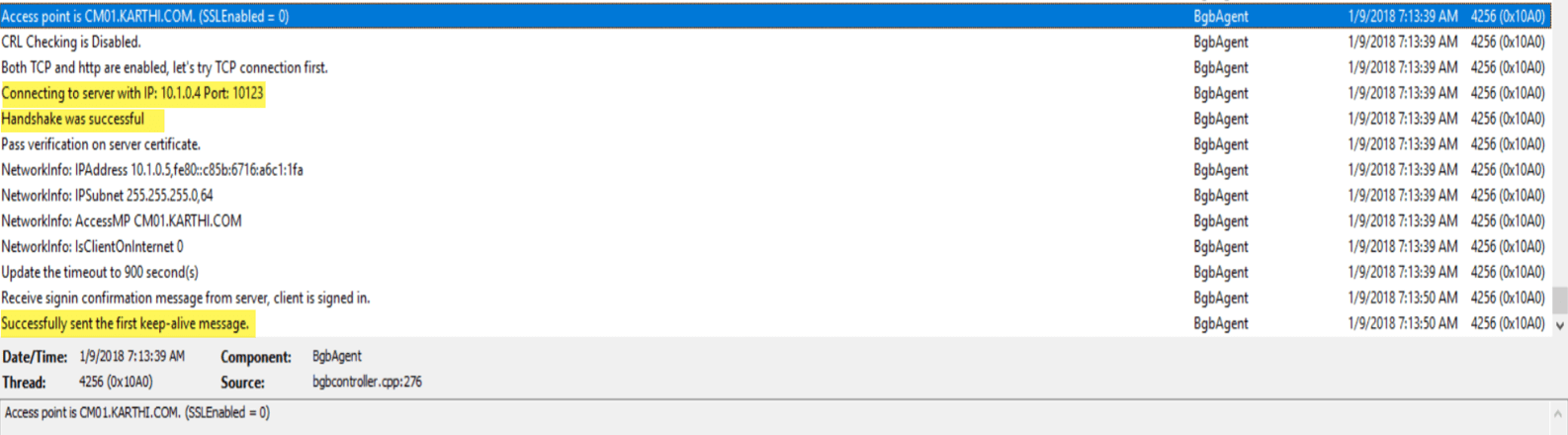
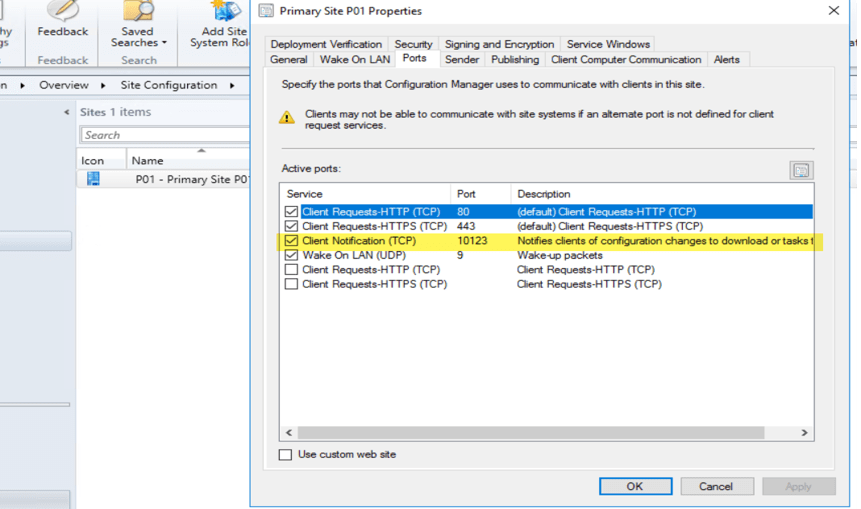
The notification agent(Client) will attempt to connect the TCP to the current management point using 10123 Port. Once it’s successful, the client will send the keep-alive message every 5 minutes through ClientNotificationAgent.log & CCMMessaging.log to MP.
If the client fails to establish a TCP connection (Port 10123), the notification agent will try the HTTP protocol.
CcmNotificationAgent.log
Access point is CM01.KARTHI.COM. (SSLEnabled = 0) BgbAgent 1/9/2018 7:13:39 AM 4256 (0x10A0)
CRL Checking is Disabled. BgbAgent 1/9/2018 7:13:39 AM 4256 (0x10A0)
Both TCP and http are enabled, let’s try TCP connection first. BgbAgent 1/9/2018 7:13:39 AM 4256 (0x10A0)
Connecting to server with IP: 10.1.0.4 Port: 10123
BgbAgent 1/9/2018 7:13:39 AM 4256 (0x10A0)
Handshake was successful
BgbAgent 1/9/2018 7:13:39 AM 4256 (0x10A0)
Pass verification on server certificate. BgbAgent 1/9/2018 7:13:39 AM 4256 (0x10A0)
NetworkInfo: IPAddress 10.1.0.5,fe80::c85b:6716:a6c1:1fa BgbAgent 1/9/2018 7:13:39 AM 4256 (0x10A0)
NetworkInfo: IPSubnet 255.255.255.0,64 BgbAgent 1/9/2018 7:13:39 AM 4256 (0x10A0)
NetworkInfo: AccessMP CM01.KARTHI.COM BgbAgent 1/9/2018 7:13:39 AM 4256 (0x10A0)
NetworkInfo: IsClientOnInternet 0 BgbAgent 1/9/2018 7:13:39 AM 4256 (0x10A0)
Update the timeout to 900 second(s) BgbAgent 1/9/2018 7:13:39 AM 4256 (0x10A0)
Receive signin confirmation message from server, client is signed in. BgbAgent 1/9/2018 7:13:50 AM 4256 (0x10A0)
Successfully sent the first keep-alive message. BgbAgent 1/9/2018 7:13:50 AM 4256 (0x10A0)
CCMMessaging.log
Initializing queue ‘BgbAgent’… CcmMessaging 1/11/2018 6:18:01 AM 2080 (0x0820)
Queue ‘BgbAgent’ initialized with 0 messages. CcmMessaging 1/11/2018 6:18:02 AM 2080 (0x0820)
Initialized queue processor ‘BgbAgent’. Enabled=true Concurrency=1 CcmMessaging 1/11/2018 6:18:02 AM 2080 (0x0820)
Initializing queue ‘CertificateMaintenanceEndpoint’… CcmMessaging 1/11/2018 6:18:02 AM 2080 (0x0820)
Queue ‘CertificateMaintenanceEndpoint’ initialized with 0 messages. CcmMessaging 1/11/2018 6:18:02 AM 2080 (0x0820)
Initialized queue processor ‘CertificateMaintenanceEndpoint’. Enabled=true Concurrency=5 CcmMessaging 1/11/2018 6:18:02 AM 2080 (0x0820)
Initializing queue ‘OOBMgmt’… CcmMessaging 1/11/2018 6:18:02 AM 2080 (0x0820)
Queue ‘OOBMgmt’ initialized with 0 messages. CcmMessaging 1/11/2018 6:18:02 AM 2080 (0x0820)

Notification Server(Management Point)
The notification Server on the Management Point will receive clients’ requests, generate online status every 5 minutes, and place it under <Installation Directory>\inboxes\bgb.box\*.BOS on the site server.
BgbSetup.log & bgbisapiMSI – Records the installation & uninstallation process.
BGBServer.log
Total online clients: 1 (TCP: 1 HTTP: 0) SMS_NOTIFICATION_SERVER 1/10/2018 6:46:44 AM 14308 (0x37E4)
Online/Offline clients since last successful report: 1 SMS_NOTIFICATION_SERVER 1/10/2018 6:46:44 AM 14308 (0x37E4)
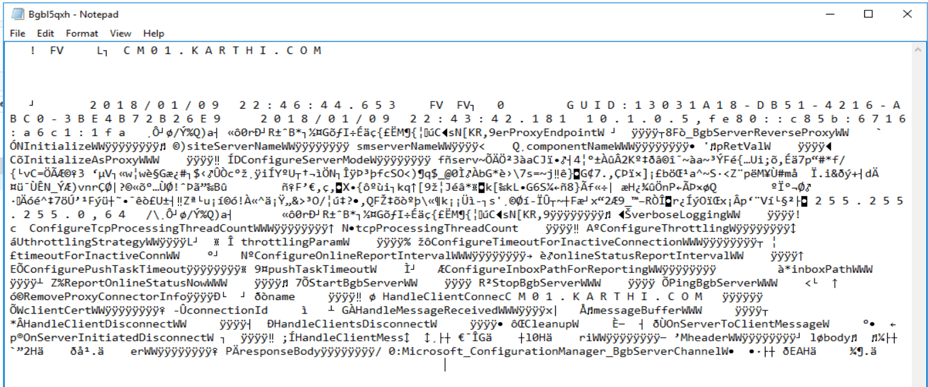
Generated BGB online status DELTA report C:\Program Files\Microsoft Configuration Manager\inboxes\bgb.box\Bgbl5qxh.BOS (version: 4) at 01/10/2018 06:46:44 SMS_NOTIFICATION_SERVER 1/10/2018 6:46:44 AM 14308 (0x37E4)

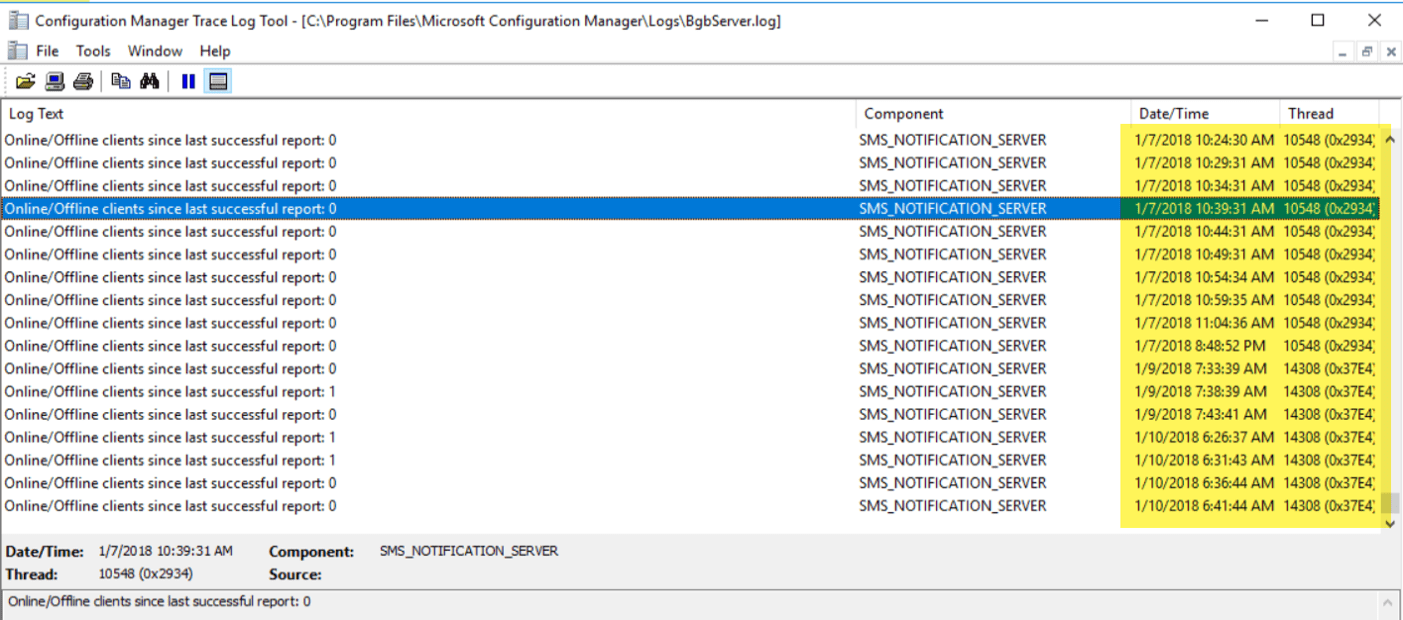
I filtered out only the status report details in the BGBServer log. As you can see in the Date/Time column, MP sends the report every 5 minutes to the site server.
Online/Offline clients since last successful report: 0 SMS_NOTIFICATION_SERVER 1/7/2018 10:24:30 AM 10548 (0x2934)
Online/Offline clients since last successful report: 1 SMS_NOTIFICATION_SERVER 1/9/2018 7:38:39 AM 14308 (0x37E4)
Online/Offline clients since last successful report: 0 SMS_NOTIFICATION_SERVER 1/9/2018 7:43:41 AM 14308 (0x37E4)
Online/Offline clients since last successful report: 1 SMS_NOTIFICATION_SERVER 1/10/2018 6:26:37 AM 14308 (0x37E4)
Notification Manager(Site Server)
The notification manager will process the Online files (*.BOS) from bgb. box and update the online information in the site database
BGBManager.log
Successfully ran sql task for file C:\Program Files\Microsoft Configuration Manager\inboxes\bgb.box\Bgbl5qxh.BOS SMS_NOTIFICATION_MANAGER 12/26/2017 7:52:05 PM 15452 (0x3C5C)
Successfully processed file C:\Program Files\Microsoft Configuration Manager\inboxes\bgb.box\Bgbl5qxh.BOS SMS_NOTIFICATION_MANAGER 12/26/2017 7:52:05 PM 15452 (0x3C5C)
Successfully processed file Bgbl5qxh.BOS, clean it. SMS_NOTIFICATION_MANAGER 12/26/2017 7:52:05 PM 15452 (0x3C5C)
Registry Entries Related to Client Online Status in SCCM Console
The registry below is related to the Notification Manager on the site server. We can modify the interval cycle & Client notification trigger timed out (ex., Machine policy, Collect H/W inventory..etc. trigger timed out) in the SCCM console.
If the machine is offline, the triggered actions will time out after the configured seconds in the registry below.
HKEY_LOCAL_MACHINE\SOFTWARE\Microsoft\SMS\COMPONENTS\SMS_NOTIFICATION_MANAGER
SQL Queries Related to Client Online Status in SCCM Console
The query below lists the resourceID with details on its online status.
select * from BGB_ResStatus

2. List the Notification Servers details.
select * from BGB_Server

3. List the total number of online clients with the Notification Server(Management Point).
select B.ServerName, A.OnlineClients from Bgb_Server B left join dbo.v_BgbServerCurrent A on A.ServerID=B.ServerID order by 2

BGB-related tables are below.
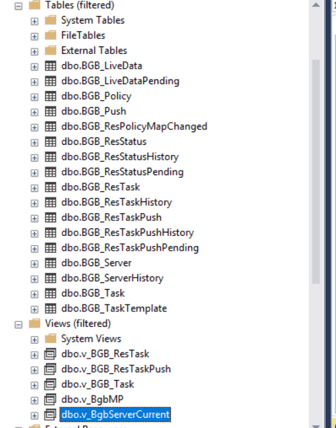
BGB_TaskTemplate Table Provides the Details of Client Notifications Actions and Valid Seconds. – SCCM Client Online Status in Site Server WMI
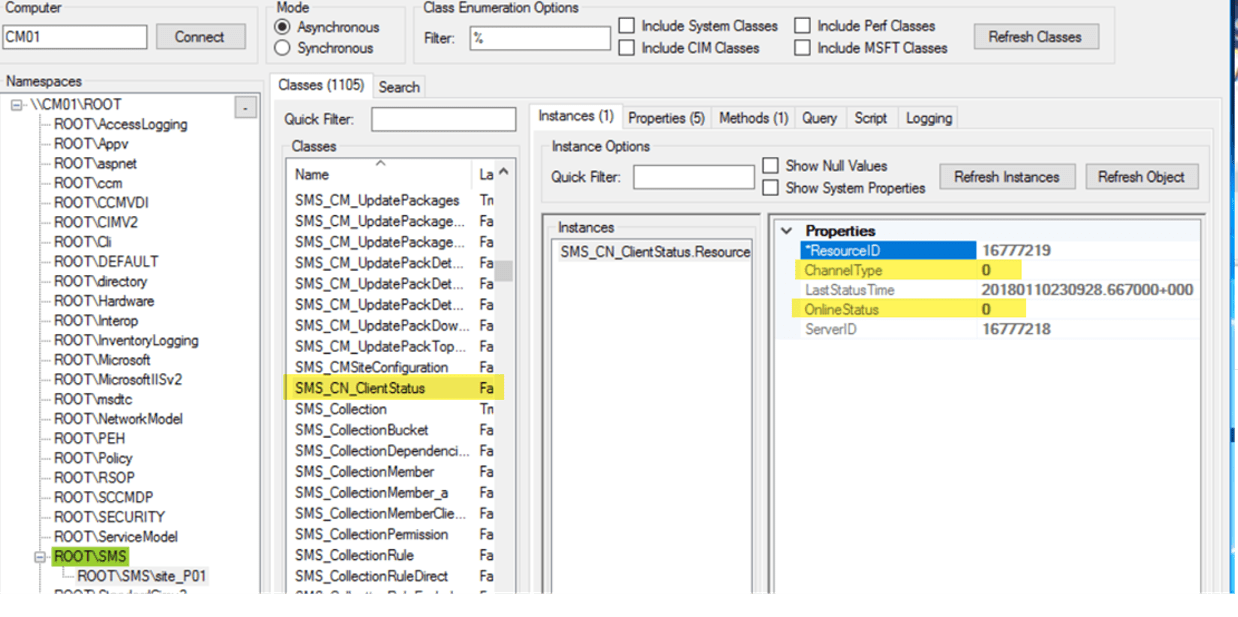
Value 1 means online, and 0 represents offline. ChannelType = 0 stands for TCP Protocol and 1 is HTTP protocol.
\CM01\ROOT\SMS\site_P01:SMS_CN_ClientStatus.ResourceID=16777219
Client Notification port settings in the Site Properties.
I hope this post helps you. Thank you for reading
We are on WhatsApp now. To get the latest step-by-step guides, news, and updates, Join our Channel. Click here. HTMD WhatsApp.
Author
Myself Karthick. I started my career in 2011 and have worked in IT for around 7 Years. I love sharing more wonderful things within Configuration Manager




Wonderful insight !!
Great article Karthick, very comprehensive thanks for this.
Hi Karthick, Very Nice thank you very much. Do you have SCCM inboxes flow chart with you. if you have it could you please share to my my id reply2raj@gmail.com
StaffDid this help SCCM Troubleshooting Steps for Newbies with Flowcharts https://www.anoopcnair.com/sccm-troubleshooting-steps/ ?
Thanks Anoop. Let me explorer this and update you.
Hi
what troubleshoot steps to deal with this error
Bgb client agent is stopping
I have a lot o clients with icon gray X but replying ping status
if i have a computer with icon gray but has installed the 2 last applications deployed the last communication is 2weeks past from the las installation.
where can i start to check ?
regards
I am in learning stage and it’s very helpful for me. Thank for this.
Hi
now i have problem on my MECM client not update last online time.
On client in log i see client sending messages on server i see server generate BOS
Client:
Raising event:
instance of CCM_CcmHttp_Status
{
ClientID = “GUID:a7b5e393-632e-4d60-af7c-991fe7a1f343”;
DateTime = “20200902151514.974000+000”;
HostName = “sccmserver”;
HRESULT = “0x00000000”;
ProcessID = 11464;
StatusCode = 0;
ThreadID = 6940;
};
CcmMessaging 02.09.2020 17:15:14 6940 (0x1B1C)
Successfully sent keep-alive message. BgbAgent 02.09.2020 17:37:58 9196 (0x23EC)
Updating MDM_ConfigSetting.ClientHealthLastSyncTime with value 2020-09-02T15:37:58Z
BgbAgent 02.09.2020 17:37:58 9196 (0x23EC)
sever :
Generated BGB online status DELTA report D:\Program Files\Microsoft Configuration Manager\inboxes\bgb.box\Bgbzbx3q.BOS (version: 3)
Successfully processed file Bgbzbx3q.BOS, clean it.
But in console last online time is no updating.
This time is updated only when computer or MECM client is restarted, or MSCM server is restarted.
Please help.