






Exciting News! Microsoft Introduced CrowdStrike Falcon as a Mobile Threat Defense partner with Intune. Mobile phones are crucial in our personal and professional lives in this technological world. Do you feel this exposes our growing number of mobile users to various security risks? Of course, nowadays, cyber threats are growing and targeting mobile devices.
Recently, Microsoft has taken a significant step regarding mobile threats by introducing CrowdStrike Falcon as a Mobile Threat Defense partner with Intune.CrowdStrike Falcon is a powerful solution for defending against threats from mobile devices such as tablets and smartphones.
Microsoft Intune always focuses on Mobile device management( MDM) and Mobile application management( MAM). It allows organizations to control and secure their devices, including mobile phones and laptops. CrowdStrike Falcon, as a Mobile Threat Defense partner with Intune, will enhance the security of the results, providing a more robust defence against attacks.
CrowdStrike Falcon is a mobile threat defence solution that integrates with Microsoft Intune. Intune and Falcon team up; they make your phone super safe. In this post, we share an overview of CrowdStrike Falcon as a Mobile Threat Defense partner with Intune.

- Deploy CrowdStrike Using Intune EXE Deployment Guide
- Best Guide to Configure OneDrive Auto Sign-in Sync with Intune
- Intune create Conditional Access Policies for Windows MAM Devices

Microsoft Introduced CrowdStrike Falcon as a Mobile Threat Defense Partner with Intune
The CrowdStrike Falcon app for mobile devices (Android and iOS/iPad) gathers data about your device’s files, network, and apps through its cloud service to assess security risks. It will analyse and determine whether your device is at risk from mobile threats.
Organizations can use Intune’s Conditional Access policies to make decisions based on CrowdStrike Falcon for Mobile’s risk assessment. These policies allow or block access to corporate resources for devices depending on the threat level detected by CrowdStrike.
- With the Intune 2404 service release, the CrowdStrike connector is now available in the Intune admin center.
- However, it will not be operational until CrowdStrike publishes the required App Configuration profile details to support iOS and Android devices.
- This publication is expected sometime after the second week of May.
- Once available, you can configure and utilize the CrowdStrike connector to strengthen your mobile device security posture.
Read More – 2404 Microsoft Intune New Features April Update
| Supported Platforms |
|---|
| Android 9.0 and later |
| iOS 15.0 and later |
Control Access Based on Threats from Malicious Apps
You can control access based on threats from malicious apps. When malware is detected on your device, you can block devices from some actions like Connecting to corporate e-mail, Syncing corporate files with the OneDrive for Work app and Accessing company apps until the threat is resolved.
- The screenshot below shows the structure of how it blocks when malicious apps are detected.
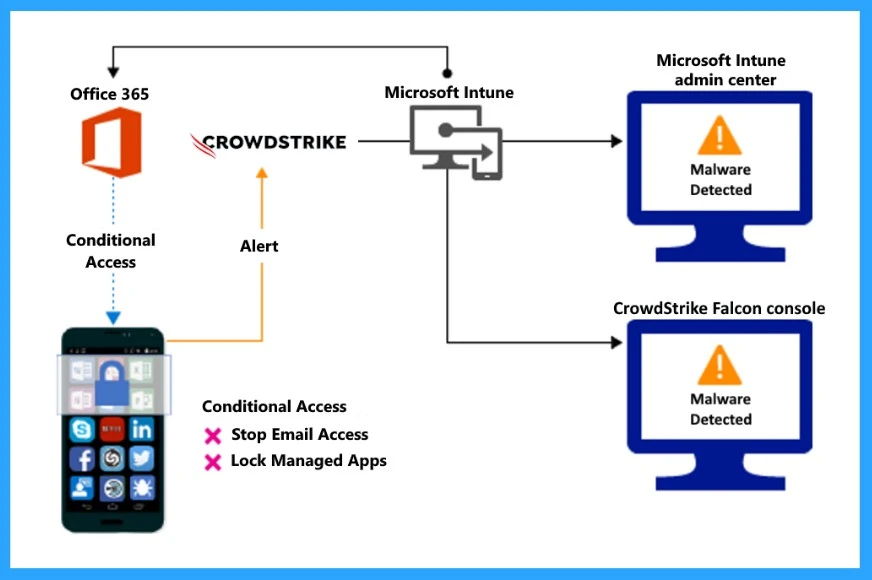
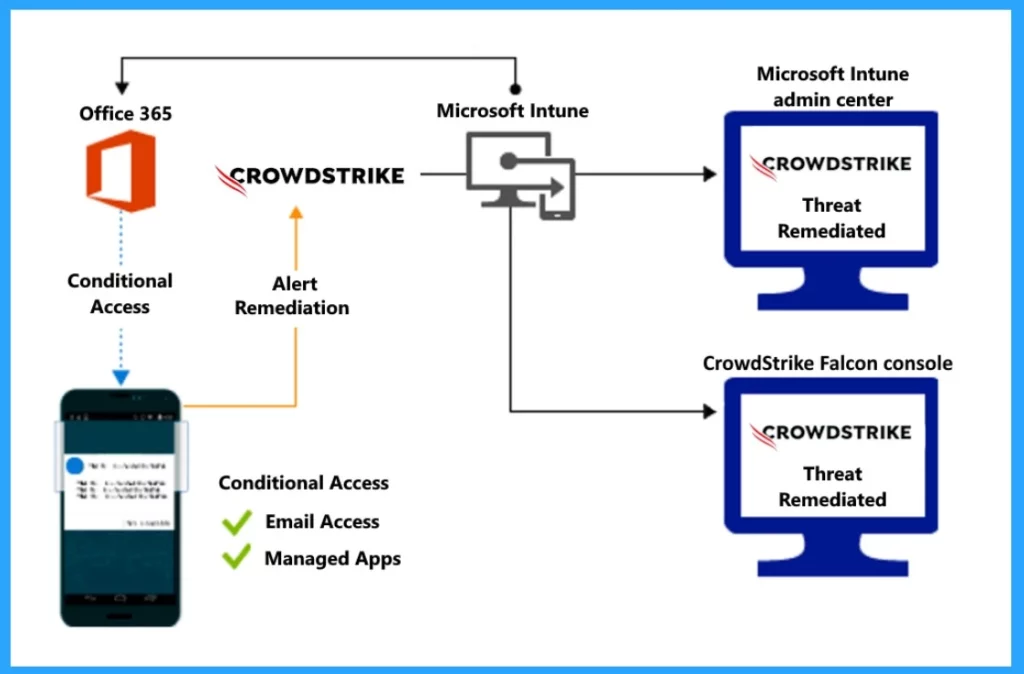
I mentioned above that some actions will be blocked when malware is detected on your device. The screenshot below shows Access granted on the remediation structure, which means that access to corporate resources is initially blocked for a non-compliant device but later granted once the device is brought back into compliance.
- Intune Issue with iOS 16 Upgrade new MDM payload does not match the old payload
- Best Way to Remediate Vulnerabilities with Microsoft Defender for Endpoint using Intune
- 5 Top Intune AI-Driven Troubleshooting and Remediation
Control Access Based on Threat to Network
You can control access based on threats to the network. In this case, network threats such as Man-in-the-Middle attacks safeguard Wi-Fi network access by evaluating the risk level of devices. When a threat alert is sent to Intune, it will block access to the corporate network.
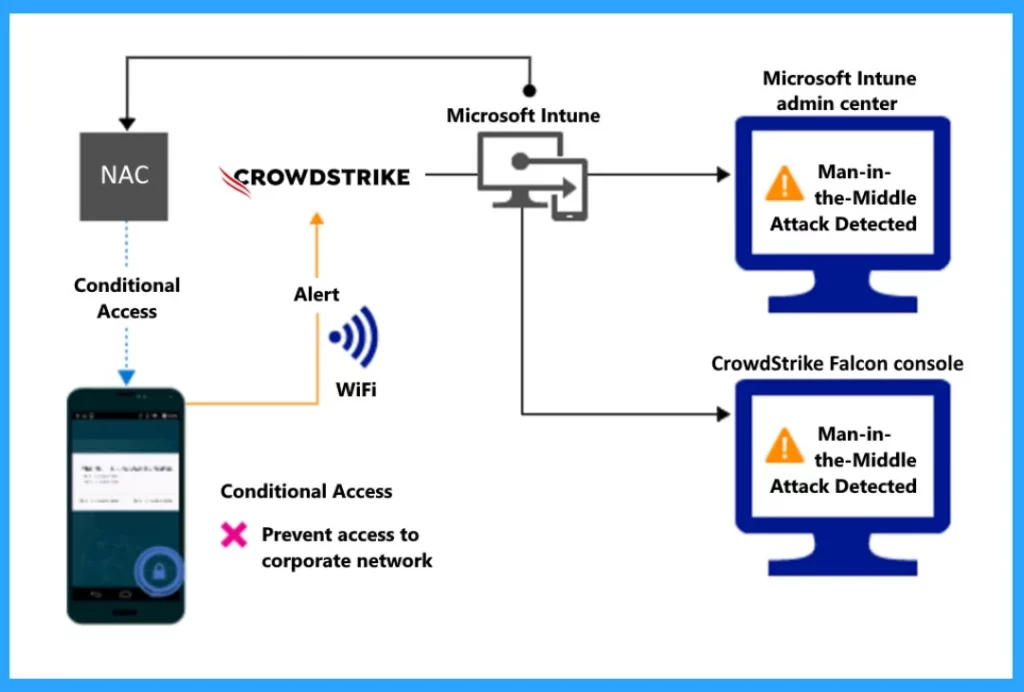
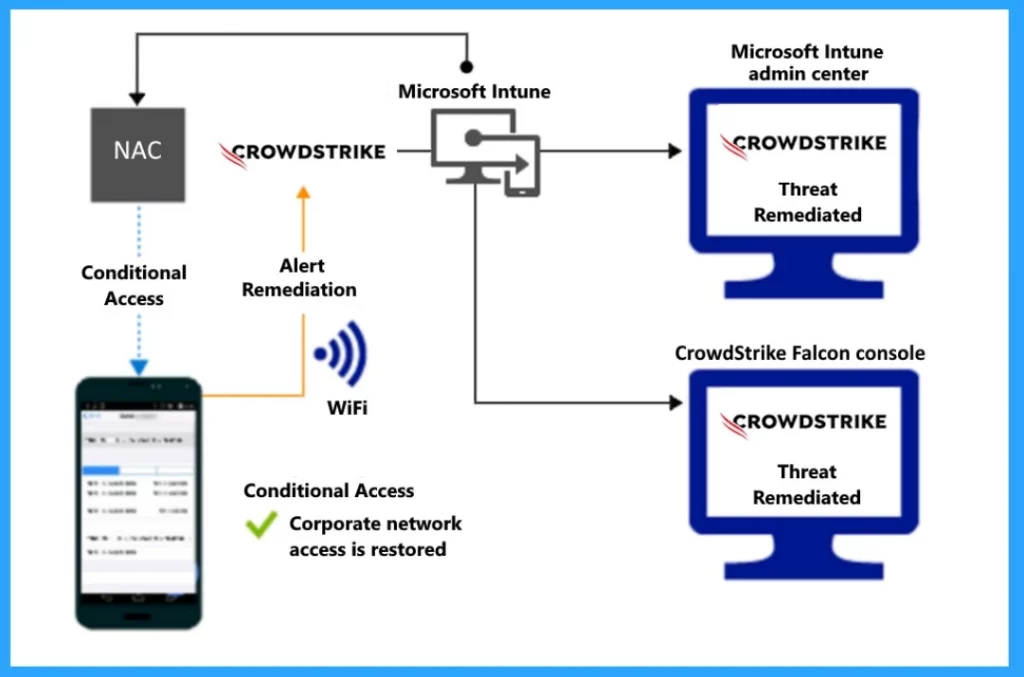
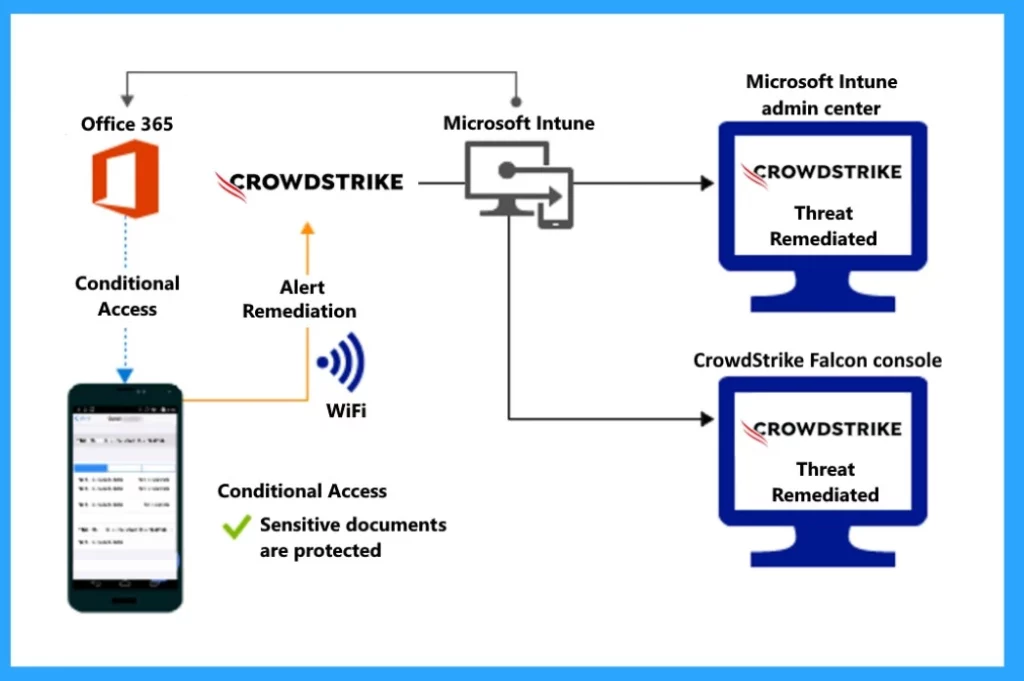
The screenshot below shows the access granted to the remediation structure for the threat to the network. Here, you can see when the alert remediation is sent to Intune, and they check if a device is safe by looking at security information from CrowdStrike Falcon. As a result, access to a resource or system is allowed once the issues identified during threat assessment have been resolved.
- Corporate Network access is resolved.
Control Access to SharePoint Online Based on Threat to Network
You can control access to SharePoint online based on Threats to the network. When malware is detected, such as Man-in-the-middle attacks, it blocks the synchronization of corporate files based on the device’s assessed risk.
- It prevents access to sensitive documents in SharePoint
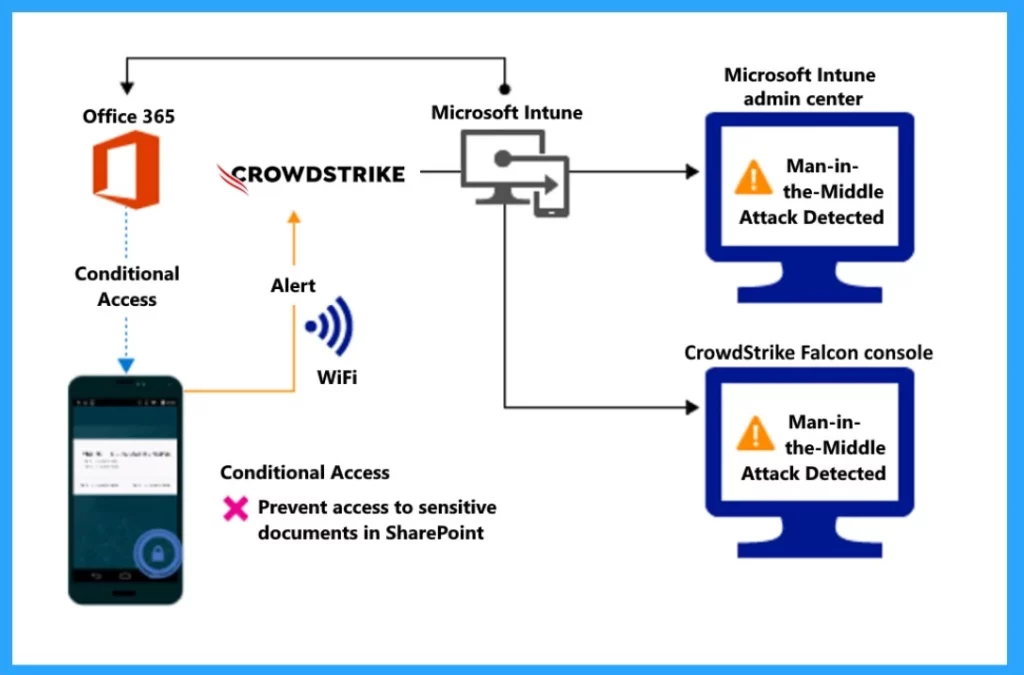
In Access granted on remediation structure, you can see when the remediation alert through the Wifi network is sent to Intune, and they check if a device is safe by looking at security information from CrowdStrike Falcon. If the issue is resolved, allow access to the system.
- Access granted on remediation
Reference
CrowdStrike Falcon Mobile Threat Defense connector with Microsoft Intune
We are on WhatsApp. To get the latest step-by-step guides and news updates, Join our Channel. Click here –HTMD WhatsApp.
Author
Krishna. R is a computer enthusiast. She loves writing about Windows 11 and Intune-related technologies and sharing her knowledge, quick tips, and tricks about Windows 11 or 10 with the community.


Discussion