






Fix SCCM Admin Console Version Compatibility Issue ConfigMgr
Fix SCCM Admin Console Version Compatibility Issue ConfigMgr. This is a quick post on the console connectivity issues with the latest version. It is also applicable to SCCM CB versions.
Fix the SCCM ConfigMgr Admin Console Version Compatibility Issue using the following method explained below.
In the current branch (CB) version of SCCM, the admin console with the N-1 version is supported, where N is the site server version.
- Export List of SCCM Global Conditions using SQL Query and Admin Console
- ConfigMgr Admin Console Silent Install Application Using SCCM
Fix SCCM Admin Console Version Compatibility Issue ConfigMgr
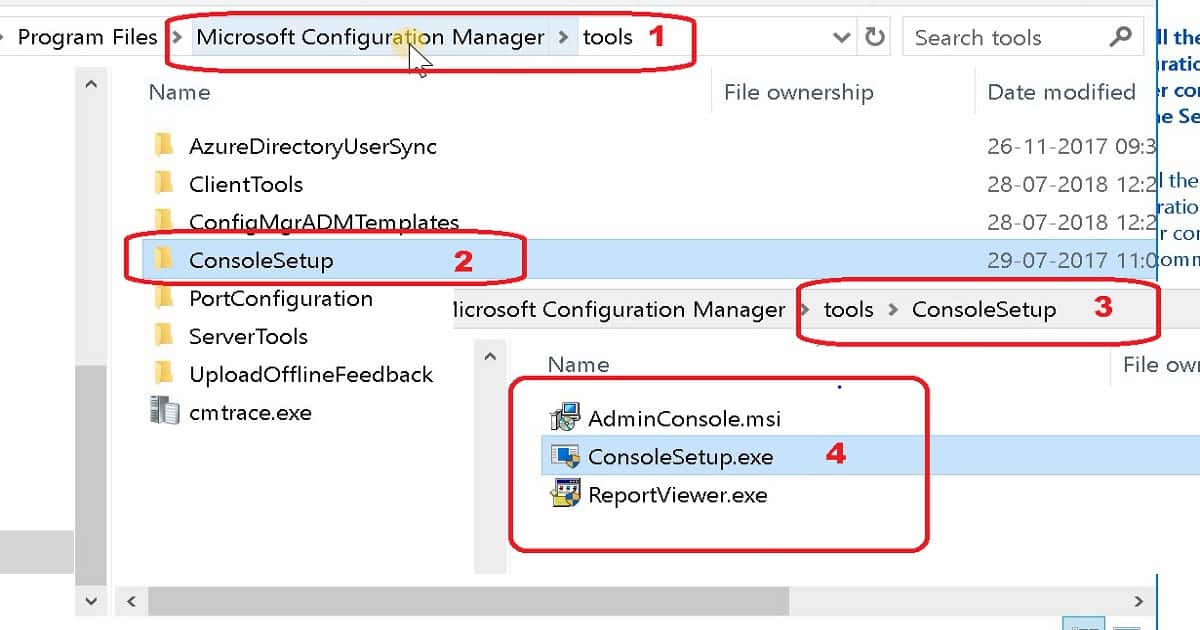
When you install a site server, it copies the SCCM console installation files and supported language packs for the site to the ToolsConsoleSetup subfolder. In this post, I’ll show you the English version of the console installation.

But if you are using an old version of the console and your site server is the latest version, you might still encounter these kinds of issues.

Error
Configuration Manager Cannot Connect to the site. How can this issue be solved? You need to upgrade the console to the latest compatible version—install SCCM Console Remotely.
The Configuration Manager Administrator Console Could not connect to the Configuration Manager Site database. Verify the Version of the Console is Compatible with the version of the site server you are connecting to, and then try to connect again.
FIX SCCM ConfigMgr Admin Console Version Compatibility Issue
I was getting the above error when I was trying to connect to my primary site from the CAS server console. The SCCM current branch doesn’t support installing more than a single Admin console on a Windows 11 device.
To use multiple consoles that are specific to different versions of Configuration Manager, install the different consoles on separate computers.
- FIX SCCM Console Access Error 0x80070005 0x800706ba RPC Server Is Unavailable HTMD Blog (anoopcnair.com)
- FIX Unable To Run CMPivot Issue SCCM Interoperability Mode HTMD Blog (anoopcnair.com)
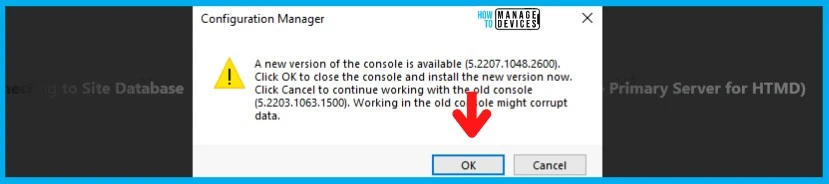
A New version of the console is available. Click OK to close the console and install the new version now. Click Cancel to continue working with the old console. Working in the console might corrupt data.
- I have upgraded the console to the latest version by clicking on the OK button.
We are on WhatsApp. To get the latest step-by-step guides and news updates, Join our Channel. Click here –HTMD WhatsApp.
Author
Anoop C Nair has been Microsoft MVP from 2015 onwards for 10 consecutive years! He is a Workplace Solution Architect with more than 22+ years of experience in Workplace technologies. He is also a Blogger, Speaker, and leader of the Local User Group Community. His main focus is on Device Management technologies like SCCM and Intune. He writes about technologies like Intune, SCCM, Windows, Cloud PC, Windows, Entra, Microsoft Security, Career, etc..




Discussion · 2 comments