






How to Set Google as Default Search Engine with CSP Intune Profiles. Most Organisations follow the “Traditional device management approach,” which uses Group policy as their primary tool to set security standards and end-user settings.
However, we should try new solutions like Windows CSPs in the modern device management approach. This post will show how to deploy and monitor the Default Search Engine CSP policy via Microsoft Intune.
Modern device management uses Azure solutions. Azure cloud solutions include Autopilot, Intune, Windows update for business, Windows Analytics, etc. For more details on Modern management, you can read How to Move from Traditional to Modern Management.
In the “Modern device management” world, Microsoft’s guideline is to use Windows 10 CSPs wherever possible and avoid Group policy unless and until it’s necessary.

TIP: Windows 10 RS4 & higher PCs managed through the Intune MDM channel will now have
MDM setting is prioritized over group policy, starting with settings in the Policy CSP.
Table of Contents
Overview of Windows 10 CSPs
There are 500 + CSPs for Windows 10 management. New CSPs will be added for every new Windows 10 release. In this post, we will see how to change the default search engine in Edge to “google” instead of “Bing” using CSP. We will use Intune to deploy the CSP. Based on requirements, you can use other CSPs.
Below is the reference to the new CSPs added :
Below is the CSP to configure the Default Search Engine, which was added in Windows 10 1703. This post will show configuring the default search engine policy via Intune Profiles.
./Device/Vendor/MSFT/Policy/Config/Browser/SetDefaultSearchEngine
- Intune Policy Tattooed or Not Tattooed Windows CSP Policy
- Various Ways to Enable or Disable Widgets Feature in Windows 11 GPO Intune Policy Registry
How to Configure Default Search Engine CSP Policy in Intune
As we have identified the CSP policy to change the default search engine, we can log in to the Azure portal, navigate to the Microsoft Intune blade, select Device configuration, select Profiles, and select Create Profile.
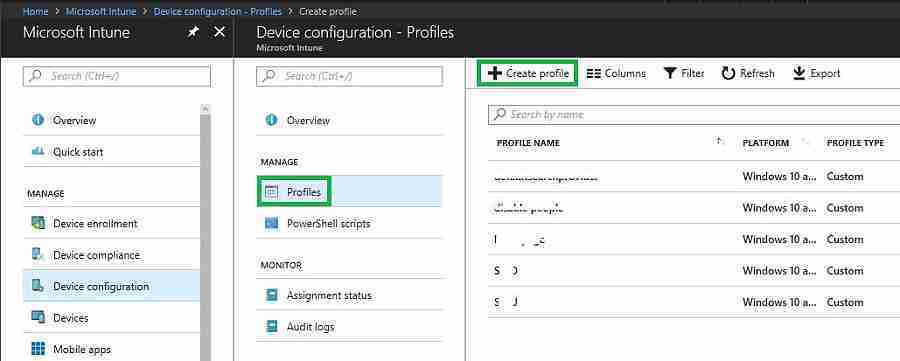
Navigate via Intune Blade, Create a profile, and go to Settings, Configure, Custom OMA-URI Settings, Windows 10 and later, and Add OMA-URI settings.
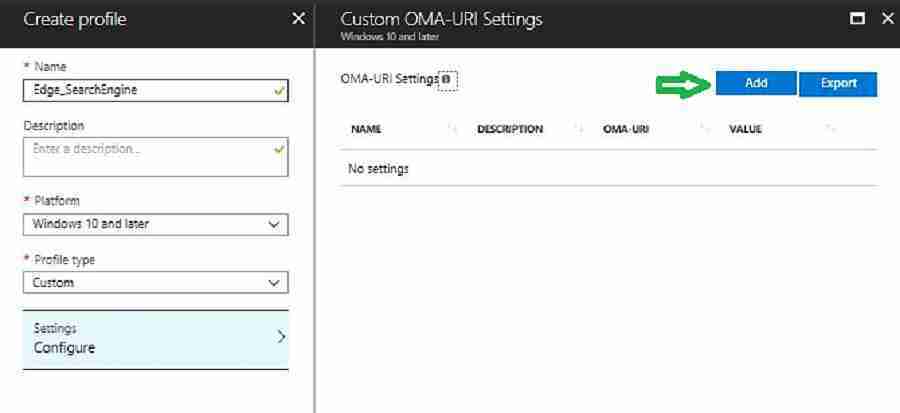
OMA-URI settings set up the Default Search Engine in the Edge browser, and the value is the most critical setting in the policy. The table below provides more details.
| Name | Description | OMA-URI | Data Type | Value |
|---|---|---|---|---|
| Edge_Search_Engine | NA | ./Device/Vendor/MSFT/Policy/Config/Browser/SetDefaultSearchEngine | String | https://www.google.com/searchdomaincheck?format=opensearch |
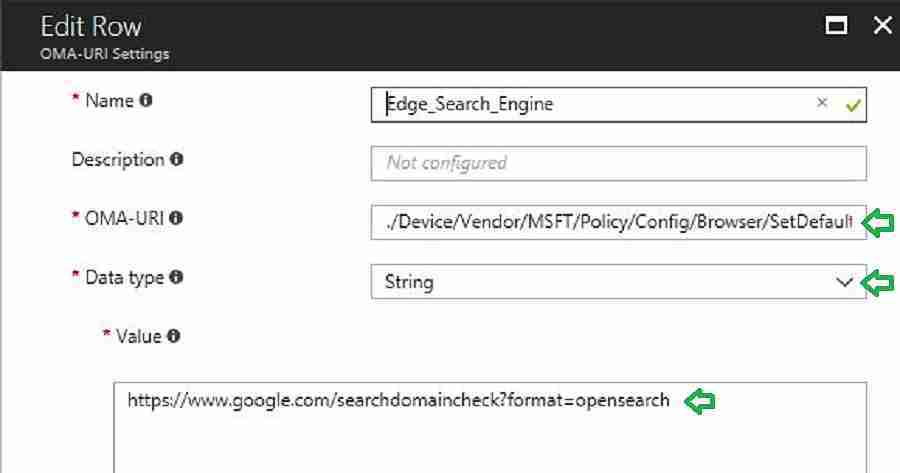
How Do You Verify that the Default Search Engine CSP Policy was Applied?
We can verify the CSP deployment status from both the Intune console and the client. We will go through each one. How can we monitor the CSP policy deployment from the Intune console? The following are some of the options.
Intune Console
Azure portal Navigate to Microsoft Intune blade -> Device configuration – profiles -> “Device configuration profile – > Device status.
As shown below, you can see a list of computers and the status of CSP deployment. This will help IT to understand how many computers successfully applied the CSP.
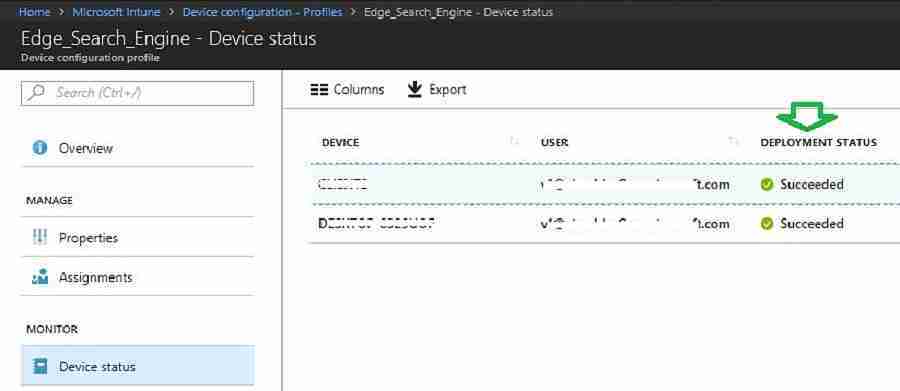
Client-side
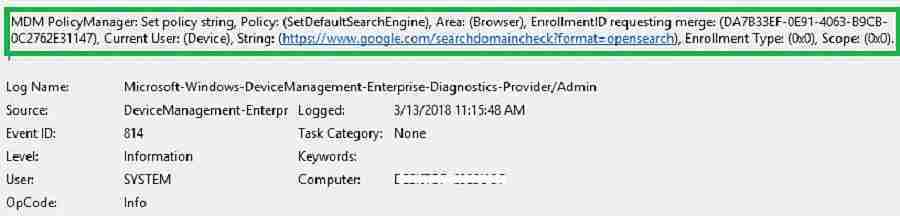
Below are the areas to verify and troubleshoot CSP deployment issues. MDM events are captured in the Event Viewer, as shown below.
- Event viewer
MDM PolicyManager: Set policy string, Policy: (SetDefaultSearchEngine), Area: (Browser),
EnrollmentID requesting merge: (DA7B33EF-0E91-4063-B9CB-0C2762E31147), Current User:
(Device), String: (https://www.google.com/searchdomaincheck?format=opensearch),Enrollment Type: (0x0), Scope: (0x0)
As shown below, the browser policy has been applied successfully. However, for a detailed diagnostics report, click on Create a Report.
- MDM Diagnostics
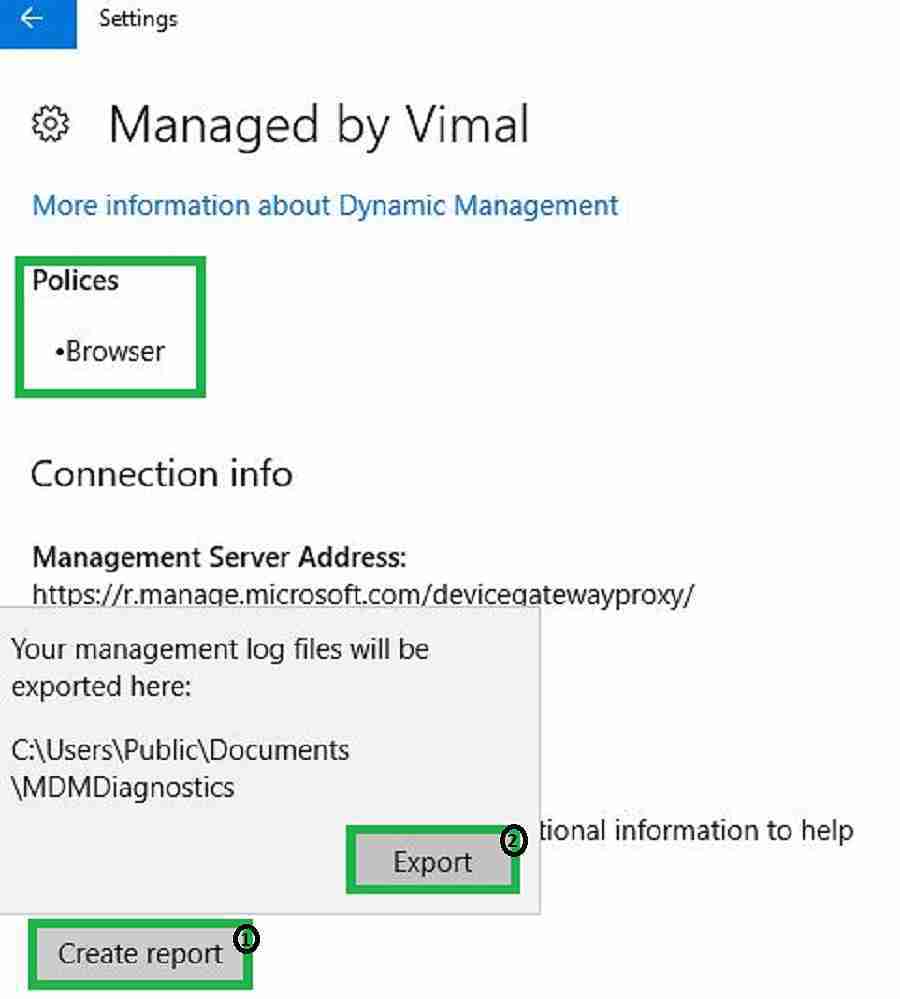
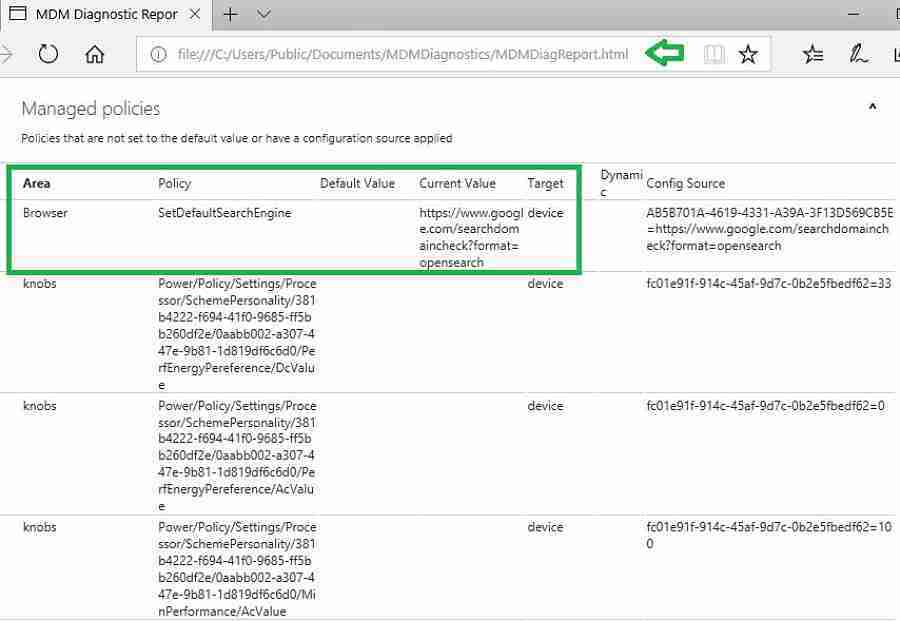
The screenshot below shows the MDM Diagnostic report in HTML format. Details are given below.
MDM Diagnostics reports are in HTML format. Reports are available within C:\Users\Public\Documents\MDMDiagnostics\MDMDiagReport.html
We can use the MDM Bridge WMI Provider to see the settings CSPs apply to the computer. Connect to the WMI Namespace below and verify using Wbemtest or WMI Explorer.
- WMI provider
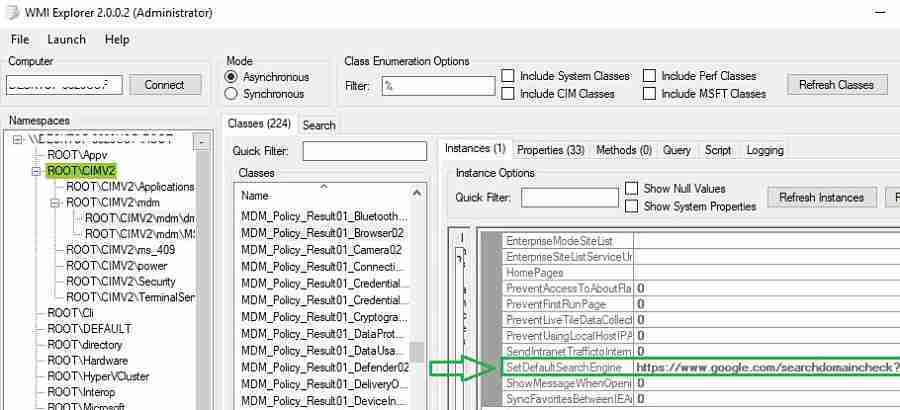
Note: you need to launch wmiexplorer in the system context; otherwise, the setting will not show
- Registry :
- All the MDM Policy CSP settings applied on the device registry are in the below location
[HKEY_LOCAL_MACHINE\SOFTWARE\Microsoft\PolicyManager\current\device\Browser]
“SetDefaultSearchEngine”=”https://www.google.com/searchdomaincheck?format=opensearch”
“SetDefaultSearchEngine_ProviderSet”=dword:00000001
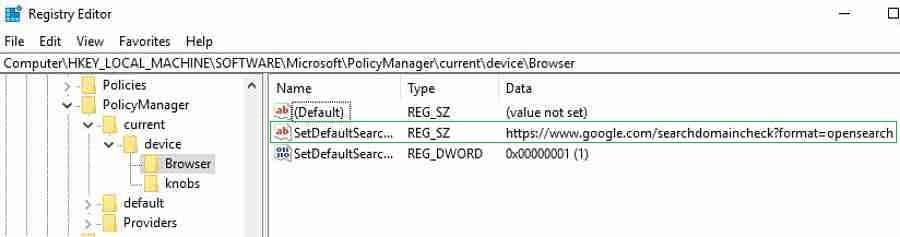
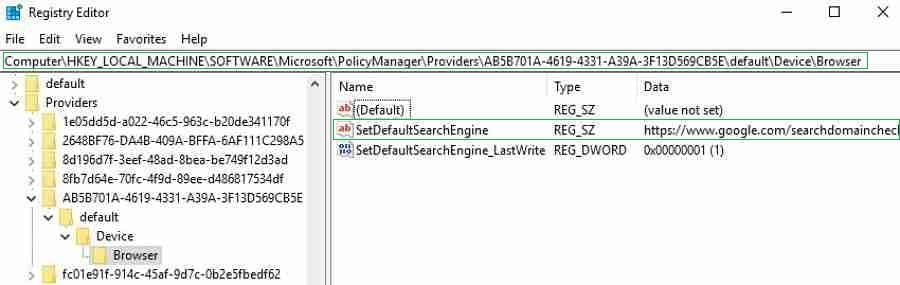
The below screenshot shows the Registry editor. The path is given below.
[HKEY_LOCAL_MACHINE\SOFTWARE\Microsoft\PolicyManager\Providers\DA7B33EF-0E91-4063-B9CB-0C2762E31147\default\Device\Browser]
“SetDefaultSearchEngine”=”https://www.google.com/searchdomaincheck?format=opensearch”
“SetDefaultSearchEngine_LastWrite”=dword:00000001
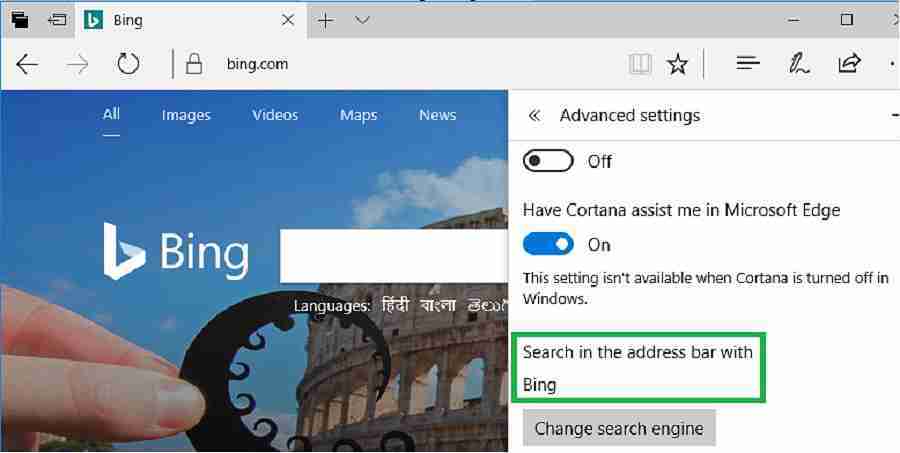
End-User Experience of Default Search Engine CSP Policy
The default search engine is Bing before applying the Intune policy.
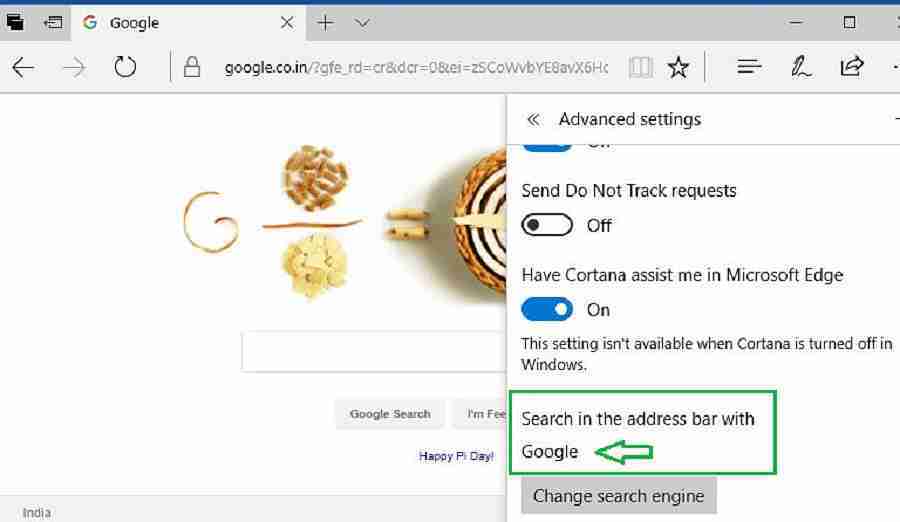
Now, the search engine is Google, and after applying the Intune policy.
Note
Users can change the default search engines by default. To prevent users from changing this setting, deploy additional CSP.
Browser/AllowSearchEngineCustomization
We are on WhatsApp now. To get the latest step-by-step guides, news, and updates, Join our Channel. Click here. HTMD WhatsApp.
Author
Vimal has more than ten years of experience in SCCM device management solutions. His primary focus is Device Management technologies like Microsoft Intune, ConfigMgr (SCCM), OS Deployment, and Patch Management. He writes about SCCM, Windows 10, Microsoft Intune, and MDT.


Great stuff! However, I think you forgot to cover “assigning” the CSP policy.