






Windows 10 KB5039211 June 2024 Patches and 0 Zero-Day Vulnerability
Let’s discuss the Windows 10KB5039211 June 2024 Patches and 0 Zero-Day Vulnerability. The June 2024 Windows 10 KB5039211 Patch Tuesday updates show recent improvements and bug fixes. This update allows users to improve their work life.
Microsoft releases Patch Tuesday updates every month to enhance users’ experience. Windows 11 KB5039212 and KB5039213 also show improvements and bug fixes for the current month. Knowing the latest updates on Windows 11 is very important because it is the latest version of Windows.
I have already mentioned that the Patch Tuesday Update shows the fixed issues with Windows 10 KB5039211. One of the critical fixed issues this month is an issue with the Share button on USB controllers. It might not work with Game Bar.
The main improvement of Windows 10 is the new snipping tool feature. The feature is available when you link your Android mobile device to your PC. When you take a photo or screenshot on your Android device, a dialog on your PC prompts you to open the Snipping Tool.

| Windows 10 22H2 |
|---|
| KB5039211 |
- May 2024 Windows 10 KB5037768 Patches and 2 Zero-Day Vulnerabilities
- May 2024 Windows 11 KB5037771 KB5037770 Patches and 2 Zero-Day Vulnerabilities
Windows 10 KB5039211 June 2024 Patches
The Windows 10 patch Tuesday update helps you improve device security. After the updates, you get the latest version. Each update includes a current version number and build number. The following list shows the details.
- Windows 10 Version Details – Windows 10 22H2 KB5039211
- Version Details – Windows 10 version 22H2– (OS Builds 19044.4529 and 19045.4529)
- More Details on Windows 10 version Numbers: Windows 10 Version Numbers Build Numbers Major Minor Build Rev
How to Seek Windows Updates?
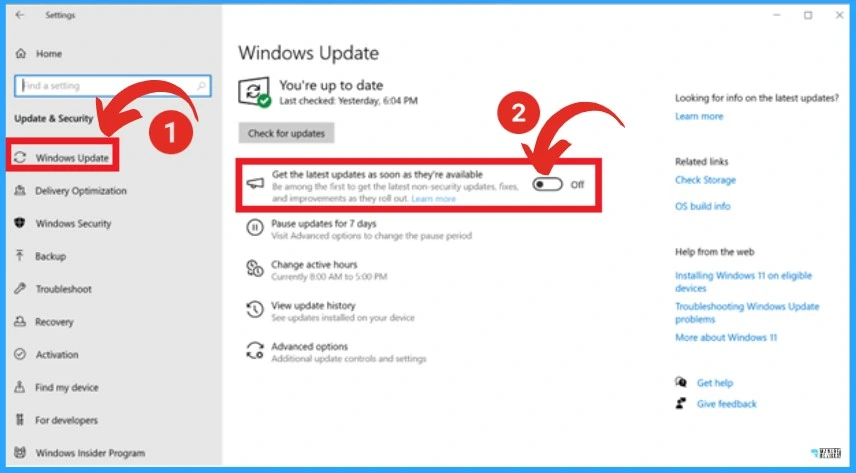
Microsoft allows you to customize your update preferences and review the available updates by clicking the “Check for Windows updates” option. The screenshot below helps you to show the Windows update in the settings app.
Read More – Windows Updates New Feature Get the Latest Updates as soon as They’re Available
Windows 10 New Improvements with June Patches
Microsoft is dedicated to providing recent Improvements to Windows 10 KB5039211 via Patch Tuesday updates. This month, the Country and Operator Settings Asset (COSA) profiles update for certain mobile operators was improved.
| New Improvements with June Patches | Details |
|---|---|
| Adds new Snipping Tool Feature | This is an update that adds a new Snipping Tool Feature. This feature is available when you link your Android mobile device to your PC. When you take a photo or screenshot on your Android device, a dialog on your PC prompts you to open the Snipping Tool. Go to Settings > Mobile devices. Choose to allow your PC to access your mobile devices and select Manage devices. Your PC will get a Cross-Device Experience Host update in the Microsoft Store. You need this for the feature to work. Finally, use the Add device option to link your Android phone. Note This feature might not be available to all users because it will roll out gradually. |
| Brings Country and Operator Settings Asset (COSA) profiles up to date for certain mobile operators | This Update Brings Country and Operator Settings Asset (COSA) profiles up to date for certain mobile operators. |
Issues Fixed with Windows 10 June Patches
Fixed Issues are also an essential factor in Patch Tuesday updates. The Microsoft Entra ID account is one of this month’s major fixed issues. The table below shows more details of fixed issues.
| Fixes with Windows 10 June Patches | Details |
|---|---|
| An issue affected on Share button on USB controllers | Update that affects the Share button on USB controllers. It might not work with Game Bar. |
| The Issue that affects displays a hidden window | The Issue that affects displays is a hidden window. Its title bar has no content and no client area. This occurs when you share your screen using certain apps. |
| An issue that affects the Microsoft Entra ID account | Microsoft Entra ID account is affected by an issue. Devices cannot authenticate a second one. After you install the Windows update, dated November 13, 202, this issue occurs. |
| Server affected by an issue, after you remove it from a domain | This update addresses an issue affecting the server, after you remove it from a domain. The Get-LocalGroupMember cmdlet returns an exception. This occurs if the local groups contain domain members. |
| Update that addresses issues that affected on Windows Presentation Foundation (WPF) app. | The issue with the Windows Presentation Foundation (WPF) app is addressed in this update. It stops responding. |
| IPP-over-USB printer affected by an issue. | This update addresses an issue that affects IPP-over-USB printers. After you delete it, it still appears unavailable in the Control Panel. |
| TWAIN drivers were affected by an issue that was addressed in this update. | The TWAIN drivers issue is addressed in this update. They might stop responding when you use them in a virtual environment. |
| Unified Write Filter (UWF) Windows Management Instrumentation (WMI) API calls affected by an issue. | This issue is affected by Unified Write Filter (UWF) Windows Management Instrumentation (WMI) API calls. Calls to shut down or restart the system throw an access denied exception. |
- Windows 10 KB5036892 April 2024 Patches and 0 Zero-Day Vulnerability
- Windows 11 KB5036893 KB5036894 April 2024 Patches and 0 Zero-Day Vulnerability
Known Issues – Windows 10 KB5039211 June Patch 2024
Microsoft also shows known issues of Windows 10 KB5039211. These issues help users understand the current issues of Windows 10. The table below shows the details of known issues.
| Summary | Originating Update | Details |
|---|---|---|
| Enterprise customers might be unable to use Microsoft Connected Cache | OS Build 19044.4046 | Working on Resolution |
| Devices with a locale set to Croatia might not utilize the expected currency | N/A | Workaround Provided |
| Desktop icons might move unexpectedly between monitors | OS Build 19045.3758 KB5032278 2023-11-30 | Working on Resolution |
SCCM Windows 10 Deployment
SCCM allows you to deploy Windows 10 KB5039211 June Cumulative Update using SCCM/WSUS. The Monthly package for June 2024 can be created from the SCCM Console.
You can quickly learn how to create a Deploy New Software Update Patch Package Using SCCM ConfigMgr. SCCM ADR Automatic Deployment Rule Creation Process is obtained from this blog post.
Windows 10 KB5039211 Direct Download Links
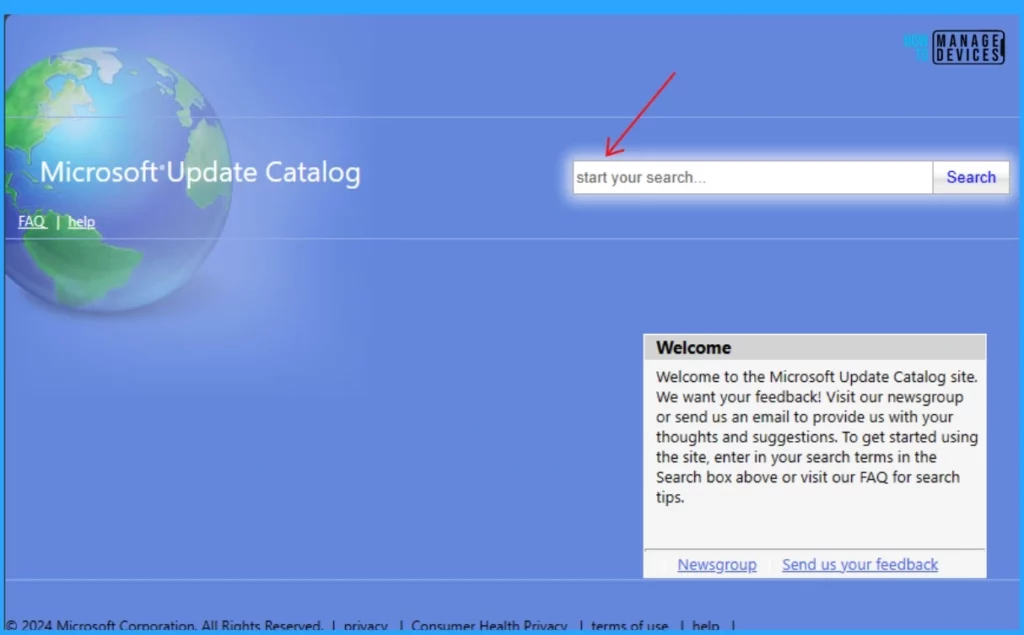
To obtain the June 2024 Cumulative Update for Windows 10 KB5039211, we can download it manually from the Microsoft Update Catalog website. The tables below provide direct links to download the June 2024 Cumulative Updates for Windows 10.
You can check the Microsoft Update Catalog portal to get the direct download links to the hotfixes for the June 2024 LCU. Check this out: Microsoft Update Catalog – https://www.catalog.update.microsoft.com/ and Search Keyword 2024-06
| Title | Product | Size | Direct Download |
|---|---|---|---|
| 2024-06 Cumulative Update for Windows 10 Version 22H2 for x64-based Systems (KB5039211) | Windows 10 22H2 | 651.0 MB | Download |
Automated Patch Management with Windows Autopatch
Autopatch helps streamline updating operations and create new opportunities for IT pros. The Windows Autopatch Release Management clarifies the quality, feature updates, and installation schedules in the Intune portal; here, you can get more information on the Windows Autopatch Implementation Setup Guide.
Reference
June 11, 2024—KB5039211 (OS Builds 19044.4529 and 19045.4529) – Microsoft Support
We are on WhatsApp. To get the latest step-by-step guides and news updates, Join our Channel. Click here for HTMD WhatsApp.
Author
Gopika S Nair is a computer enthusiast. She loves writing on Windows 11 and related technologies. She is here to share quick tips and tricks with Windows 11 or Windows 10 users. She is Post Graduate Diploma Holder in Computer Science.


Discussion