






Changes in SCCM Client Support for Windows 10 1803
Let us learn about Changes in SCCM Client Support for Windows 10 1803 Configuration Manager. Microsoft released the Windows 10 1803 version, which includes some changes in the SCCM client, ADK support model, and Windows 10 1803 version release.
Microsoft also updated the SCCM Client Support for Windows 10 1803 statement. This is a quick post to cover SCCM client support for the Windows 10 1803 version and Windows 10 ADK support for the SCCM CB environment.
Have you upgraded your SCCM CB to the latest version of CB 1802? If not, Microsoft won’t officially support Windows 10 1803 SCCM clients in your environment. This doesn’t mean that previous versions of the SCCM client won’t work with Windows 10 1803.
I quickly tested the SCCM 1710 client on the Windows 10 1803 machine, which worked. However, I tested all the features of SCCM. So, there is no hard block on the SCCM client installation and functionality.

Table of Contents
SCCM Client Support for Windows 10 1803
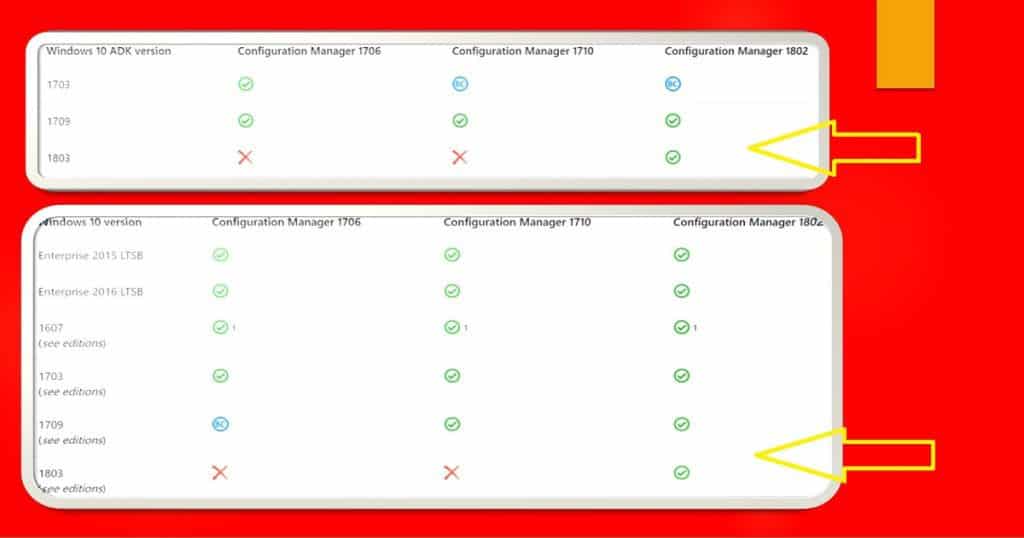
Microsoft recently updated support statement documentation about Windows 10 1803 as an SCCM client. The following table has more detailed information. SCCM attempts to provide support as a client for each new Windows 10 version as soon as possible after it becomes available.
- More details about End of Support Dates for SCCM CB’s Current Branch
- SCCM Client version 1802 or later is the ONLY supported version for Windows 10 1803
- Do you have Windows 10 1803 machines with SCCM CB client version (1710 or below)?
- Microsoft doesn’t support any previous versions of the SCCM CB client running on Windows 10 1803 machines
| Windows 10 version | SCCM 1706 | SCCM 1710 | SCCM 1802 |
|---|---|---|---|
| Enterprise 2015 LTSB |  | | |
| Enterprise 2016 LTSB | | | |
| 1607 (see editions) | | | |
| 1703 (see editions) | | | |
| 1709 (see editions) |  | | |
| 1803 (see editions) |  | | |
- Fix Software Update Deployment Issues with SCCM Clients with KB28458746
- New Features in SCCM Technical Preview 2401
- New Key Features of SCCM 2309 | Top Improvements
- Download SCCM 2309 Early Ring Version using PowerShell Script
- SCCM Versions Build Numbers Client Console Site
Windows 10 ADK Support with SCCM CB Infra Versions
Microsoft released the newest version of ADK for Windows 10 1803 version. Windows 10 1803 ADK is NOT supported with the SCCM 1710 version. So, Microsoft doesn’t recommend you install Windows 10 1803 ADK when your SCCM CB version is 1710 or below.
You can have 1803, 1709, or 1703 (backward compatibility) Windows 10 ADK versions for 1802 version SCCM CB infra.
The following table lists the versions of the Windows 10 ADK that you can use with different versions of SCCM. Microsoft has already updated the support statement documentation to reflect the following changes.
| Windows 10 ADK version | SCCM 1706 | SCCM 1710 | SCCM 1802 |
|---|---|---|---|
| 1703 | | | |
| 1709 | | | |
| 1803 | | | |
We are on WhatsApp now. To get the latest step-by-step guides, news, and updates, Join our Channel. Click here. HTMD WhatsApp.
Author
Anoop C Nair is Microsoft MVP from 2015 onwards for consecutive 10 years! He is a Workplace Solution Architect with more than 22+ years of experience in Workplace technologies. He is a Blogger, Speaker, and Local User Group Community leader. His main focus is on Device Management technologies like SCCM and Intune. He writes about technologies like Intune, SCCM, Windows, Cloud PC, Windows, Entra, Microsoft Security, Career, etc…




Hi – Based on above info, I should remove older version of ADK and install ADK 1803 within my lab infra running CB1802 – right?
Thanks
Ram
StaffWindows 10 ADK 1703, 1709, and 1803 are supported for SCCM 1802. But I would recommend to install 1803 as best practice.
How does one handle multiple version of Windows? There does not seem to be an easy answer here. Currently we deploy Windows 7 and Windows 10 1703 in our environment. When I upgraded from SCCM 1702 to SCCM 1710, I moved us from ADK 1607 to ADK 1709. While I am aware we should be matching the ADK to the version of Windows 10 we deploy, most environments dont just have a single version. Not only do we still have some SCCM Windows 7 build requirements, but I also need to support Windows 10 LTSB 2016 (which is actually Windows 1607) as well as support newer versions of Windows 10 like 1709 and 1803 for testing. Based off of Microsofts logic I should only be using 1703, as thats the main version of Widows we deploy. Next week I will be upgrading SCCM to 1802. Do I keep the ADK level at 1709?
Same question as below in my mind. Can ADK 1803 support Windows 7 SP1 OSD?
How does one handle multiple version of Windows? There does not seem to be an easy answer here. Currently we deploy Windows 7 and Windows 10 1703 in our environment. When I upgraded from SCCM 1702 to SCCM 1710, I moved us from ADK 1607 to ADK 1709. While I am aware we should be matching the ADK to the version of Windows 10 we deploy, most environments dont just have a single version. Not only do we still have some SCCM Windows 7 build requirements, but I also need to support Windows 10 LTSB 2016 (which is actually Windows 1607) as well as support newer versions of Windows 10 like 1709 and 1803 for testing. Based off of Microsofts logic I should only be using 1703, as thats the main version of Widows we deploy. Next week I will be upgrading SCCM to 1802. Do I keep the ADK level at 1709?
Hello Anoop,
I am facing a issue since 1 week. I have deployed application task sequence in client. TS installs fine but after 18 hrs my machine crashes. I cannot open C:\ drive and throws a message saying – “C:\ is not accessible. Access is denied” Please help me.
SCCM Version – 1706
SCCM Client – Win 10 1709 build