






SCCM ConfigMgr Setup Co-Management AAD Connect UPN Suffix Sync Identities to Azure AD
Let us learn about SCCM ConfigMgr Setup Co-Management AAD Connect UPN Suffix Sync Identities to Azure AD. On-prem Active Directory users, groups, etc.. must be synced with Azure AD. This sync is required to have a bridge between traditional & modern management.
AAD Connect is a tool for syncing on-prem users and groups with Azure AD. It is also a prerequisite for Co-Management. In this post, we will help you set up Co-Management AAD Connect and configure UPN Suffix.
UPN suffix setup is essential to sync the users from on-prem AD to Azure AD. We need to create a UPN suffix according to your Azure AD UPN. The user UPN suffix needs to be changed to have that user synced with Azure AD.
In this post, you will get all the details of the SCCM ConfigMgr Setup Co-Management AAD Connect UPN Suffix Sync Identities to Azure AD. It is explained in detail below.

Table of Contents
SCCM ConfigMgr Setup Co-Management AAD Connect UPN Suffix Sync Identities to Azure AD – Setup UPN Suffix
How do we change users’ UPN values? The option is to go to on-premises AD and create a new alternate UPN suffix, as shown in the following screen capture: How to Add a UPN Suffix to a Forest.
| SCCM ConfigMgr Setup Co-Management AAD Connect UPN Suffix Sync Identities to Azure AD – Setup UPN Suffix |
|---|
| Open Active Directory Domains and Trusts. |
| Right-click Active Directory Domains and Trusts in the Tree window pane, and then click Properties. |
| On the UPN Suffixes tab, type the new UPN suffix (anoopc.onmicrosoft.com) that you would like to add to the forest. |
| Click Add, and then click OK. |
All Co-Management Video Tutorial
Overview Windows 10 Co-Management with Intune and SCCM
Custom Report to Identify Machines Connected via SCCM CMG
How to Setup Co-Management – Introduction – Prerequisites Part 1
How to Setup Co-Management – Firewall Ports Proxy Requirements Part 2
Setup Co-Management – AAD Connect UPN Suffix Part 3 (This Post)
Setup Co-Management – CA PKI & Certificates Part 4
Setup Co-Management Cloud DP Azure Blob Storage Part 5
Setup Co-Management Azure Cloud Services CMG Part 6
SCCM Configure Settings for Client PKI certificates Part 7
How to Setup SCCM Co-Management to Offload Workloads to Intune – Part 8
How to Deploy SCCM Client from Intune – Co-Management – Part 9
End User Experience of Windows 10 Co-Management – Part 10
Video Co-Management AAD Connect & UPN Suffix Configuration
I have created a video tutorial to install Azure AD Connect. This video will help you understand how to develop a UPN suffix for syncing on-prem users to Azure AD.
This video will help you to understand Co-Management AAD Connect and UPN suffix configurations.
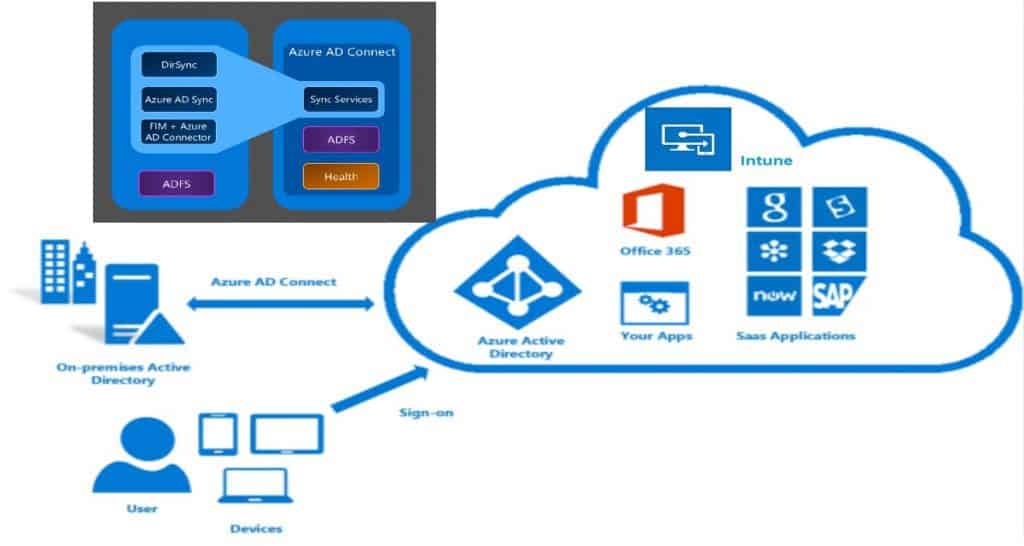
What is Azure AD Connect?
I use Azure AD to set up and test co-management in the lab environment. This is important for SCCM admins. However, your organisation should handle this through the Active Directory. Azure AD Connect helps to integrate your on-premises directories with AAD Directory.
Azure AD and On-Prem AD identities sync allow you to provide a common identity for your users for Office 365, Azure, Intune, and SaaS applications integrated with Azure AD. This is one of the prerequisites for co-management. Following are the three(3) main components of Azure AD Connect.
- Synchronization
- AD FS (Optional)
- Health Monitoring
Install & Configure Azure AD Connect
I used Express settings to install AAD Connect in the lab. However, your organization may have a particular requirement. When you have custom requirements, you need to select customized settings during the installation. The documentation provides more details. The AAD connect installation process is followed, which I explained in the video tutorial.
- Download Azure AD Connect
- Install using Express settings
- Install using Customized settings (Optional)
- Upgrade from DirSync (Optional)
- After installation checks
We are on WhatsApp now. To get the latest step-by-step guides, news, and updates, Join our Channel. Click here. HTMD WhatsApp.
Author
Anoop C Nair is Microsoft MVP from 2015 onwards for consecutive 10 years! He is a Workplace Solution Architect with more than 22+ years of experience in Workplace technologies. He is a Blogger, Speaker, and Local User Group Community leader. His main focus is on Device Management technologies like SCCM and Intune. He writes about technologies like Intune, SCCM, Windows, Cloud PC, Windows, Entra, Microsoft Security, Career, etc…




Anoop,
Maybe you can shed some light on the following question:
I am implementing Windows Hello for Business with Hybrid Key Trust with W2016 DC’s etc.
In 1 domain the customers use 2 or three different upn-suffixes like ab.nl and bc.be to access the tenant in Azure. How will AD-connect synchronizes 2 quite different upn-suffixes. And will it work if Users log in with a PIN on their ADDJ devices to connect to resources on Premise (like printers and File-shares)?without the resources asking for their name/password.
This should give you some idea if you are still looking.
https://github.com/MicrosoftDocs/azure-docs/issues/27680