






SCCM ConfigMgr Setup Co-Management CA PKI Request Export Certificates
Let us learn about SCCM ConfigMgr Setup Co-Management CA PKI Request Export Certificates. I struggled to set up the PKI infrastructure in my lab environment. Setting up PKI infrastructure is not easy for SCCM admins.
However, when I tried the method explained in this post, I felt it was straightforward. This post will show how to set up lab PKI (Certificate Authority) infra for co-management.
We will also see how to set up Co-Management PKI and create the PKI certificates required for CMG and CDP.
I have a co-management post explaining PKI or CA certification requirements for CMG and CDP. I recommend reading the following post How to Setup Co-Management Introduction Prerequisites.

Table of Contents
Video Tutorial to Setup Co-Management PKI Certs
The following video tutorial explained how to Setup SCCM ConfigMgr Co-Management CA PKI Request Export Certificates.
Co-Management Related Posts
- How To Setup SCCM ConfigMgr Co-Management Video Tutorials
- Overview Windows 10 Co-Management with Intune and SCCM
- Custom Report to Identify Machines Connected via SCCM CMG
- How to Setup Co-Management – Introduction – Prerequisites Part 1
- How to Setup Co-Management – Firewall Ports Proxy Requirements Part 2
- Setup Co-Management – AAD Connect UPN Suffix Part 3
- Setup Co-Management – CA PKI & Certificates Part 4 (This Post)
- Setup Co-Management Cloud DP Azure Blob Storage Part 5
- Setup Co-Management Azure Cloud Services CMG Part 6
- SCCM Configure Settings for Client PKI Certificates Part 7
- How to Setup SCCM Co-Management to Offload Workloads to Intune – Part 8
- How to Deploy SCCM Client from Intune – Co-Management – Part 9
- End User Experience of Windows 10 Co-Management – Part 10
Co-Management PKI and Certificate Requirements
Co-management doesn’t have any PKI & certificate requirements. However, SCCM Cloud Management Gateway (CMG) and Cloud DP (CDP) have some PKI and certificate requirements. SCCM, CMG & CDP are required for most scenarios when an organization starts the journey of modern management.
Setup Co-Management PKI is a very difficult steps if you don’t have PKI infra. In that case, you can try using the Public certificate.
Setup PKI/CA Feature Server 2012 –
Install the PKI or Certificate Authority(CA) on the 2012 server with the following PowerShell commands. I’m impressed with these two PowerShell commands. This is the easiest way to set up Co-Management PKI. Those two commands do everything for you.
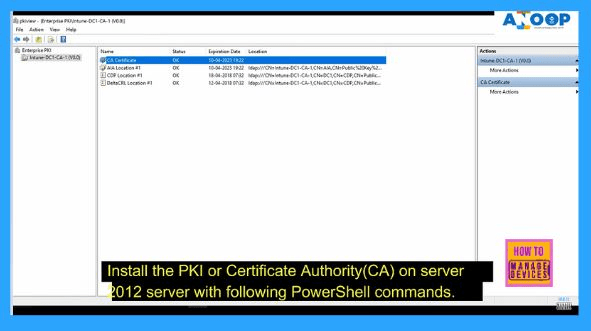
Using Windows PowerShell, open Windows PowerShell, type the following command, and then press ENTER.
Add-WindowsFeature Adcs-Cert-Authority -IncludeManagementTools
After AD CS is installed, type the following command and press ENTER.
Install-AdcsCertificationAuthority -CAType EnterpriseRootCA
We can confirm whether the CA environment is working with the tool PKIVIEW.msc. More information about the health of the CA environment can be found in a quick check of the CA health health article.
How to Get Ready with Certificates Required for Co-Management (Setup Co-Management CA PKI)
In the video tutorial, I explain the step-by-step process for creating the certificates required for Co-management. Once you complete the setup of the Co-Management PKI, you can start configuring the certificates. (SCCM ConfigMgr Setup Co-Management CA PKI Request Export Certificates)
- Create Management Self-Signed Certificate (Upload to Azure Portal)
We need to create a management self-signed certificate for Azure Cloud DP installation. For SCCM CMG, this is not required when you use ARM instead of the classic deployment method (only available SCCM 1802 or later).
I recommend reading the prerequisite post for more details about CMG and CDP cert requirements. You can also read more information about Azure management certificates.
The PowerShell command can create the management certs for CMG (optional) & CMD.
– $cert = New-SelfSignedCertificate -DnsName yourdomain.cloudapp.net -CertStoreLocation “cert:\LocalMachine\My” -KeyLength 2048 -KeySpec “KeyExchange” $password = ConvertTo-SecureString -String “your-password” -Force -AsPlainText – PfxCertificate -Cert $cert -FilePath “.\my-cert-file.pfx” -Password $password – Export-Certificate -Type CERT -Cert $cert -FilePath .\my-cert-file.cer
- 2. Create Duplicate Certificate Templates for Web Server and Workstation Certs
In this section, we will see how to create duplicate certificate templates for:-
- Web server Auth certificate for SCCM site systems that run IIS
- Web Server Auth service certificate for CDP/CMG
- Workstation Authentication certificate
The video tutorial explains the process of creating duplicate certificate templates. I recommend reading the Microsoft documentation(CDP) for more details about duplicate templates.
Please note there are a couple of changes for CMG certs. I recommend reading the Microsoft documentation (CMG) to have more details. I have shown the exact steps in the Video Tutorial as well.
- 3. Group Policy to Deploy Client Certificate
In the video tutorial, I have shown how to create a group policy to deploy client certificates to all the domain-joined devices.
Use Group Policy to configure the Workstation Authentication template’s autoenrollment. See the Microsoft documentation for more details on creating Group Policy.
- 4. Request the Custom Web Server Certificate
Request the custom web server certificate for CMG, CDP, and SCCM site Servers IIS. This procedure requests and then installs the custom web server certificate on the member server that will run the site server.
I recommend reading Microsoft documentation (CDP/IIS) to learn more about the process. Also, keep reading about CMG documentation. I have a video tutorial that shows how to request custom web server certificates for CMG, CDP, and IIS. (SCCM ConfigMgr Setup Co-Management CA PKI Request Export Certificates)
5. Export the Custom Web Server & Root CA Certificate
Export the custom web server certificate for CDP, CMG, Root CA, and SCCM site Servers.
This procedure exports the custom web server certificate to a file to be imported when you create the cloud-based distribution point, Cloud Management Gateway, Root CA, and IIS.
I recommend reading Microsoft documentation (CDP/IIS) to learn more about the process. Also, keep reading about CMG documentation. I have a video tutorial that shows how to request custom web server certificates for CMG, CDP, Root CA, and IIS.
We are on WhatsApp. To get the latest step-by-step guides and news updates, Join our Channel. Click here –HTMD WhatsApp.
Author
Anoop C Nair is Microsoft MVP! He is a Device Management Admin with more than 20 years of experience (calculation done in 2021) in IT. He is a Blogger, Speaker, and Local User Group HTMD Community leader. His primary focus is Device Management technologies like SCCM 2012, Current Branch, and Intune. He writes about ConfigMgr, Windows 11, Windows 10, Azure AD, Microsoft Intune, Windows 365, AVD, etc.




Please describe Infra setup used for Co-management like site servers where certs needs to be imported.
Are you using separate site for CMG/CDP ?