






End-User Experience of Windows 10 Co-Management
In this post, I will cover the end-user experience of Windows 10 Co-Management. I have a series of posts on this topic, and this is the last post in that series.
Microsoft is still making design changes in co-management topics, which are expected to become more interesting in later versions of SCCM. I wrote all my co-management posts with the SCCM 1802 product release.
This post is my post number 10 (ten) to help you configure Windows 10 Co-Management in a lab environment. I recommend reading Microsoft documentation to get the latest updates about the co-management features.
I have attached Microsoft documentation links in all of my blog posts to make it easy.

(End User = Admins, Support teams, and Business users)
Table of Contents
Video Tutorial – End User Experience of Windows 10 Co-Management
In this video, you will learn the end-user experience of Windows 10 Co-Management.
Co-Management Related Posts
- Overview Windows 10 Co-Management with Intune and SCCM
- Custom Report to Identify Machines Connected via SCCM CMG
- How to Setup Co-Management – Introduction – Prerequisites Part 1
- How to Setup Co-Management – Firewall Ports Proxy Requirements Part 2
- Setup Co-Management – AAD Connect UPN Suffix Part 3
- Setup Co-Management – CA PKI & Certificates Part 4
- Setup Co-Management Cloud DP Azure Blob Storage Part 5
- Setup Co-Management Azure Cloud Services CMG Part 6
- SCCM Configure Settings for Client PKI certificates Part 7
- How to Setup SCCM Co-Management to Offload Workloads to Intune – Part 8
- How to Deploy SCCM Client from Intune – Co-Management – Part 9
- End User Experience of Windows 10 Co-Management – Part 10
- All in One – How to Setup Co-Management Eight(8) Video Tutorials
User Communication Management of Windows 10 Co-Management
The real-world end-user experience of using SCCM and Intune co-managed Windows 10 devices differs from normal SCCM-managed devices.
We should communicate this change to end-users and support teams. This change in communication will make their life easier. I hope SCCM and Intune product teams are working to improve the end-user experience of co-managed devices.
What is the tool they want to use for application installation?
Software Center? Application Catalog? Intune Company Portal/ https://portal.manage.microsoft.com/Apps ? Windows Store for Business?
Windows 10 Co-managed Device – How to Refresh SCCM/Intune Policies?
As mentioned in the SCCM 1806 TP post, users or admins can now sync the Intune and SCCM policy refresh from one place (download client policy or SCCM client agent).
This MDM sync will automatically happen when you change the workload switch settings in co-management configuration properties. You don’t need to sync from management tools, such as the Intune MDM and SCCM client agent settings.
SCCM CB 1806 (TP) client actions from a co-managed device automatically synchronize MDM policy from Microsoft Intune. This sync also happens when you initiate the Download Computer Policy action from Client Notifications in the SCCM console.
How to Install SCCM client on Intune Managed Windows 10 Device?
I have an Intune-managed Windows 10 device. This post will show the experience of getting that device into SCCM management. As discussed in the previous post, I have deployed a required SCCM client application from Intune to this Windows 10 device.
You can check the status of the SCCM client deployment from https://portal.manage. microsoft.com/Apps. As you can see in the video tutorial, the content is downloaded from the cloud DP, and the client gets installed.
The Windows 10 device’s co-management status was updated in the SCCM console only after a couple of policy refreshes.
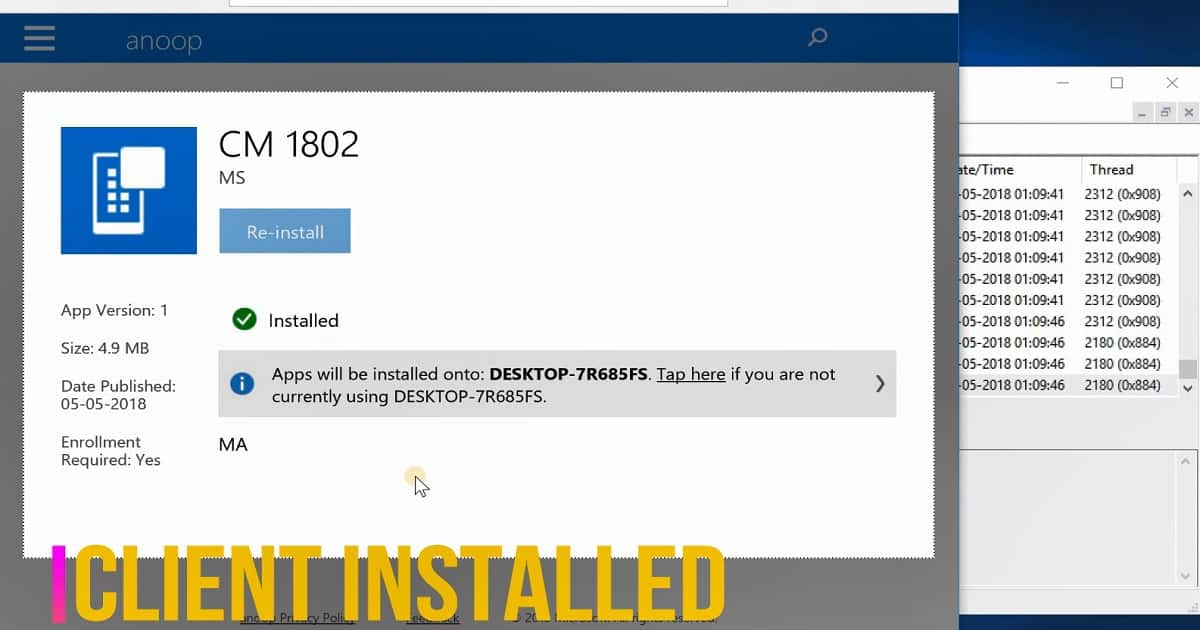
Immediate use of Microsoft Intune features for SCCM Managed Devices.
Immediate use of Microsoft Intune features available for SCCM-managed devices in a co-managed scenario.
- Remote Actions
- Factory reset
- Selective wipe
- Delete devices
- Restart device
- Fresh start
SCCM Orchestration with Intune for the following workloads
SCCM can offload the workloads to Intune for the following workloads. As I explained in this post, SCCM can handle Intune workloads like application deployment. SCCM can be used to deploy complex MSI applications to a co-managed device.
Compliance Policies Device Configuration (Available with SCCM TP 1805 or later) Resource Access Policies (WiFi, VPN profiles) Endpoint Protection Configuration Policies Office Click-to-Run Apps (Available with SCCM TP 1806 or later) Windows Update Policies (Patching without on-prem WSUS/SUP)
SCCM Client Status from the Control Panel Applet
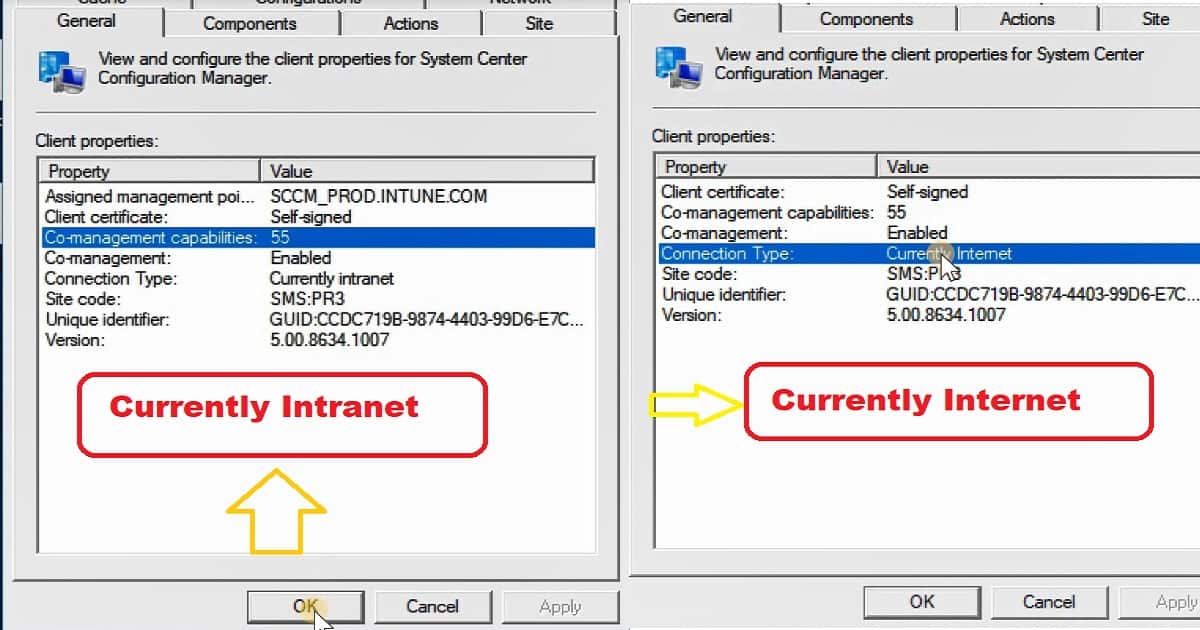
The following are the Windows 10 co-management properties for the SCCM client applet. The SCCM 1802 production version has 55 co-management capabilities.
When a device is co-managed, the co-management feature should be enabled in the SCCM client applet.
- Client Certificate: Self-signed
- Co-management Capabilities:55
- Co-Management: Enabled
- Connection Type: Currently Internet
In the screenshot below, you can see that the connection type is Currently INTRANET. After a couple of policy refreshes, it changed to the Currently Internet.
Once all the policies are delivered to the client, the status is changed to “Currently Internet” in the SCCM client applet in the control panel.
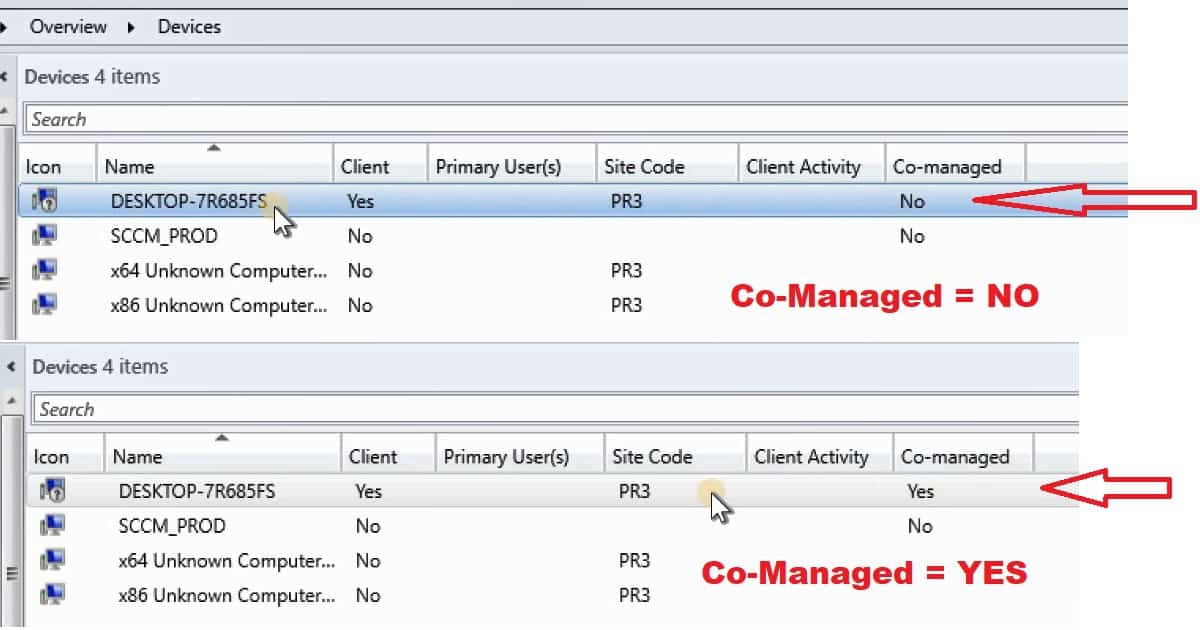
SCCM Console – How to check the Windows 10 Co-Management Status of a Device?
As you can see in the video tutorial, check whether the device is enabled for co-management from the SCCM console. You may need to add the column “Co-Managed” to get co-management information in the SCCM 1802 console.
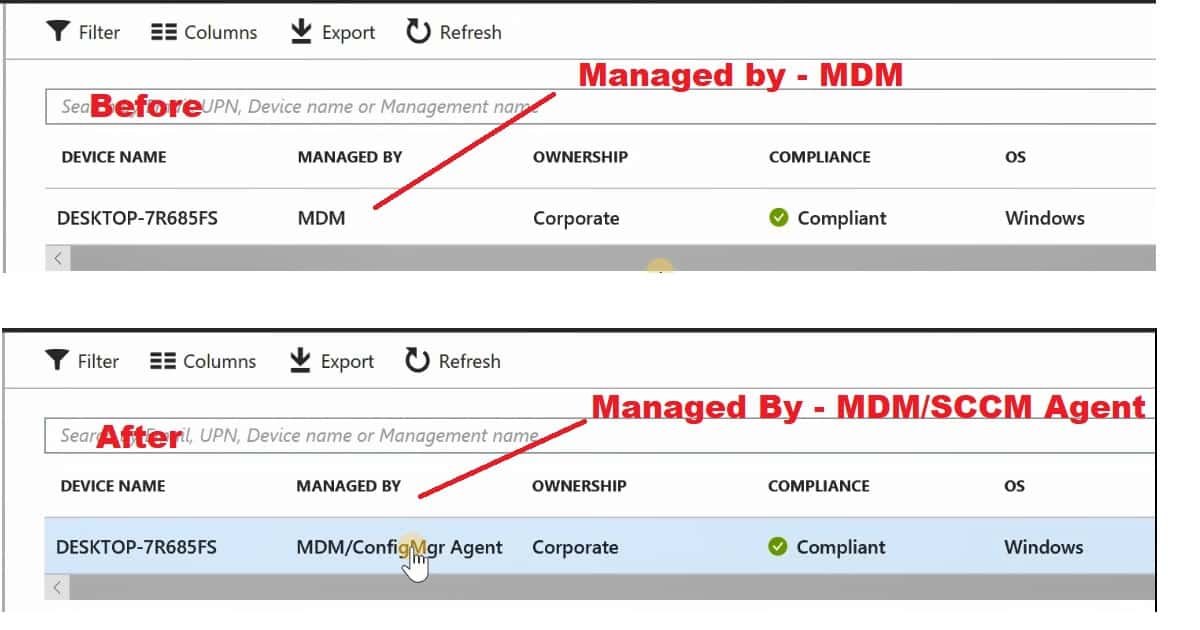
Intune Portal – How to check the Windows 10 Co-Management Status of a Device?
As you can see in the video tutorial, check whether the device is enabled for co-management from the Intune portal. The All Devices tab in the Intune Blade will help you video the co-managed status of a Windows 10 device.
- Managed by MDM
- Managed by MDM/ConfigMgr Agent/SCCM Agent
We are on WhatsApp. To get the latest step-by-step guides and news updates, Join our Channel. Click here –HTMD WhatsApp.
Author
Anoop C Nair is Microsoft MVP! He is a Device Management Admin with more than 20 years of experience (calculation done in 2021) in IT. He is a Blogger, Speaker, and Local User Group HTMD Community leader. His primary focus is Device Management technologies like SCCM 2012, Current Branch, and Intune. He writes about ConfigMgr, Windows 11, Windows 10, Azure AD, Microsoft Intune, Windows 365, AVD, etc.




Discussion