






In this post, we will check how to fix SCCM Client CMG Communication Failure Error 0x87d0027e. Cloud Management Gateway (CMG) is today’s most talked-about feature, having become a full-release feature from SCCM CB 1802 onwards.
If you are looking for the deployment steps, the CMG Client communication post is not the right post, and you can check the detailed tutorial by Anoop.
While working on deploying a Cloud Management Gateway (CMG) for one of the organizations, I encountered a client communication failure issue.
I thought of posting it as a blog so that others can benefit from it and don’t have to go through the same pain we did.

Table of Contents
Fix SCCM Client CMG Communication Failure Error 0x87d0027e
We deployed Cloud Management Gateway (CMG) in Azure, which was successful, and then we tested the features on one of the client machines successfully.
When we moved on with the testing for a larger UAT group, the client communication failed for most of the laptops.
Troubleshooting – SCCM CMG Client Communication Failure
We started the troubleshooting via log files. I will explain how you can troubleshoot SCCM CMG Client communication Failure issues.
When you check the locationservices.log, it will show that the INF (Internet Facing) MP failed to communicate, and the MP switching happens frequently between the INF MP and on-prem MP.
Log snippet from locationservices.log (Domain name changed for security reasons)
[CCMHTTP] ERROR: URL=https://MYCMG.MYDOMAIN.COM/CCM_Proxy_MutualAuth/720575940XXXXXXXX/SMS_MP/.sms_aut?MPLIST2&PR1, Port=443, Options=448, Code=0, Text=CCM_E_BAD_HTTP_STATUS_CODE LocationServices 6/21/2018 2:17:18 PM 11180 (0x2BAC) Raising event: instance of CCM_CcmHttp_Status { ClientID = “GUID:B704E758-91A8-479B-A629-747A66E4065B”; DateTime = “20180621121718.306000+000”; HostName = “MYCMG.MYDOMAIN.COM”; HRESULT = “0x87d0027e“; ProcessID = 5448; StatusCode = 401; ThreadID = 11180; }; LocationServices 6/21/2018 2:17:18 PM 11180 (0x2BAC) Successfully queued event on HTTP/HTTPS failure for server ‘MYCMG.MYDOMAIN.COM’. LocationServices 6/21/2018 2:17:18 PM 11180 (0x2BAC)
A similar error can be seen in the CCMMessaging.log.
Successfully queued event on HTTP/HTTPS failure for server ‘MYCMG.MYDOMAIN.COM’. CcmMessaging 6/21/2018 1:50:15 PM 7348 (0x1CB4) Post to https://MYCMG.MYDOMAIN.COM/CCM_Proxy_MutualAuth/720575940XXXXXXXX/ccm_system/request failed with 0x87d00231. CcmMessaging 6/21/2018 1:50:15 PM 7348 (0x1CB4) [CCMHTTP] ERROR: URL=https://MYCMG.MYDOMAIN.COM/CCM_Proxy_MutualAuth/720575940XXXXXXXX/ccm_system/request, Port=443, Options=448, Code=0, Text=CCM_E_BAD_HTTP_STATUS_CODE CcmMessaging 6/21/2018 2:00:26 PM 9468 (0x24FC) Raising event: instance of CCM_CcmHttp_Status { ClientID = “GUID:B704E758-91A8-479B-A629-747A66E4065B”; DateTime = “20180621120026.920000+000”; HostName = “MYCMG.MYDOMAIN.COM”; HRESULT = “0x87d0027e“; ProcessID = 5448; StatusCode = 401; ThreadID = 9468; }; CcmMessaging 6/21/2018 2:00:26 PM 9468 (0x24FC)
Deep Dive into Firewall, PKI, etc. – CMG Client Communication Failure
The first thing we checked here is the port 443 connectivity from this test machine to the CMG public IP using the port query UI tool. Port connectivity was fine; it listened for port 443 without any issues.
After hours of troubleshooting, we identified that the PKI infrastructure has multiple CAs. The picture below gives an overview of the PKI infrastructure.
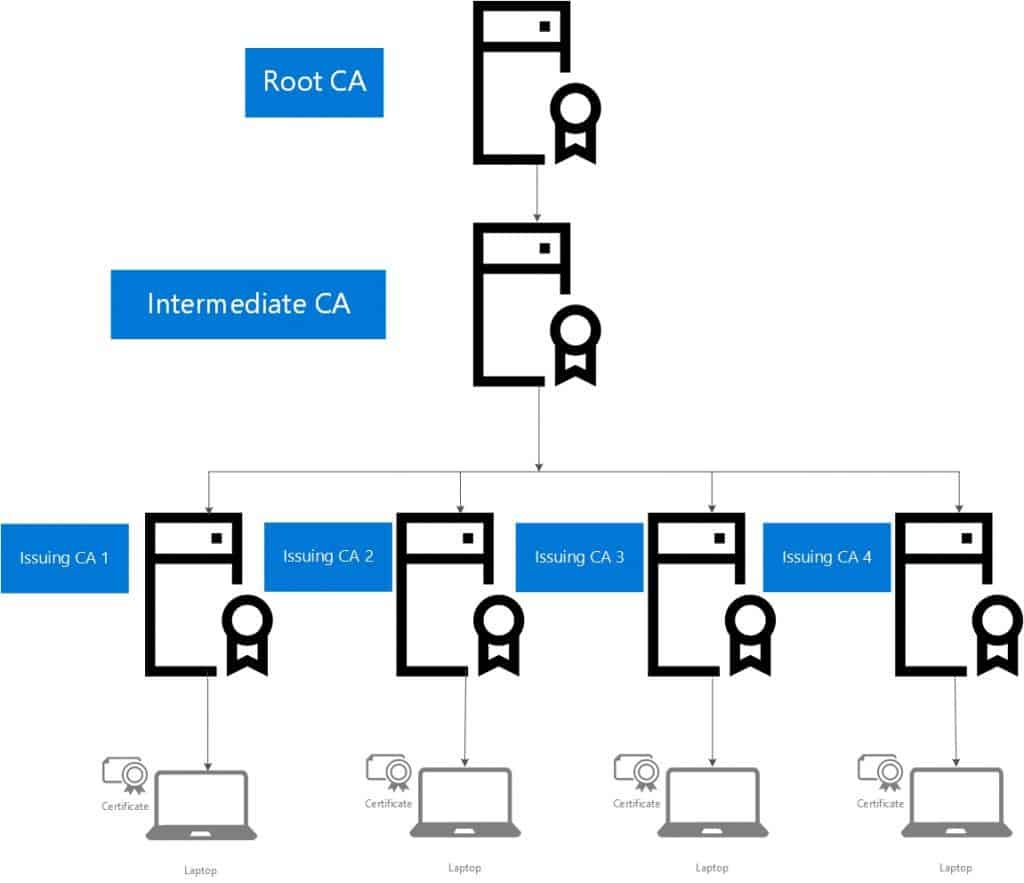
In this scenario, the certificates on the server and a few devices were issued by Issuing CA 1. Hence, we have uploaded the RootCA, Intermediate CA, and Issuing CA 1 to Azure while installing CMG.
So, whichever machines got a certificate enrolled from Issuing CA 1, the client communication was a success. For others, it failed because they were missing the Certificate Chain.
Solution – CMG Client Communication Failure
To rectify the problem, we have to upload all the certificates so that their certificate chains are not broken.
For Example, below is the list of certs that should be provided to Azure while installing the CMG.
- Root CA
- Intermediate CA
- Issuing CA 1
- Issuing CA 2
- Issuing CA 3
- Issuing CA 4
SCCM CMG – Is there a limitation to uploading client Credentials?
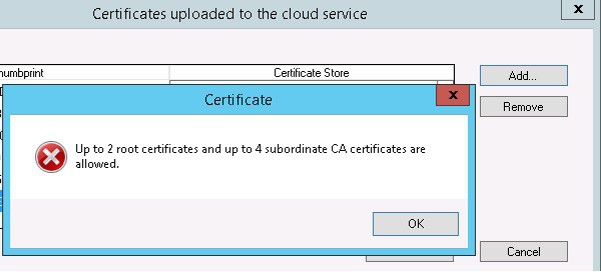
Note: Currently, uploading only 6 (2 root CA and 4 Intermediate CA)certs while deploying a CMG is restricted. This may be changed in future releases.
References
We are on WhatsApp. To get the latest step-by-step guides and news updates, Join our Channel. Click here –HTMD WhatsApp.
Author
Anoop C Nair is Microsoft MVP! He is a Device Management Admin with more than 20 years of experience (calculation done in 2021) in IT. He is a Blogger, Speaker, and Local User Group HTMD Community leader. His primary focus is Device Management technologies like SCCM 2012, Current Branch, and Intune. He writes about ConfigMgr, Windows 11, Windows 10, Azure AD, Microsoft Intune, Windows 365, AVD, etc.




how did u determine the number of root/intermediate/issuing CAs?
StaffYou can get this information from certificate properties on “Certification Path” tab you can have this details.
Good morning Rajul OS, I have this problem on my server but only the intranet communication was not implemented in the PKI Certificates. What should I check in that case. I hope you can support me please.
I’m getting a similar issue, but we don’t use internal certs, just public certs and we use Enhanced HTTP.
Any ideas?
Hi John, we are in the same rabbit hole ` 🙁