






Intune MDM Enrollment Error Code 80180005
Hi, Let’s discuss the Intune MDM Enrollment Error Code 80180005. Microsoft identified an error code in Intune Mobile device management (MDM). As you all know, MDM is essential in organizations. It helps organizations manage and secure employees‘ mobile devices.
MDM enrollment involves signing up devices with a system like Microsoft Intune to manage and protect them. Do you know why MDM enrollment is essential? By enforcing security rules, users can protect their sensitive information.
Sometimes, users may encounter errors during the enrollment process, and there are many reasons for this. Now, Microsoft has recognized Error Code 80180005, which is a very common issue during the enrollment process.
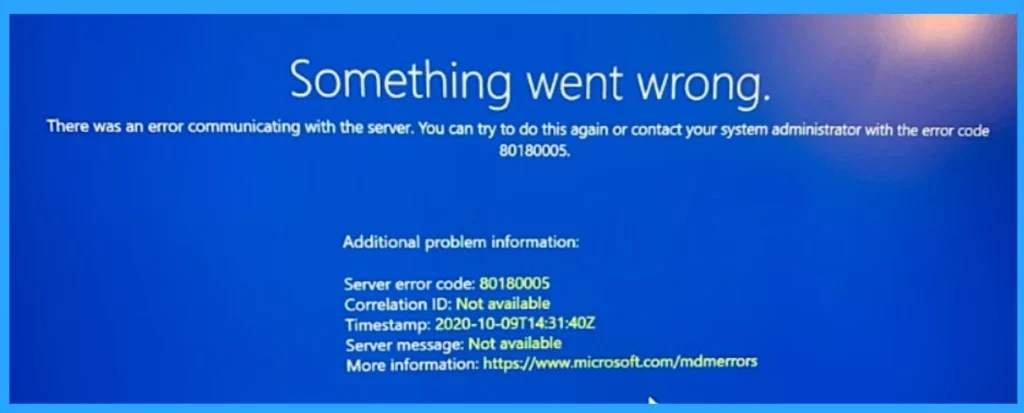
Many users mention this error code during enrollment. These errors can be irritating, but understanding their causes can help troubleshoot and resolve them effectively. Some users reported that Error Code 80180005 with MENROLL_E_DEVICE_CONFIGMGRSERVER_ERROR message was showing in the enrollment stage. So, in this post, we can discuss some of the most used fixes for this issue.

- How to Configure Automatic Intune MDM Enrollment | Auto Enrollment
- Troubleshoot MDM Enrollment Error Code 80180004
- iOS iPadOS Intune Enrollment Method is Based on Web Based
- FIX Intune Windows Enrollment Invalid_Client Error
What is an Enrollment Intune?
Intune MDM Enrollment Error Code 80180005
Above, I shared an overview of the MDM Enrollment Error Code 80180005. I already mentioned that it’s a standard Error in the Enrollment stage. Microsoft also noted this error. This is an error code that happens when communicating with the server. We have already covered many error codes that occur during enrollment time.
See More: Troubleshoot MDM Enrollment Error Code 80180004
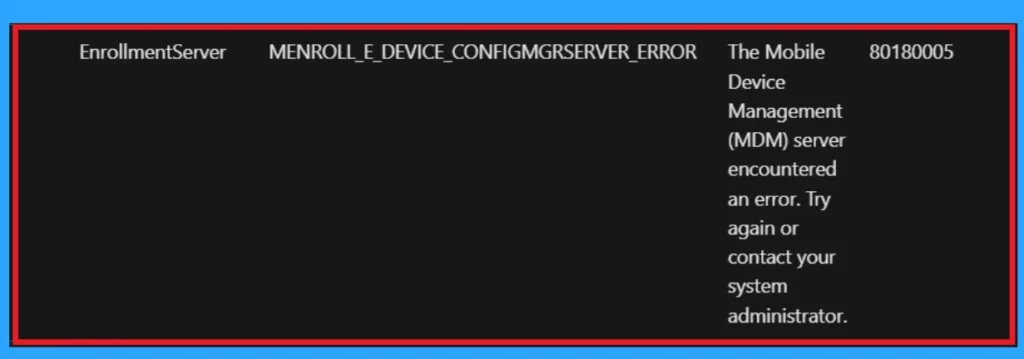
| Subcode | Error | Description | HResult |
|---|---|---|---|
| EnrollmentServer | MENROLL_E_DEVICE_CONFIGMGRSERVER_ERROR | The Mobile Device Management (MDM) server encountered an error. Try again or contact your system administrator. | 80180005 |
Note: Proxy settings can sometimes cause issues when enrolling devices in a Mobile Device Management (MDM) system like Microsoft Intune.
- Fix MDM Enrollment Error Code 0x80180001
- FIX Windows Autopilot Enrollment with Error 0x801C03ED
- Fix Intune Enrollment Errors 0x80180014 80180003 Unknown Win32 Error Code Failed Issue
Solution for Fixing the Issue
When this error happens, you must try to do the enrollment again, or You can quickly contact the administrator. First, you have to check whether the internet connection has any problem. Also, you must check that the error happens on 1or multiple devices. Also, you have to check that all these. The fixes for the issues are listed below.
- Always check your internet connection. Sometimes, it will be the reason.
- Verify that no network restrictions are blocking the enrollment process.
- As you all know, proxy servers are essential in an organization; if any configuration happens to the proxy server/service, these types of errors may occur.
- You may understand that enrollment has some requirements, like proxy and firewall requirements.
- Verify that your network connection is stable and that no firewall or proxy issues block server communication.
- Regularly check the Intune MDM service via Microsoft alerts.
- Ensure firewalls do not block any required communications.
- You must check if this error happens with 1device or multiple devices.
- You must retry using mobile data if those devices are connected to the same WiFi.
- Retrying the process after a short wait can resolve temporary issues.
- Contact your system administrator or IT support if the issue is not solved.
- I think these solutions will help you resolve the issue.
See More: Windows Autopilot Troubleshooting – Beginners Guide
We are on WhatsApp now. To get the latest step-by-step guides, news, and updates, Join our Channel. Click here. HTMD WhatsApp.
Author
Anoop C Nair is Microsoft MVP! He is a Device Management Admin with more than 20 years of experience (calculation done in 2021) in IT. He is a Blogger, Speaker, and Local User Group HTMD Community leader. His main focus is on Device Management technologies like SCCM 2012, Current Branch, and Intune. He writes about ConfigMgr, Windows 11, Windows 10, Azure AD, Microsoft Intune, Windows 365, AVD, etc.


Discussion