





ConfigMgr Learn How to Force a SCCM Site to Sync from its Parent Site
Learn ConfigMgr Learn How to Force a SCCM Site to Sync from its Parent Site. While troubleshooting some weird site replication issues today, we decided to force a sync of our SCCM 2007 site with its parent, as the child primary was missing some OSD advertisements.
Software update synchronization in Configuration Manager retrieves the software update metadata that meets your configure criteria, including specific products, classifications, and languages.
Usually, the software update point on the central administration site or a stand-alone primary site recovers the metadata from Microsoft Update. Then, the top-level site will send a synchronization request to other sites.
When a site receives the synchronization request from the parent site, the site’s software update point retrieves software update metadata from its upstream synchronization source.

Table of Contents
ConfigMgr Learn How to Force a SCCM Site to Sync from its Parent Site
So, after some research, the following is the process of forcing a resync between a Parent site and its Child site.
- SCCM Log Files Updated List Client and Server
- How To Change SCCM Parent Site Of SCCM Primary Server Part 2 Simplify Hierarchy ConfigMgr HTMD Blog (anoopcnair.com)
- ConfigMgr Reports Power Management | Default | SCCM HTMD Blog (anoopcnair.com)
- FIX SCCM SQL Replication Issues using Replication Link Analyzer
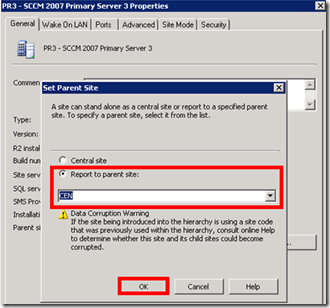
1. Identify the Parent Site
On the Site with problems (the Site you want to get re-synced), in the SCCM console, expand Site Management, Site Code, right-click on the Site, choose Properties, and note what the Parent Site: value is set to. Learn how to Force a ConfigMgr SCCM Site to sync from its parent site.
2. Logon to the Parent Site
Login to the Parent site with the same account that you installed SCCM on that Site with, e.g.: if you installed the Parent site while logged on as SMSadmin, then login as SMSAdmin; otherwise, you may get errors in the preinst command.
3. Run the preinst command
Locate the SCCM installation directory, open a command prompt, and browse to X:\SMS\bin\i3860000409, where X: is the drive you installed SCCM on. Execute the following command. How to Force a SCCM Site to Sync from its Parent Site
preinst.exe /syncchild XXX
Where XXX is the SITE CODE of the child site you want to sync. The following should be the output
F:\SMS\bin\i3860000409>preinst.exe /syncchild ABC
- Microsoft System Center Configuration Manager v4.00 (Build 6487)
Copyright (C) 2005 Microsoft Corp. - Synchronized child site ABC
- Note: as this is full sync, it will take many hours to sync everything.
4. What Logs to look at?
Pay close attention to the following logs on the Parent and Child site
- Despool.log – Records incoming site-to-site communication transfers.
- Replmgr.log – Records the replication of files between the site server components and the Scheduler component.
- Sender.log – Records files that are sent to other child and parent sites.
Related Reading: How to Force a SCCM Site to Sync from its Parent Site
Learn How to Force a ConfigMgr SCCM Site to sync from its parent site.
1. Understanding Site Communication in SMS/SCCM
2. SCCM Object Replication Issue From Central To Primary
3. preinst.exe /syncchild <– Not a known site?
4. Technet: Hierarchy Maintenance Tool Syntax
We are on WhatsApp. To get the latest step-by-step guides and news updates, Join our Channel. Click here –HTMD WhatsApp.
Author
Anoop C Nair is Microsoft MVP! He is a Device Management Admin with more than 20 years of experience (calculation done in 2021) in IT. He is a Blogger, Speaker, and Local User Group HTMD Community leader. His primary focus is Device Management technologies like SCCM 2012, Current Branch, and Intune. He writes about ConfigMgr, Windows 11, Windows 10, Azure AD, Microsoft Intune, Windows 365, AVD, etc.




Discussion