






Microsoft Announces Deprecation of WSUS Driver Synchronization
Latest News! Microsoft Announces Deprecation of WSUS Driver Synchronization. Microsoft always makes decisions for the best future in technology. We have heard that Microsoft will declare many depreciation features in the past months. Today, the latest news is the deprecation of WSUS driver synchronization.
You all know about WSUS Driver Synchronization, which helps automatically send driver updates to an organization’s devices. Drivers are essential for letting the operating system interact with the hardware. Do you know why we need to update the driver? It plays a leading role in the system’s stability, security, and performance.
Microsoft is changing Windows Server Update Services (WSUS), a tool that helps IT administrators manage and distribute updates for Microsoft products. They announced they will stop using WSUS for driver updates and switch to newer cloud-based services.
A recent survey proves that 34% of users use WSUS for driver updates. If you are still using WSUS driver updates, you must know about MS’s new cloud-based service. Also, you have to understand that many users change their minds and ṭhe prefer to switch to other solutions.

| Index |
|---|
| Microsoft Announce Deprecation of WSUS Driver Synchronization |
| Preparing for WSUS Driver Synchronization Deprecation |

- WSUS Enhancements Preview Expected Soon as per Microsoft | Exciting News
- Differences between WSUS Vs. WUfB Patching method
- Windows WMI Command Line WMIC Reaching End of Life
- Microsoft Announces Deprecation of NTLM Authentication Protocols
- Microsoft Introducing Multi-Tenant Organization Capabilities in Microsoft 365
- Intune Vs SCCM and WSUS Vs WUfB Patching Method Differences
What is WSUS Driver Synchronization?
Microsoft Announce Deprecation of WSUS Driver Synchronization
Above, I mention many things related to the latest news of WSUS Driver Synchronization. Microsoft plans to continue the driver synchronization feature in WSUS on April 18, 2025, and move toward the cloud-based diver service.
| SCCM | ConfigMgr | WSUS |
|---|
| WSUS |
| Windows Update Service |
| Clients Scan against WSUS (CAB file) |
| Don’t send any Device ID to Windows Update |
| The client doesn’t send any information to Windows Update. |
| No Safeguards available |
| Content is downloaded with SCCM DP* |
| Policies are configured |
| More Granularity |
| No Out of Box Solution |
| No Out of Box Solution |
| Individual KB selection option is there |
| Software Center |
| Fully supported for Server operating systems |
Preparing for WSUS Driver Synchronization Deprecation
After April 18, 2025, drivers will still be available on the Microsoft Update catalogue for on-premises use. However, the notable point is that it cannot be imported into WSUS.
- Microsoft suggests the use of other methods, like Device Driver Packages.
- Many users expressed concern about the changes to WSUS driver import functionalities.
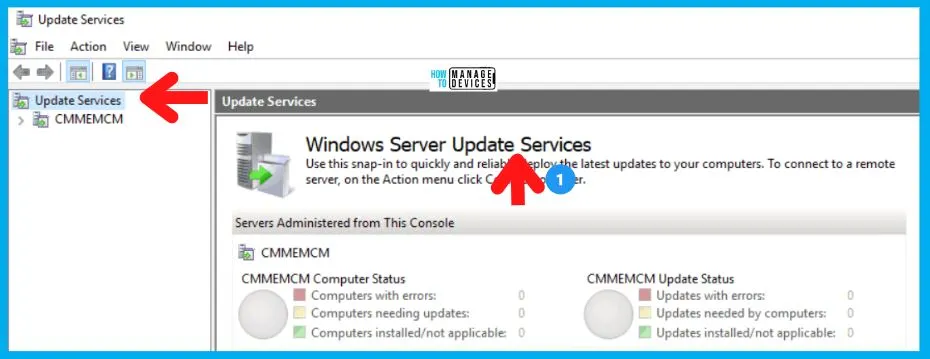
- The screenshot below is from our post on Intune Vs SCCM and WSUS Vs WUfB Patching Method Differences.
Note: Deprecation means a feature is no longer developed and may be removed in future updates.
See More: Intune Vs SCCM and WSUS Vs WUfB Patching Method Differences
| No | Why Microsoft Suggesting the Depreciation |
|---|---|
| 1 | Lack of use is the main point, which is why Microsoft Suggested Depreciation. |
| 2 | The MS survey declared that 34% of people use WSUS Driver Synchronization. |
| 3 | Microsoft encourages users to use cloud-based diver for efficient driver management. |
| 4 | Cloud services are better for the IT environment. |
- Enable Windows 10 servicing using SCCM | ConfigMgr | WSUS
- FIX Windows Update issues for Windows 11 Errors Troubleshooting Tips
- Third-party Patch Management with WSUS|SCCM
Reference
Deprecation of WSUS driver synchronization
We are on WhatsApp. To get the latest step-by-step guides and news updates, Join our Channel. Click here –HTMD WhatsApp.
Author
Anoop C Nair is Microsoft MVP! He is a Device Management Admin with more than 20 years of experience (calculation done in 2021) in IT. He is a Blogger, Speaker, and Local User Group HTMD Community leader. His main focus is on Device Management technologies like SCCM 2012, Current Branch, and Intune. He writes about ConfigMgr, Windows 11, Windows 10, Azure AD, Microsoft Intune, Windows 365, AVD, etc.




Discussion