






Translate Real-Time Video with Microsoft Edge for Business
Exciting News! Translate Real-Time Video with Microsoft Edge for Business. You all know about Microsoft Edge. We have enjoyed this browser’s features for a very long time. Every update brings new enhancements for users to improve the complete work experience through Microsoft Edge.
The latest news is that real-time translations are available for the digital workplace. This feature mainly focuses on enhancing communication and collaboration without affecting the language. We cannot speak or understand many languages, but this improvement will be straightforward.
We all know the influence of AI nowadays; this feature will use AI to provide dubbing and subtitles in so many languages. In the past month, Microsoft announced a real-time translation feature for MS Edge at the Build 2024 conference.
I think it is a much-needed feature for users. Although MS announced this in the past month, it has not been publicly available until now. Microsoft Edge Dev’s official social media platform recently mentioned this feature again, so I think it will be coming soon.


- Method to Start Close Read Aloud in Microsoft Edge
- Guide to Enable Efficiency Mode in Microsoft Edge using Intune
- Importance to Add Name for MS Edge Browser Windows
- Best Way to Organise Your Workspaces in Microsoft Edge
What is Real-Time Video Translation?
Translate Real-Time Video with Microsoft Edge for Business
Above, I mentioned the new Real-Time translation feature for business in MS Edge. Do you know its main advantages? This feature will help users with language problems, as they can translate the video to their preferred language.
- I think it may be helpful for the user who has hearing disabilities.
- With this feature, you don’t need to worry about the Privacy.
- Translations are only done locally, and it keeps your data private and secure.
| Supported Websites |
|---|
| YouTube |
| Reuters |
| CNBC News |
| Bloomberg |
| Money Control (IN) |
| Coursera |
How to Use Real-Time Video Translation with Microsoft Edge for Business
When you play a video, the translate icon appears once you hover over a video for a few seconds. At that time, you will get the option for translation. You can see the screenshot below. I highlighted the translated icon.
- Click on the Translated icon.
- Then, you will get the option to select a language.
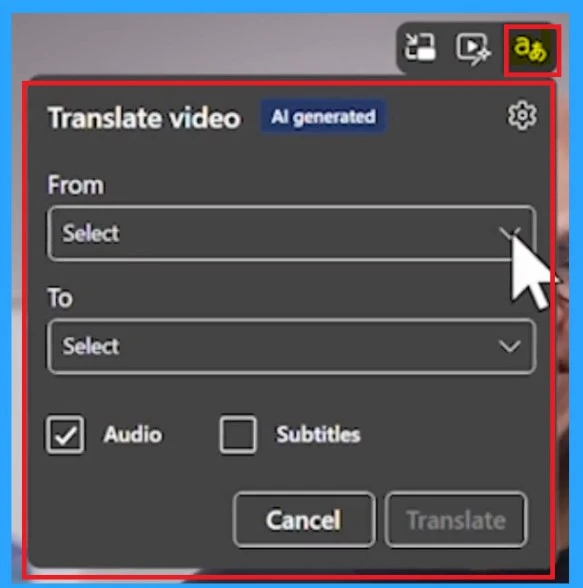
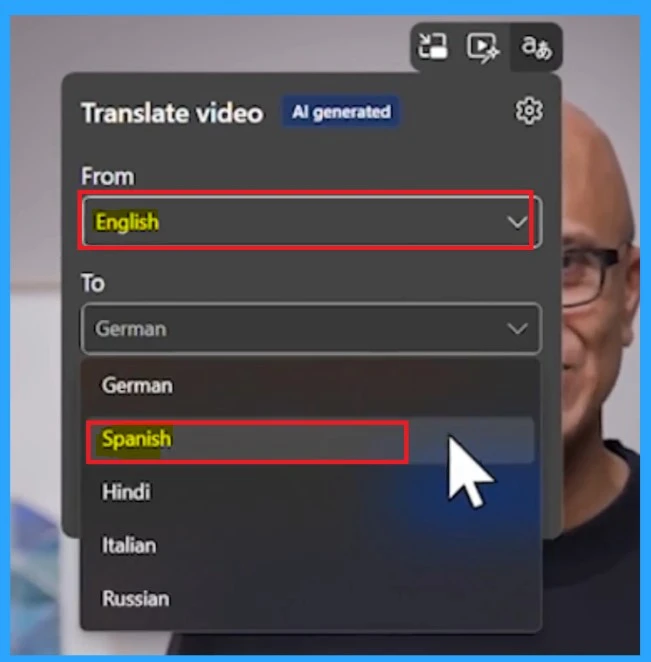
From the video language, you get the option to translate the video into your preferred language. For example, here, the video is shown in English, and we have to translate the video into Spanish. Some languages offer real-time video translation.
| Available language for Translation |
|---|
| Spanish |
| Korean |
| English |
| Hindi |
| Italian |
| Spanish |
| Russian |
- New Text Prediction and other Features in MS Edge Browser
- MAM for Microsoft Edge on Windows
- How to Enable and Use the New Screenshot Tool in MS Edge
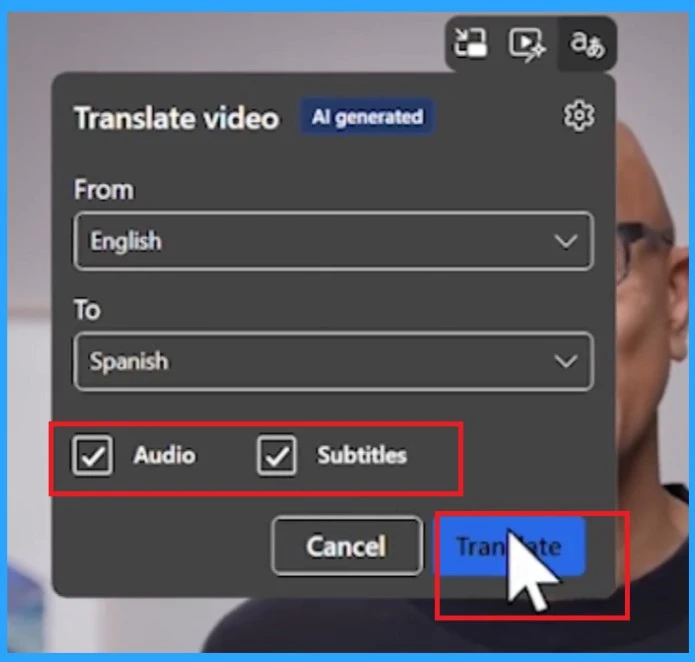
When we selected the languages From English to Spanish, the next step was selecting the Audio and Subtitles. With the audio option, the video’s audio is translated into Spanish. If you choose the subtitle, you will get the Spanish subtitles.
- If you need an audio option and subtitles, you can choose both.
- Then click on the Translate option.
End-User Experience – Result of Real-Time Video Translation with Microsoft Edge
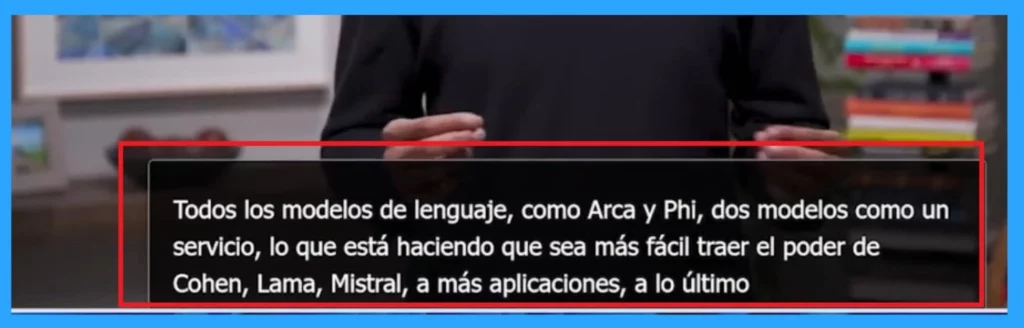
At last, you can see the result in just seconds. The audio is translated into Spanish on your screen. The accuracy of translations depends on the background music, the number of speakers, and the original language.
We are on WhatsApp. To get the latest step-by-step guides and news updates, Join our Channel. Click here –HTMD WhatsApp.
Author
Anoop C Nair is Microsoft MVP! He is a Device Management Admin with more than 20 years of experience (calculation done in 2021) in IT. He is a Blogger, Speaker, and Local User Group HTMD Community leader. His main focus is on Device Management technologies like SCCM 2012, Current Branch, and Intune. He writes about ConfigMgr, Windows 11, Windows 10, Azure AD, Microsoft Intune, Windows 365, AVD, etc.




microsoft edge video translate feature enable How to get this feature in your browser?
Tell me how to get this feature in the browser? microsoft edge video translate
[7/17, 11:23 PM] ahmedhassan: microsoft edge video translate feature enable browser Tell me how to get this feature in the browser? How to get this feature in your browser? How can you get it? microsoft edge video translate feature enable this feature
[7/17, 11:23 PM] ahmedhassan: microsoft edge video translate Tell me how to get this feature. How will this feature come? browser
[7/17, 11:25 PM] ahmedhassan: https://www.anoopcnair.com/translate-real-time-video-with-microsoft-edge/#comment-601136 You had given the link of this feature on your website, so how can you bring this feature in the browser?
[7/17, 11:26 PM] ahmedhassan: I want this feature. I need this feature for video translation.
[7/17, 11:26 PM] ahmedhassan: microsoft edge video translate
[7/17, 11:28 PM] ahmedhassan: Can you tell me how to bring video translation to Microsoft Edge?
StaffHello Ahmedhassan,
Right now, Microsoft Edge’s video translation feature works on a few websites like YouTube, Reuters, CNBC News, Bloomberg, Money Control (IN), LinkedIn, and Coursera. This is because of technical reasons. Microsoft is working to make it available on more sites soon. Thank You